Hey,
So I have a question for you guys. I’m currently helping my job redoing their entire network. I’m by no means a network engineer. I just volunteered my way into this mess.
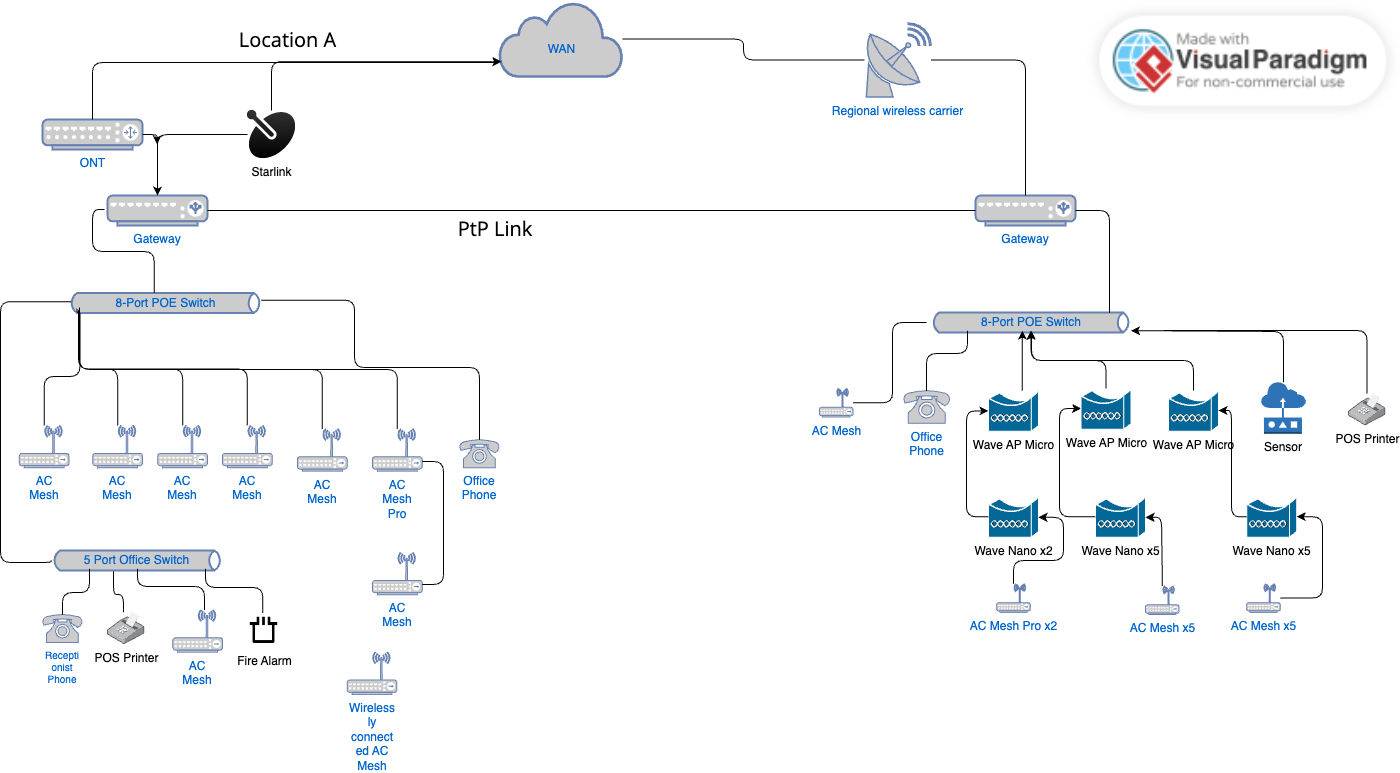
TLDR: Multi-Location sharing primary WAN with Both over Wireless Backhaul, and Sharing or if possible load balancing independent locations backup connections if primary goes down.
Anyways, they have two different properties about a km apart. We don’t owe the property in the middle though we do have an easement on it that we could run a fiber line on if push came to shove. (This isn’t a great option atm since the cost would be high for the reward and would be a hard sell)
They currently use two starlinks at Location A facing different directions, and at Location B they have two starlinks, and one regional wireless internet provider.
My current plan is to get fiber at Location A and keep a starlink as a backup on the lowest plan at Location A, and the regional wireless provider at Location B. I want to use some form of wireless backhaul to share the fiber connection between the two buildings. Having fiber at both isn’t a realistic option because of the rural nature of the locations. The only reason one works out is because of where the lines run between the towns that’s being built out currently. If possible I would like to just drop down to a single connection at each location that failover for each other though its not a bad idea to have 3 different providers since how everything is cloud based now adays and realistically if the internet went down for one day the loss alone would likely cover the backup connections cost for the year.
Currently the Cloud Key (at Location B) manages both networks, though this makes the Guest Login portal buggy at the location A (Haven’t dived into fixing this as they didn’t have a portal before and I just left it disabled. It is something I want to get working in the future but it would only be at Location A because of certain devices don’t play nice with those portals, and we just have a locked network over at Location B for those guests)
During our busiest season we have about around 400 people at Location B, and around 150 at Location A we expect this to increase to around 250-300 within the next two years though, So I’d like to make sure the network can handle that load when it’s the busiest. Location B will likely have a significantly higher bandwidth usage due to the cliental there, it will be mostly 4k video streaming, likely all at the similar times.
So to the root of the issue, I would like to ensure proper setup of this network. We don’t have anything on site that’s required access at both locations other than the cloud key (and I’m just using our static IP address for the inform currently for Location A) and I don’t expect this to change within the next few years. I would however like to have it so even the backups internet connections can share with each site, or even load balance the backup connections if the primary goes down. I know I’m digging into more enterprise stuff with this, but if we’re paying for the connections anyways it’d be nice to have them available for both sites. I’m willing to push to move to Opensense if needed though I do enjoy the benefits the UXG-Pro provides for easy tracking of bandwidth usage, and notifications of issues.
Oh last by not least I’ll have 5 static IPs available to me.
In terms of gear currently available to me
Cloud Key G2 Plus
Gateway: UXG-Pro, Edge Router X & 12, Several consumer routers
APs: ~ 5 AC Mesh Pros, ~ 25 AC Mesh
Switch: 2 US 8 60W, 4 USW Flex Mini, 5 port unmanaged Switch, 12 port unmanaged Swith.
PtMP: ~ 3 Wave AP Micro
PtP: ~ 2 airMAX Lite AP GPS, ~ 12 Wave Nano
If you’re wondering about the odd gear list, we have a roughly 200 acre outdoor area that we want to have full wifi coverage in, and this what was included in a quote from a 3rd party company that wanted to manage it. (He bought it thinking that he’d have the time to do it himself… and I kinda just took the project over since well I like overtime and it wasn’t going to get done otherwise  )
)
Any help would be appreciated.