Hi!
After two days of researching I’m still pretty lost about this so I’d love to get some help here.
So I’ve got LXC \w Adguard Home + LXC \w Nginx Proxy Manager. Both are on the same Proxmox machine.
Adguard Home
The Adguard Home has encryption enabled (Let’s Encrypt wildcard cert there)
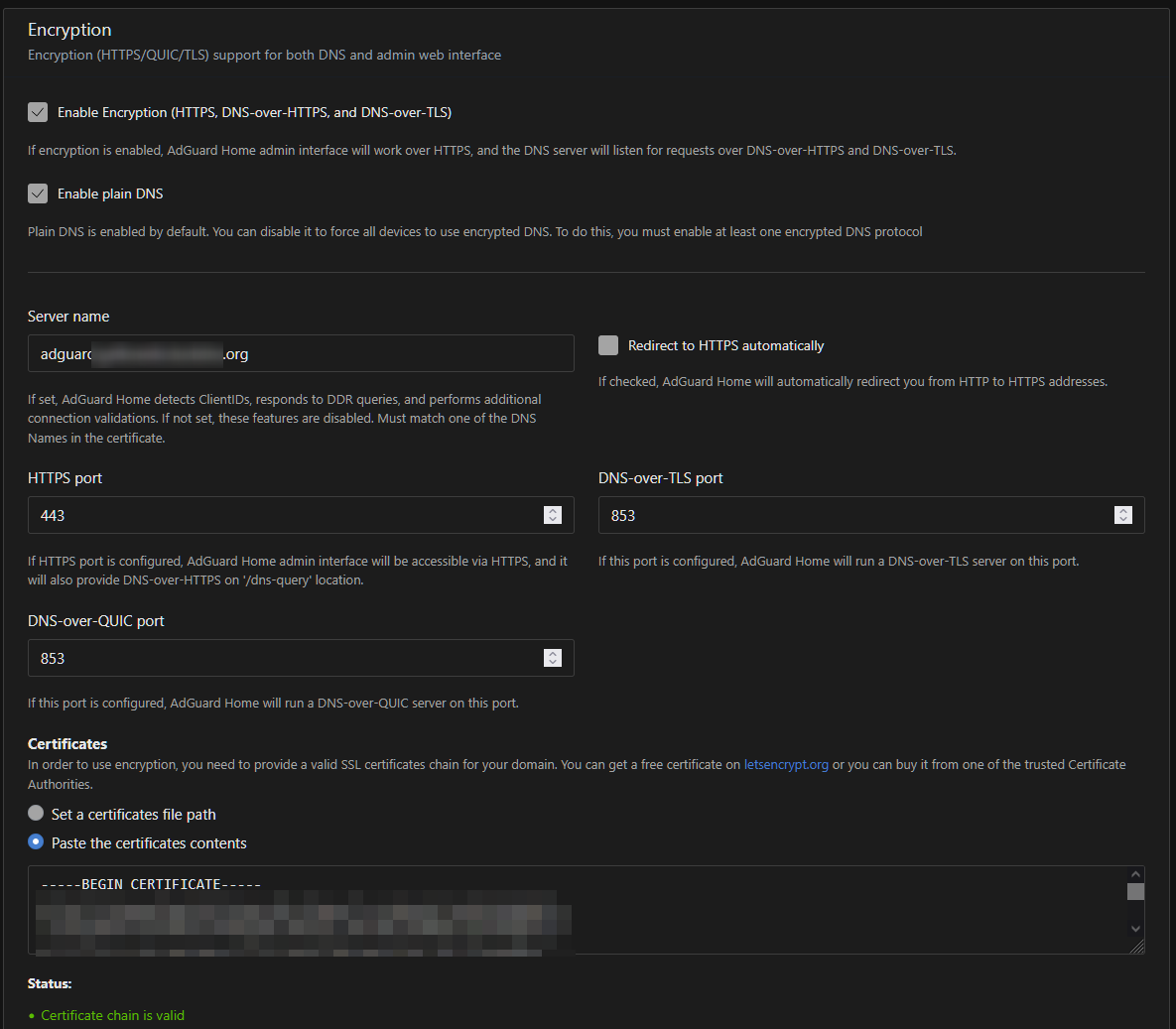
It says it running plain DNS, DoH, DoT and HTTPS:
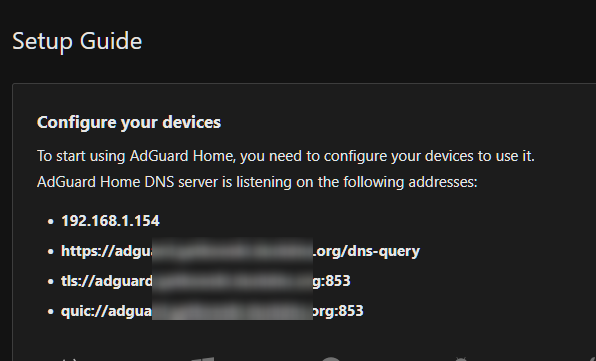
According to FAQ | AdGuard DNS Knowledge Base I’ve set allow_unencrypted_doh: true in Adguard Home configuration.
there is also this section in AdguardHome.yaml
  trusted_proxies:
    - 127.0.0.0/8
    - ::1/128
    - 192.168.1.199/32 # NPM Proxy IP here
under Custom filtering rules i have set split horizon to force LAN resolving of *.<redacted>.org to the NPM Proxy address:
||*.<redacted>.org^$dnsrewrite=NOERROR;A;192.168.1.199,client=192.168.1.0/24
||*.<redacted>.org^$dnsrewrite=NOERROR;A;192.168.1.199,client=192.168.10.0/24
Nginx Proxy Manager
This config was generated through NPM WebUI.
I’ve restricted access to just LAN as I’m aware this also Proxies the AdguardHome Admin Panel.
The same wildcart cert is used here.
root@nginxproxymanager:/data/nginx/proxy_host# cat 1.conf
# ------------------------------------------------------------
# adguard.<redacted>.org
# ------------------------------------------------------------

map $scheme $hsts_header {
    https   "max-age=63072000; preload";
}

server {
  set $forward_scheme http;
  set $server         "192.168.1.154";
  set $port           80;

  listen 80;
listen [::]:80;

listen 443 ssl;
listen [::]:443 ssl;

  server_name adguard.<redacted>.org;

  http2 on;

  # Let's Encrypt SSL
  include /etc/nginx/conf.d/include/letsencrypt-acme-challenge.conf;
  include /etc/nginx/conf.d/include/ssl-cache.conf;
  include /etc/nginx/conf.d/include/ssl-ciphers.conf;
  ssl_certificate /etc/letsencrypt/live/npm-2/fullchain.pem;
  ssl_certificate_key /etc/letsencrypt/live/npm-2/privkey.pem;

  # Block Exploits
  include /etc/nginx/conf.d/include/block-exploits.conf;

proxy_set_header Upgrade $http_upgrade;
proxy_set_header Connection $http_connection;
proxy_http_version 1.1;

  access_log /data/logs/proxy-host-1_access.log proxy;
  error_log /data/logs/proxy-host-1_error.log warn;

  location / {

    # Access Rules: 2 total

    allow 192.168.1.1/24;
    allow 192.168.10.1/24;

    deny all;

    # Access checks must...

    satisfy all;

    proxy_set_header Upgrade $http_upgrade;
    proxy_set_header Connection $http_connection;
    proxy_http_version 1.1;

    # Proxy!
    include /etc/nginx/conf.d/include/proxy.conf;
  }

  # Custom
  include /data/nginx/custom/server_proxy[.]conf;
}
Router port forwarding
On my router there are basically two forwarded ports that matters here
- 443 is forwarded to NPM Proxy
- 853 is forwarded directly to AdguardHome (TLS and QUIC)
Results
- Plain DNS from LAN works just fine
nslookup example.com 192.168.1.154
Server:  adguard.lan
Address:  192.168.1.154

Non-authoritative answer:
Name:    example.com
Addresses:  2606:4700::6812:1a78
          2606:4700::6812:1b78
          104.18.27.120
          104.18.26.120
- I have no idea how to test DoH from LAN
curl -H 'accept: application/dns-json' 'https://adguard.<redacted>.org/dns-query?name=example.com&type=A'
Bad Request
OR maybe it does not work?
BUT I’ve also set the https://adguard.<redacted>.org/dns-query in Firefox DNSoverHTTPS and it says ‘active’ so maybe it does work?
- I have tried to set
adguard.<redacted>.orgin Android DNSoHTTPS but it says it cannot connect (even from LAN)
BUT if I’d disable DNSoverHTTPS in Android and set it it Android Adguard app it connects fine, also when using TLS in Adguard app it works fine.
Final words
Now I still have the feeling that I’m doing something wrong here, and that’s why I’m afraid of exposing it (even through Nginx) externally.
I think I should do these:
- Remove 853 port forwarding from my router
- Use Nginx to proxy the TLS (via stream module I think?)
- Only have encryption at Nginx level
- Only expose
/dns-queryendpoint everywhere, while everything else should be exposed only internally - I still have no idea if the HTTPS works or not..
Can someone confirm? Or maybe tell me that I am indeed making some mistake?
Kind regards!
EDIT:
I’ve added the /dns-query endpoint like this (again via NPM WebUI:
location /dns-query {
    allow all;

    proxy_set_header Host $host;
    proxy_set_header X-Forwarded-Scheme $scheme;
    proxy_set_header X-Forwarded-Proto  $scheme;
    proxy_set_header X-Forwarded-For    $remote_addr;
    proxy_set_header X-Real-IP          $remote_addr;

    proxy_pass       http://192.168.1.154:80;

    # Access Rules: 2 total

    allow 192.168.1.1/24;

    allow 192.168.10.1/24;

    deny all;

    # Access checks must...

    satisfy all;

  # Block Exploits
  include /etc/nginx/conf.d/include/block-exploits.conf;

    proxy_set_header Upgrade $http_upgrade;
    proxy_set_header Connection $http_connection;
    proxy_http_version 1.1;

  }