Hi everyone. I have Gigabyte MZ73-LM1 configured with two Epyc 9354 processors. Everything is working fine except for the U.2 drive detection. Using DiliVing 𝐃𝐢𝐋𝐢𝐧𝐤𝐞𝐫 PCIe 5.0 𝐌𝐂𝐈𝐎 x8 to 2*𝐔.𝟐 𝐍𝐕𝐌𝐞 cable, I connected two Seagate Nytro 5350M 1.92TB NVMe U.3 drives. But they are not detected. Under Linux, the command ‘nvme list’ shows no drives.
But when I connect the same cable and drives to Supermicro X14SBM-TF, the disks are presented. Thus I know the cable and drives are ok. I tried both MCIO 8x ports on the Gigabyte board. But none of them detects the drives.
If you have any idea, please let me know. Thank you in advance.
According to Gigabyte website, MZ73-LM1 has SlimSAS (SFF-8654), not MCIO (SFF-TA-1016)… These 2 connectors are functionally and visually similar, but NOT interchangeable. You sure you are using the right cable?
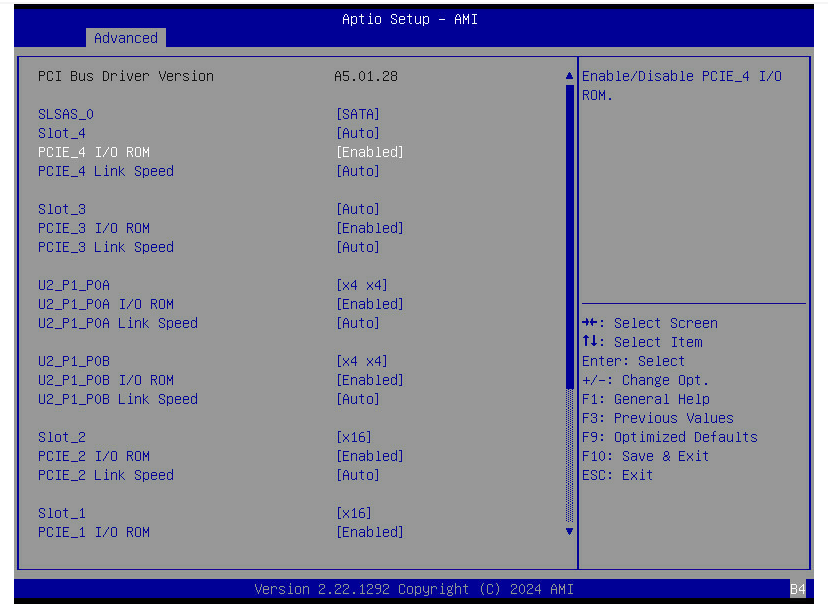
You should also go into the firmware settings and set the relevant ports to Auto or x4x4. By default, NVMe/SATA combo ports on Gigabyte SP5 motherboards are set to SATA only.
Note that these combo ports also have inadequate NVMe hot-swap support, at least on the MZ33-CP1. On Linux, pulling a drive out won’t crash the whole system, but the OS won’t automatically reflect the hardware change either.
Oops I mistyped the model number. The board is MZ73-LM0 which has two MCIO 8x ports. Let me check the BIOS setting for bifurcation. Thanks!
Yeah, now with all SATA ports gone for good, BIOS switch and managing NVMe/SATA and possibly bifurcation and other switches become more common.
Saw one new AsRock Rack EPYC 4004 board where one MCIO port and a PCIe slot are linked by a switch and you have to choose what to enable depending on use.
I like the flexibility as long as you account for the fact you have to setup some PCIe in the BIOS. On smaller boards, one MCIO instead of 8x SATA or M.2 saves space on the board and enables more density for a given form factor.
I have been using Supermicro serverboards that have MCIO 8x on board. None of them require manual bifurcation setting in the BIOS. This is my 1st time using the Gigabyte board.
It’s not really a bifurcation thing. I haven’t tested on mine, but I’d be very surprised if these boards can’t do auto bifurcation. Rather, Gigabyte’s defaults had these ports running under SATA mode. (link groups P0 and G3 on an SP5 IOD can operate under SATA mode). Changing the mode to Auto or x4x4 makes the ports run PCIe.
As to why your Supermicro boards don’t have this issue, it’s because the MCIO ports on those boards are not SATA/PCIe combo. I haven’t looked into every Supermicro board, but at least on the H13SSL, the SATA capabilities of the processor are exposed as straight up SATA, and not end-user configurable.
Thank you everyone for the pointer. You are right about the MCIO ports default setting (SATA interface). After changing the value to x4 x4, both Micron 7450 Pro NVMe drives are detected