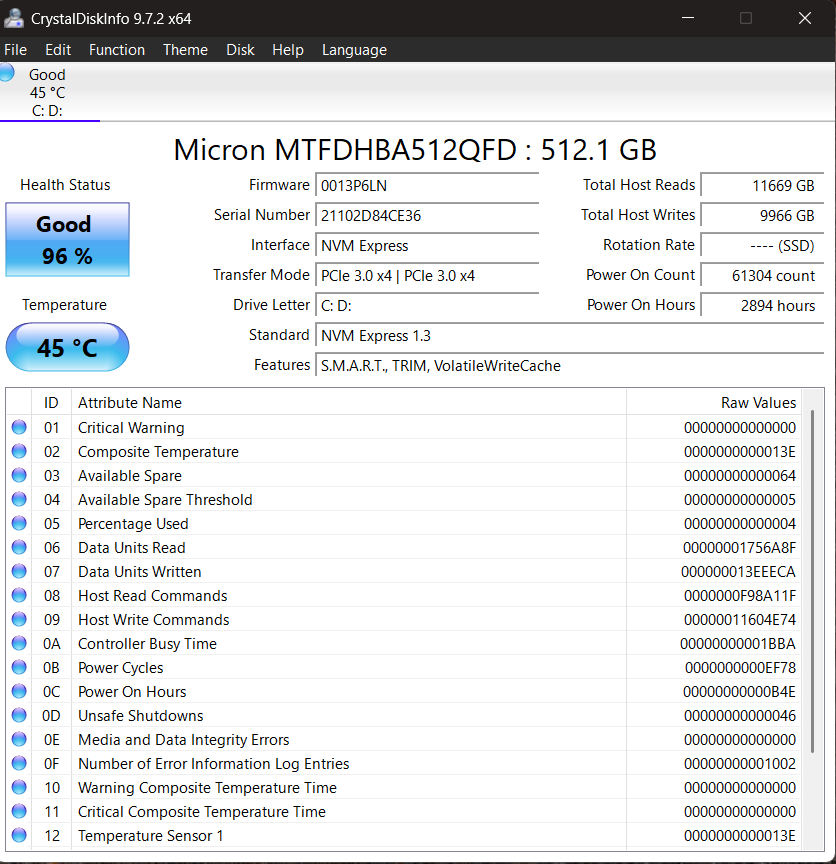
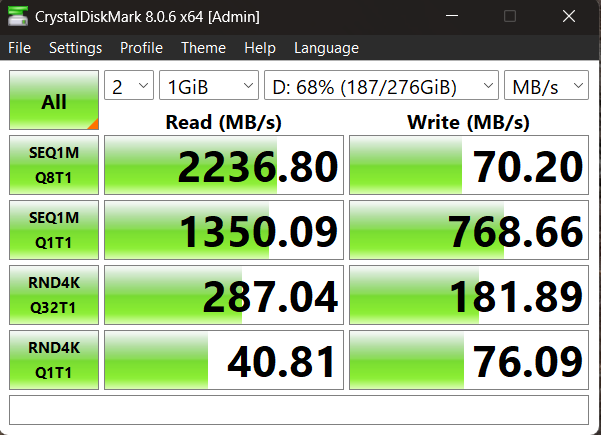
hi, i have a serious problem with my ssd drive. Its model is Micron MTFDHBA512QFD (2210?). it;s write speed constantly bounce between different speeds (even zero speed!). Can anyone help me find out what the real problem is? I will attach some screenshots of its properties and bug log.
What would you use for testing the SSD over a period of time? (not CrystalDiskInfo, that’s a MSWin tool and I run Linux). Did you gather info the drive had saved up or did you have to run it through a series of tests to exercise the drive?
I’m wondering if that’s what’s contributing to my system’s poor performance. When I kicked Fedora off my machine I put in a new SSD and saved the old one aside. Granted, it’s a MSI motherboard, so it could just be the board itself.
How big are the writes? Usually when this question comes up it’s Crucial/Micron’s small pSLC, of which ~40% is likely remaining in this case, and poor cache folding behavior.
You tend to get what you pay for. If large write performance is important that usually means something like SN850X or SN8100 in consumer flash. Crucial’s generally been trailing with the T500 being bugged at launch and stalling to 0 B/s. Sounds like that should be fixed in post-launch firmware but I haven’t seen a retest.
The T705 quite competitive, though (enough 4 GB/s direct to offset its 1.2 GB/s folding), and IIRC there’s some reports here of Micron enterprise drives sustaining 6 GB/s.
IMO your best bet to figure this out is to benchmark the performance characteristics of your drive, the way SSD reviews do.
It would be an involved process, especially if this is your system drive.
Basically you need it at ~80% free space and ~20% free space, and you need some data that’s at least 100 gig in size. (And you need to make sure to not bottleneck the process elsewhere - like doing this over a 1G network.)
This will basically help you discover the steady state write performance and the size of the SLC cache of the drive. Then you can compare the current performance characteristics with the observed data from the benchmark.
Also, it seems you’re not the first one to encounter this issue, which suggests that what you’re observing is the normal performance characteristics of the drive, rather than some heisenbug or transient state.
But it’s always popular to blame the Microsoft and Windows for everything, so don’t let any of that stop you folks.