I’m making a new thread mostly because the other AV1 threads don’t do things the exact way I’m doing them, nor focus on what I focus on, so rather than try and take over their threads, here I am.
Goals:
- Format shift personal movie collection for long term storage.
- Preserve videos with as close to near-lossless quality as possible, while reducing file size as much as possible. Keeping in mind that the power use of a very slow encode might outweigh the space savings at a given cost of storage. IE: if storage is cheap, just save the raw files.
- “One setting to rule them all” Realistically this will probably be 2-3 setups and a flow-chart to pick between them. I don’t watch any anime, but anime or early Disney animated films would require meaningfully different settings to what I have.
147300_.zip (75.7 MB)
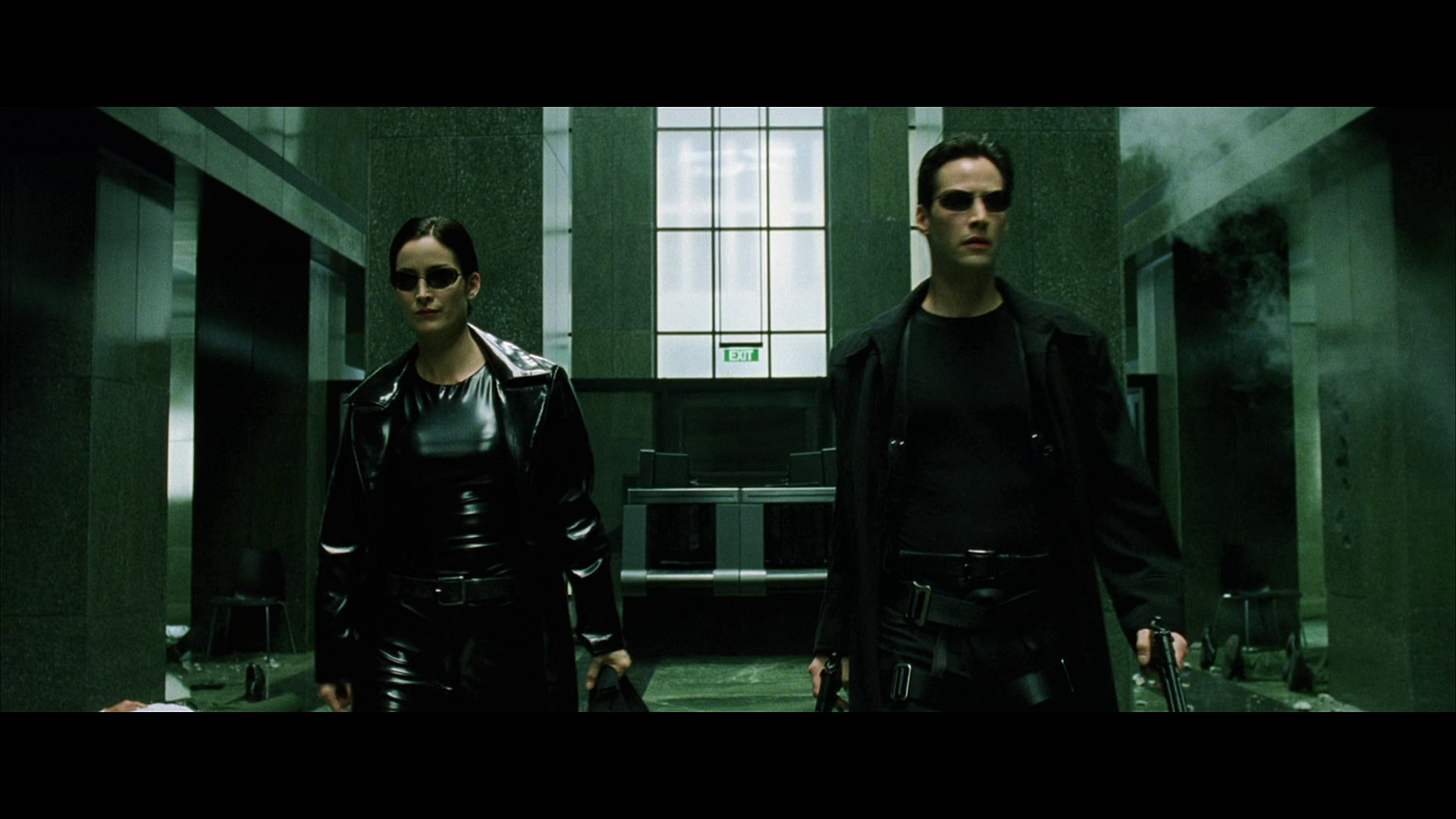
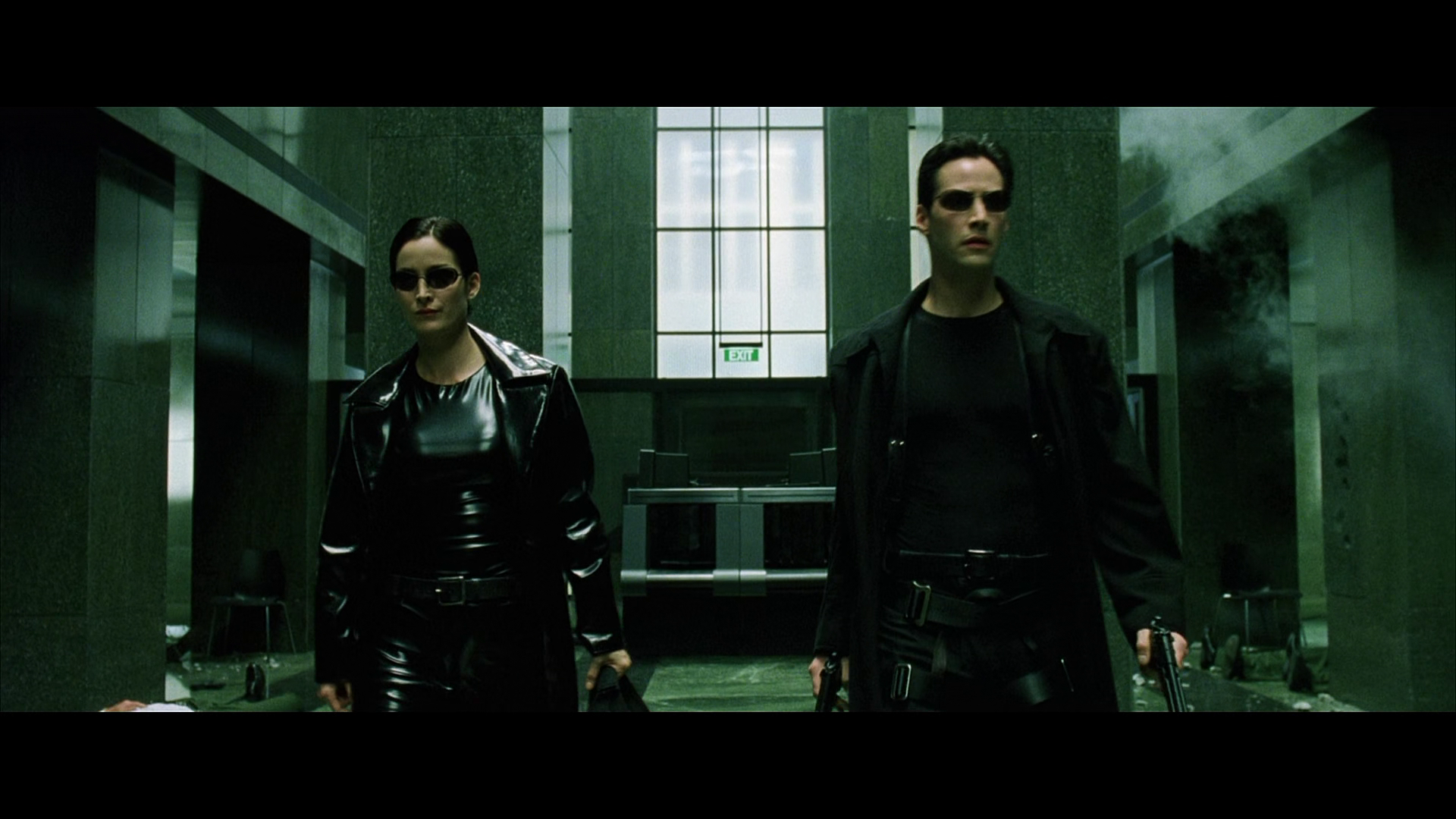
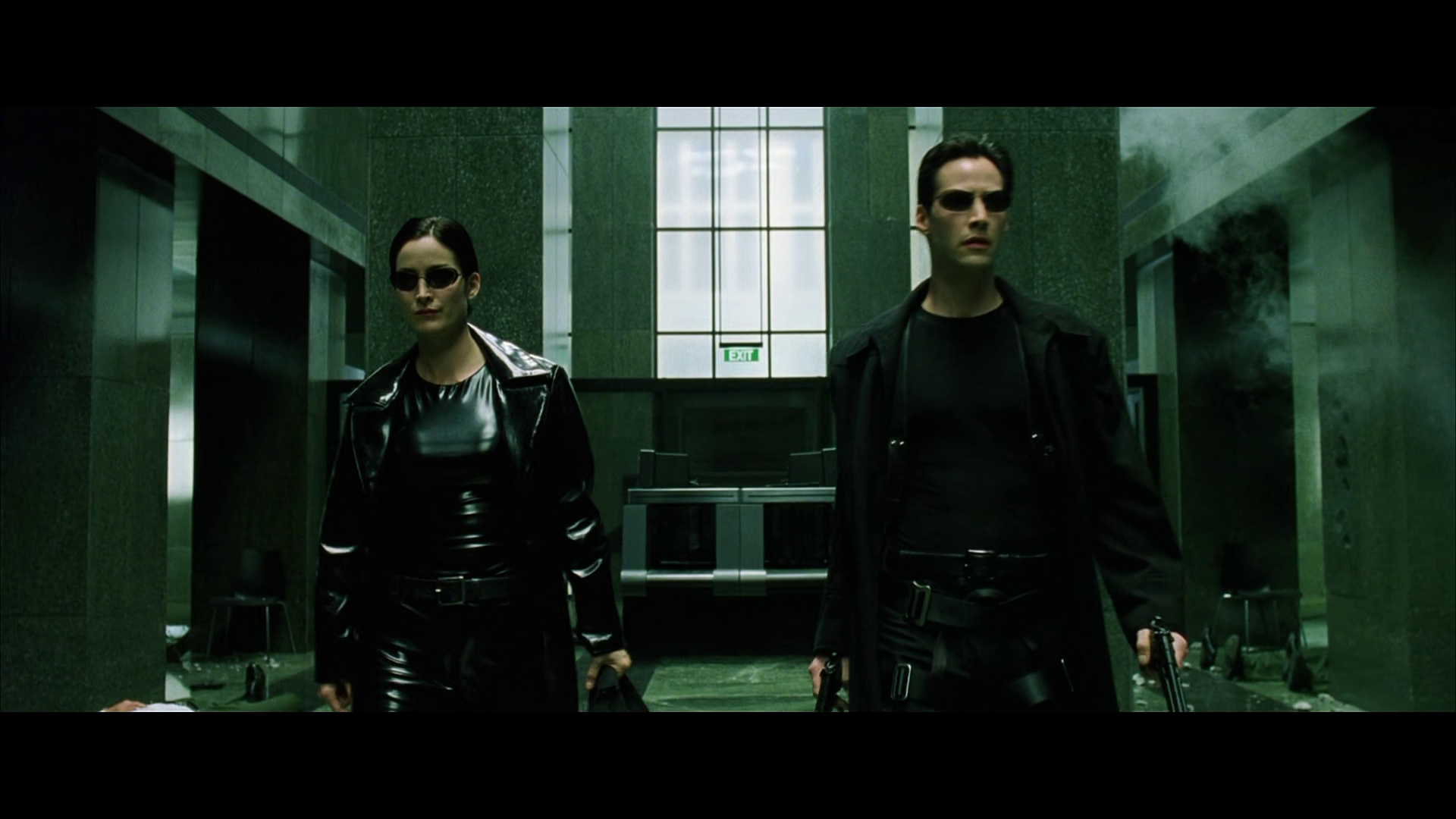
This is a collection of screen grabs for every h265 and AV1 encode I have done so far, so that you can flip through them and spot the differences for yourself. This frame is consistently one of the hardest for either h265 or AV1 (SVT-av1 specifically) to encode. It has a lot of fine detail (the grain pattern in the marble, smoke, clothing wrinkles) and difficult lighting (hard shadows on clothing, detail in blacks from clothing). Also, being from 1999, it has actual film grain.
encode_tests.zip (33.6 KB)
This is a spreadsheet I made (apparently uploading a raw .ods file isn’t allowed) to track whether an encode is profitable, or to help me split hairs when visual quality is close. The ‘SSIM avg’ column is computed via a script I have that averages the ‘All’ SSIM score for every frame in a given encode pass.
In the h265 days I did try using VMAF, but I find pixel-peeping to be a far better solution, and have switched over to SSIM exclusively. Specifically my process is:
- Use SSIM to identify which frame(s) are among the worst in an encode (I have a script that gives me the top 10 worst frames)
- Visually look at the list and identify any frames which show up in multiple encodes consistently
- Put those frames in another script which will go encode by encode and extract that exact frame from each encode. Allowing me to layer them on top of each other (in GIMP for example) and easily see what changes from encode to encode.
So, in the end, it’s my eyeball that determines quality, and SSIM is only used to help me find where to look.
What I’ve found so far:
I did try the PSNR tuning mode (-svtav1-params tune=1) and found it made the image worse than VQ (visual quality, tune = 0) mode. I will re-test it once I’ve found encode settings I’m happy with.
Film Grain Tuning (-svtav1-params film-grain=)
- Enabling this feature instantly nerfs performance. On a preset 6, CRF 32 run (I had to start somewhere) I went from 172 FPS to 44.
- For the test movie used, film grain settings of 30-50 provide no visually identifiable change (to me). Meaning setting 30 and setting 50 look the same.
- Grain settings of 20 and below look like someone shot the frame out of focus.
- Grain settings of >= 30 actually introduce more grain than the original movie had. And because the grain is a pattern, it looks worse than the natural grain the movie had.
- In my (limited) tests, it did not seem to provide any meaningful space savings. (<1MB at most)
- Grain should be given one last chance once I settle on what encode settings I am happy with for visual quality.
Presets and CRF
- In h265, preset and CRF are more or less disconnected. Preset is how fast you want the encode to go, CRF is how good you want it to look.
- There is some visual quality change from preset alone, but compared to AV1 it is minor.
- In general, lowering CRF by 1, while raising the preset by 1 category, results in the same visual quality. IE: Slow-21 and Medium-20 should look pretty close to identical.
- In AV1, preset and CRF are related. Preset DOES change quality even if CRF remains constant.
- Presets are not strictly an improvement in all scenarios. For example, look at the screens for preset 6 CRF 20 and look at the granite behind Trinity’s head. Then look at the preset 3 CRF 20 pass. In preset 6, it looks better than in preset 3. But then look at Neo’s coat (as you view him, the left of his coat) and notice that preset 3 preserves the shadows more faithfully than preset 6 does. CRF remained the same, so we are purely seeing the quality changes the preset alone brings to the table.
- CRF and preset need to be somewhat close to each other. Using a high preset (say 6) with a low CRF (15) balloons the file size. Preset 6 does make the encode go fast, but the file size grows exponentially if the CRF is too low for the preset.
- In general, this table provides what CRF ranges make sense for what preset:
| Preset | Lowest Recommended CRF |
|---|---|
| 6 | 25 |
| 5 | 10 |
| 4 | 1 |
| 3 | 1 |
| 2 | 1 |
| 1 | 1 |
To save you needing to open the spreadsheet (which also doesn’t have all the data, it was shared for the formulas) here are the h265 encoding results:
| Preset | CRF | File Size (bytes) | VMAF | Encode Time (s) | Cost to Encode | Cost to Store | Total savings (min) | Total savings (max) | Effective FPS of encode | SSIM avg | Notes |
|---|---|---|---|---|---|---|---|---|---|---|---|
| veryfast | 17 | 13,638,785,557 | 98.024514 | 2280 | $0.04 | $1.10 | $0.48 | $1.45 | 86.0 | 0.989588 | |
| Slow | 21 | 10,229,301,875 | 97.952315 | 10915.32 | $0.18 | $0.83 | $0.61 | $1.58 | 18.0 | 0.932447 | Good detail preserved |
| faster | 18 | 11,695,746,266 | 97.840642 | 2363.46 | $0.04 | $0.95 | $0.63 | $1.61 | 83.0 | 0.988597 | Makes granite blurry |
| medium | 19 | 11,203,315,853 | 97.770822 | 4023.77 | $0.07 | $0.91 | $0.65 | $1.62 | 48.7 | 0.987871 | Creates a ‘halo’ around Trinity’s head of fuzzy pixels. Looks worse than fast, somehow. |
| fast | 19 | 9,901,491,168 | 97.617865 | 2178.6 | $0.04 | $0.80 | $0.78 | $1.75 | 90.0 | 0.987519 | Viable, a bit of smearing, but minor |
| medium | 20 | 9,493,557,954 | 97.530238 | 3805.97 | $0.06 | $0.77 | $0.79 | $1.76 | 51.5 | 0.986599 | Makes granite look fuzzy |
| veryslow | 23 | 7,281,782,040 | 97.484458 | 54000 | $0.90 | $0.59 | $0.13 | $1.10 | 3.6 | 0.985194 | Good detail preserved |
| medium | 21 | 7,989,584,534 | 97.253111 | 3573.58 | $0.06 | $0.65 | $0.91 | $1.89 | 54.9 | 0.985218 | |
| fast | 21 | 6,951,535,923 | 97.031401 | 2111.3 | $0.04 | $0.56 | $1.02 | $1.99 | 92.9 | 0.985072 | |
| faster | 21 | 6,969,701,535 | 97.027839 | 2012.02 | $0.03 | $0.56 | $1.02 | $1.99 | 97.5 | 0.98502 | |
| veryfast | 21 | 6,963,443,574 | 97.020857 | 1977.45 | $0.03 | $0.56 | $1.02 | $2.00 | 99.2 | 0.985003 |
And here’s the table of SVT-AV1 tests:
| Preset | CRF | File size | SSIM avg | Encode Time (s) | Grain | Tune | Cost to encode | Cost to store | Total savings (min) | Total Savings (max) | Rawtime | Effective FPS | Notes |
|---|---|---|---|---|---|---|---|---|---|---|---|---|---|
| 5 | 5 | 25,970,127,466 | 0.993285 | 1536.752 | -1 | 0 | $0.03 | $2.10 | -$0.51 | $0.46 | 25m36.752s | 127.590528595375 | Pixel-perfect to original |
| 3 | 10 | 11,934,861,357 | 0.990331 | 4760.455 | -1 | 0 | $0.08 | $0.97 | $0.57 | $1.55 | 79m20.455s | 41.1882897748219 | Slightly better than preset 4 (in terms of quality) |
| 4 | 10 | 11,930,788,932 | 0.989879 | 2537.649 | -1 | 0 | $0.04 | $0.97 | $0.61 | $1.58 | 42m17.649s | 77.2663989385451 | Slightly better than preset 5 (in terms of quality) |
| 5 | 10 | 12,108,739,788 | 0.989626 | 1424.769 | -1 | 0 | $0.02 | $0.98 | $0.62 | $1.59 | 23m44.769s | 137.618799959853 | Viable, and around 10x the speed of h265 for roughly the same filesize |
| 2 | 15 | 7,373,968,517 | 0.988214 | 15161.148 | -1 | 0 | $0.25 | $0.60 | $0.77 | $1.74 | 252m41.148s | 12.9327277855213 | Loss of detail greater than in h256 |
| 3 | 15 | 7,019,701,213 | 0.96769 | 8602.513 | 30 | 0 | $0.14 | $0.57 | $0.91 | $1.88 | 143m22.513s | 22.792758348636 | More grain than original |
| 3 | 15 | 7,019,410,060 | 0.974034 | 8607.923 | 20 | 0 | $0.14 | $0.57 | $0.91 | $1.88 | 143m27.923s | 22.7784333107998 | |
| 3 | 15 | 7,018,245,599 | 0.980799 | 8615.896 | 10 | 0 | $0.14 | $0.57 | $0.91 | $1.88 | 143m35.896s | 22.757354545598 | |
| 3 | 15 | 6,993,933,809 | 0.987416 | 5501.848 | -1 | 0 | $0.09 | $0.57 | $0.96 | $1.93 | 91m41.848s | 35.6380256233905 | Loss of detail greater than in h256 |
| 4 | 15 | 7,057,829,629 | 0.987002 | 2500.819 | -1 | 0 | $0.04 | $0.57 | $1.01 | $1.98 | 41m40.819s | 78.4043147464891 | Loss of detail greater than in h256 |
| 5 | 15 | 7,184,785,645 | 0.98664 | 1438.365 | -1 | 0 | $0.02 | $0.58 | $1.01 | $1.99 | 23m58.365s | 136.317972141981 | Loss of detail greater than in h256 |
| 6 | 15 | 8,505,336,370 | 0.986897 | 1101.868 | -1 | 0 | $0.02 | $0.69 | $0.91 | $1.88 | 18m21.868s | 177.947812260634 | |
| 3 | 20 | 4,096,666,031 | 0.984512 | 5806.464 | -1 | 0 | $0.10 | $0.33 | $1.19 | $2.16 | 96m46.464s | 33.7684001829685 | |
| 4 | 20 | 4,199,626,977 | 0.984175 | 2517.053 | -1 | 0 | $0.04 | $0.34 | $1.24 | $2.21 | 41m57.053s | 77.8986378117584 | |
| 5 | 20 | 4,279,650,358 | 0.983914 | 1590.778 | -1 | 0 | $0.03 | $0.35 | $1.25 | $2.22 | 26m30.778s | 123.257299258602 | |
| 6 | 20 | 5,313,952,980 | 0.984217 | 1123.135 | -1 | 0 | $0.02 | $0.43 | $1.17 | $2.14 | 18m43.135s | 174.578300916631 | |
| 6 | 25 | 3,443,314,663 | 0.982076 | 1139.728 | -1 | 0 | $0.02 | $0.28 | $1.32 | $2.29 | 18m59.728s | 172.036661378855 | |
| 6 | 32 | 1,918,913,775 | 0.95215 | 4364.214 | 50 | 0 | $0.07 | $0.16 | $1.39 | $2.36 | 72m44.214s | 44.9279068349994 | Looks bad |
| 6 | 32 | 1,918,811,306 | 0.955061 | 4367.156 | 40 | 0 | $0.07 | $0.16 | $1.39 | $2.36 | 72m47.156s | 44.897640478151 | Looks bad |
| 6 | 32 | 1,918,730,677 | 0.959553 | 4364.13 | 30 | 0 | $0.07 | $0.16 | $1.39 | $2.36 | 72m44.130s | 44.9287715993795 | Looks bad |
| 6 | 32 | 1,918,439,525 | 0.965862 | 4368.704 | 20 | 0 | $0.07 | $0.16 | $1.39 | $2.36 | 72m48.704s | 44.8817315157997 | Looks bad |
| 6 | 32 | 1,917,275,080 | 0.972595 | 4368.798 | 10 | 0 | $0.07 | $0.16 | $1.39 | $2.36 | 72m48.798s | 44.8807658307846 | Looks bad |
| 6 | 32 | 1,892,929,992 | 0.979196 | 1119.448 | -1 | 0 | $0.02 | $0.15 | $1.45 | $2.42 | 18m39.448s | 175.153289835705 | Looks bad |
| 6 | 32 | 1,753,565,212 | 0.98004 | 1136.838 | -1 | 1 | $0.02 | $0.14 | $1.46 | $2.43 | 18m56.838s | 172.474002452416 | Looks bad |
Conclusions:
To get the same visual quality h265 can give me, I need a CRF somewhere between 14 and 10. But at that CRF, the file size would be roughly the same as h265. SVT-AV1 is HUGELY faster than h265. Like 10x faster for very minimal quality loss (with preset 5) and even with preset 3 CRF 10, it is essentially equal to h265 Slow CRF21, while still being 3x faster to encode.
But there’s no file size savings at CRF 10. Or the file is slightly worse (by about 1 GB). And what is the net cost savings of AV1, since it’s 10x faster? About 2 cents. $0.02. Electricity, even at 20c/kwh, is far cheaper than disk.
In terms of disk space? If you’re willing to have your encodes take longer, using the slower/veryslow preset in h265, while bumping the CRF up slightly (veryslow CRF23 / slower CRF22) will save you significant disk space for the extra encoding time with no obvious visual quality change. Slow 21 is 10.23GB. Veryslow 23 is 7.2 GB. However, veryslow lives up to its name and only runs at about 3.6 FPS, and the power usage of such a long encode means that you only end up saving $0.13 versus the $0.61 you save with Slow 21. I have not tested slower, I’ll do that tonight, mostly from morbid curiosity. And also because my SSIM score on my slow21 encode is weirdly low, so I’m going to re-do it to test.
Further testing Conditional
If anyone has experience with aom-psy101, aom-av1ador, or aom-av1-psyex, feel free to reach out. I tried looking into these and av1-psy does seem to improve visual quality, but it does that by encoding incredibly slowly. I didn’t test presets 1 and 2 because if I wanted it to take 10 hours to encode a movie…it has to encode, at worst, overnight. I’m not going to plan my day around not being able to use my PC for a few hours while an encode finishes.
I can’t find any data that tells me these custom forks are good enough to warrant testing. I’d be happy to learn I was wrong, but I’m not curious enough to explore at this time.