My First Dedicated Gaming & VM Workstation (with a £400 Budget) - Why Planning your Real-World Needs is Important to Saving Money

Before jumping to any conclusions I do NOT expect to build an entire system suitable for my needs with a budget of just £400 GBP.

Additionally, I am located in the UK so if you make recommendations on parts or systems take into consideration the cost of shipping & import tax if the prices you’re looking at are not from UK sellers.

The UK market is a mess right now and so while things are cheap in the USA they are NOT always equally cheap here in good old blighty.

Now, on with my build plan…

I intend to use the system as a sort-of consolidated Workstation & Dedicated Gaming System all in one.

The Host Operating System will be Proxmox, under it I will run all of my Virtual Machines.

The Dedicated Gaming System will itself be a Virtual Machine with a Pass-Through Graphics Card running a Linux-Based OS.

The Other Virtual Machines will be running tasks like;
• Content Aquisition
• Content Management
• Torrenting
• Hosting Various Repositories for Archival Storage of Data
• VPN Server Hosting
• Mini Private Cloud Hosting
• Extra Data Backup via a Lightweight Linux Distro
• Multiple Game Server Hosting (Minecraft, Minetest, Driving Games, Possibly Other Games too)
• Network Infrastructure Management VM

So what am I looking for?
• Support for up-to 256GB of RAM Minimum

• Support for at least 24-Core/48-Threads of CPU (Can be Single or Dual Socket)

• Similar performance in games to a 1st Generation AMD Ryzen CPU (Zen 1) - Intel Skylake would be a suitable Alternative, and possibly even Intel Broadwell

• Relatively okay low-power state power draw (I don’t want a system that idles at 250W 400W of CPU-only Power)

• Upgradable CPU, RAM, &, Storage just in case any of those parts fail
• Reliable.

• Widely Deployed - Not a custom 1of 1 build.

• Easy to obtain Spare Parts

• User Accessible Feature Control without any expensive Licenses or DRM.

• No DRM under any circumstances!

• No “Call Home” features baked into Firmware, BIOS, UEFI - Must be able to operate fully without any external depenendency of any kind!

• Must Support PCI-E Passthrough for at least one PCI-E 3.0 x16 Slot
• Support for at least four PCI-E 3.0 x16 Slots

• Easily Replacable PSU - It can be proprietary if needed, it just needs to not be a pain to remove and replace it if it dies

• Can Operate in a Quiet Office (I don’t mind doing a Noctua Mod for the fans if that is needed)

• Is Desktop PC sized - Similar in size & shape to a common Desktop PC Tower, similar to a HP Z820

• Supports at least six Hotswap SAS 12Gbps 3.5" HDD’s, preferably eight.

• Support for at least Two Hotswap 2.5" SATA 6Gbps SSD’s, or, Two Dual-Sided M.2 2280 NVMe SSD’s at PCI-E 3.0 x4 Speeds

• Support for at least one Graphics Card that Requires 4× PCI-E 6+2-Pin Internal Power Cables via the included PSU

• Support for a Graphics Card that is 360mm in Length

I already have a HP Z620, and it is very close to what I am looking for, it just lacks the 3.5" HDD Support that I desperately need and the HP Z820 doesn’t appear to be much better in that respect.

I am after only the barebones system, no RAM, no CPU’s, no SAS HBA Cards or SATA HBA Cards, no Storage Drives, no OS, no GPU’s.

Just a Case with Motherboard, PSU, Fans, and if designed to support them the HDD Caddys/Cages (Although the Caddys/Cages aren’t neccessary if it means they add on a huge additional cost).

Additional nice-to-have features include 2× 5.25" Front Expansion Bays so I can install some extra 2.5" SSD Capacity and enough PCI-E Ports to facilitate that expansion.

I am happy to buy used, and that is typically what I do these days, I don’t mind external scratches or dents so long as they don’t compromise the case by taking off coatings that prevent rusting/corrosion, or by making panels or other parts misalign/not sit in place properly & securely.

What should I look at for £400?

I would say, your requirements are contradictory. With hotswapp bays build in you are either ending up with an ancient system which will munch lots of power or in the proprietary region of OEM server / workstations where you’ll have a hard time to find replacement parts.

I would go for first gen or second gen threadripper system for self assembly. In Austria this combo is pretty cheap (600 Euro for a whole PC including PSU and GPU) : AMD Threadripper 2920x + Asrock Gaming 6 x399 - as a bare bones system it should be even cheaper - maybe you can find something compareable in the OEM space.

Self assembly would allow you to cheap out on other parts and you would still have a “recently-ish” plattform:

You could throw it in standard cases or try to source a old one like an ancient Thermaltake case so you can get all the 5 inch slots you’ll need for aftermarket hotswappable bays. I personally love this Coolermaster case - people are almost giving them away for free here:

The board I mentioned above has only 3x PCIe 16x but you could abuse one of the 3 other m.2 slots or go for different mainboard alltogether.

I will admit that I hadn’t even considered 1st Generation or 2nd Generation Ryzen Threadripper, mostly because it doesn’t offer enough Cores/Threads or RAM support for my use case.

Most Threadripper X399 Systems are flaky even with 128GB of RAM installed, while I am aiming for a system with at least support for 256GB of RAM.
Additionally the two Threadripper 2nd Gen (Zen+) SKU’s that do offer enough Cores/Threads are extremely expensive still, those CPU’s by themselves are already more than my £400 budget on the used market, they have held their value really well considering their age.

I was wondering if anything from HP, Dell, Lenovo, Asus, or, Supermicro running two Broadwell-Era or Skylake-Era Intel Xeon CPU’s would be suitable…
The performance would be roughly what I am after, they support a healthy amount of PCI-E 3.0 lanes, they offer the RAM density I am after and the CPU’s sell for a relatively low price on the 2nd-hand market, especially compared to something like the AMD Ryzen Threadripper 2nd Gen 2970WX or 2990WX which are the only CPU’s that meet my minimum requirements for Core/Thread support.

Also pricing in Europe is nothing like pricing in the UK.
Unfortunately as I eluded to at the start of my OG post the UK market is absolutely AWFUL for pricing on PC Hardware right now, and so translating prices from other markets which have typically had similar economic value simply doesn’t add up in the same way as it traditionally has done in past recent years.

Thanks for the reccomendation on that Cooler Master Case though, even if i don’t use something like that this time around I may use something like it in the future so it’s a good case to keep a note of.

I don’t mind dealing with a proprietary OEM Chassis’ so long as it was sold in large enough quantities so that in the future if needed I can buy another of the exact same Chassis just for it’s spare parts.
And I am willing to be flexible on power to some extent, not 400W idle power draw, but I can manage 300W (2 × ~150W) power draw just from the CPU’s if so required, the system will rarely be idle anyway as some of the cores will always be under load 24-Hours a Day, 365-Days a Year.

An OEM Workstation is almost the exact type of thing that I am after.

Typically is at this budget

HP Z series, Lenovo Thinktower, Dell precision

Any specific models that would meet my needs?

As far as i am aware Dell & HP don’t offer the HDD support that I am after.
Lenovo seem to be pretty rare and expensive in the UK vs HP & Dell Hardware of the same spec.

I have no idea of where to even search for Supermicro Workstations, their naming scheme is terrible and impossible to understand/interpret.

T400 or T600 series
Both have up to 8x 3.5’s hot swap

1 Like

If you can find a Dell T320 with the hotswap SAS option, put a newer board in there, like a supermicro X10 series dual socket board (X99 era Xeons). You’ll have to cut and mod the case (with rivets or welding) to bolt a standard ATX PSU in it. Has nice tool-less slot latches, quick release side panel, thick metal, many extra standoff holes. The 1st slot is a half height. Anything much beyond that and the budget… I wouldn’t see how to make it all work. How good of gaming you want? Tesla M40 good enough? Those are listed for about $50US lately.


Mine with the welded on ATX bracket.

Found that case on the curb locally, not the hot swap SAS version though. I have a Supermicro X9DRH-7F in mine.

2 Likes

I’m really detecting a theme here with you

won’t pay for it, gonna make it instead

Bold, but very effective

1 Like

£400 will not get you very far… But £650 might. Here is what I would build, today, that is upgradable. I know this is outside budget, maybe you could scavenge some parts. GPU is not included.

PCPartPicker Part List

Type Item Price
CPU AMD Ryzen 9 7900 £319.56
Motherboard Asus PRIME A620M-A-CSM £114.98
Memory TEAMGROUP T-Force Vulcan 2x16 GB DDR5-5600 CL36 £83.98
Storage TEAMGROUP MP44L 500 GB M.2-2280 PCIe 4.0 £36.97
Case Aerocool Trinity Mini V2 £29.99
Power Supply SeaSonic B12 BC 850W 80+ Bronze £74.95
Total £660.43

This is as close to your wishlist I believe is possible without splurging on a proper system. It is power efficient, upgradable and powerful with 12 cores. It even has ECC support. AM5 supports upgrades to EPYC 16 core CPUs and possibly even Zen 6.

Yes, this is an extremely jank setup. Yes, some of these are questionable, for instance I would prefer a server motherboard or an Asus X670E ProART Creator. Yes, PSU is on the low quality side (but from a reputable brand at least). Yes, there is no GPU. Yes, only possible to have 192 GB of RAM.

Apart from that though… Most of it is there for something like 10% of what you would pay for it otherwise. Take it, leave it, or stomp it, it is your computer, your money and your gun to shoot yourself in whatever foot-like body part you’d like. :slight_smile:

This is much closer to the type of system that I was looking for.

The hardware isn’t even that dated, at least not for my needs where I don’t require blazing fast storage I just need density & capacity at a reasonable (to a low budget consumer) price.

It isn’t that I won’t source SSD’s if I went with an option like this one, but the SSD’s I would choose would not be these power hungry hot mess PCI-E Gen 4.0 & PCI-E Gen 5.0 NVMe M.2 Drives that need a heatsink as big as some budget motherboard VRM heatsinks just to not thermal throttle when operating. In my opinion hardware operating that close to it’s limits is beyond ridiculous and is just plain stupid.

I personally prefer hardware that aims for the best mix of efficiency & performance based around it’s specific design and intended use case’s, and not just the outright most efficienct hardware that exists but costs a literal Arm & Leg in terms of market value.

I also much prefer this enterprise type hardware because it has had 5-7(+) years of the same type of medium usage where it has sat mostly in a office environment with conditioned air and consistent temperature behaviour, it typically see’s the same repeated 8AM-6PM usage year round with very little in terms of sudden and exccessive performance intensive scenarios.

It is the type of hardware that I guess you could refer to as “Battle Tested” or “Veteran Hardware”, it has already seen most types of situations and it continues to chug along nicely.
It is sold as what is mostly valued as “scrap” for many large entities and then the middlemen recyclers find the best conditioned units with value still in them and re-sell them online to people like me who are looking to grab a decent deal and save the planet by not buying completely new hardware, keeping what has already been made in use but at a more leisurely pace than it would have previously experienced in it’s prior deployment.

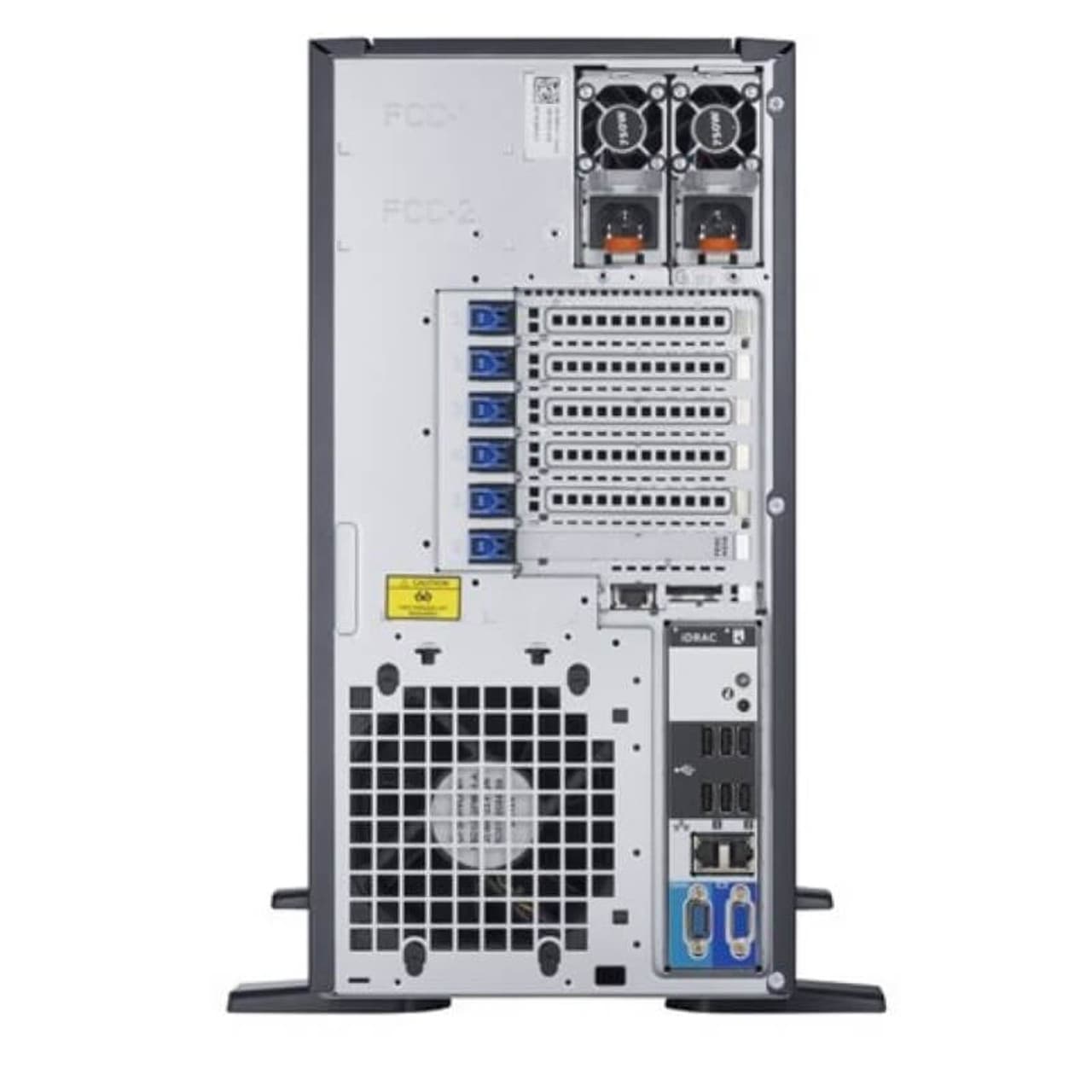
The Dell PowerEdge T-Series of Storage Workstations seems to be exactly what I am after, so I will pursue that avenue.

Thanks for your advice, it has proved to be very valuable to my search.

All the best,
Hexagon Platypus.

Thanks for the reply,

For my needs and use case this sort of hardware is overkill and focuses on single-thread performance whereas I am more in need of just more overall threads.

Additionally I don’t need RAM or Storage as that isn’t part of my ~£400 budget that I am trying my best to stick to.

On top of that A620 doesn’t offer the amount of PCI-E lanes that I mentioned previously nor the RAM support, and I don’t know of any A620 motherboard that has at least four PCI-E ×16 slots for expansion cards (mostly GPU’s, but not all GPU’s).

If I was aiming to buy anything newer than Zen 1 then I would expand my budget significantly to accomodate newer hardware that woukd still offer the amount of expandability & flexibility that I am after.

On top of all of that, the case you linked wouldn’t even meet my basic storage requirement of supporting 8× 3.5" SAS HDD’s.

Lastly the price is £250 above what I am looking to spend.
I don’t expect to be buying new hardware at my budget range, that would be totally unrealistic and borderline insane levels of expectation on my part.

I sort of already had a rough idea of what to expect before posting my original question, and as much as I totally appreciate your help the build that you shared doesn’t meet many of my core requirements meaning it just isn’t suitable for my needs.

Also pairing a 7900 with A620? Can the A620 Motherboard VRM’s safely handle the peak power draw of a 7900 for a sustained period of time?
I only ask because having seen previous coverage of inadquate motherboard VRM’s on some older but recent Intel motherboards which caused the CPU’s to run under spec I would very much be questioning tge reliability of such a hardware pairing without some significant undervolting and underclocking.

Anyway, I really do appreciate the input and even if it’s not much use to me it may still be useful to other people who stumble across this post in the future looking for similar advice.

All the best,

Peace :v:

Also, I forgot to mention, for gaming side of things I don’t plan to upgrade beyond a AMD Radeon RX 5700XT and that’s only because I plan to run three 1080p displays with it.
Medium settings at most I expect, which is fine for my needs.

And, great job on the welding, do be careful welding that steel though, not sure if it is the situation here but some cases used treated steel that can ommit harmful crap when welding it and I don’t just mean galvanised either, other steel treatments can be used such as anti-corrosion additives which are narsty when you try to weld such steel without specific gases flowing into the area you are welding to neutralise certain chemcial reactions that occur as a result of extreme heat + metal + air.
But like I say, awesome job on the tac welding, seems to provide a lot of space for a standard ATX-sized PSU.

Thanks once again for your input!

Thanks to your reply I spent hours on eBay.

It’s a great suggestion as is pretty much on point with what I am after, and pricing wise in the UK it seems to be okay which is a nice change.

Thanks again for the guidance!

All the best,

Platypus.

1 Like

I used a flux core MIG.
This exact model. Price has gone down a bit since I bought mine.

AM5 will not cut it for that. Threadripper 1st gen seems like the best bet there.

Seeing as the 7900 is a 12c24t 65W CPU that draws a maximum of 90W… Yes. Yes, A620 actually does work with that, although margins are very low. As I mentioned in the original reply, I would rather pair it with an Asus ProArt X670E.

Also, I think spending £400 on a computer that draws 200W+ as a server is insanity, when you can spend £800 on a computer that draws 50W. That is ~1 300 kWh saved every year, you do the math on how much money you save on power draw.

Again, your foot, your money, and your gun. Have fun :slight_smile:

1 Like

Some cost and power draw doesn’t change between old and new. Either way you’re buying a PSU. Either way you’re using as much power for drives. And power draw isn’t constant.

You’re on the money with the 1st Generation Threadripper recommendation.

My current primary system is based around a 1st Generation AMD Ryzen Threadripper 1950X, and if I could afford to do it then I would turn that PC into what I plan to use this £400 system for.
And maybe over time that is what might eventually transpire, I can’t say for certain right now because financially I am really trying to limit my spending if I can whilst still improving my overall setup by providing better data backups & improved process segmentation.

Given how often yet more vulnerabilties are being discovered, and given some of my technological interests I am already just today starting to re-evaluate if virtualising some of my more delicate workloads is really such a good idea or if I might just be better served by completely isolating the three sets of primary uses that I plan to distribute across my entire computer arrangement of ALL machines & hardware (multiple workstations, servers, desktops, laptops, SBC’s, etc).


Power Usage, Efficiency, &, Management

You raise a really good point here in regards to both individual component power draw/ussge in different states of operation, and, also in regards to overall system power draw/usage in different states of operation.

In particular the amount of power being drawn when the systems are idle or operating at lower than peak performance.

It is however the overall efficiency of the hardware to complete tasks using the most effective use of power that becomes most important here.
I say this because if you have a newer CPU that operates at high clockspeeds but with less overall threads, and it is tuned not for overall peak efficiency but instead tuned to get as much reasonable performance from the silicon as you can then it may be that in certain workloads using older but more multi-threaded CPU’s you might be able to complete some tasks quicker despite the older CPU drawing more power both at Idle & at Peak load, but because that older CPU never hits peak load, and because it has access to far more threads it may be that for certain use cases & scenarios that strangely the older silicon is more efficient.

Now logically speaking these situations don’t happen with every workload, but if enough of my workloads can take advantage of this then I may be better served overall by slightky older hardware that just also happens to be cheaper to buy, and because it has already had one service life I would be providing it yet more opportunity to generate value which means less resources are used making new parts that may not be needed. Yes theirs far more to this calculation than I sm detailing here, I am simply trying to highlight that these situations are not always as “Black & White” as they appear, and sometimes we have a “Grey Area” in the middle, it is a spectrum of possibilities rather than just a singular “Good” or “Bad”.

Having given some of thks further thought as I have typed out this reply I do now wonder if I might be better served if I completely re-evaluate my entire setup as a whole once again, but with a look to invest in my future needs rather than my current more temporary needs, investing in the hardware solutions that could work togther with what I already have and perhaps change the primary purpose of my main system to be a different usage scenario.

I run a unique arrangement of monitors currently, and in recent days I have been considering if this will be the type of setup that I want in the future, or, if I instead want to reduce the amount of hardware that I am utilising & changing the way I am interacting with my PC from traditional monitors to something more cutting edge like a XR Headset from the likes of XReal or Similar.
Current limitations being the lack of Linux Support for Virtualised Desktops.

Anyway I am starting to go on a tangent here.
Thanks for your input, it has proven valuable to making me rethink what my needs and requirements actually are, and, what I should plan to invest in going forwards, with a more future-looking outlook on my current arrangement, and one that may prove to be financially better thought out.

All the best to you stranger, I appreciate you spending time to discuss these matters with me.

Peace :v:

I will be completely honest with you here…
I had not even considered just how much power my HardDrives (HDD’s) could be drawing while in operation.

SSD’s can also draw up to around 10W of powet in some scenarios but many of them draw far less power than that most of the time, even while under load, simply because in most usage scenario’s you aren’t heavily loading all of the NAND on the drive nor are you putting a lot of load on the SSD’s controller because a lot of operations are small, fast, and mostly reliant on processing latency.

It seems I may have jumped into this lake of water before understanding just how wide it spreads, how deep it goes, or how far I have yet to travel…

I really feel like I need to completely re-evaluate this situation and come back to it with a fresh mind and far more knowledge gained from additional research of the specifics of certain hardware and software solutions, and how best that may all fit into what I genuinely need, and, what I can afford to buy given my limited income.

Either way your input has been greatly appreciated and without it I don’t think I would have answered a lot of questions that I have had regarding what I am looking to achieve.

So thank you for your time, and for your patience.
All the best to you stranger.

Peace :v:

1 Like

Glad we helped you get there without spending money first.

1 Like