Multi GPU setup, wrong GPU at GPU0: changing PCIe device enumeration/order on a Gigabyte X570 Aorus Master - is that possible?

Update: CUDA_VISIBLE_DEVICES works fine, just not with Ollama (even though it should). As far as I can tell, this is only an issue with Ollama, bug report filed.


The context:
I’m building a AI rig for my homelab, running 2x3090s and 1x3090Ti on a Gigabyte X570 Aorus Master and a Ryzen 5700X, with a single 4TB nvme drive.

I’m running Ubuntu Server 24.04 LTS, with nvidia-driver-570-server, CUDA toolkit 12.8 installed.

  • The 3090Ti (pcie 0000:09:00.0) is in the primary x16 PCIe slot, running at x8 Gen4, on a 10cm Gen4 riser cable
  • One 3090 (pcie 0000:0a:00.0) is in the secondary x16 PCIe slot, running at x8 Gen4, on a 10cm Gen4 riser cable
  • One 3090 ( pcie 0000:04:00.0) is in the tertiary x16slot, running at “x4” Gen4 from the Chipset (dmesg | grep -i pcie returned only x2 link for the card), on a 20cm Gen4 riser cable

Since I’m using every single lane, I reduced the unused PCIe devices as much as possible:

    • physically removed the WiFi/BT add in card under the IO shield
    • deactivated 1Gbit Ethernet port (using the 2.5Gbit only)
    • deactivated Audio, SATA

My problem:
Checking with nvidia-smi, it shows the “slowest” GPU, the 3090 connected to the Chipset, as GPU0.

This introduces performance issues for me, especially in applications that can only utilize 1 GPU, as they often default to GPU0.

My understanding is that the PCIe device order is assigned at boot, depending on what card is detected first on the bus by the BIOS, and that order is then used to enumerate the GPUs.

I’ve combed through the BIOS, but could not find any way to force a specific order, and tried some settings (e.g. presence detect mode → AND) that could potentially impact detection order, but none of them produced any change.

I’ve also tried setting the environmental variables for the CUDA toolkit to specific device orders and device listings, no luck. Every application that uses CUDA and only 1 GPU, always seems to select the 3090 on the chipset slot, instead of the 3090Ti on the primary slot.

Does anyone know what might be going on here and if that is fixable? Or are there any workarounds at least for CUDA?

My suspicion is that the PCIe x4 special uplink lanes that the chipset is connected to get preferential treatment in boot order, and the Chipset (and connected peripherals) are then detected earlier than PCIe devices connected to regular PCIe lanes.

Also, let me know if this is not the right forum category for this topic. I just picked the place I thought would most likely be frequented by folks that might have dealt with similar issues building DIY AI rigs.

Below the complete results of sudo dmesg | grep -i pcie, in case that helps:

[    2.413267] acpi PNP0A08:00: _OSC: OS now controls [PCIeHotplug SHPCHotplug PME AER PCIeCapability LTR DPC]
[    2.414373] pci 0000:00:01.1: [1022:1483] type 01 class 0x060400 PCIe Root Port
[    2.414682] pci 0000:00:01.2: [1022:1483] type 01 class 0x060400 PCIe Root Port
[    2.415218] pci 0000:00:03.1: [1022:1483] type 01 class 0x060400 PCIe Root Port
[    2.416186] pci 0000:00:03.2: [1022:1483] type 01 class 0x060400 PCIe Root Port
[    2.416794] pci 0000:00:07.1: [1022:1484] type 01 class 0x060400 PCIe Root Port
[    2.417196] pci 0000:00:08.1: [1022:1484] type 01 class 0x060400 PCIe Root Port
[    2.418311] pci 0000:01:00.0: [1d97:1602] type 00 class 0x010802 PCIe Endpoint
[    2.418825] pci 0000:02:00.0: [1022:57ad] type 01 class 0x060400 PCIe Switch Upstream Port
[    2.419190] pci 0000:02:00.0: 31.506 Gb/s available PCIe bandwidth, limited by 16.0 GT/s PCIe x2 link at 0000:00:01.2 (capable of 126.024 Gb/s with 16.0 GT/s PC                                                                          Ie x8 link)
[    2.419770] pci 0000:03:02.0: [1022:57a3] type 01 class 0x060400 PCIe Switch Downstream Port
[    2.420797] pci 0000:03:05.0: [1022:57a3] type 01 class 0x060400 PCIe Switch Downstream Port
[    2.421801] pci 0000:03:08.0: [1022:57a4] type 01 class 0x060400 PCIe Switch Downstream Port
[    2.422448] pci 0000:03:09.0: [1022:57a4] type 01 class 0x060400 PCIe Switch Downstream Port
[    2.423075] pci 0000:03:0a.0: [1022:57a4] type 01 class 0x060400 PCIe Switch Downstream Port
[    2.423827] pci 0000:04:00.0: [10de:2204] type 00 class 0x030000 PCIe Legacy Endpoint
[    2.424314] pci 0000:04:00.0: 31.506 Gb/s available PCIe bandwidth, limited by 16.0 GT/s PCIe x2 link at 0000:00:01.2 (capable of 252.048 Gb/s with 16.0 GT/s PC                                                                          Ie x16 link)
[    2.424543] pci 0000:04:00.1: [10de:1aef] type 00 class 0x040300 PCIe Endpoint
[    2.425069] pci 0000:05:00.0: [10ec:8125] type 00 class 0x020000 PCIe Endpoint
[    2.426192] pci 0000:06:00.0: [1022:1485] type 00 class 0x130000 PCIe Endpoint
[    2.426508] pci 0000:06:00.0: 31.506 Gb/s available PCIe bandwidth, limited by 16.0 GT/s PCIe x2 link at 0000:00:01.2 (capable of 252.048 Gb/s with 16.0 GT/s PC                                                                          Ie x16 link)
[    2.426753] pci 0000:06:00.1: [1022:149c] type 00 class 0x0c0330 PCIe Endpoint
[    2.428861] pci 0000:06:00.3: [1022:149c] type 00 class 0x0c0330 PCIe Endpoint
[    2.429406] pci 0000:07:00.0: [1022:7901] type 00 class 0x010601 PCIe Endpoint
[    2.429782] pci 0000:07:00.0: 31.506 Gb/s available PCIe bandwidth, limited by 16.0 GT/s PCIe x2 link at 0000:00:01.2 (capable of 252.048 Gb/s with 16.0 GT/s PC                                                                          Ie x16 link)
[    2.430042] pci 0000:08:00.0: [1022:7901] type 00 class 0x010601 PCIe Endpoint
[    2.430414] pci 0000:08:00.0: 31.506 Gb/s available PCIe bandwidth, limited by 16.0 GT/s PCIe x2 link at 0000:00:01.2 (capable of 252.048 Gb/s with 16.0 GT/s PC                                                                          Ie x16 link)
[    2.430688] pci 0000:09:00.0: [10de:2203] type 00 class 0x030000 PCIe Legacy Endpoint
[    2.430973] pci 0000:09:00.0: 126.024 Gb/s available PCIe bandwidth, limited by 16.0 GT/s PCIe x8 link at 0000:00:03.1 (capable of 252.048 Gb/s with 16.0 GT/s P                                                                          CIe x16 link)
[    2.431130] pci 0000:09:00.1: [10de:1aef] type 00 class 0x040300 PCIe Endpoint
[    2.431448] pci 0000:0a:00.0: [10de:2204] type 00 class 0x030000 PCIe Legacy Endpoint
[    2.431730] pci 0000:0a:00.0: 126.024 Gb/s available PCIe bandwidth, limited by 16.0 GT/s PCIe x8 link at 0000:00:03.2 (capable of 252.048 Gb/s with 16.0 GT/s P                                                                          CIe x16 link)
[    2.431861] pci 0000:0a:00.1: [10de:1aef] type 00 class 0x040300 PCIe Endpoint
[    2.432155] pci 0000:0b:00.0: [1022:148a] type 00 class 0x130000 PCIe Endpoint
[    2.432544] pci 0000:0c:00.0: [1022:1485] type 00 class 0x130000 PCIe Endpoint
[    2.432860] pci 0000:0c:00.1: [1022:1486] type 00 class 0x108000 PCIe Endpoint
[    2.433133] pci 0000:0c:00.3: [1022:149c] type 00 class 0x0c0330 PCIe Endpoint
[    2.486532] pcieport 0000:00:01.1: PME: Signaling with IRQ 28
[    2.486694] pcieport 0000:00:01.2: PME: Signaling with IRQ 29
[    2.486859] pcieport 0000:00:03.1: PME: Signaling with IRQ 30
[    2.487016] pcieport 0000:00:03.2: PME: Signaling with IRQ 31
[    2.487263] pcieport 0000:00:07.1: PME: Signaling with IRQ 33
[    2.487323] pcieport 0000:00:07.1: AER: enabled with IRQ 33
[    2.487475] pcieport 0000:00:08.1: PME: Signaling with IRQ 34
[    2.487542] pcieport 0000:00:08.1: AER: enabled with IRQ 34

Well, the mobo manual explains that the third PCIe slot (4x electrical) is physically connected to the chipset and no BIOS/UEFI setting can change that.

You already went through lengths to get three GPUs connected to the mobo - kudos!
If you really want all GPUs to be directly connected to the CPU you need to look for an m.2 to PCIe adapter and use that cheat code - probably with another cheat code that allows you to use your m.2 in the third PCIe slot…

Good luck!

Probably a stupid thing to try, but try only plugging in the riser cable for the last GPU after the system boots and you’re in the program you want and see if it’ll be recognized.

I don’t think I’ve ever had to plug a GPU in from a chipset before though, but found that it fixed an issue with my computer always running everything on the iGPU because it was GPU0 and it somehow reset the software I was trying to run. Also was in like windows 7/8 not ubuntu server. Not even sure it would even recognize and initialize the gpu if it plugs in after the fact on ubuntu server. :clown_face:

On an aside, doing this to replace a trash built in wifi card is always something I forget to do and get too lazy to do after the fact

isnt it the case that when you run most CUDA applications you are able to specify which GPU it should use via environment variables?

And if you are able to parse the output of something like nvidia-smi or other PCI tool to see which GPU is in which slot (based on the one with x4 speed listed) then you should be able to script it up such that the env var for CUDA devices is the one that does not have x4 speed?

I don’t need every GPU to be connected to CPU PCIe, I just don’t want the one that is connected via the chipset to erroneously get recognized as my primary GPU.

With that said, you’re probably right in the sense that moving all the cards onto the CPU lanes might solve my problem, and I have thought about either using a x4+x4 splitter on my second x8 slot, or using a m.2 to x4 adapter on my nvme0 slot, and then running the OS drive via chipset nvme or sata.

However, I also really like the fast transfer speeds I get from my nvme0 drive, especially if I’m testing and frequently switching between different models for stable diffusion. I might consider a x4+x4 splitter for the second slot tho if I can’t find a software solution.

Oh, I love stupid ideas and of course have already thought about that :slight_smile:

I wonder if it would be enough to disconnect the PSU cables rather than disconnecting from the slot directly: If it works, I could fabricate an inline adapter for the power cord with an electronic circuit that connects power to the GPU after a sufficient delay post boot - but that would be a whole project of it’s own. I have enough projects. I think. Or do I?

I tried messing around with CUDA_VISIBLE_DEVICES and CUDA_DEVICE_ORDER in the ollama.service file, but could not get it to affect any change in outcome.

Maybe I did something wrong, because it should work, right? That functionality is specifically mentioned in both the ollama and cuda documentation.

The only explanation, other than user error, is that the 3090 and 3090Ti have the same performance rating from the perspective of CUDA, so the “FASTEST_FIRST” doesn’t work, and it defaults to PCI_BUS_ORDER instead.

Some GPUs still show up on a device just plugged into the PCIe slot. Might not work but will still show up sometimes if the PSU isnt connected

I was going to mention that you should try to set CUDA_DEVICE_ORDER= PCI_BUS_ID, but seems like it won’t solve your issues.

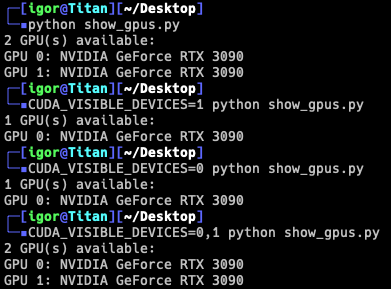
Setting CUDA_VISIBLE_DEVICES however should work. I just tried it out here and setting this makes ollama only see the GPU I have specified. How did you set it?

Sample test with regular torch:
image

Yep, CUDA_DEVICE_ORDER= PCI_BUS_ID doesn’t work, because the PCIe bus ID is in the “wrong” order in the first place.

I also tried FASTEST_FIRST, which seems to default to PCIe bus ID order, I think because Cuda can’t tell the 3090 and 3090Ti apart in performance (both 8.6 compute score)? I have an old 980Ti that I can slot in and see if that makes a difference.

I also tried CUDA_DEVICE_ORDER=1,2,0 but I think that env-var is not meant to contain an actual order, just a reference to the rule it should follow.

For CUDA_VISIBLE_DEVICES I only tried for reordering, i.e. CUDA_VISIBLE_DEVICES=1,2,0 - not for isolating an individual card. I’ll try that when I get home - if that works, it would at least tell me that my CUDA installation recognizes the changes.

To make matters more confusing, I also realized that my nvme0, which should have its own x4 link, is only running on a x2 link. And when I remove the 3rd GPU on the x4 slot, my ethernet interface stops working. I think the NIC PCIe bus ID changes without the GPU connected to the chipset, and that is causing some linux weirdness: /etc/netplan/50-cloud-init.yaml gets magically altered to reference a network interface that doesn’t exist. If I edit the file manually to correct it, it works, but only until the next reboot.

I’m starting to wonder if maybe there is something wrong with my CPU IO die. Will swap in a different CPU to test.

Yeah, the only options are the ones you tried before, it doesn’t allow for custom order afaik.

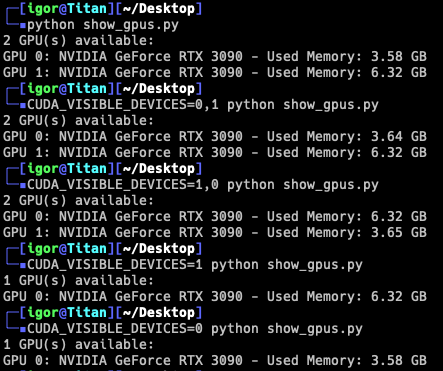
It should work for reordering as well, se below, I added some changes to show the current VRAM in use to make it easier to differentiate my GPUs:

cat show_gpus.py
import torch

def list_available_gpus():
    num_gpus = torch.cuda.device_count()
    if num_gpus == 0:
        print("No GPUs available.")
    else:
        print(f"{num_gpus} GPU(s) available:")
        for i in range(num_gpus):
            name = torch.cuda.get_device_name(i)
            memory_used = torch.cuda.device_memory_used(i) / (1024 ** 3)  # Convert bytes to GB
            print(f"GPU {i}: {name} - Used Memory: {memory_used:.2f} GB")

if __name__ == "__main__":
    list_available_gpus()

image

However, even it you give some ordering, and your main issue is with ollama, I noticed it kinda choses which GPU to use at “random” (i’m not sure what metric it takes into consideration), but it’s not like it always tries to use the first GPU every time.

You mean the topmost NVMe? That’s weird, given that it should be coming from the CPU lanes and shouldn’t be sharing bandwidth with anything else.

That’s kinda expected if you’re using predictable interface names (something like enp5s0 instead of eth0). See this for reference:

https://systemd.io/PREDICTABLE_INTERFACE_NAMES/

Hey, thank you for taking the time to look into this so thoroughly, I really appreciate it.

Interface names: good to know, if its behaving as expected, then I don’t need to worry about it as a symptom of a potential larger issue.

Ollama: I didn’t consider that it itself might be a factor - seems kind of obvious in retrospect.

x2 Link NVMe: Yep, right next tot he CPU. AFAIK those lanes are not shared with anything else. Strange. An if I understand the dmesg output correctly, my chipset is also connected on a x2 link instead of x4.

I’m going to setup a more controlled test environment and better testing methods (i.e. not just Ollama), and rule out a hardware issue with the MB or CPU. I don’t even know if the GPU on Slot3 getting the lowest ID and becoming GPU0 is normal for x570, or already pointing towards some other issue itself. Don’t have another x570 board to compare :\

1 Like

Update: Ollama definitely is not behaving as expected.

I’ve tried setting CUDA_VISIBLE_DEVICES to a specific device in the ollama.service file, in an override.conf, and even setting it as a system wide variable, to 0 effect. For me, Ollama ALWAYS chooses GPU0 as the first GPU to load up.

At the same time, with system wide CUDA_VISIBLE_DEVICES set to a specific GPU, Invokeai (stable diffusion image generation) follows that direction as expected.

This is good to know, now I can focus on WHY Ollama doesn’t CUDA_VISIBLE_DEVICES, even though the Ollama documentation explicitly states that this is the way to select a specific GPU.

The missing PCIe lanes have not yet been resolved, but I’m drawn to treat that as separate from the GPU selection/enumeration. The issue persisted with a different NVMe in the same slot, will try different CPU next.

no need to change bios I use multiple GPUs in my AI workflow and I assign what one to use in a python run script no problems. I know programs like comfyai you can do your GPU assigning in the program or swarmAI can and is more setup to do this out of the box both can run ollama.