Minisforum MS-01 - SRIOV | i915 | iGPU to VMs for Jellyfin/Frigate [SOLVED]

Hello all,

I recently purchased a Minisforum MS-01 i9-12900H and I’m trying to get SR-IOV working properly so I can run Jellyfin (VM) and Frigate (VM) on separate virtual functions.

I followed various guides—mostly the instructions from the SR-IOV DKMS project here:
https://github.com/strongtz/i915-sriov-dkms
(Using Xe instead of i915, since the MS-01 uses Xe Graphics).


Host Config

Kernel: 6.17.2-1-pve

GRUB_CMDLINE_LINUX_DEFAULT="quiet intel_iommu=on xe.max_vfs=7 xe.force_probe=0x46a6 module_blacklist=i915"

The installation succeeded without errors. dmesg shows clean initialization, and the VF devices appear correctly:

dmesg | grep sriov
root@mf01:~# dmesg | grep sriov
[    3.000919] intel_sriov_compat: module verification failed: signature and/or required key missing - tainting kernel
[    3.001192] intel_sriov_compat: loaded
[    3.199754] xe: You are using the i915-sriov-dkms module, a ported version of the i915/xe module with SR-IOV support.
[    3.199755] xe: Please file any bug report at https://github.com/strongtz/i915-sriov-dkms/issues/new.
[    3.199756] xe: Module Homepage: https://github.com/strongtz/i915-sriov-dkms
[    3.241678] WARNING: CPU: 8 PID: 767 at /var/lib/dkms/i915-sriov-dkms/2025.11.10/build/drivers/gpu/drm/i915/display/intel_dmc.c:659 assert_dmc_loaded+0x227/0x230 [xe]
[    3.241784] Modules linked in: intel_rapl_msr intel_rapl_common intel_uncore_frequency intel_uncore_frequency_common xe(OE+) mt7921e x86_pkg_temp_thermal mt7921_common intel_powerclamp intel_sriov_compat(OE) mt792x_lib coretemp gpu_sched mt76_connac_lib drm_gpuvm drm_ttm_helper mt76 drm_exec kvm_intel drm_suballoc_helper mac80211 kvm btusb drm_buddy btrtl ttm btintel drm_display_helper btbcm irqbypass polyval_clmulni mei_pxp mei_hdcp cec btmtk cfg80211 ghash_clmulni_intel cmdlinepart aesni_intel spi_nor rapl mei_me rc_core wmi_bmof libarc4 bluetooth mtd intel_cstate mei pcspkr i2c_algo_bit igen6_edac intel_pmc_core pmt_telemetry pmt_discovery pmt_class intel_pmc_ssram_telemetry intel_vsec acpi_tad acpi_pad input_leds joydev mac_hid sch_fq_codel msr vhost_net vhost vhost_iotlb tap efi_pstore nfnetlink dmi_sysfs ip_tables x_tables autofs4 zfs(PO) spl(O) btrfs blake2b_generic xor raid6_pq hid_generic rndis_host usbhid cdc_ether uas usbnet hid usb_storage mii i2c_i801 nvme spi_intel_pci xhci_pci i2c_mux spi_intel
lspci output
root@mf01:~# lspci -nn | grep '00:02'
00:02.0 VGA compatible controller [0300]: Intel Corporation Alder Lake-P GT2 [Iris Xe Graphics] [8086:46a6] (rev 0c)
00:02.1 VGA compatible controller [0300]: Intel Corporation Alder Lake-P GT2 [Iris Xe Graphics] [8086:46a6] (rev 0c)
00:02.2 VGA compatible controller [0300]: Intel Corporation Alder Lake-P GT2 [Iris Xe Graphics] [8086:46a6] (rev 0c)
00:02.3 VGA compatible controller [0300]: Intel Corporation Alder Lake-P GT2 [Iris Xe Graphics] [8086:46a6] (rev 0c)
00:02.4 VGA compatible controller [0300]: Intel Corporation Alder Lake-P GT2 [Iris Xe Graphics] [8086:46a6] (rev 0c)
00:02.5 VGA compatible controller [0300]: Intel Corporation Alder Lake-P GT2 [Iris Xe Graphics] [8086:46a6] (rev 0c)
00:02.6 VGA compatible controller [0300]: Intel Corporation Alder Lake-P GT2 [Iris Xe Graphics] [8086:46a6] (rev 0c)
00:02.7 VGA compatible controller [0300]: Intel Corporation Alder Lake-P GT2 [Iris Xe Graphics] [8086:46a6] (rev 0c)

VMs

I then created the two VMs each connected to a seperate VF for Jellyfin and Frigate. Using them individually runs fine however when both hit the iGPU they both run into issues. The following are the errors that Jellyfin,Frigate, and the Proxmox host itself report during the “incident”

Jellyfin Error

Jellyfin VAAPI logs
[AVHWDeviceContext @ ...] libva: vaGetDriverNames() failed with unknown libva error
DRM_IOCTL_VERSION failed: Operation canceled
[AVHWDeviceContext @ ...] libva: /usr/lib/jellyfin-ffmpeg/lib/dri/iHD_drv_video.so init failed
[AVHWDeviceContext @ ...] Failed to initialise VAAPI connection: 18 (invalid parameter).
Device creation failed: -5.
Failed to set value 'vaapi=va:/dev/dri/renderD128,driver=iHD' for option 'init_hw_device': Input/output error
Error parsing global options: Input/output error

Frigate Errors

Frigate ffmpeg logs
[AVHWFramesContext @ ...] Failed to sync surface 0x13: 34 (HW busy now).
[hevc @ ...] Failed to transfer data to output frame: -5.
Error processing packet in decoder: Input/output error
Task finished with error code: -5
...

Host Kernel Errors

dmesg on host
xe 0000:00:02.0: [drm] *ERROR* Tile0: GT0: GuC engine reset request failed on 0:0 because 0x00000000
xe 0000:00:02.0: [drm] Tile0: GT0: trying reset from xe_guc_exec_queue_reset_failure_handler.cold [xe]
xe 0000:00:02.0: [drm] Tile0: GT0: reset queued
xe 0000:00:02.0: [drm] Tile0: GT0: reset started
xe 0000:00:02.0: [drm] Tile0: GT0: reset done

Question

Googling—and even asking the “AI gods”—suggests the iGPU may simply be overloaded, causing GuC engine failures and VF resets. But this seems odd since each VM runs fine alone. For extra context, Frigate had three camera streams and Jellyfin had one.

Is this a known limitation of Intel Xe SR-IOV?
Has anyone else seen this behavior or found a fix/workaround?

Thanks in advance!

Sorry if I’m missing something, but have you tried using the i915 driver instead of the xe driver? In my use so far i915 has been reliable enough, though I haven’t updated my system in a while (don’t wanna break it right now).

Seems like xe should work for the 12th gen integrated graphics (Alder Lake), but the i915 driver stack appears to still be the default, so I’m wondering if you experience any difference using that one?

Searching around for any modern write-ups on the difference between the xe and i915 drivers suggests that there are still some media features that are only supported via i915.

from: Intel Arc & Iris Xe: Linux Driver Compatibility Guide iGPU - Discrete

The Impact of Kernel Drivers on Media Capabilities

The full suite of media features depends on the HuC firmware being loaded. The experimental xe driver currently lacks HuC support for Arc Alchemist GPUs. This has a direct consequence: a user with an Arc A770 who wishes to use its hallmark AV1 hardware encoding feature must use the default i915 kernel driver.

Now, I realize we’re not talking about an Arc A770 discrete GPU here, but my thought is that perhaps you’re running into an issue of media encode/decode stability under the xe driver where something isn’t supported?

Honestly, I’m happy to try and help out, but I’ve been sailing smoothly with my setup for a while now and haven’t followed the Xe driver developments much lately.

Hello there,

Thanks for the research efforts! No need to risk your stable setup for this investigation. In my homelab the MS-01 isn’t doing anything at the moment and I am willing to reinstall and try again until I run out of steam. :stuck_out_tongue:

If XE does not support all the encoding/transcoding features then its definitely off the table.

I am in the process of testing i915 drivers instead of Xe. I’ll report back soon once I do some stress testing.

Currently trying the following guide/instructions:

@shadowimmage Could you share what version of Proxmox and kernel version you are using? Is it rock solid? How many VFs have you had in use at a single time?

Where is your AV collection. One nvme stick or is the warehouse somewhere else.

@wwed26

Hello there,

I assume your asking where the video files etc are located relative to the VMs. The MS-01 is connected via 10G SFP+ to a Truenas server. The issue is not the TrueNAS server. It has been up and functional for months. I also have Jellyfin on a production proxmox host serving content to my users.

Thanks for clarification. Once life permits I am hoping to do something in the same vein. This proof of concept helps.

P.s. sorry recognize now I went off the script of the chat.

Update

Hello All,

I wiped and started over with the MS-01

Kernel: Linux 6.17.2-1-pve
Proxmox VE: 9.0.18

I followed the following guide/instructions:
(installation/configuration of Proxmox Host)

(configuration of VM with VF)

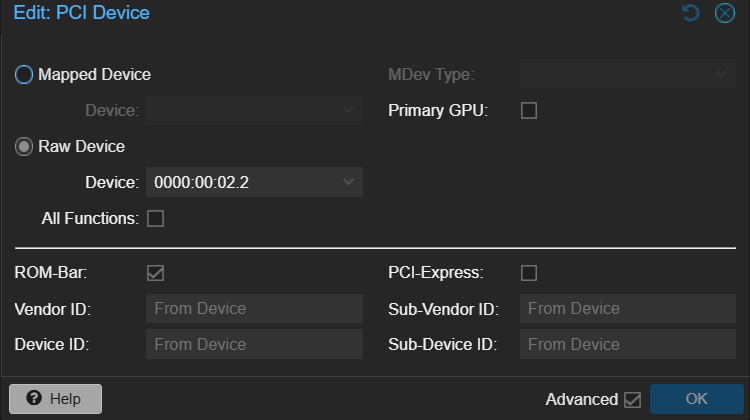
a notable difference in what I previously did vs. the links is above is the configuration of the PCIe device on the VM. The following are the settings I am using for testing.

Testing
I created two VMs for testing. Each connected to a different VF. Each VM is running Docker and has a Jellyfin container. The VMs are using NFS to access my media server(TrueNAS).

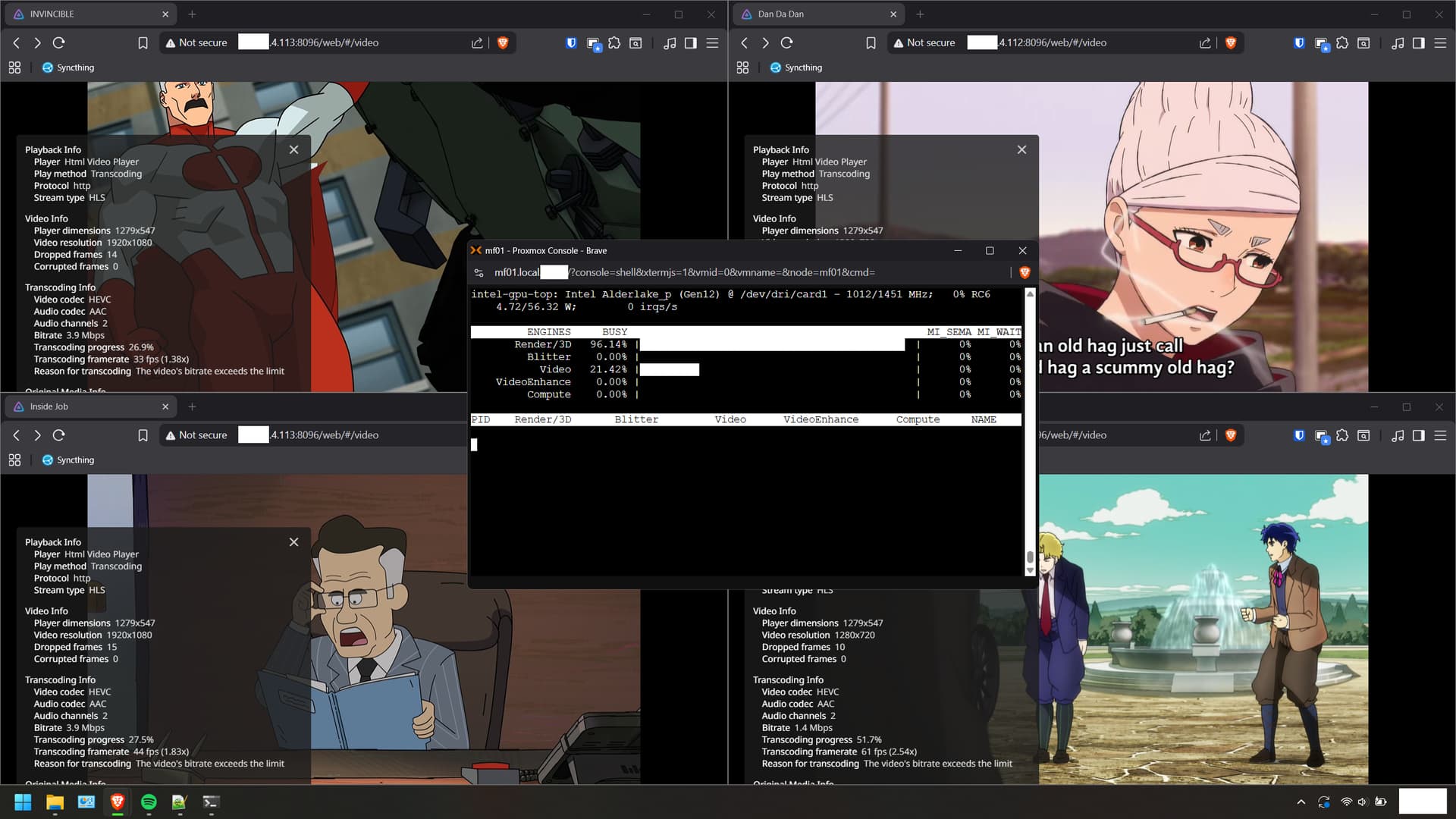
On each Jellyfin instance, I configured transcoding and started two streams per instance. each stream is a different show and at different quality. I wanted to see if it would break. Good news! It doesn’t. All streams work without issue and the proxmox host reports no errors. So in terms of running many jellyfin instances using different VFs, this works.

Here’s some proof.

The next test will be running Frigate on a VF and see if issues occur. I’ll report back when I run those tests.

Hello all,

After my last post I left the VMs running while they indexed the media content for future testing. I returned to the MS-01 being unresponsive and when I checked my KVM I see the following:

Not good. I had to hard shutdown the MS-01. I am unsure how to describe this issue. :expressionless: to start googling.

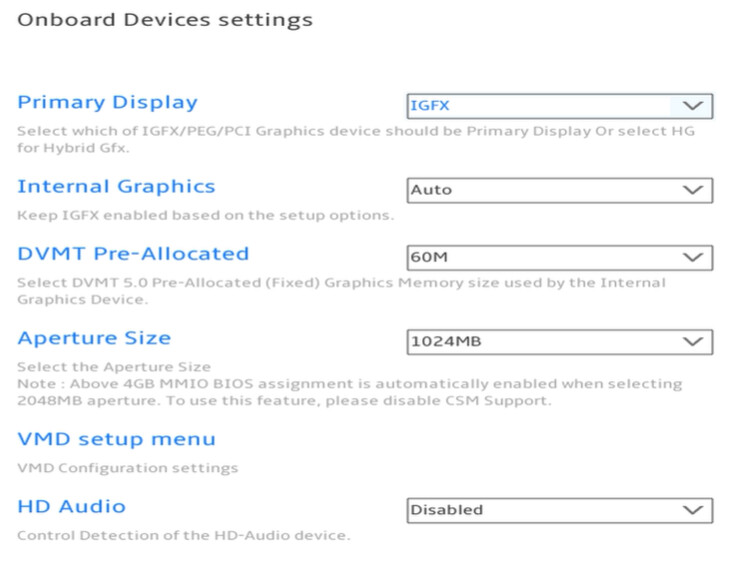
I suspect this might be caused by a BIOS setting I changed in a previous test of VF/i915. Therefore I went back to the BIOS and changed the Primary Display setting back to IGFX

Let’s see if this resolves the issue.

Hey, so here’s my system info:

Proxmox 8.3.3
Kernel 6.8.12-8

Took me a few to figure out what my settings were - so Jellyfin is running in an LXC container, and I have one of the virtual functions passed through to it.

It’s pretty rock solid ---- Uptime: 267 days, 7 hours. :exploding_head:

I can clone the LXC to have a second, third, fourth, etc. Jellyfin instance running *(just did these tests) and the LXCs share the resources. It’s definitely able to transcode a couple 4K HDRs down to standard 1080p or so. **Note: I did go through after cloning and set each LXC to user a separate /dev/dri/renderD1xx device, which map to the virtual functions on the proxmox MS-01 host.

At the host / Proxmox level it’s set up with 7 functions, but I doubt they’d all be able to be used so heavily all at once.
The kernel boot options are as in my other post:
GRUB_CMDLINE_LINUX_DEFAULT="quiet intel_iommu=on iommu=pt i915.enable_guc=3 i915.max_vfs=7"

One thing I noticed is that in your screenshot of intel_gpu_top your VideoEnhance wasn’t showing any activity - not sure what that actually represents, but in my case, when I’m transcoding a 4K HDR video I have

  • 44% render/3D
  • 43% Video
  • 98% VideoEnhance
1 Like

Not sure if this’ll help:
BIOS → Onboard Devices → Video (or maybe primary display?) → Hybrid

But in my case I use the Intel vPro interface (via mesh commander) and the HDMI output of my MS-01 has a cheapo dummy plug.

@shadowimmage

I had the “Primary Display” set to Hybrid. I changed it now to IGFX to see if that helps with the issue I am having. Why does it need to be set to Hybrid?

I have dummy HDMI plugs so I can test removing the KVM. I’ll give it a couple hours and see if it crashes again before making more changes.

Cheers

Heyo,

The crash I showed in the video in a previous post occurred again. After a hard reboot I took a dive into the logs and found that my CoralTPU (or the cable) are causing a flood of errors. This device was connected to a VM I was using to test Frigate on the MS-01. However it was functionally doing nothing as frigate was not configured nor running.This may be unrelated but I disconnected it to clear up these errors on the proxmox host regardless.

Here’s what I saw in the logs

Nov 19 22:21:58 mf01 kernel: usb 4-1: LPM exit latency is zeroed, disabling LPM.
Nov 19 22:28:28 mf01 kernel: usb 4-1: reset SuperSpeed USB device number 3 using xhci_hcd
Nov 19 22:28:28 mf01 kernel: usb 4-1: LPM exit latency is zeroed, disabling LPM.
Nov 19 22:37:29 mf01 kernel: usb 4-1: reset SuperSpeed USB device number 3 using xhci_hcd
Nov 19 22:37:29 mf01 kernel: usb 4-1: LPM exit latency is zeroed, disabling LPM.
Nov 19 22:41:49 mf01 kernel: usb 4-1: reset SuperSpeed USB device number 3 using xhci_hcd
Nov 19 22:41:49 mf01 kernel: usb 4-1: LPM exit latency is zeroed, disabling LPM.

In Wendell’s topic on the MS-01 SRIOV he mentioned that the following was highly recommended for the kernel parameters. Therefore I added i915.modeset=1 to mine. For Reference my kernel parameters up to this point are:
intel_iommu=on iommu=pt i915.enable_guc=3 i915.max_vfs=7 i915.modeset=1

I also disconnected the KVM and I am using a HDMI Dongle as shadowimmage mentioned he was using one in his setup. Who knows! :smiley:

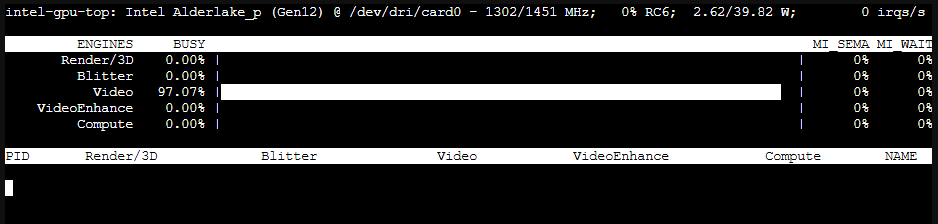
In the following test. I turned on Frigate (3 Camera Streams) and everything works fine. When Jellyfin starts transcoding ontop of this I see the following (using intel_gpu_top -d sriov) on the proxmox host.

Then frigate begins to report errors. Once the transcoding is stopped, Frigate goes back to normal. The logs are below are from Frigate (configured for VAAPI)

frigate  | 2025-11-20 07:11:10.245566654  [2025-11-20 07:11:10] ffmpeg.garden.detect           ERROR   : [AVHWFramesContext @ 0x7f41480bbdc0] Failed to sync surface 0x15: 34 (HW busy now).
frigate  | 2025-11-20 07:11:10.245733985  [2025-11-20 07:11:10] ffmpeg.garden.detect           ERROR   : [h264 @ 0x560806318880] Failed to transfer data to output frame: -5.
frigate  | 2025-11-20 07:11:10.245858510  [2025-11-20 07:11:10] ffmpeg.garden.detect           ERROR   : [vist#0:0/h264 @ 0x56080631a2c0] [dec:h264 @ 0x560806315ac0] Error while processing the decoded data
frigate  | 2025-11-20 07:11:10.245986504  [2025-11-20 07:11:10] ffmpeg.garden.detect           ERROR   : [vist#0:0/h264 @ 0x56080631a2c0] [dec:h264 @ 0x560806315ac0] Error processing packet in decoder: Input/output error
frigate  | 2025-11-20 07:11:10.246105387  [2025-11-20 07:11:10] ffmpeg.garden.detect           ERROR   : [vist#0:0/h264 @ 0x56080631a2c0] [dec:h264 @ 0x560806315ac0] Task finished with error code: -5 (Input/output error)
frigate  | 2025-11-20 07:11:10.246215634  [2025-11-20 07:11:10] ffmpeg.garden.detect           ERROR   : [vist#0:0/h264 @ 0x56080631a2c0] [dec:h264 @ 0x560806315ac0] Terminating thread with return code -5 (Input/output error)
frigate  | 2025-11-20 07:11:10.246339295  [2025-11-20 07:11:10] ffmpeg.garden.detect           ERROR   : [vost#0:0/rawvideo @ 0x560806311700] Could not open encoder before EOF
frigate  | 2025-11-20 07:11:10.246461803  [2025-11-20 07:11:10] ffmpeg.garden.detect           ERROR   : [vost#0:0/rawvideo @ 0x560806311700] Task finished with error code: -22 (Invalid argument)
frigate  | 2025-11-20 07:11:10.246582521  [2025-11-20 07:11:10] ffmpeg.garden.detect           ERROR   : [vost#0:0/rawvideo @ 0x560806311700] Terminating thread with return code -22 (Invalid argument)
frigate  | 2025-11-20 07:11:10.246718281  [2025-11-20 07:11:10] ffmpeg.garden.detect           ERROR   : [out#0/rawvideo @ 0x560806319700] Nothing was written into output file, because at least one of its streams received no packets.
frigate  | 2025-11-20 07:11:10.246824251  [2025-11-20 07:11:10] watchdog.garden                INFO    : Restarting ffmpeg...
frigate  | 2025-11-20 07:11:10.266993164  [2025-11-20 07:11:10] watchdog.front                 ERROR   : Ffmpeg process crashed unexpectedly for front.
frigate  | 2025-11-20 07:11:10.267336889  [2025-11-20 07:11:10] watchdog.front                 ERROR   : The following ffmpeg logs include the last 100 lines prior to exit.
frigate  | 2025-11-20 07:11:10.267453502  [2025-11-20 07:11:10] ffmpeg.front.detect            ERROR   : [AVHWFramesContext @ 0x7f841005f180] Failed to sync surface 0x15: 34 (HW busy now).
frigate  | 2025-11-20 07:11:10.267572064  [2025-11-20 07:11:10] ffmpeg.front.detect            ERROR   : [h264 @ 0x55cf05d90100] Failed to transfer data to output frame: -5.
frigate  | 2025-11-20 07:11:10.267764547  [2025-11-20 07:11:10] ffmpeg.front.detect            ERROR   : [vist#0:0/h264 @ 0x55cf05d7d480] [dec:h264 @ 0x55cf05d8dc40] Error while processing the decoded data
frigate  | 2025-11-20 07:11:10.267955076  [2025-11-20 07:11:10] ffmpeg.front.detect            ERROR   : [vist#0:0/h264 @ 0x55cf05d7d480] [dec:h264 @ 0x55cf05d8dc40] Error processing packet in decoder: Input/output error
frigate  | 2025-11-20 07:11:10.268123245  [2025-11-20 07:11:10] ffmpeg.front.detect            ERROR   : [vist#0:0/h264 @ 0x55cf05d7d480] [dec:h264 @ 0x55cf05d8dc40] Task finished with error code: -5 (Input/output error)
frigate  | 2025-11-20 07:11:10.268257190  [2025-11-20 07:11:10] ffmpeg.front.detect            ERROR   : [vist#0:0/h264 @ 0x55cf05d7d480] [dec:h264 @ 0x55cf05d8dc40] Terminating thread with return code -5 (Input/output error)
frigate  | 2025-11-20 07:11:10.268428536  [2025-11-20 07:11:10] ffmpeg.front.detect            ERROR   : [vost#0:0/rawvideo @ 0x55cf05d89a80] Could not open encoder before EOF
frigate  | 2025-11-20 07:11:10.268574233  [2025-11-20 07:11:10] ffmpeg.front.detect            ERROR   : [vost#0:0/rawvideo @ 0x55cf05d89a80] Task finished with error code: -22 (Invalid argument)
frigate  | 2025-11-20 07:11:10.268756451  [2025-11-20 07:11:10] ffmpeg.front.detect            ERROR   : [vost#0:0/rawvideo @ 0x55cf05d89a80] Terminating thread with return code -22 (Invalid argument)
frigate  | 2025-11-20 07:11:10.268918458  [2025-11-20 07:11:10] ffmpeg.front.detect            ERROR   : [out#0/rawvideo @ 0x55cf05dfd740] Nothing was written into output file, because at least one of its streams received no packets.
frigate  | 2025-11-20 07:11:10.269069193  [2025-11-20 07:11:10] watchdog.front                 INFO    : Restarting ffmpeg...
frigate  | 2025-11-20 07:11:10.274199658  [2025-11-20 07:11:10] watchdog.driveway              ERROR   : Ffmpeg process crashed unexpectedly for driveway.
frigate  | 2025-11-20 07:11:10.274366902  [2025-11-20 07:11:10] watchdog.driveway              ERROR   : The following ffmpeg logs include the last 100 lines prior to exit.
frigate  | 2025-11-20 07:11:10.274559397  [2025-11-20 07:11:10] ffmpeg.driveway.detect         ERROR   : [AVHWFramesContext @ 0x7f587c0b6980] Failed to sync surface 0x15: 34 (HW busy now).
frigate  | 2025-11-20 07:11:10.274667439  [2025-11-20 07:11:10] ffmpeg.driveway.detect         ERROR   : [h264 @ 0x55ed281d4800] Failed to transfer data to output frame: -5.
frigate  | 2025-11-20 07:11:10.274777181  [2025-11-20 07:11:10] ffmpeg.driveway.detect         ERROR   : [vist#0:0/h264 @ 0x55ed281c8480] [dec:h264 @ 0x55ed281d89c0] Error while processing the decoded data
frigate  | 2025-11-20 07:11:10.274872442  [2025-11-20 07:11:10] ffmpeg.driveway.detect         ERROR   : [vist#0:0/h264 @ 0x55ed281c8480] [dec:h264 @ 0x55ed281d89c0] Error processing packet in decoder: Input/output error
frigate  | 2025-11-20 07:11:10.274985678  [2025-11-20 07:11:10] ffmpeg.driveway.detect         ERROR   : [vist#0:0/h264 @ 0x55ed281c8480] [dec:h264 @ 0x55ed281d89c0] Task finished with error code: -5 (Input/output error)
frigate  | 2025-11-20 07:11:10.275118637  [2025-11-20 07:11:10] ffmpeg.driveway.detect         ERROR   : [vist#0:0/h264 @ 0x55ed281c8480] [dec:h264 @ 0x55ed281d89c0] Terminating thread with return code -5 (Input/output error)
frigate  | 2025-11-20 07:11:10.275254414  [2025-11-20 07:11:10] ffmpeg.driveway.detect         ERROR   : [vost#0:0/rawvideo @ 0x55ed281d5a00] Could not open encoder before EOF
frigate  | 2025-11-20 07:11:10.275359062  [2025-11-20 07:11:10] ffmpeg.driveway.detect         ERROR   : [vost#0:0/rawvideo @ 0x55ed281d5a00] Task finished with error code: -22 (Invalid argument)
frigate  | 2025-11-20 07:11:10.275486437  [2025-11-20 07:11:10] ffmpeg.driveway.detect         ERROR   : [vost#0:0/rawvideo @ 0x55ed281d5a00] Terminating thread with return code -22 (Invalid argument)
frigate  | 2025-11-20 07:11:10.275630134  [2025-11-20 07:11:10] ffmpeg.driveway.detect         ERROR   : [out#0/rawvideo @ 0x55ed28245b80] Nothing was written into output file, because at least one of its streams received no packets.
frigate  | 2025-11-20 07:11:10.275760309  [2025-11-20 07:11:10] watchdog.driveway              INFO    : Restarting ffmpeg...
frigate  | 2025-11-20 07:11:10.719827992  127.0.0.1 - - [20/Nov/2025:07:11:10 +0100] "" 400 0 "-" "-" "-"

I also reran the test but with frigate configured for Quicksync instead. The issue occurs but the errors are slightly different. Therefore I believe this issue is definitely outside of the frigate container.

frigate  | 2025-11-20 07:19:56.154126373  [2025-11-20 07:19:56] ffmpeg.front.detect            ERROR   : [h264_qsv @ 0x5649fe5d1300] Error during QSV decoding.: GPU Hang (-21)
frigate  | 2025-11-20 07:19:56.154234484  [2025-11-20 07:19:56] ffmpeg.front.detect            ERROR   : [vist#0:0/h264 @ 0x5649fe572f00] [dec:h264_qsv @ 0x5649fe5d7dc0] Decoding error: Input/output error
frigate  | 2025-11-20 07:19:56.154334640  [2025-11-20 07:19:56] ffmpeg.front.detect            ERROR   : [h264_qsv @ 0x5649fe5d1300] Error during QSV decoding.: GPU Hang (-21)
frigate  | 2025-11-20 07:19:56.154435493  [2025-11-20 07:19:56] ffmpeg.front.detect            ERROR   : [vist#0:0/h264 @ 0x5649fe572f00] [dec:h264_qsv @ 0x5649fe5d7dc0] Decoding error: Input/output error

It appears to me that the iGPU is at its limit but I need to investigate more to be sure.

P.S.

I believe you see more as your using LXC containers and I am trying to get VMs working instead. I prefer a VM becuase isolation from host-wide crashes. :slight_smile:

To be continued!

Thanks for the update! Sorry to hear you’re still getting some crashes. But I applaud your diligence in debugging. One thought that kind of comes to me is that I wonder if the Frigate configuration is expecting more real-time processing and isn’t tolerant of the iGPU scheduling / sharing processes across the different VMs? I’m wondering if there’s some aspect to how the whole architecture works that means that each thing using the iGPU needs to sometimes wait for other processes / VMs using the GPU, but that ends up appearing as a GPU hang at the VM level. Perhaps there’s some configuration to the ffmpeg runtime options in frigate that would give it some more tolerance of latency?

Heyo,

Looks like the MS01 locked up again. The KVM was not connected but I assume its the same output as before. Checked the logs (journalctl -b -1) and found no errors. Shame. I got no hints whats going on.

Frigate was not running at the time. Only Jellyfin was running. Its possible Jellyfin was going a scheduled task at the time. :confused:

I opened a issue on the github of i915-sriov-dkms and got a hint from a user.

The current version of the driver scheduler is not very intelligent.
Jellyfin tends to use the entire GPU

I’ll implement this change and let the system sit doing nothing. See if the crashes occur again.

Stay Tuned!

Heyo,

I’ve been looking into this further and have reached some conclusions. I initially blamed Jellyfin for the issue, but after discussing it with a developer on a GitHub issue, I’ve learned that the problem is actually driver-related.

A temporary workaround can be applied—such as using a wrapper to limit FFmpeg’s read rate—but this isn’t a permanent solution. So the high resource usage in Jellyfin appears to stem from the driver not handling this properly.

I hope the developer of the i915-sriov-dkms project sees my issue and can provide some insight.

Stay tuned!

Heyo Reader,

The issue I mentioned earlier has been resolved! With the help of the creator of i915-sriov-dkms, we were able to track down the cause and create a fix.

Recap:
Whenever Jellyfin started a transcoding job, it would greedily consume the entire GPU, which interrupted other GPU-dependent services — in my case, Frigate.

Solution:
We used a wrapper script to apply a readrate limit to the ffmpeg process launched by Jellyfin. This prevents Jellyfin from monopolizing the GPU and keeps everything running smoothly.
You can find both the wrapper scripts and the docker-compose file I used in this thread.

A note from the creator. This issue will never be permanently solved as support for i915 has ended. We need to wait for kernel 6.18 and proper Xe support.

Validation:
I confirmed these settings work and are stable by running multiple video streams from Jellyfin, Frigate, and Windows (RDP). The system has been up and stable.

And with that, the problem is solved! I hope this helps someone else down the line.

Another happy ending! :smiley:

1 Like

\o/
Glad to hear you got it worked out!

I’m glad you came back and put your findings and details on how you solved the issue. I’ll probably refer back to this and other threads next time I rebuild my MS-01 setup.

I hope this also helps other folks do off-the book things with iGPUs in these kinds of systems.