Hey Guys,
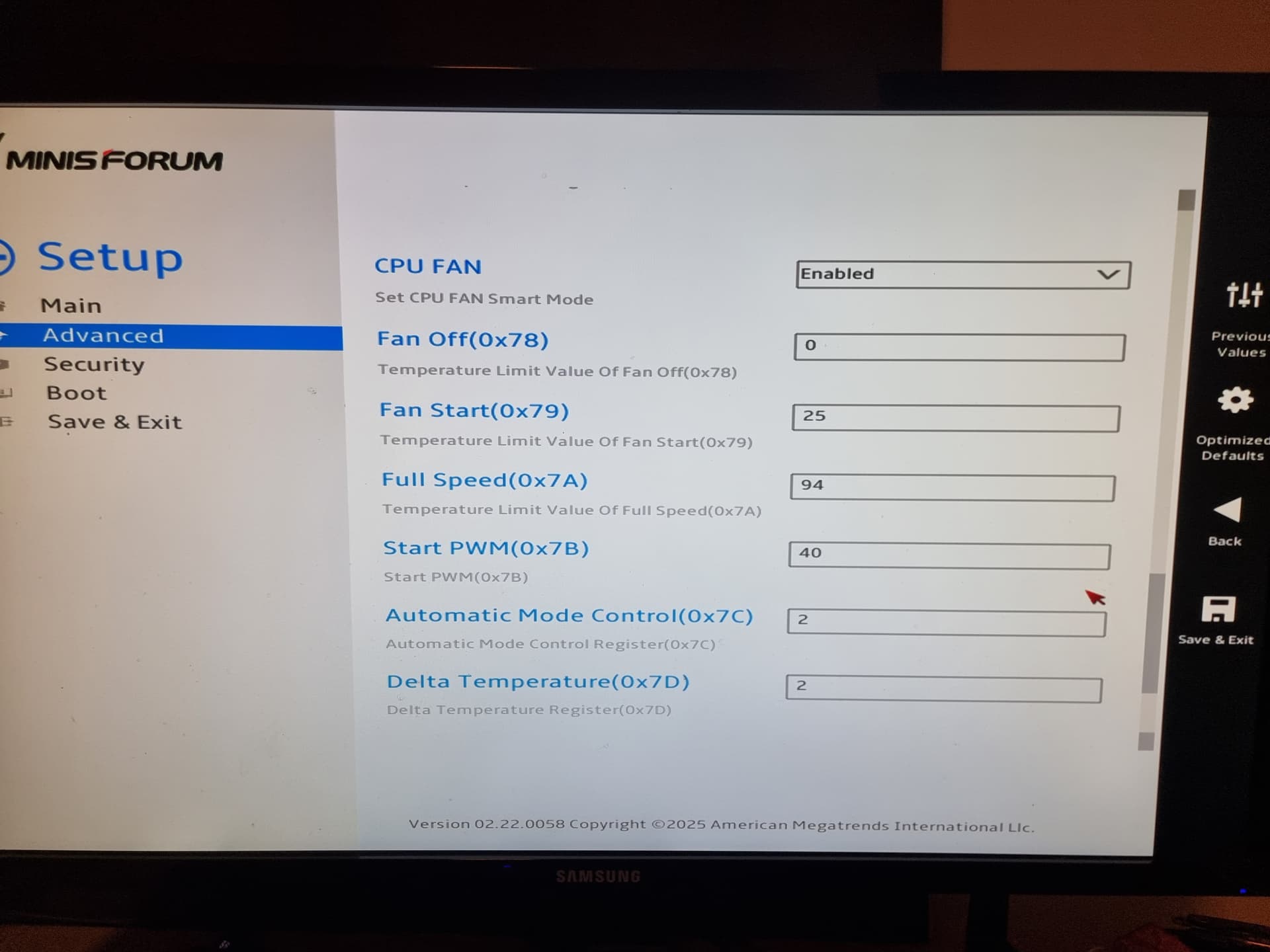
i bought the Minisforum BD795i SE. I want to control the fans a bit to reduce the idle noise under load i dont care anyway. But now the Bios hits me with this?
Thanks in advance i am sure here are people that are smarter than me.
Hi,
i have the same question!
I have tried to use lmsensors, sensor-detect, fancontrol & pwmconfig in Linux but they don’t appear to recognise anything that gives me control via the OS.
Has anybody had more success?
I’ll have to give the BIOS options a try now.
@Heinz_Bongwasser1 if you are using Wndows then you should try the excellent “fancontrol” utility.
I purchased a Noctua PWM fan for my motherboard and set it as below.
This worked very nicely to give me a very quiet CPU fan curve.
Note that setting Full speed above 127 seems to cause issues.
(I chose this setting to get the angle of the curve as I wanted it. I am happy with the resulting CPU temps which don’t go above 89)
Fan Off (C) = 10
Fan Start (C) = 40
Full Speed (C) = 127
Start PWM (%) = 15
I did not change the other two settings.
I’m struggling with fan control as well. My CPU fan runs at idle or “full speed” with no in between.
I think start pwm is meant to be a pwm value rather than percentage. PWM value is usually out of 256 values starting at 0, ending with 255.
Automatic fan control and delta temperature I don’t understand.
I have the BD790i, and from what I can tell from running some sensors-detect commands from within the Unraid terminal the fan controller is detected, but drivers for it are still “to be written”
I have the MINIS FORUM BD795i SE and spent some time tinkering with BIOS settings for fan control. HWiNFO reports that the board uses an ITE IT8613E internal fan controller. This chip supports 3 temperatur sensor sources including one internal sensor. HWiNFO reports these as follows:
“Temperature 1” - this appears to be the internal sensor
“Temperature 2” - this sensor roughly seems to track SOC VRM temp
“Temperature 3” - CPU die temperature (Tctl/Tdie)
HWiNFO recognises 3 fans controlled by the IT86xx:
“CPU” - this actually corresponds to the MinisForums “SYSFAN2”
“Power” - this shows “SYSFAN”
“Fan4” - this is the actual CPU-Fan.
So far so confusing. Frustratingly, sensors mapping to fans is fixed:
“Temperature 1” controls SYSFAN2
“Temperature 2” controls SYSFAN
“Temperature 3” controls CPU FAN
While mapping “Temperature 3” = Tdie to the CPU-fan makes sense, the other sensors need a little more analysis:
Now let’s take a look the the BIOS parameters for fan control:
“Fan off”: if the temperature falls below this value at which the fan switches off.
" Fan start": if the temp exceeds this limit, the fan switches on.
“TFull Speed”: if this temp is exceeded the fan goes to max RPM
“Start PWM”: this defines the RPM at which the fan start when reaching “Fan start” temp
(range: 0 - 255 which 0 = off and 255=max RPM)
“Automatic Mode Control”: this parameter appears to define the RPM slope between Start RPM and max RPM. I seems to accept values from 0 to 63 with 0 defining no slope and 63 defining a more smooth increase of RPMs between Start and Max temps.
“Delta Temperature” defines the number of degrees delta for a change to happen.
As a starting point for experimentation you could use the following values:
“SYS FAN2”
SYS FAN:
For some reason the “Automatic Mode Control” for the “CPU FAN” seems to require much lower values for a smooth slope than SYS FAN2 and SYS FAN. Values higher than 3 of 4 lead to excessive RPMs even at lower temps.
I hope this helps
Thank you for this. I have the 795m variant with an AIO cooler and the auto ramp-up is driving me nuts when there’s an immediate spike to 70c. I was hoping one of the settings pertained to delay before the fan begins compensating for the rise in temperature, since most of the spikes are transient
Here yoou Goo!!!
Sys Fan 1&2
Tfull-72
Start PWM-45
PWM Slop is the fans amps on the back; -1 on amps as shown for bored power.
CPU
Fullspeed-88
Start PWM Slop-24
Delta-3 for this means zone one two or three-temperature 1-2 and cpu!
SSD
Fullspeed-65
Start PWM-35
PWM Slop-11
Delta-1…
I have learned that nothing else will replace the heat sink for the CPU best thing you can do is turn the fan around so it faces the opposite direction and pulls heat away from the motherboard. The capacitors are overheating from the excess heat being blown towards the motherboard…also replace your thermoPace with a thermopad the lowest wattage I found was “eight” good luck and happy building.
Also make sure you have a CPU case that has a lot of ventilation