UPDATE: This is the really impoortant update. I haven’t fixed it or figured it out directly, but I have Just now got a brand new 1TB NVME SSD to try. I passed it through directly to the VM and installed yet another fresh install of Arch, Nothing changed at all, stutter city. However, now that I have a seperate drive with Arch installed on it, I rebooted the whole server and ran that exact installation on bare metal and to my pure joy. 100% stutter free. Well, other than the basic one or two frame hiccups here and there. otherwise it was running perfectly. So this absolutely rules out storage speed/iOPs, it rules out IO entirely really. I am writing this right now on my server in the Arch install bare metal and I will be doing some testing on several more games to see if my general performance issues were actually the same stuttering problem. i would be willing to bet they are. Now I need to decide if I am going to be running unraid as a VM itself and passthrough the SAS controller or if I am going to try out proxmox and see if it is an unraid exclusive issue.
So, Long story short, as the title suggests, I am getting INSANELY bad performance on my system. For context, I am actually running an Arch Gaming VM on an Unraid host. Not to get into too much detail here but this was necessary due to a hardware failure about 2 years ago and it has been a reasonably good experience untyil recently. I havent played a huge amount of games recently so I guess I didn’t notice but I have started a few recently that seem to have WAY worse performance then I expect.
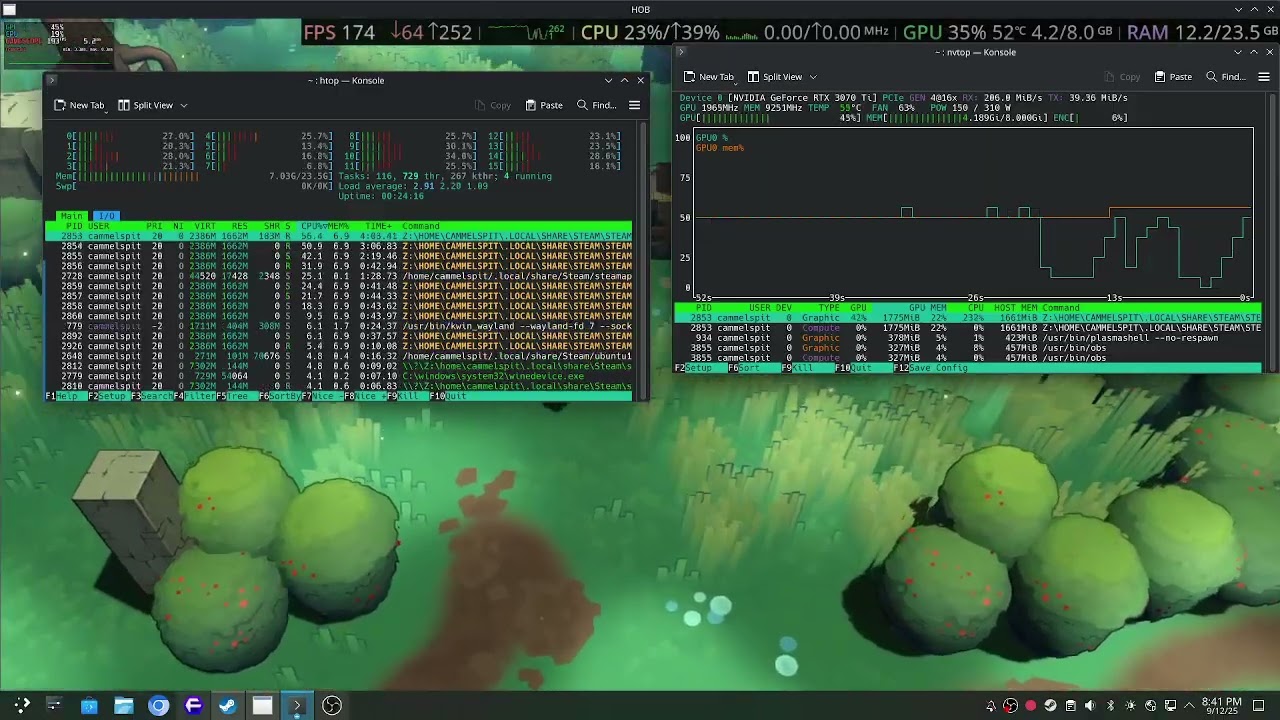
this is a video showcasing the issues. Some games don’t seem bothered but this one is the easiest to reliably reproduce the issues repeatedly for testing. On my Steam Deck, which is orders of magnitude less powerful, does not have ANY of this stuttering. As you can probably see here, the CPU and GPU utilization as well as the ram and VRAM usage are way below a level where I would expect this kind of thing.
For context, this is a brand new mainline Arch install in the video, I have also tried a brand new and updated Fedora 42, Debian 13, and OpenSUSE and they all behive in exactly the same way. This was to rule out some weird Arch config issue because lord knows I have done that before. Specs below.
CPU Vendor: AuthenticAMD
CPU Brand: AMD Ryzen 9 7950X 16-Core Processor
“Arch Linux” (64 bit)
Kernel Name: Linux
Kernel Version: 6.16.7-arch1-1
Driver: NVIDIA Corporation NVIDIA GeForce RTX 3070 Ti/PCIe/SSE2
Driver Version: 4.6.0 NVIDIA 580.82.09
X670E Steel Legend
I have 64GB of ram, half of it is dedicated to the VM, I have 8 CPU cores isolated from unraid and used exclusively for the VM.
I have been through my UEFI settings with a fine toothed comb with google so I ‘THINK’ they are all good. Since the OS itself isnt the issue I can only assume it has to be something with the KVM/QEMU configuration. For those of you who are familiar, I will drop in the XML for the VM.
<?xml version='1.0' encoding='UTF-8'?>
<domain type='kvm' id='1'>
  <name>Arch</name>
  <uuid>ebd9719c-52c7-3c86-cde5-9e4aa2667c23</uuid>
  <metadata>
    <vmtemplate xmlns="http://unraid" name="Arch" iconold="arch.png" icon="arch.png" os="arch" webui="" storage="default"/>
  </metadata>
  <memory unit='KiB'>25165824</memory>
  <currentMemory unit='KiB'>25165824</currentMemory>
  <memoryBacking>
    <nosharepages/>
  </memoryBacking>
  <vcpu placement='static'>16</vcpu>
  <cputune>
    <vcpupin vcpu='0' cpuset='8'/>
    <vcpupin vcpu='1' cpuset='24'/>
    <vcpupin vcpu='2' cpuset='9'/>
    <vcpupin vcpu='3' cpuset='25'/>
    <vcpupin vcpu='4' cpuset='10'/>
    <vcpupin vcpu='5' cpuset='26'/>
    <vcpupin vcpu='6' cpuset='11'/>
    <vcpupin vcpu='7' cpuset='27'/>
    <vcpupin vcpu='8' cpuset='12'/>
    <vcpupin vcpu='9' cpuset='28'/>
    <vcpupin vcpu='10' cpuset='13'/>
    <vcpupin vcpu='11' cpuset='29'/>
    <vcpupin vcpu='12' cpuset='14'/>
    <vcpupin vcpu='13' cpuset='30'/>
    <vcpupin vcpu='14' cpuset='15'/>
    <vcpupin vcpu='15' cpuset='31'/>
  </cputune>
  <resource>
    <partition>/machine</partition>
  </resource>
  <os>
    <type arch='x86_64' machine='pc-q35-9.2'>hvm</type>
    <loader readonly='yes' type='pflash' format='raw'>/usr/share/qemu/ovmf-x64/OVMF_CODE-pure-efi.fd</loader>
    <nvram format='raw'>/etc/libvirt/qemu/nvram/ebd9719c-52c7-3c86-cde5-9e4aa2667c23_VARS-pure-efi.fd</nvram>
  </os>
  <features>
    <acpi/>
    <apic/>
  </features>
  <cpu mode='host-passthrough' check='none' migratable='on'>
    <topology sockets='1' dies='1' clusters='1' cores='8' threads='2'/>
    <cache mode='passthrough'/>
    <feature policy='require' name='topoext'/>
  </cpu>
  <clock offset='localtime'>
    <timer name='hpet' present='yes'/>
    <timer name='hypervclock' present='no'/>
    <timer name='pit' tickpolicy='catchup'/>
    <timer name='rtc' tickpolicy='catchup'/>
  </clock>
  <on_poweroff>destroy</on_poweroff>
  <on_reboot>restart</on_reboot>
  <on_crash>restart</on_crash>
  <devices>
    <emulator>/usr/local/sbin/qemu</emulator>
    <disk type='file' device='disk'>
      <driver name='qemu' type='raw' cache='writeback' discard='unmap'/>
      <source file='/mnt/user/domains/Arch/vdisk1.img' index='2'/>
      <backingStore/>
      <target dev='hdc' bus='virtio'/>
      <serial>vdisk1</serial>
      <boot order='1'/>
      <alias name='virtio-disk2'/>
      <address type='pci' domain='0x0000' bus='0x04' slot='0x00' function='0x0'/>
    </disk>
    <disk type='file' device='cdrom'>
      <driver name='qemu' type='raw'/>
      <source file='/mnt/user/isos/archlinux-2025.09.01-x86_64.iso' index='1'/>
      <backingStore/>
      <target dev='hda' bus='sata'/>
      <readonly/>
      <boot order='2'/>
      <alias name='sata0-0-0'/>
      <address type='drive' controller='0' bus='0' target='0' unit='0'/>
    </disk>
    <controller type='sata' index='0'>
      <alias name='ide'/>
      <address type='pci' domain='0x0000' bus='0x00' slot='0x1f' function='0x2'/>
    </controller>
    <controller type='pci' index='0' model='pcie-root'>
      <alias name='pcie.0'/>
    </controller>
    <controller type='pci' index='1' model='pcie-root-port'>
      <model name='pcie-root-port'/>
      <target chassis='1' port='0x8'/>
      <alias name='pci.1'/>
      <address type='pci' domain='0x0000' bus='0x00' slot='0x01' function='0x0' multifunction='on'/>
    </controller>
    <controller type='pci' index='2' model='pcie-root-port'>
      <model name='pcie-root-port'/>
      <target chassis='2' port='0x9'/>
      <alias name='pci.2'/>
      <address type='pci' domain='0x0000' bus='0x00' slot='0x01' function='0x1'/>
    </controller>
    <controller type='pci' index='3' model='pcie-root-port'>
      <model name='pcie-root-port'/>
      <target chassis='3' port='0xa'/>
      <alias name='pci.3'/>
      <address type='pci' domain='0x0000' bus='0x00' slot='0x01' function='0x2'/>
    </controller>
    <controller type='pci' index='4' model='pcie-root-port'>
      <model name='pcie-root-port'/>
      <target chassis='4' port='0xb'/>
      <alias name='pci.4'/>
      <address type='pci' domain='0x0000' bus='0x00' slot='0x01' function='0x3'/>
    </controller>
    <controller type='pci' index='5' model='pcie-root-port'>
      <model name='pcie-root-port'/>
      <target chassis='5' port='0xc'/>
      <alias name='pci.5'/>
      <address type='pci' domain='0x0000' bus='0x00' slot='0x01' function='0x4'/>
    </controller>
    <controller type='pci' index='6' model='pcie-root-port'>
      <model name='pcie-root-port'/>
      <target chassis='6' port='0xd'/>
      <alias name='pci.6'/>
      <address type='pci' domain='0x0000' bus='0x00' slot='0x01' function='0x5'/>
    </controller>
    <controller type='pci' index='7' model='pcie-root-port'>
      <model name='pcie-root-port'/>
      <target chassis='7' port='0xe'/>
      <alias name='pci.7'/>
      <address type='pci' domain='0x0000' bus='0x00' slot='0x01' function='0x6'/>
    </controller>
    <controller type='pci' index='8' model='pcie-root-port'>
      <model name='pcie-root-port'/>
      <target chassis='8' port='0xf'/>
      <alias name='pci.8'/>
      <address type='pci' domain='0x0000' bus='0x00' slot='0x01' function='0x7'/>
    </controller>
    <controller type='pci' index='9' model='pcie-root-port'>
      <model name='pcie-root-port'/>
      <target chassis='9' port='0x10'/>
      <alias name='pci.9'/>
      <address type='pci' domain='0x0000' bus='0x00' slot='0x02' function='0x0'/>
    </controller>
    <controller type='virtio-serial' index='0'>
      <alias name='virtio-serial0'/>
      <address type='pci' domain='0x0000' bus='0x03' slot='0x00' function='0x0'/>
    </controller>
    <controller type='usb' index='0' model='qemu-xhci' ports='15'>
      <alias name='usb'/>
      <address type='pci' domain='0x0000' bus='0x00' slot='0x07' function='0x0'/>
    </controller>
    <filesystem type='mount' accessmode='passthrough'>
      <source dir='/mnt/user/'/>
      <target dir='unraid'/>
      <alias name='fs0'/>
      <address type='pci' domain='0x0000' bus='0x01' slot='0x00' function='0x0'/>
    </filesystem>
    <interface type='bridge'>
      <mac address='52:54:00:b6:80:89'/>
      <source bridge='br0'/>
      <target dev='vnet0'/>
      <model type='virtio-net'/>
      <alias name='net0'/>
      <address type='pci' domain='0x0000' bus='0x02' slot='0x00' function='0x0'/>
    </interface>
    <serial type='pty'>
      <source path='/dev/pts/0'/>
      <target type='isa-serial' port='0'>
        <model name='isa-serial'/>
      </target>
      <alias name='serial0'/>
    </serial>
    <console type='pty' tty='/dev/pts/0'>
      <source path='/dev/pts/0'/>
      <target type='serial' port='0'/>
      <alias name='serial0'/>
    </console>
    <channel type='unix'>
      <source mode='bind' path='/run/libvirt/qemu/channel/1-Arch/org.qemu.guest_agent.0'/>
      <target type='virtio' name='org.qemu.guest_agent.0' state='disconnected'/>
      <alias name='channel0'/>
      <address type='virtio-serial' controller='0' bus='0' port='1'/>
    </channel>
    <input type='mouse' bus='ps2'>
      <alias name='input0'/>
    </input>
    <input type='keyboard' bus='ps2'>
      <alias name='input1'/>
    </input>
    <audio id='1' type='none'/>
    <hostdev mode='subsystem' type='pci' managed='yes'>
      <driver name='vfio'/>
      <source>
        <address domain='0x0000' bus='0x01' slot='0x00' function='0x0'/>
      </source>
      <alias name='hostdev0'/>
      <address type='pci' domain='0x0000' bus='0x07' slot='0x00' function='0x0' multifunction='on'/>
    </hostdev>
    <hostdev mode='subsystem' type='pci' managed='yes'>
      <driver name='vfio'/>
      <source>
        <address domain='0x0000' bus='0x01' slot='0x00' function='0x1'/>
      </source>
      <alias name='hostdev1'/>
      <address type='pci' domain='0x0000' bus='0x07' slot='0x00' function='0x1'/>
    </hostdev>
    <hostdev mode='subsystem' type='pci' managed='yes'>
      <driver name='vfio'/>
      <source>
        <address domain='0x0000' bus='0x07' slot='0x00' function='0x0'/>
      </source>
      <alias name='hostdev2'/>
      <address type='pci' domain='0x0000' bus='0x05' slot='0x00' function='0x0'/>
    </hostdev>
    <hostdev mode='subsystem' type='pci' managed='yes'>
      <driver name='vfio'/>
      <source>
        <address domain='0x0000' bus='0x08' slot='0x00' function='0x0'/>
      </source>
      <alias name='hostdev3'/>
      <address type='pci' domain='0x0000' bus='0x06' slot='0x00' function='0x0'/>
    </hostdev>
    <hostdev mode='subsystem' type='pci' managed='yes'>
      <driver name='vfio'/>
      <source>
        <address domain='0x0000' bus='0x14' slot='0x00' function='0x0'/>
      </source>
      <alias name='hostdev4'/>
      <address type='pci' domain='0x0000' bus='0x08' slot='0x00' function='0x0'/>
    </hostdev>
    <watchdog model='itco' action='reset'>
      <alias name='watchdog0'/>
    </watchdog>
    <memballoon model='none'/>
  </devices>
  <seclabel type='dynamic' model='dac' relabel='yes'>
    <label>+0:+100</label>
    <imagelabel>+0:+100</imagelabel>
  </seclabel>
</domain>
Thanks in advance, I am really hoping I can get one of you folks way smarter than i am to help me figure this out.
