KVM Model:
Dual monitor four computer
USB Interface (5-gigabit or 10-gigbit):
10-gigabit
Layout:
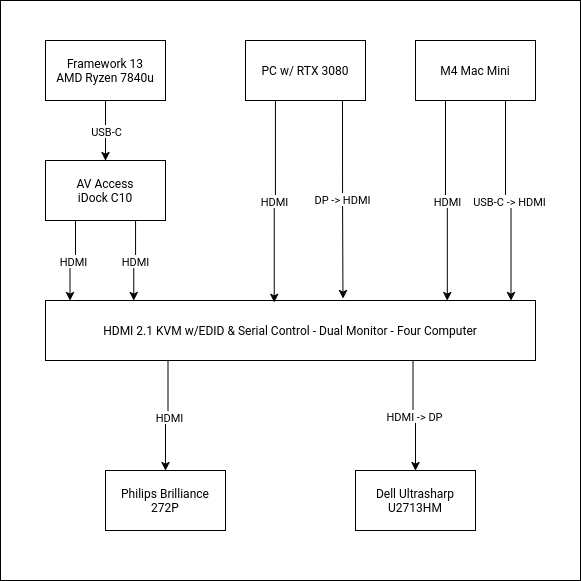
Problem:
I have 3 computers:
- Framework 13
- PC with AMD Ryzen and RTX 3080
- M4 Mac Mini
I have two monitors:
- Philips Brilliance 272P (4k)
- Dell Ultrasharp U2713HM (2560x1440)
The Framework 13 and the PC have no problems recognising the Philips monitor and work perfectly.
The M4 Mac Mini refuses to recognise the Philips monitor when connected through the KVM.
If I plug the Philips monitor into the Mac directly it works correctly.
When plugged into the KVM:
- With the Dell monitor attached, the Mac will not detect the Philips monitor or present it as an option.
- If I remove the Dell monitor, then the Mac will present a 1280x720 image on the Philips monitor but won’t enable any other options and doesn’t show the monitor name.
Other Notes:
- The Mac only has one HDMI port, hence the USB-C->HDMI adaptor
- When connecting the Philips to the Mac, I get the same results if I use the HDMI port or the USB-C->HDMI adaptor
- The Dell monitor only supports 1080p through HDMI, hence the HDMI->DP adaptor.