Might not be the right place for this but looking for helped as I am stumped.
Had a perfectly great and powerful Zephyrus G15 laptop die on me for the keyboard. Tried a replacement keyboard, didn’t work. Machine is perfect otherwise.
Decided to repurpose it as a server. Have done all of the hard work to put it in a 2U 12 HDD bay chasis for the rack. Custom mounting plate machined. DC to DC converter from the ATX PSU to power the laptop. Custom IO with keystone jacks to route the IO out the chassis. NVME Oculink to PCIE for a 9400-16i. Now the hardest part is I’m stuck on the power management. And it’s driving me crazy because everything tests out perfect and it’s ready to go in the rack except this.
I bought a DC converter that powers the laptop by wiring the CPU EPS into it supplying 12V and it outputs 20V to the original DC barrel jack. The other normal PSU outputs power fans, backplanes, etc. This works great in bench tests but I’m powering by shorting the 14-15 pin on the 24 pin cable to start it, then shorting pins on the laptops ribbon cable to boot it once the PSU is up.
I’m trying to find a way to make this ridiculous system act like a normal PC/server with the front chasis power button and reset. Seeing how a laptop motherboard doesn’t have front panel J headers this is feeling impossible and I can’t be sliding this out of the rack to jump pins each time to start it.
Does anyone have an idea of what might be able to handle this? Not sure if there’s a breakout board or something that I can wire the PSU and the laptop power button ribbon cable into that could control these laptop and PSU together in tandem like a normal PC would. Here I thought the DC converter and custome mounting plate was going to kill me on this project but it’s literally the damn power button at the very last 1% of the project. Any ideas? Or direction I could start looking?
I assume you can’t just solder stuff because just soldering a couple wires on the power button contacts would give you something to extend it to whatever panel.
is the laptop ribbon cable just dangling on one side or does it have to be connected to both ends?
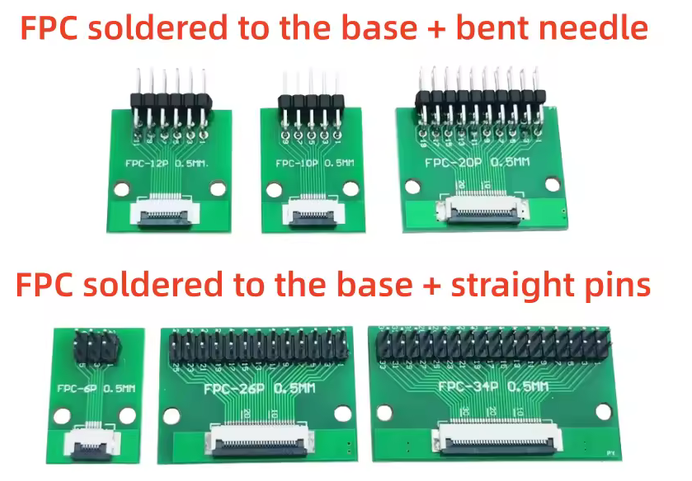
If it’s dangling on one side you can figure out the name of the connector and get a header board like this, then you can attach a normal atx power button. https://it.aliexpress.com/item/1005012532914679.html
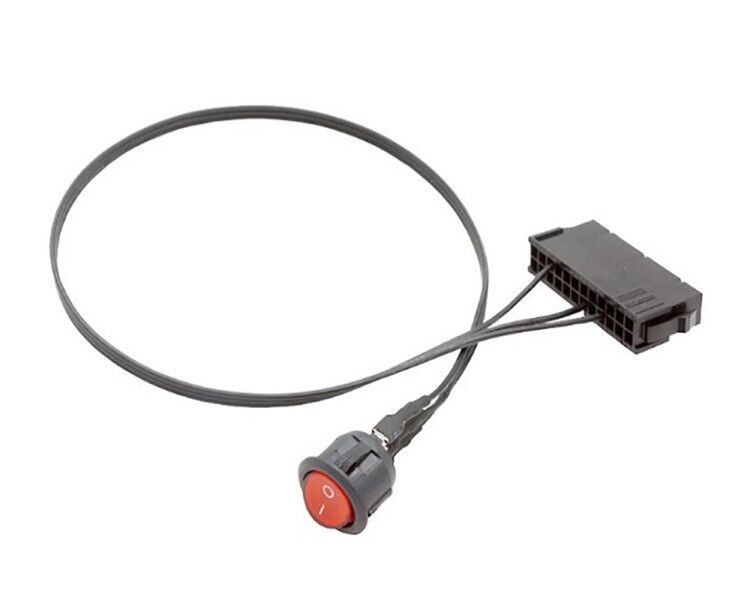
For the PSU there are very simple 24pin atx connectors already wired with a power button like this you can find searching with “atx 24pin power button” on the usual sites.
This kind of setup makes it a bit annoying to set up a pikvm or similar but since you didn’t ask that I’m not looking into that.
You can probably get away with a custom config that wires a couple GPIO pins to a raspberry/arduino relay board (that has the pins expecting GPIO signal and operates the relay on its own power)
bruh. Don’t get me wrong but if he wanted to get an AI answer he could have asked an AI himself
Oh interesting. This doesn’t fully solve the problem but certainly makes it much easier by adapting the ribbon cable. It is just dangling on one end so this would at least help with not having to solder the ribbon cable (was the best I can think of).
How about a ESP relay board with a few relays and an input? You can use ESPHome to write some yaml logic to turn the PSU on, wait 10 seconds, then power on the laptop, with a button press. You can also wire an input to an power LED so on startup from a power loss, it checks to see if everything is not already on, and if not, run the powercycle process. So it recovers from a power loss.
This has been a thought but have been trying to be a bit lazy and try to find something off the shelfish. If u do end up using some sort of MCU I’d definitely need it to be passive to get it working as close to a normal atx machine as possible
This stuff will also be able to use networking (wired or wifi) so you can also make it serve a webpage with a couple buttons and indicators (or a simple web api) so you can power on or off the thing remotely. Claude or similar coding AI assistents can easily write you the firmware for an esp32 micro nowadays.