Logitech G Software - Writing Code to Update Mouse Settings

One of the small issues I have been having so far in my gaming adventure on Linux has been my mouse DPI settings. In Windows, I used the Logitech Gaming Software to update the settings on my G502 Proteus Core. Knowing that Logitech gives no love to Linux I am seriously considering writing some software to adjust the profile settings on my mouse. Fortunately I have an old G500 with a bad switch to experiment with!

I have torn down my G500 (mostly for SCIENCE, and so maybe in the future I will replace the switch) and ready to poke around. I tried searching around to see if anyone had already tried this before but didn't come up with much. Even if there was, I still think I would try writing either a shell script or something for fun even if it was just for myself.

First thing, I need to figure out how to work with the firmware/bios. The only way I have found that may allow me to interface with it might be by using libusb. Although, I'm still not quite sure how to use it or what type of calls the mouse is looking for.

If anyone has any experience with this and could help point me in the right direction, it would be greatly appreciated!

Edit: Moved to proper category :D

I was hoping for more info on the internet, perhaps someone else had attempted but alas there isn't much out there. One of the things I need to resolve is the protocol which the Logitech software uses to communicate with the chip on the mouse. I am considering running a usb sniffer while running LGS in Windows to see what's going on.

Spring break is coming up, hoping to take a crack at this then.

You wouldn't believe how easy it is lolz, because it's dealt with at a kernel/hardware level. You really don't need bloatware to deal with mouse settings in linux.

I posted the modus operandi for mouse settings some time ago in the linux gaming tips and tricks thread, check it out. That was mostly directed towards setting the polling rate, but it's the same thing basically for setting the base dpi.

The G502 has hardware buttons that are normally bound to dpi up and downscaling, but you can reassign all buttons easily, so you might want to preset dpi's for different applications directly in the configuration files. I usually don't bother with that, just use the buttons on the mouse to switch dpi because it works great, that is, if I even switch dpi, because normally I just leave the dpi setting as it is, and set and forget the sensitivity in the game or application that needs mouse input of a certain sensitivity.

So I'm not sure you understand what I am looking to do.

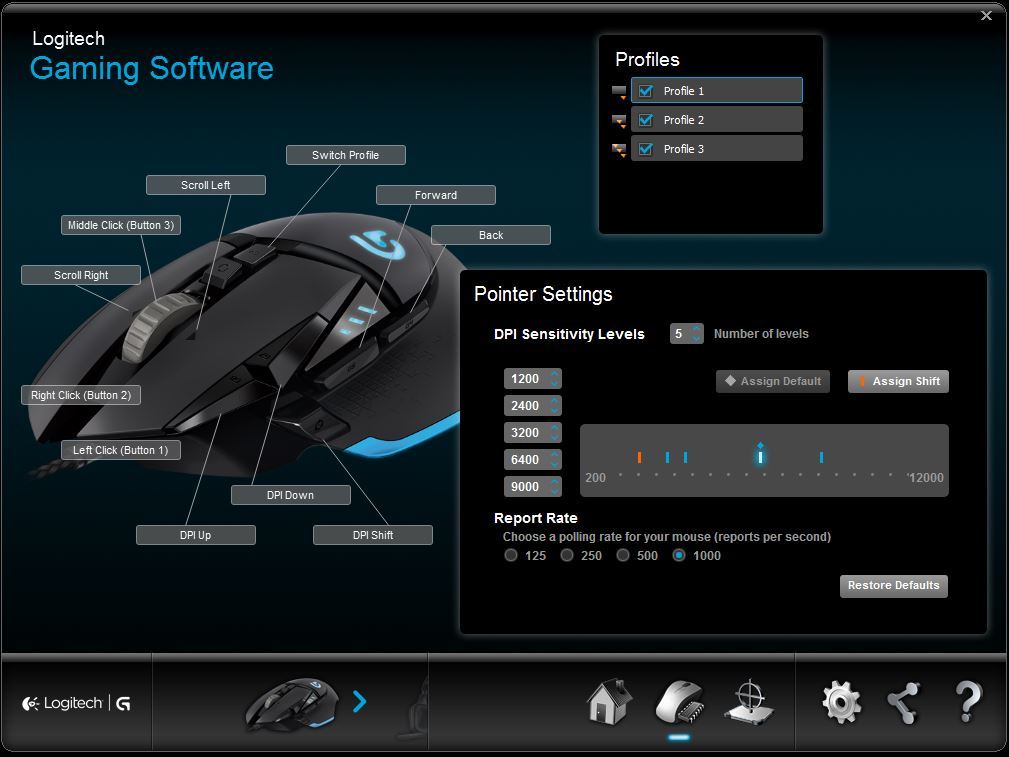
The Logitech software does this in Windows:

You are allowed up to 5 dpi settings on a profile (up to 3 profiles) which you set with the sliders. These dpi setting are saved to the mouse and will follow you even if you plug it into another computer without any software. You can also assign macros to buttons for various things as well.

Using this picture for example, pressing DPI Up would shift the dpi setting to 9000 and DPI down to 3200 (given in the picture it is set to 6400).

From my understanding, you are saying that I would adjust the game mouse sensitivity (per application/game) -- effectively a dpi scaler from my understanding -- which is not what I am looking to do. I prefer to run high dpis on the mouse (near ~9000 dpi) then turn down the (scaler) sensitivity slider entirely on the game as it feels smoother and more responsive to me. My CSGO sens is around 0.3-0.4 .

So what I would like to be able to do is adjust those "slider" setting while in Linux.

?

I know what the software does, I have it, I use Logitech mice and other gaming peripherals myself. The dpi setting with the buttons on the mouse in linux does exactly the same as in Windows, and you can also set the different dpi values.

I don't think you understand the concept of how mice work. In linux, it doesn't need a bloated driver, but that doesn't mean that it has less functionality. If you set the dpi values in a conf file for your HID device, the HID device will effectively store those values, just as it does with the Windows software. The difference is, in linux it will store those values a few microseconds after system start, whereas in Windows, you'll have to wait for the driver to load, which takes a long time, because it's a big driver with a lot of bloatware surrounding it. If you're playing CS:GO for instance, you know that sometimes after a CS:GO update, your mouse doesn't switch profiles automatically when you start CS:GO. That's because the driver needs to catch up on the CS:GO update. In linux, that doesn't happen, if you've assigned values in a conf file, those remain unaffected by CS:GO updates and/or by a bloatware driver, it just always works the same, just as you've set it.

In Windows, the profiles are not stored in the mouse, but in the driver. Try uninstalling the driver, and then switching profiles, it will not work. The profiles are linked to applications. The only thing that's stored in the mouse, are the dpi values your switch to. The same as in linux.

The way it works, is that you can set values in a persistent and a non-persistent way. For instance, you can set different dpi values for different applications, and set those in a conf file linked with the application. That way, the dpi values will be set when you run that application, but will not be persistent in your mouse. The values that you set for the HID device itself, will be persistent, and are stored by the mouse. So in Windows, you can have 3 profiles, but in linux, you can have as many profiles as you want, and you can link it to whatever you want. All it takes, is a few seconds on typing a few characters in gedit or nano or leafpad or vim or whatever text editor you fancy. You're not sliding a GUI slider in some driver bloatware application, but for that, you're having more reliability, more functionality, and better response, and it works more consistently.
Indeed.

This will give you some ideas to tweak your personal settings without the need for SetPoint.

Linky

1 Like

@thirdmortal Wow, I'm surprised this didn't turn up in my search results. This is exactly what I was looking for. I am thinking I may sniff the 502 protocol before I decide to try anything with it.

Exactly, this is because the dpi values and profiles are also stored on the mouse firmware. I can take the mouse and get the local mouse setting available to me even in UEFI bios. I never used the per-application profiles, which is why I'm looking for a way to change the settings inside the mouse via a script not a bloated driver.

I know I don't understand the kernel/mouse driver interactions completely, but you have some resources you could point me to, I'd love to learn more about them.

In fact, Logitech uses an extended protocol to interact on a hardware level with HID devices. It's called HID+ I believe. Logitech has always made sure to be compatible with linux, and they've shared the specs of that protocol with the linux foundation. The HID+ protocol will be integrated in kernel 4.0, together with quite a lot of other HID improvements in the linux kernel. At that point, there are basically two options: 1. Logitech makes a GUI app available for logitech devices in linux, which is something that I personally think will happen because of Steam boxes being launched in November, but it's not a "linux-ish" solution of course, or 2. the main DE's will just integrate the functionality, something I'm sure will be happening with Gnome and KDE, not so sure with Cinnamon, Unity, XFCE, etc...

I think you are completely missing the point here.

This project is first and foremost about tinkering, learning, and having fun. I also enjoy using my computer in the present.

Can't wait for spring break to get started!

You can't expect a desktop user to understand the mind of a developer.