This is my first post here and I am looking to build a homelab computer to use for learning running AI locally. I want to mostly learn how to build agents and maybe try to do a local coding assistant.
I have a list of parts which I am thinking about, but I would appreciate some help or advice to build something good enough.
This motherboard will leave me space for a second GPU in future, as it can do x8/x8.
I plan to install Proxmox and passthough the GPU to a VM where I will run the AI tools.
For CPU, i was also looking at AMD Ryzen 9 7900, but is has less cores and for Promox the 9950x probably is a better choice, in case I end up running multiple VMs for other purposes.
For GPU, this cost around 600 usd where I live and I am not sure if the 16 GB vRAM will be good enough. If i want to go higher than 16 GB, cards are getting too expensive.
Depends on which models and what you want to achieve with it.
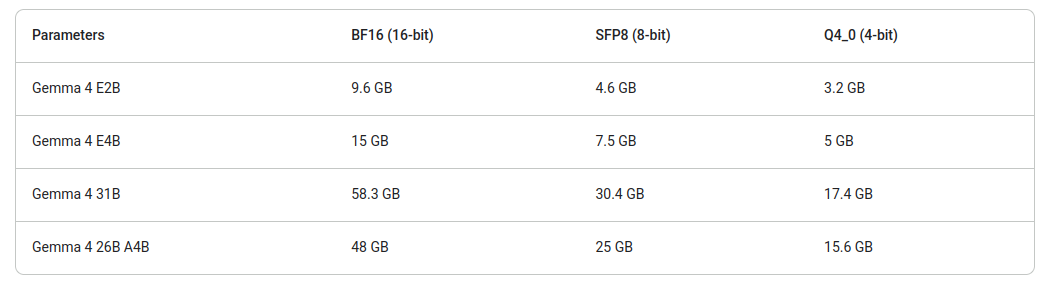
Gemma 4 opened up some possibilities for agentic workloads with tool calling on normal consumer GPUs, the E2B model variant at F16 quantization with a 128K context would run very well on the 5060 Ti.
You can squeeze a fair amount out of 16gb vram currently, but more is always better. You could spend less on the cpu and stretch to something with 24gb vram and get even more, or 36gb if intel arc ends up working out.
Probably i will end up getting the 9950x, as I would like to learn how to build a RAG system as well, which i think it needs some more CPU power than normal inference.
I was looking for 24 GB vram option, but not many options here, especially as I want to get new parts.
For what it’s worth, I run a pair of R9700s in my AI rig. On there, I’m currently running Qwen 3.6 35B with 256k context (both model and context quantised at Q8) for agentic workloads, as well as Qwen 3 Coder 30B REAP with 32k context (model at Q4_K_M, KV cache at Q8) for inline suggestions. The 64GB total VRAM lets me have both loaded simultaneously with about 7.5GB free, which may come in handy if the llama.cpp team ever get EAGLE3 support working.
The CPU is largely irrelevant - it’s a 5700X, but I get the exact same performance as other people running the same GPUs. I do have 128GB RAM, purchased before the Altman-pocalypse, which is mainly useful when I’m swapping models around thanks to Linux file caching.
Aside from that…fast storage is really important if you want to be swapping models in and out without wasting half your life waiting for models to load. The drives in there are a mix of PCIE 4.0 NVMe, an Intel DC P3600 PCIE 3.0 drive, and 4 x Intel DC 3510 drives. They’re all capable of in excess of 2.5GB/s, but I’ve never seen more than 1.5GB/s out of any of them. I’m considering grabbing a SAS3 controller and four more SATA drives to see if I can get some decent constant transfer rates out of them, but…that’s a luxury at this point.
tl;dr on storage - read speeds are more important than writes, because you’re not going to be writing any faster than your WAN download speed, but you’re going to be loading and unloading large files a lot.