Im almost off of WIndows entirely, however, I have a huge affninity for PotPlayer which is a Windows only program but the one main reason Im stuck on it is because it has the side button support for playback. Hitting the side back button will rewind 5 seconds, the forward skipping ahead 5 sec. Its incredibly useful and who woulda thought it would be the one thing keeping me on Windows.
Ive tried several different media players on Linux and none seem to have this option or even support. Ive tried mapping specifically the fast forward and rewind option in some programs but they just done read the mouse side buttons.
Anyone know of a program that has this kind of mouse support or ability to tweak settings like this maybe in some config file?
Add the following lines to ~/.config/mpv/input.conf
MBTN_BACK seek -5
MBTN_FORWARD seek 5
You can see other configuration options in the sample input.conf file here if you want to consider other options (like skipping by frame count instead of time, et cetera).
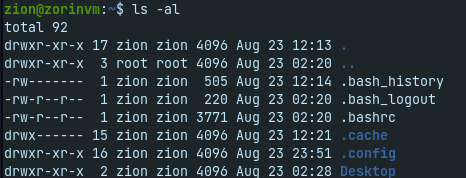
Thanks high, but i wasnt able to find that file, unless Im suppose to generate it myself and add all that text. Here’s my search for the file and/or directory. The second to last looks sort of like the path but obv very different. Be gentle Im new to Linux
The linked input.conf is just the default values that you get without specifying your own configuration. You just need to add ~/.config/mpv/input.conf and put in the 2 lines that he mentioned. Since it seems you are new to Linux, this is basically the defacto way to configure your users settings.
The “~” means the current logged in user directory which is under /home/yourusername
Meaning it should be something like
/home/Ghaz013/.config/mpv/input.conf
The “~” (squiggly?) is used as a shortcut instead of typing and retyping the whole /home/yourusername.
Meaning:
/home/Ghaz013/.config/mpv/input.conf
Is the same as
~/.config/mpv/input.conf
Take note that the “dot” in the directory file structure (like .config) means that it is a hidden directory. Under nautilus or dolphin (or thunar) you need to press CTRL+h to reveal the hidden directory in your home directory if you cant see it.
@Ghaz013 make sure it is installed. If it is, try to change a setting to force an entry. If you dont see any input.conf, it means the distro maintainers may have put the config files elsewhere?