Linux Distro?

So I’m getting a new (To me) 2-in-1 laptop. I intend to put Linux on it (And probably try multiple distros) to get a feel for it so that when Win10 EOL rolls around, I hopefully have an idea of what I’m going to do with my desktop, since I have a moral objection to Win11 (If I haven’t done it already by then)

So, to that end… suggestions? I am going to use it hooked up to a TV to run media, and emulators, like Dolphin. I also intend to do web browsing, spreadsheets, and maybe attempt something code-wise. I may also run non-emulated games on it, but since I have the desktop for that it should be fairly rare. I will be using the touchscreen lots, so I need something that does good touchscreen support (Took a quick look and that varies a lot by distro)

I’ve heard good things about Mint being easy to transition from Windows to, Bazzite being good for games (Though maybe having issues trying to do much else?), Nobara I’ve also seen good things about (Basically being a better Bazzite?), as well as Endeavour (Being based on Arch helps?).

Any others I should maybe look at? I’m also reading through the I Want to Install Linux FAQ here

2 Likes

I switched to Linux myself a year ago. I should tell you that your hardware choice will decide a lot of your distro options/choices for you. This is even more true for laptops. If the distro’s package manager doesn’t have a driver for your hardware it might be difficult or impractical to use that distro. After you install a distro, or when test the live image make sure to test all your hardware. (WiFi, bluetooth, LAN, USB, input devices, audio and video outputs)

I suggest you start with Debian. Version 13 just dropped, and it’s quite good. If your hardware is supported without much fuss, or hunting down extraneous drivers through the non-free repositories then this would be my first recommendation. If this distro isn’t smooth sailing for your hardware then I suggest you move on to the Linux Mint, Mint Debian Edition, Ubuntu flavors, etc. These are all Debian derivatives, and depending on your needs or hardware can be valid options.

The Bazzite question is an interesting one as well. If you are focused on gaming, and your hardware supports this distro I would consider it a valid option. If you’re running recently released hardware it might be easier to get it to work than the previous recommendations. If you decide on Bazzite go do the reading on what an immutable distro is, and how it works compared to traditional OS installations. There are limitations to how the system works, and what software you can install on an immutable system.

Welcome to the Linux party. I hope you have fun.

2 Likes

Ah I forgot to include the laptop

I’m getting the R7 8840HS variant of this.

I think that the Desktop Environment is more important than distro for new users. The most common desktop environments (DE’s) are KDE Plasma, Gnome, XFCE, and Cinnamon. Most distros will allow you to choose which of these you want when installing.

KDE Plasma - Good start menu with categories to organize it, familiar taskbar and system tray, tons of customization options, good touchscreen support.

Gnome - Start menu is a full screen app drawer similar to android not organized into folders or categories by default, menu bar serves a similar function to the top bar on mac, probably the best touchscreen support, tons of customization available via extensions.

XFCE - Start menu reminds me of windows xp or 7, good customization but not as easy as KDE, familiar taskbar and system tray, touchscreen was not great a couple of years ago but could be beter now.

Cinnamon - this is basically windows 7, touchscreen support was not good a couple of years ago but could be better now.

I recommend KDE Plasma.

As far as distro choice goes you have 4 basic options; Arch, Debian, Fedora, or independent. With how you described your use-case I don’t think this matters, they will all feel the exact same to you.

Arch: receives updates almost immediately, which can lead to problems but not often enough to worry about. It can be intimidating for new users to install and configure. Some notable Arch-based distros are CachyOS, EndeavourOS, and Garuda Linux.

Debian: very rarely updates which means things very rarely have problems. Can be annoying to install. Some notable Debian-based distros are Ubuntu(and all DE variants), Linux Mint, and MX Linux.

Fedora: updates fairly often, easy install. Some Fedora-based distros are Bazzite and Nobara.

Independent: too many distros to count or compare.

4 Likes

Gentoo! For new users! :innocent:

(Joking. It’s been my daily driver for over a decade, but not good to start with).

Honestly, just grab four random ones from the top of the list at DistroWatch. If you’re going to distro hop for a bit before you decide, it’s best to make your own opinions.

As @middle_pickup says, see which distro support all of your hardware out of the box. Honestly, every distro will probably support any modern laptop, but it’s nice not to have to go through hoops if the distro doesn’t autoload the right modules/firmware or you have to dig through packages to install the right stuff.

Any no matter what distro you chose, they will probably all support whatever desktop environment you want. Nearly ever distro has packages for KDE/Plasma, Gnome, XFCE … or if you want to go crazy hardcore, i3/Sway/Hyprland (warning, sharp learning curve). So don’t be afraid to install every DE on every distro and make sure they can all start up sanely without any broken stuff.

After a few tries you’ll probably settle on one you like. Then you can start the customization adventure.

If you still want suggestions, the only major one I’ve installed recently was Fedroa42. It defaults to KDE/Plasma. It’s alright. You can install my media browser on it if you want: https://mediahug.app. I have a friend who just tried Mint and liked it. Void is a bit more advanced, but not as difficult as Getnoo if you want something more hardcore.

Good luck!

2 Likes

Asking for Linux distro recommendations is like asking for shoe recommendations. You’ll get a thousand different suggestions that are completely valid. That can be overwhelming if you forget you only have one set of feet.

Pick a general purpose distro, learn how to do things their way, and keep a notes file describing how you like to deviate from defaults in order to make your system represent your workflows.

Linux Mint Cinnamon Edition would be my recommendation to start, especially for migrating Windows users.

There will be a major Mint upgrade soon too. That will be a refreshing experience compared to Windows update cyles.

5 Likes

While I don’t disagree with anyone here, I will have to personally say Mint (this can be the Ubuntu based OR LMDE, it doesn’t matter because it’s all Debian based) just to get started, then maybe move up to EndeavourOS (or SteamOS for Desktop if that’s out by the time you’re ready to distro hop).

Experimentation is fun. :slightly_smiling_face:

4 Likes

Or install all of them and pick on the log-in screen :wink:

4 Likes

Im still a fan of Zorin OS especially for Windows users. It’s graphical look and feel is Windows 7 by default, but allows customization into Windows 10, Mac OS, and standard Gnome. It is like Mint but even easier, and still based on Ubuntu LTS just like Mint is.

Zorin OS 18 is set to be released in a month or two, before Windows 10 support ends.

1 Like

Distro: Use something that has a wide user base. Chances get better someone solved your specific issue before you encountered it the more braincells were on it.

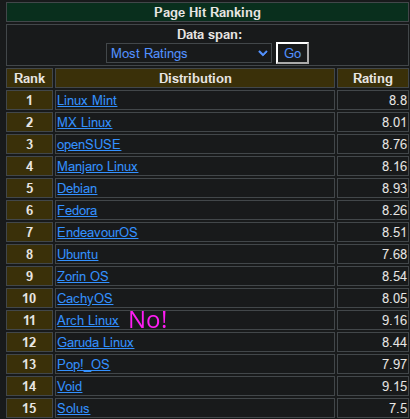
So, Distrowatch sorted by most ratings, top-15:
Find yourself a D20, roll until number is on the list (and not Arch, do not start on Arch).
image

Desktop Environment: This is much more important than the distro since you will be touching it all the time! Good news: A lot of these can just be installed along side each other, and on the log-in screen, you can pick between them.

A selection:


Maze’s short guide to first-time-linux:

  1. Have a dedicated Linux-Device, or at least dedicated SSD

  2. Torrent the Distro you want, saves the devs a few bucks on hosting.

  3. Search for that USB-Drive you have somewhere

  4. Fedora Media Writer has given me the least issues. Switch it to “Select .iso file” and point it at the .iso you aquired in step 2

  5. Boot from the USB-stick

  6. Follow the “click to install”-crumbs, leave everything on auto, read what it says and sip drink of choice while watching the progress bar.

  7. Done! :slight_smile:

7 Likes

:rofl: :rofl: :rofl: This is perhaps the absolute best advice for starting with Linux ever.

4 Likes

Actually, a D12 and scratch also Debian and Void from that list. Otherwise, advice is solid. :slight_smile:

Truth. Ubuntu-based or Debian based distros are the ones I have had the best luck with, but up to OP. Mint is… Kind of not good anymore, due to the lack of Wayland support, so won’t be getting stuff like HDR. But as a getting-your-feet-wet distro it is allright.

Pop!_OS shows the most promise for now, but they still need to release that Cosmic desktop…

3 Likes

What is D20, and D12? Total newb here…

dnd dice

“roll a D20” would mean you roll a dice with 20 sides and it lands on a number so you choose that number.

3 Likes

WOW RUDE

I can confirm the dell laptop is likely a good fit. I’m on the intel variant as intel support is top notch in linux.

Mint is actually my distro of choice if I am not going to use arch. FWIW, I wouldnt steer you towards arch either. Cinnamon is really good.

I think before you dive in though, its important to realize none of these distros are going to work like windows. This statement seems obvious on its face, “duh its linux”, but things you dont realize you take for granted are going to be different. Things you rely on just simply wont have an equivalent on linux. Your favorite piece of software isnt going to be compatible. There will be some soul searching and frustration, but there is generally an alternative to anything you need. This is the harder part of making the transition. Feel free to post your road blocks, and others will help you with a piece of software google failed to mention.

2 Likes


Ones on left and right, respectively.

3 Likes

Alas,

solid Bing DuckDuckGo Google
tetrahedron nope nope nope
cube nope nope d6
octahedron nope nope nope
decahedron d10 nope d10
dodecahedron nope nope nope
icosahedron d20 nope d20

Though the supported Bing and Google queries both give buttons for the full d4, d6, d8, d10, d12, d20 set. Also rolladie.net’s not bad.

2 Likes

Yeah that’s why I’m trying it on a new laptop that isn’t that important first :smiley:

Something I think I’ll need to try though, in the case of wanting to find something I like for a windows replacement for my desktop in the future, is trying to do stuff I’d normally do on my desktop. At least once, so I can figure out what I need to do.

1 Like

I watched this whole thing. Is all that customization he was going through because it’s KDE Plasma?

Lol this was me I ended up with like 8 different window manger’s installed side by side at one point.

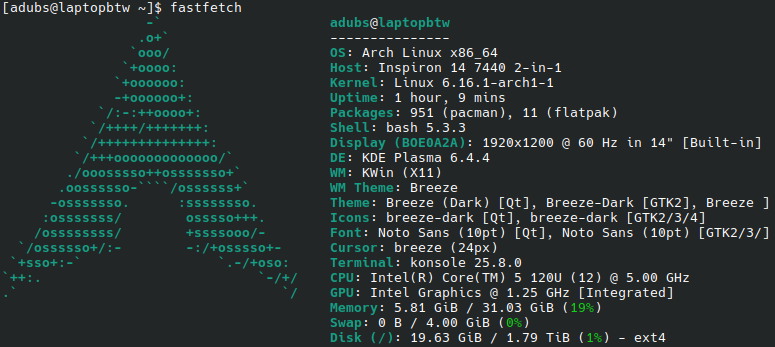
As an Arch user I definitely agree. Arches difficulty is directly proportional to ones knowledge of all the working pieces of linux. If you want to end up here start elsewhere noting all the different packages you use at both a user an system level and why you use them. Makes installing and configuring arch much easier.


If your going for new experinces or really like windows 10 window snapping, i actually would look at hyprland or any tiling window manager. Although i would caution that hyprland is not a desktop environment(yet). And like MazeFrame said thes are all probably more advanced.


You don’t have to customize kde like he was doing kde has fairly sane usable defaults he just falling down the customization rabbit hole, which can happen in many desktop environments on linux, gnome included.

3 Likes