To occupy my mind with something other than my father’s death… I’m thinking out loud and I’ll bring up the laptop issue.
The machine was a family member’s work machine, not mine, so I don’t know the story of how it was treated.
I got it to install literally one game… And already at 5% of the installation, W11 crashed with a blue screen and automatic restart. The game was installed from a USB drive to the internal NVMe.
Repeated attempts to install it ended exactly the same… Blue screen and restart. Each time the time between BS was getting shorter and shorter, to the point that starting W11 was sometimes impossible, and finally NVMe stopped being detected in the BIOS, until it disappeared completely.
But if I left the machine for say 1 hour without power, sometimes the disk would be detected again and even start W11, although it disappeared more often than it was there.
My first thought was that the disk was dying. It was a Toshiba BG5 512GB NVMe M.2 2242 PCIe 4.0(KBG50ZNT512G).
Despite 2-3 days of trying to tire the laptop and try everything, the tendency to the disappearing disk only intensified.
I eliminated incorrect BIOS settings. The problem was not with Windows 11 because Linux behaved similarly. Booting from USB to the live distro did not cause any anomalies with the laptop itself, but the disk still disappeared or did not show up at all.
I checked Windows 11 boot from USB, the NVMe itself disappears/is not detected at the BIOS level. The laptop itself does not show any anomalies other than the behavior of this disk.
Problem with power supply? I tested the behavior on battery and AC, still just as bad.
So, by the method of elimination, I rule out:
A general problem with the laptop that would cause the OS instability error. The problem is limited to nvme only and booting from another medium works fine, only that nvme is still not visible more often.
A problem with the power supply? The same behavior on AC and battery alone.
A problem with RAM? I tested it and no errors.
A problem with the CPU? I stressed it on all cores and there were no anomalies.
A problem with BIOS settings? I checked and tested every possible configuration without improvement.
A problem with the temperature? The same behavior even with the bottom of the case removed and an additional radiator and fan.
The first quick conclusion… I need to buy a new nvme. So I quickly ordered ADATA Legend 710 512GB (it was $37 and fast delivery).
In the meantime I removed the nvme and put it in the usb casing and started making a backup and surprisingly I managed to copy almost 400GB without errors. I thought I was lucky and that’s it.
The new disk arrived and I mounted and restored the backup. I start the laptop… BIOS sees the new disk, W11 starts ok, I think it’s done but I decided to do disk load tests (mainly writing) and the blue screen appeared very quickly, exactly the same behavior as before. Another few hours and I can clearly see that the behavior on the new disk is exactly the same as on the old one. Conclusion it was not a problem with nvme…
Stress and anger because the deadline for returning the laptop is pressing. I dare say that there is a huge problem with the m.2 socket or something in the area of nvme on the motherboard. Optical inspection shows nothing and everything looks ok. Cleaning the socket and the pins of the disks does not help. Carefully reinserting it into the socket does not change anything either.
I do not have any equipment at hand that would allow me to do a deeper analysis, so I see a ribbon port for sata on the motherboard. Of course, the laptop does not have the appropriate cable and basket for 2.5.
I buy a used sata cable specifically for this model ($15 with delivery for a stupid cable) and order a new ADATA Ultimate SU650 512GB 2.5. Of course, the drop in performance is colossal on paper, but I have to somehow revive this laptop and there are no more m.2.
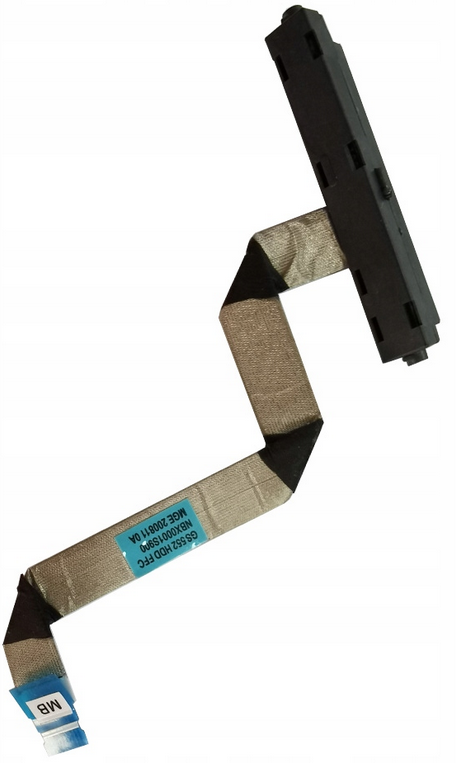
The parts arrive, I mount the 2.5 with Velcro and connect the cable. OK, the BIOS sees the disk, I restore the backup (almost 400GB). Windows 11 starts and goes through the disk load repetitively. Phew, it doesn’t show any problems, although I didn’t have more time for long tests.
So the last thing I want to do is to update Windows, so I want to connect wifi… and surprise, the wifi/bt card is detected when trying to use it disappears from the OS… It starts doing the same thing that nvme did.
I test by messing with drivers, I even start another W11 installation from USB and still the same. I suspect that the card is faulty, although I feel that it is not at all. I had no alternative to replacing it, so I assume that there is something very wrong with the sockets or this section of the motherboard or pcie paths…? 
I also checked whether after physically removing the wifi card the old disk will behave normally, not both problems still occur independently of each other.
I insert the TP-Link T600UB Nano card into the USB port and assume that the laptop is still working and I can’t do more.
Has anyone encountered something like unstable sockets/lines/chip… The PCB doesn’t look physically damaged. Cold solder joints? Stress in the PCB? Some component on the board got hit in the teeth and stopped working?
Everything else on the laptop works, every port… Only these two sockets showed a problem.
And of course the laptop was 100% functional and only when I took it in my hand the problems appeared… My luck.