I have an i5-8600k with a AsRock Z370 Pro4 motherboard that supports CAM/ReBar. Does anyone have any idea whether the performance hit I’ll take will simply be due to a slower CPU compared to the 10700k or is there something more?
Curious of the performance hit for 5600/5600X on B450 & B550. I have a few out there with 20 series and 16 series.
The only problem I see with these new intel chips. Is that they use the same node as Nvidia. But it uses like twice the silicon to get the same performance. They might be in trouble if the competition decides to lower prices. The performance looks good. But I would have to take a look at power consumption before deciding to buy.
Looking a bunch of reviews. It seems to be pretty efficient under load. But idle power draw seems to be kind of high compared to the competition. Which might be a deciding factor for people with high energy cost. However it might be a simple fix with a later driver.
But overall it looks to be a pretty good budget GPU. Especially for people wanting to game at 1440p.
How well do you think this will work with the Beelink gti14 with the intel core ultra 7 155H and EX dock? Would it work better with the Beelink gti12 with the i9 12900h/hk and EX dock?
Should work great with both.
For what it’s worth, with PCIe ASPM enabled, idles power consumption goes down to 8W:
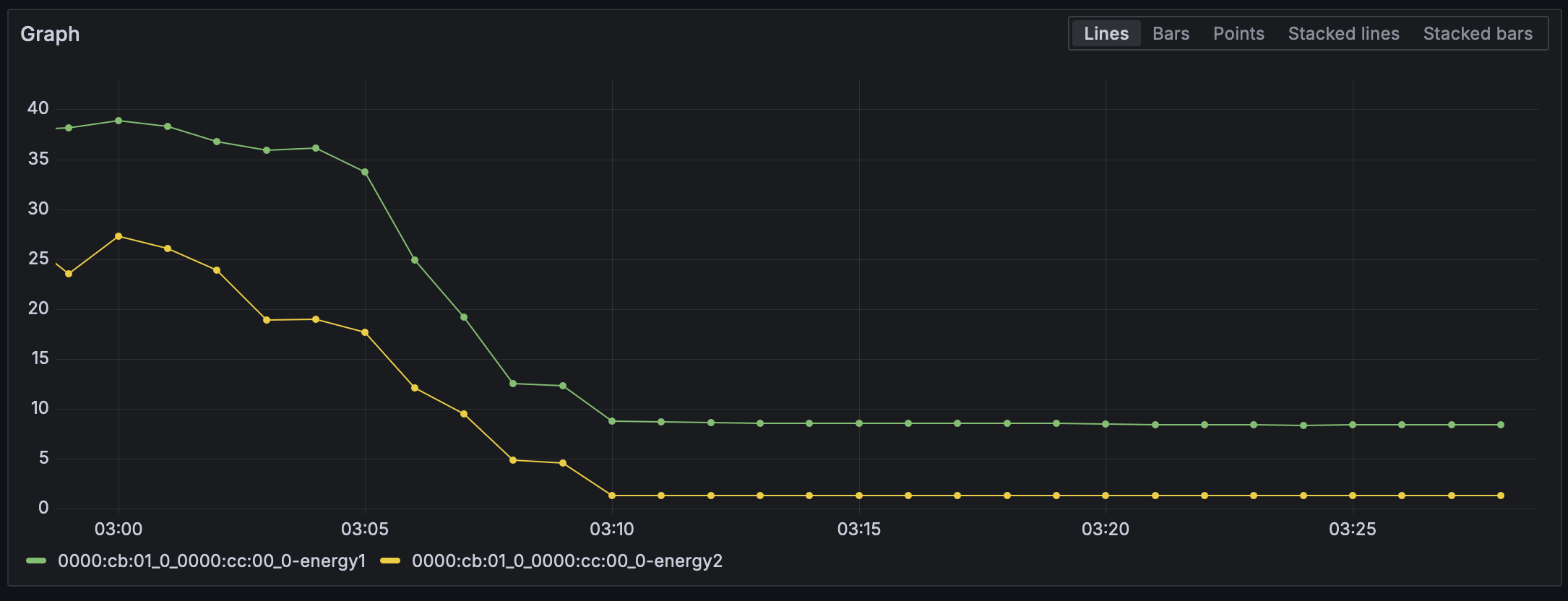
(energy1 is labelled as “card” and energy2 is labelled a “pkg” by hwmon)
3 Likes
I’ve been wondering this as well. The 8600k apparently does not support resizable bar, which means it won’t get full performance out of the card.
What that amounts to I dunno - haven’t seen any testing with 8th or 9th gen systems. I’m tempted to buy the card anyway and find out.
1 Like
I ordered the Sparkle version of this card (which was the only one I could find in stock, and even that was ever-so-briefly found on Newegg late Saturday night) for a Ryzen 1800x system I’m upgrading to a 5700X3D system. Unfortunately I ordered it before watching Wendel(l?)'s video where he explicitly mentioned older system performance could be less-than-optimal.
If anyone has run this with a 5700X3D and can report back results, it would be greatly appreciated. I’d like to avoid completely replacing that system with an AM5 now (especially since I’ve got a brand-new 5700X3D chip in the box ready to install and a B580 on the way), but there’s a chance I’ll need to bite the bullet and update that whole system to AM5.
It’s needed for good performance with these Intel cards. With the A380, lacking resizable bar resulted in a 17% performance drop.
1 Like
Have you updated your motherboard’s bios yet? You’ll most likely need to do that to upgrade to that CPU.
What Wendel meant when talking about older systems was referring to ones that had pcie gen3 and did not have rebar as an option. You’ll only really be able to know that if you look at what the bios will support. If anything, you might have to swap to a newer motherboard for AM4, but that shouldn’t be too expensive compared to buying into AM5.
1 Like
Thank you for the reply. I have not updated the bios yet, but it’s on my list of things to do.
If I have to buy a new motherboard then I will most certainly just bite the bullet, sell the new 5700X3D and move to AM5, while (likely) keeping the B580, unless I switch to a powerful enough CPU that has an integrated GPU approaching 4060 speeds. Either way I’m not likely to get to even installing the 5700X3D until after the new year.
When I can get one for $250 I’m pulling the trigger. Or if the B770 comes out that has me super excited. I game but I’m far more excited to play around with it in compute tasks (and maybe be see if distributed computing like FAH plays nice). Alchemist piqued my interest, battlemage has my attention.
Edit: especially excited to see its FP64 horsepower. It is based on the same DNA (Xe) as Ponte Vecchio after all
I would love to see some benchmarks with LLMs using IPEX on it.
i too am excited to see its folding at home performance,
the mad lads on the FAH forums have already been hard at work trying to get it folding, according to FAHbench, it should fold slightly below a 4060, about 2-2.5M PPD. which would not be a big gain over my 1080ti which can do 1.8-2.2M PPD, but it would be able to do it with less power draw.
EDIT: link for the forum post Intel Arc Battlemage B580 for folding? - Page 4 - Folding Forum
1 Like
Found a video that has pcie 3.0 vs 4.0 comparisons, for those that are interested in it.
https://youtu.be/PEJgid45qMA?si=lgoFQziA_FdzPEiF
Hoping there will be some tests done just to see what the performance loss is like without rebar.
3 Likes
I’m seeing conflicting information that resizable bar works on older CPUs. Why would AsRock release firmware to support resizable bar if it didn’t work for the CPU platform; I have the option to enable it in the BIOS. I also found this GitHub - xCuri0/ReBarUEFI: Resizable BAR for (almost) any UEFI system which could be helpful for people that do not have motherboard support
1 Like
That’s awesome! Thanks for the link. It’s sort of a bummer CUDA is basically a requirement. I know TFLOPS is a bad measure but with this and particularly AMD they aren’t at their full potential.
hope is coming. AMDs ROCm is promising and has some features for cuda translation that make this less painful. I got to learn about it on the LTT forums during folding month.
in theory there isnt a reason why intel couldnt also benefit from ROCm. but i do not know if that is coming at all.
1 Like
Hi, so I have a request for some AI/ML benchmarks. Recently I did some LLM inference testing with llama.cpp and the Xe2 on a new Lunar Lake laptop I had on hand (Core Ultra 7 258V, Arc Graphics 140V).
Xe2 did terribly with the Vulkan backend, OK with the SYCL backend, and fantastically when using Intel’s IPEX-LLM backend.
I have recently also set up configured the latest PyTorch and confirmed it working. Would be interesting to do some basic tests with that as well.
For those looking for some collated setup docs: Intel GPUs
(BTW, I’ve done a large amount of llama.cpp, vLLM, and other inference testing from iGPUs to multi-H100 and MI300X nodes, feel free to drop a DM if you need help doing proper benchmarks. I think for LLM inference, using llama-bench on some standard model sizes and vLLM’s benchmark_serving.py are good places to start.)
2 Likes
it does, the reason ours was so low is purely bios and what motherboard you have. Some do not implement it properly
3 Likes