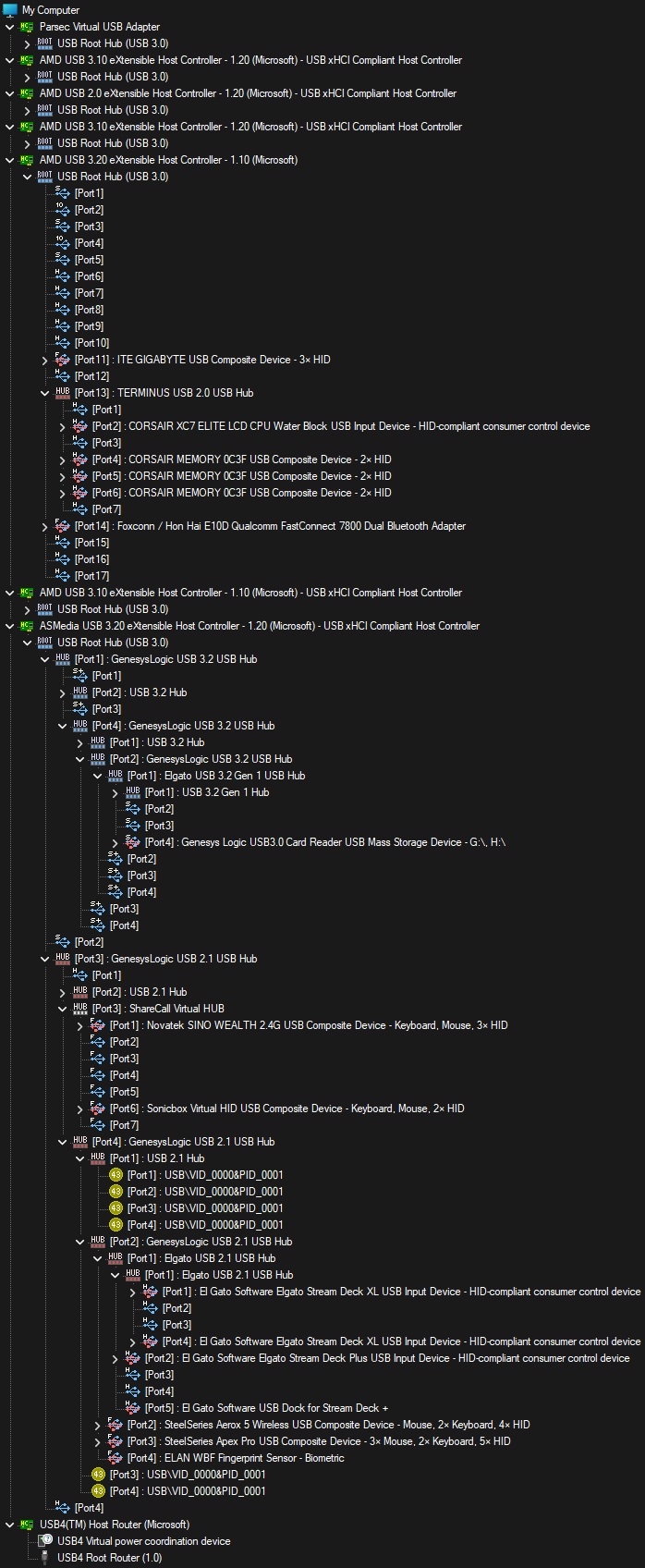
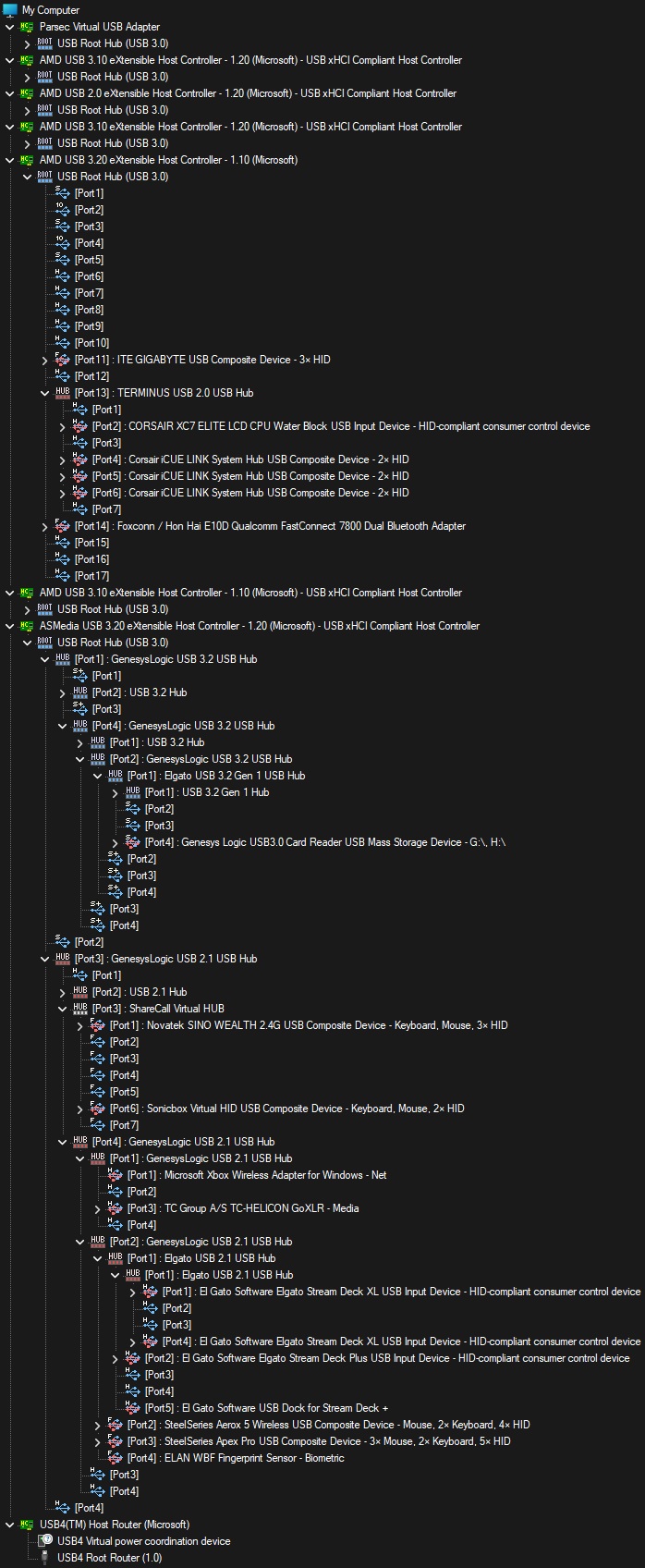
KVM Model:
1.4 Display Port KVM Switch - Dual Monitor - Four Computer
Purchased June 2024 from lvl1 store.
USB Interface (5-gigabit or 10-gigbit):
10-gigbit
Problem:
Recently built(earlier this year) new computer with Gigabyte X870E AORUS XTREME AI TOP with 9950x.
Doesn’t seem to matter which USB port I use from the motherboard I can’t boot the system with the KVM selected to the position of the Gigabyte board is using.
If I do boot on that position I end up with devices not setup due to errors.
Even tried with a Asus Proart 870e. Same issue occurs.
As for why I had another 870e board. I can link to details about it if allowed(if not then search the gigabyte board on reddit under my name). Short version my original Gigabyte board died 100% via USB port issues.
I have tried simpler keyboard and mouse coming off various different hubs powered hubs.
I have even gotten a Club3d USB C to C cable to use between computer and KVM.
I have tried shorter cables from KVM to hubs, including the ones the hubs have come with.
Though I am still wonder even with the hubs and shorter in theory better quality cables if its still a signal issue, and if I should spend some more on Club3d cables to go from KVM to Hubs, and from Hub to Stream Decks.
I can boot the system with the KVM not selected on that device 1-4 (doesn’t seem to matter which position as long as its not that position for the system).
Once it seems like system is booted to Windows Login.
Switch to that position.
Let it connect and display with the Main Devices connected.(see below)
Then either Connect the Other Devices, or Login. This order doesn’t seem to matter.
At this point everything behaves and works as expected.
If I boot with the position(Main system with the 870e board) selected with or without the other devices connected I will have some devices not work and throw errors in windows.
Note I have it plugged into position one I can leave it there and do the following to resolve device errors.
Cut power to the KVM and devices(I have put them all on a little power strip with a switch because of this).
Unplug the Other devices. Leaving them plugged in will more than like cause errors again.
Power the strip back on after a little bit. No I don’t tend to have to unplug rear USB C from powered devices when doing this normally.
Once system is displaying reconnect other devices. At this point usually things are connected correctly.
Systems that I don’t run into issues with.
Previously I was using some cheaper cables with this setup.
My old 2950X Threadripper in a Asus Zenith Extreme X399.
Using the 10gigbit rear USB C port or A port.
I had no issues with the same devices connected to hubs.
I also have a Eluktronics RP-15 G2 laptop. That I come off from it via the rear USB C port.
Runs at 10gigbit. Via a USB C cable I got off amazon. I don’t remember what brand, but it is most likely 6ft.
No issues. I can boot with that position selected and all devices connected.
I used to also have a Miniforums um790 mini system attached too it. Again no issues connected to USB C. Same as the Eluktronics laptop I can boot with everything connected.
Other Notes:
Connecting from Main system with the gigabyte board via usb c to c cables usually about 6ft. Currently using Club 3D CAC-1578.
Note I have also tried C to A adapters for the A ports. Along with other A to C cables “rated” for the speed.
Shorter cables where possible from hub to StreamDecks for my usage.
Rear Highspeed port on KVM
HUB - ACASIS Powered USB Hub,10 Ports USB 3.1 Hub with 10Gbps Data Speed, Individual On/Off Switches, 12V4A 48W - using provided cable that it came with.
Main Devices:
Steel Series Apex Pro
Steel Series Aerox 5
MS Wireless Xbox controller adapter
GoXLR(no audio issues yet connecting it like this other than windows not defaulting to it at boot on gigabyte system)
Other Devices:
2x Stream Deck XL
Stream Deck +
Front Highspeed port
Orico 3.2 hub powered used for connecting devices mostly drives. Using the cable it came with.
On occasion this Orico hub will not work with devices they will connect and show up but read/writing to/from them will fail via time outs. Usually power cycling the hub can fix it. Other times it takes cycling the whole KVM if its been powered on for a while. Not sure if this is because of KVM or this hub.
My bigger issues is above, as I have tested with out anything connected to the front high speed KVM port.
HotKey USB Port
Cheap wireless number pad for switching KVM position. With out this connected issue still occurs.
So should I replace some more cables with maybe some Club3d or other quality brand for the shorter runs?
Or am I running into some issue with the newer usb chipsets on these 870e motherboards/the cpu? Is there some setting I could change in the bios?
Note that when its all working and happy I have no issues transferring data at full 10gigbit speeds or switching between system(not when transferring data of course).
Though I will note if the KVM has been powered on for a long time the Sonic Virtual device occasionally will be the device that fails to connect/setup.
I guess I would like to know where to go next step as I would like to not have to switch and plug and tip toe around devices not working.