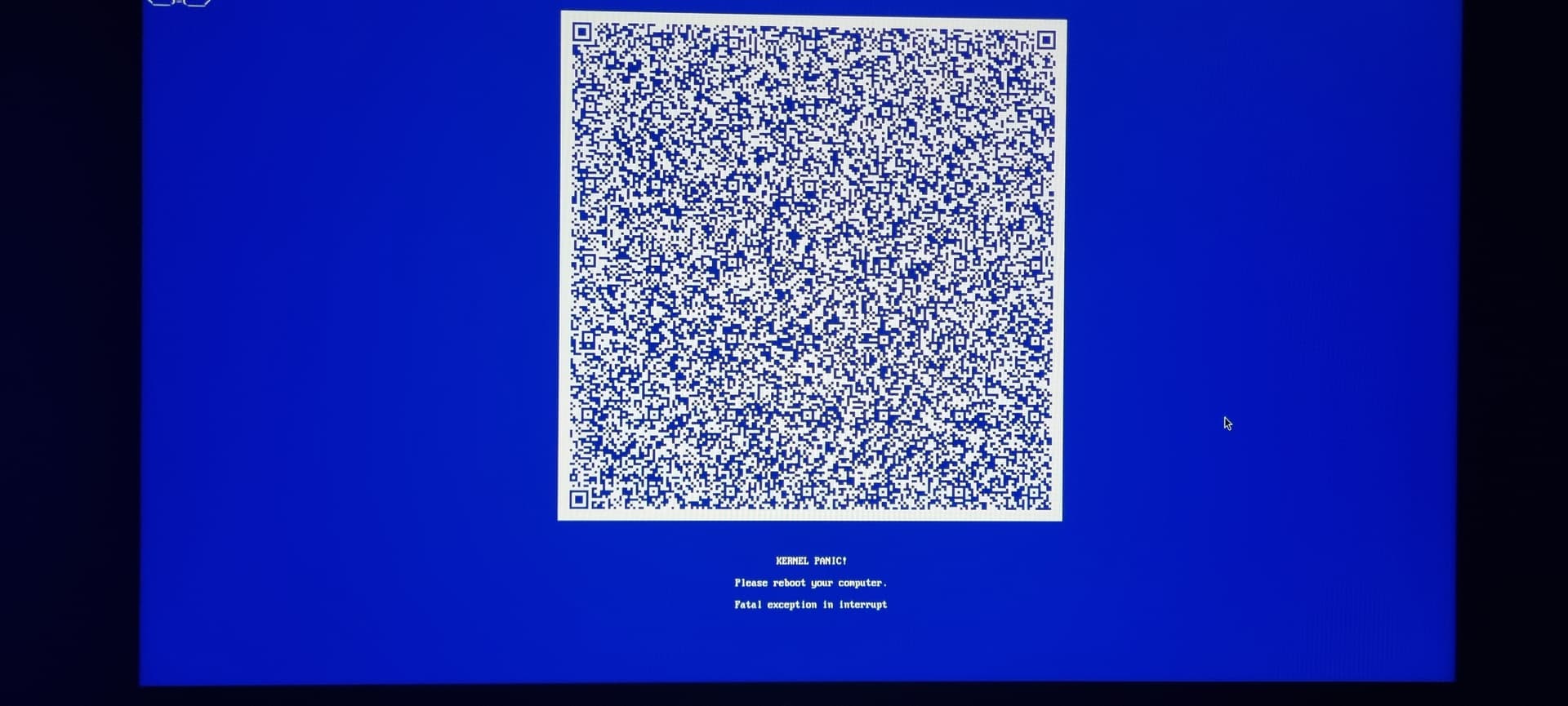
My computer has now kernel panicked three times. First time ever that I witness this. I thought Linux would br more resilient show some selfhelp before disturbing my evening.
This has given me quite the shakeup as some things don’t work anymore. Some NTFS drives stopped opening and after the third panic one of my wine programs stopped working.
Well how about start telling us what you were doing when this occurred. We know absolutely nothing
Here’s a list of stuff we want to know so we can try to help you.
What distro and version are you using
Which DE? (Gnome, KDE, Mate, Cinnamon, XFCE, something else)
Open a terminal, get root access and post the output of the following commands, use code tags, separate each command with its own code tags:
uname -a
cat dmesg | tail
cat /etc/fstab
df -h
Also, have you updated your system recently, or otherwise added programs or tools, either via the package manager or outside of said package manager (if so, how?)
We need this info to assess if we can determine the cause of the issue.
PS: you realise every time you get this kernel panic it relates to Win-OS stuff, right?
If this was an actual kernel panic (and not just a generic “oh no I crashed, woopsies”), then that means that the kernel got into a state where it determined that there is no possible way to continue operating safely.
This also means in turn it already has exhausted all possible avenues of recovery. A kernel panic is a measure of last resort and does not trigger lightly.
This also means that there is no way it could even “show some selfhelp” because that would mean to continue operating in an unsafe state.
That aside, I’d recommend running a memtest for a couple hours and/or reseat your RAM. It’s possible it got loose which resulted in some memory corruption.
Amazing that you guys can trigger kernel panics. I dont think I have seen one since I switched last 2018 so I guess I am lucky? Then again I have a pedestrian use case.
It could very well be related to unstable or failing hardware. @mihawk90’s suggestion of running memtest is probably where I would suggest starting but as a sanity check I wanted to see if anything at all got logged.
This isnt useful to tell someone because there are no best practices listed and people learn by doing things that dont work. If there was a best practice we wouldnt need so many distros. The whole ethos of linux is the freedom to do anything with it, even if its a bad idea.
Ignorance is where we all started from. If you want to share what your practices are, feel free.
That said @Rogue-agent, the main problem with NTFS on linux is its an ever moving goal post. Microsoft changes the way things work, and then never shares with anyone. The community has to reverse engineer it to make it work as is. If you need to share the same set of data between windows and linux you should consider exfat. If this is a windows drive (meaning your C:\), consider the implications of what might happen if you lost that drive to corruption.
I did only update via pacman - Syuu after the first panic, it did so twice after.
I was in equibop voice channel, steam library and friends were open, two waterfox windows with some 30 tabs together, a game starting(once The Finals and then Crusader Kings)
The last time that I marked down wad the second time and it is not listed on the journal anymore. But I did take a photo of the first panic code.
I only installed OpenBB outside of Flatpak and Pacman, but not sure what day it was.
My amnesia comes from lack of sleep.
If I find my USB storage I’ll run that.
My other installations have never failed me. Twice installed Arch from scratch, Parrot desktop, Manjaro and Linux Mint.
The only reason I used NTFS is that basically all of my drives are NTFS. And almost all being full or having some storage it takes time to move files around and organize what drive is getting formatted first.
And the first issue is to keep the data with original creation and modification dates as it failed to do so on my last transfer.
Im not a huge fan of XFS but if thats what you can work with then go for it. Anything linux native will be better than NTFS here.
I would discontinue trying to repair your disk in linux. Either image it and work on the image, or attempt to use windows to recover it.
the log from your QR code shows the issue could be amdgpu, but in the listed linked modules theres a lot going on there, including ntfs3 which is a known issue. Is the game you loaded being loaded from an NTFS drive?
Are you on a more recent kernel than the default for arch? My preference is usually to install linux-lts unless I know I need a newer kernel for hardware support.
I got it last year. Do I need to rma it ? Could it also be heat ? It has been 30°C inside the past days.
No.
I have intended to go Zen soon™, right now it is Arch 6.15.6 as per uname - r
I ran ntfsfix on all disks, on one it said corrupted, but in Windows I ran chkdsk and “Windows has scanned the file system and found no problem. No further action is required.” and I’m able to open files and folders on the disk.
I would try to mount the drives through console with the offset but I don’t know where to mount to, in userspace the mounting position is /run/media/username/label and the folder doesn’t exist when the drive isn’t mounted.
Another issue ; I ran umount - a and now one of the drives is inaccessible in Linux : No object for D-bus interface
There are a couple of things here that I would personally be thinking at this point.
Something in the filesystem has been configured in such a way that windows can make sens of it, but linux cannot. I had something similar, but it was a drive I had configured to be passed through to a proxmox vm, and it gave similar issues when I moved to a standalone server. I ended up having to rebuild the fs to get it working again.
My drive is starting to fail.
In either case, I would start by making a backup of the data on the drive if you have not already. If this is a failing drive, you never know when it is going to give up. Next I would probably use something like smartctl to monitor my drive for potential health issues. I wouldn’t want to spend a ton of time addressing an fs issue if the drive is failing.
My bad, I must have missed that in the thread. That makes me lean much more towards option one. I will poke around in my personal knowledge base and see if I documented my process for repairing my fs on my drive.
best practice is to stick to official repos and supported open-source software. The more you diverge from that, be it third-party repos or running NTFS (which is mostly fine, but still only has 100% support on read-only mount because Microsoft) and similar stuff (like dodgy and often unreliable DKMS or hacky driver support with manual DEB/RPMs outside package manager), the more unstable the system will be.
And release cadence is another aspect. Rolling release vs. stable/LTS release.
If you go off-road, expect a more choppy ride and depending on where you are going, it may break your suspension at some point.
So choose your distro (and the repos associated with it) and hardware wisely. And don’t use NTFS, the FS is 30yr old shit, even on Windows.
Oh…everything in Linux is a file. You can do a whole lot with the echo command and root+disabled SELinux/AppArmor. I’m pretty sure there is a step-by-step guide to do that to get your RGB working.
One SSD chkdsk found some error on, fixed it with arguments rfxb.
The other sata SSD has been running chkdsk for the past hours.
The last candidate is the m.2 ntfs partition that needs to be fixed. I did get it mounted with offset, excluding the windows system reserved partition. But I still don’t know where it would be accessible also for the gnome explorer to open it, as it shows up twice now.
The GPU is maybe an innocent bystander to something else going wrong. Its not impossible there’s an issue but I would expect more apparent issues than 3 seemingly random failures.
I would need more information to really point a finger.
To reiterate the problem isn’t NTFS. It’s that Linux has support for the version of NTFS that shipped with windows XP. NTFS3 as included with the kernel only officially works with version 3.1. Modern NTFS is on version 5.x+