after having my wonderful computer for a few months now, i've found myself get an itch for building again. As i can't afford to make a brand new machine (wish i could), I'm looking for things to change or upgrade in my system. not only for performance, speed improvements, but visuals as well.
SSDs are really nice. Personally I would recommend the Crucial MX100 256GB for $110. It's a fairly fast SSD and gives you a lot of storage for the price compared to some other SSDs (such as most Samsung models).
I plan on getting two MX100's in 256GB and putting them in RAID 0. For $220, I'll have half a TB of SSD storage with Seq. R/W speeds that practically saturate SATA 6.0Gbps.
I'd say ssd (crucial mx100 256gb like above) and a water cooler (Surprised you haven't already). that new swifttech h220-x is pretty nice, can even add more rads later. Then you could oc and help some CPU bottlenecks in single threaded games. Also 120hz+ monitor is a must buy IMO or at least a monitor with 1-2ms response time and low input lag like the Asus VS247H-P or the BenQ equivalent with better colors, same panel and 8.7ms input lag (forgot the name). I love my Asus VG248QE 144hz 1ms 1080p. Never going back to 60hz
Modding can be fun and take up some time. Last year I sleeved my power supply, which was quite fulfilling. Except that it took a long time and my PC was down. I eventually got really fed up with it and all I wanted was for it to be done. Also you've got a fractal case, which usually comes with white accents inside. You could choose a colour theme and match those to your sleeving colour.
I think you PSU might be the next weakpoint, especially if you overclock further (I've done some overclocking before and noticed the power consumption doubling for a 50% increase in frequency) or add another GPU.
Psu is fine. I had 3570k @4.7ghz and sli msi tf 670s, ssd, 3x hdds, thermaltake water 2.0 extreme, nzxt hue, 4 other fans on my 1000w gold psu and the max I was able to pull was 510w using a kill-a-watt
Your base CPU power consupmtion is 77W. His is 125. I believe a single of his GPUs is already drawing 30 to 50% more power than yours does. Adding a second one can seriously push him to or over the limit.
SSD hands down the best thing you can do. Add to that perhaps some custom cables (or extensions), or a stronger cooler. Dont waste money on faster ram you wont notice any difference. 8gb is more than fine as well.
@elan oc3d ran a 4770k @4.4ghz? 780 16gbs 2400ram, water cooler, ssd amd hdds off a 450w platinum drawing 420w~ So I'm pretty sure he could fit amother 780 but I wouldn't overclock and it wouldn't leave much room for psu capacitor drain in the future. Anyways after sli'ing i see i shouldbe just gone so for card (780ti wasn't out yet). I say ssd and water cooler. fx single thread sucks so overclocking would help
It would run but you'd be pushing the power supply to it's absolute limits and would be accelerating the degrading of the unit. Definitely should not be going around recommending this -_-
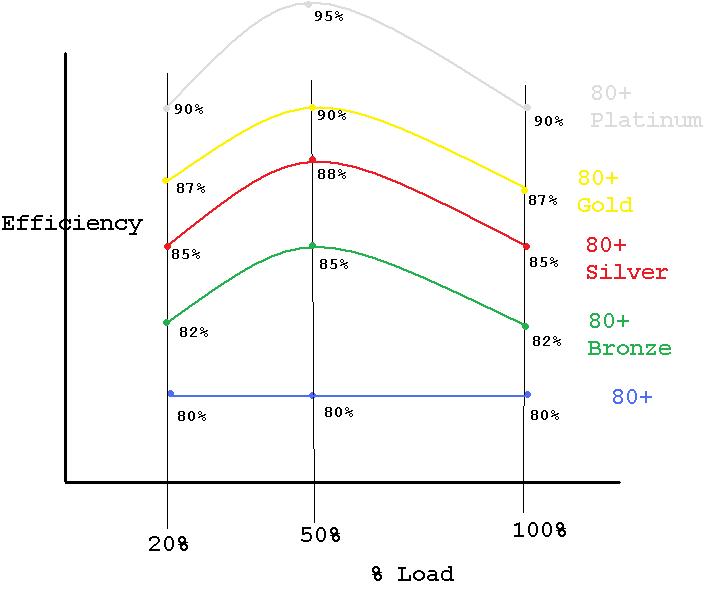
As Caveman said. Aside from that, an average PSU is running at it's maximum efficiency (the percentage of power consumed going towards powering the components, instead of dissipating as heat) at around 50% load. Here are some fairly typical PSU efficiency curves to illustrate:
Investing in a more powerful and efficient PSU can actually pay off in a couple of years. There's also the semi-passive PSUs around these days, like the 1kW Newton R3 that Logan had been showcasing some time ago. With the peak power consumption of my system peaking at 370W, the fan never had a chance to switch on yet, so it's absolutely silent.
Just added two AIO's (for CPU and GPU) and stuffed them both in a Fractal Design Node 304. After doing this I am totally sold on AIO (all in one) liquid coolers. ~20-25 degrees cooler on the CPU and GPU under heavy load and whisper quiet. Temps inside the case now stay at ambient as well, keeping all components much cooler than before.
Thus, my suggestion is to install a decent AIO cooler on your CPU, like an H80i or H100i, and see how far you can OC that FX chip. :) Run it in push-pull with two fans for optimal performance.
I just realized it sounded like I was talking about oc3d adding abouther 780. I meant op could add another 780, I wouldn't highly recomend it but he could if be wanted to, if his psu had enough +12v rail amperage. I have a 1000w gold and only pull 510w.
Well I've tested it myself and it made a bigger improvement than that for my configuration. And I don't know why people keep saying AIO's are noisy. I have two AIO's using three Corsair SP120 performance edition fans in push-pull and it's near silent! You shouldn't be running the fans at max rpm (shouldn't need to), or you should be running the quiet edition fans which only run at about 1200rpm max.
Most of the time I run the fans at about 800-1000rpm and they're nearly inaudible. At 1200-1400rpm they produce a gentle but still very quiet woosh.
If I can fit two AIOs and three 120mm fans in a Node 304, there shouldn't be any issue with room in a standard mATX or ATX case for a push-pull config.
kind of forgot i made this thread because this forum doesn't send you notifications :(
SSD is prolly then next step.
for monitors i have one 24" asus 144hz 1ms response time in portrait on the side, and a equal monitor, but larger (27") as a main screen. so i'm good on the monitor front.
thinking water cooling and ssd. but, how annoying would it be to make the ssd the boot drive?