Ah my bad, I thought it was an issue with the DP to HDMI converter.
How do I install the firmware if I don’t have any windows machines?
1 Like
As an avid Linux users, I came across this post via google search! I’d like to force 4K/120 on my TV/Desktop setup, but have been running 1440P/120 in the mean time.
Would something like this, albeit very expensive, work to solve the issue of 4K/120 over HDMI:
Razer USB4 Dock (259.99) - Supports DP 1.4 / HDMI 2.1 over USB 4. I imagine there are a lot of different hubs, at better pricing, that can do this too.
The DP to HDMI cable is one thing, but a Dock over USB4 may bring better functionality?
Running CachyOS and ould love 4K/120.
1 Like
You should be able to force 4k@120hz with the right DisplayPort → HDMI Adapter (Cable Matters or Club3D), the issue people struggle with much more with AMD GPUs is HDMI Freesync/HDMI-VRR.
I want to flag for others coming onto this thread, that your issue may be with your monitor. My RX9070 enables Freesync without issues when plugged into my LG Monitor (via HDMI!!), as that LD Monitor has Freesync support, but no such luck when plugged into my Sony X95K HDMI-VRR TV. In theory, the AMD Linux driver should support Freesync and HDMI-VRR. In reality, not so much.
Hello, everyone! I’ve recently built a living room SFF PC using a mixture of spare and new parts running Bazzite-deck to get a console like experience. I knew about hdmi 2.1 situation with the HDMI consortium not allowing hdmi 2.1 implementation, but I figured 1440p 120hz was more than enough for my 9070 XT. I got curious however and long story short: I think I may have stumbled upon a great solution using an alternative firmware for the Cable Matters Displayport 1.4 to HDMI 2.1 adapter people in this thread are probably already familiar with. With this firmware I can get 4K 120hz VR and 4:4:4 chroma. I posted my findings on the Resetera forums, but someone there suggested I should let you guy know as well.
I had a lengthy post with a bunch of helpful links, but apparently I’m not allowed to post links as a new user, so you’ll have to search on your own. Go to the Resetera forums → gaming forum → Linux & SteamOS |OT| look for post #5,869 by Vitamin C:\ (that’s me.) In summary, you need to flash an alternative firmware (7.01.124) to the Cable Matters 1.4 to hdmi 2.1 active adapter using the firmware updater tool (VmmDPTool64) in Windows. You can also flash the adapter using fwupdtool in linux, look for post #5,875 by Transistor in the same thread.
Cable Matters provides their own 7.02.120_forVRR firmware which enables VRR support, but I found that firmware to be incredibly janky. I get constant screen flickering and my TV not properly returning picture when my PC wakes from sleep, requiring me to unplug and replug the adapter to get picture again. All of those issues are gone with the alternative 7.01.124 firmware dumped by a Vzaa at the freedesktop dot org gitlab. I get 4k 120hz HDR VRR and 4:4:4 chroma. Transistor, an admin over at Resetera had similar problems with his adapter, but confirms the problems were fixed after flashing the alternative firmware. YMMV of course, but give it a try if you’d like.
3 Likes
This is awesome.
I installed FW 7.01.124 on my adapter and now it works flawlessly even after reboots. Also good to know that fwupdtool can be used!
I’ll add some links:
2 Likes
This is useful information. I am more and more tempted to trade my 5070 Ti back in for a 9070XT so I can use Linux in my living room PC. I miss my 9070XT.
I just tested this. There may be FreeSync support, and 4K@120 Hz support works great but HDMI-VRR is not supported with the 7.01.124 firmware. (My Sony TV is HDMI-VRR only, with no support for Freesync or G-Sync) I think the issue is LG TVs call anything that isn’t G-Sync or FreeSync Premium Pro “VRR”, regardless of whether it’s Freesync or HDMI-VRR. Argh, the quest continues for an HDMI-VRR compatible solution. (And yes I’ve tried the VMM2300 firmware in one of the threads, it bricked the adapter).
Hopefully someone finally hacks together a HDMI-VRR compatible VMM7100 firmware.
1 Like
I finally made the switch from Windows to Linux last weekend. It’s been over a decade, probably 15 years, since I last used Linux. I went with CachyOS. After making the switch I realized the HDMI issue since my PC is connected to an LG C9 TV. I bought the adapter, and no VRR. Also, I get random blinking lines at 4K120 or 119.88. I have to go down to 4K60 just to get a stable image. I might as well use HDMI at that point. Since I fully made the switch, there’s no updating the firmware with Windows. I tried using Wine to run the firmware updater, but it won’t launch. AI tells me that’s because Wine can’t give the low level access to the GPU it needs. I don’t know if that’s true or not.
Anyone else experience random lines blinking at 4K120 with the Cable Matters adapter?
1 Like
You can update the firmware on Linux. I’ve done it. See thofu’s post from 10/21, the link for fwupdtool explains how to do it. Did you use the Cable Mattters 7.01.120 firmware or the 7.01.124 firmware? The 7.01.124 firmware also linked in Thofu’s post is better.
2 Likes
It could still be the cable. I have had some devices working with iffy cables and some not. A better transmitter means slight signal loss from the cable is still okay, where with a marginal transmitter it’s not.
1 Like
adapter Cable Matters DP - HDMI BK102101
firmware: 7.01.124 ( post from 10/21 )
VGA: RX 9070 XT
TV: SONY 55" 4K AE2
CachyOS - KDE Plasma & Wayland
What works:
| Setting | Value |
|---|---|
| Resolution | 3840x2160 4K |
| Refresh | 120Hz |
| HDR | HDR10 |
| Color Space | BT.2020 |
| Bit Depth | 12-bit |
| Chroma | RGB (4:4:4) |
| DSC | Enabled |
What NOT working;
| VRR | Not working - shows as Active in TV but is not working |
I have almost the same problem as you, the difference is that my color format is different. If I plug in the adapter after Windows starts, I get the RGB color format; if I start the PC with the adapter plugged in, I get the YCbCr422 color format and I can’t change it at all. I’ve tried all the firmwares, including the one from this site, but none of them work. It seems like the configuration doesn’t save, or Windows doesn’t understand it, I don’t know, but it doesn’t work as it should. I think my solution is to buy a DisplayPort cable
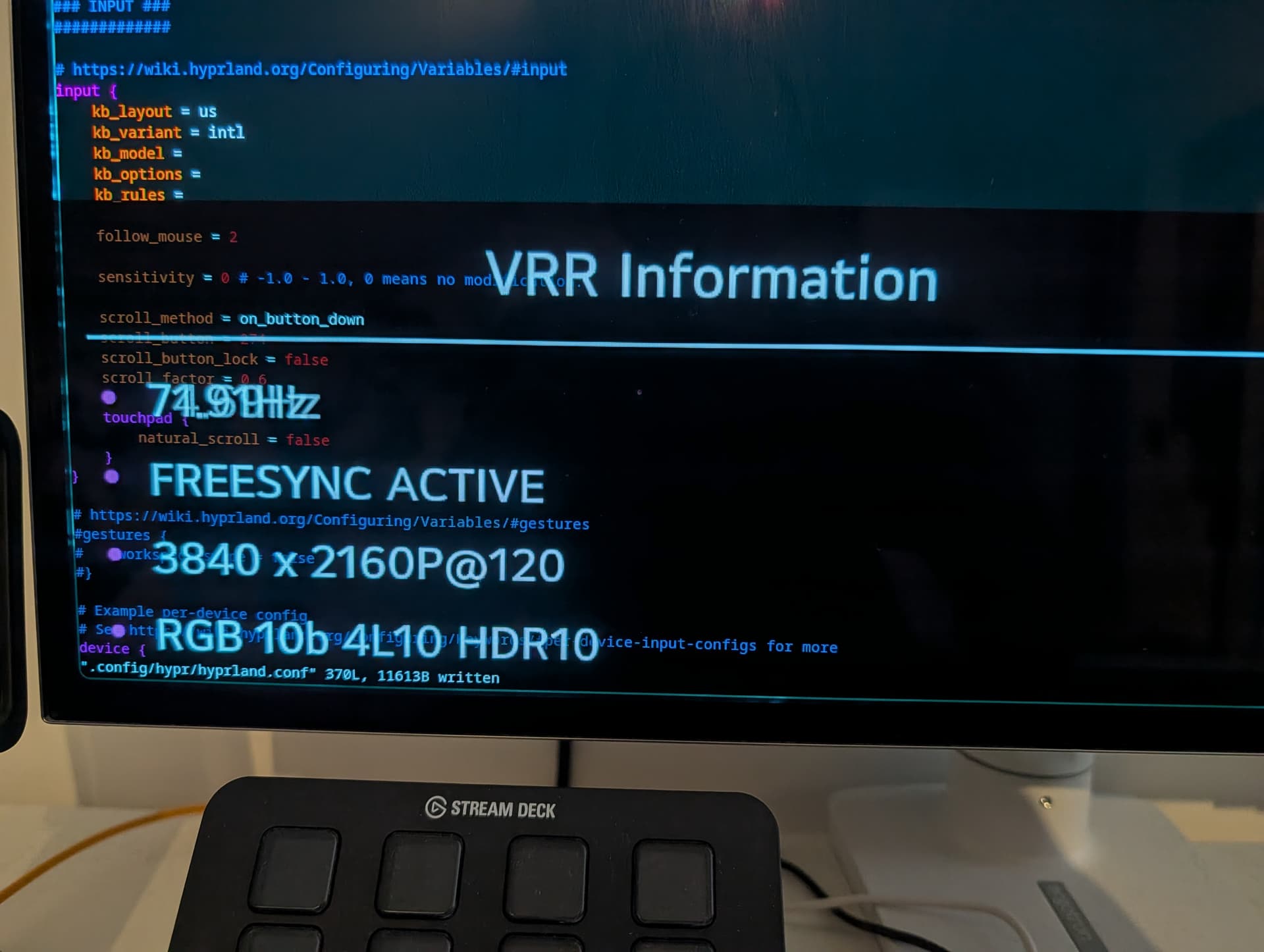
I am not sure how to accurately test if VRR is actually working or not.
But if I enable VRR in Hyprland + misc/vfr I believe all is going as intended. The display shows varying refresh frequency and I get a lot of OLED brightness flickering due to frequency shifts.
1 Like
What monitor do you own that DisplayPort is an option?
If it natively supports that, I would immediately go with direct cable instead of an adapter solution.
Is Windows actually driving 120Hz when it is RGB?
I have the Ugreen version of this cable. I’ll mess with it tonight and see about a 9070 getting there (or close)
Dell S2725QS
I didn’t buy the DisplayPort cable because an HDMI 2.1 cable came with the monitor, and I wanted to use that
Yes
I found the solution to my problem; it’s such a simple solution I couldn’t believe it worked. I leave the adapter plugged into the PC and turn it on. After Windows starts, I turn on the monitors. This always works, and I get the RGB color format. It seems that turning on the monitors before turning on the PC somehow messes up the adapter.
1 Like
Hey all, I’m also fighting linux + HDMI. I’m basically fully on bazzite these days for linux.
I’ve tried a cable matters cable with this this Synaptics “Spyder”  vmm7100 chip in it that does advertise VRR.
It’s not the same exactly since it’s usb-c, but I still wanted to try to get it working with full-everything on a legion go, macbook pro, and thinkpad 11th gen intel.
I used a windows VM in Bazzite to flash the cable to the Mac firmware and PC firmware, but I don’t remember being able to get 4k@144+HDR+VRR working on a macbook pro m4 and macbook pro m1 I tried, nor my AMD legion go with USB-4, nor a thinkpad with USB-4 and intel graphics. As far as I could tell the tool was happy with flashing the cable to the two options it had.
In the end I didn’t get VRR, although I think I did get 4k@144 on the mac, and at least 4k@120 on the legion go, but not full-everything I don’t think. Anyway I didn’t really have a use case for this cable other than to dock the legion go handheld thingy to the TV.
Now I’m considering the same setup as @merrick97: Bazzite, 9070XT, and this LG tv. I’m going to read more of this thread now.
Just wanted to let you guys know that there’s a new dongle in town. Ugreen, based on Chrontel CH7218 and this one actually advertises VRR support. Works amazingly stable, seems to convert FreeSync enable bit to HDMI VRR (all VRR implementations wokr the same in the end) and even does HDMI CEC tunneling.
I did quite a nice post about it on reddit but can’t link to it here. I wonder if I should just copy it? The title is:
(U)Green Knight - the holy grail of HDMI 2.1 dongles (yet another 4k 120Hz post)
5 Likes