Hi,
I recently purchased a fiber optic setup to connect my PC to my TV on the other side of the apartment, and I am having problems with it. The Display part of the solution works perfectly fine, i can transmit 4k@120 with HDR, Dolby Vision & Atmos and G-Sync enabled without problem. Unfortunately i cannot get the USB solution to work for my usecase (connecting a USB Keyboard, Mouse and Controller), which i would have honestly expected to be the easier part…
The fiber USB Adapter just refuses to send data for any device that is not acting in pure USB 3.0 mode (even through the USB Hub), which means that an external Samsung SSD works perfectly fine at max USB3.0 speed, while not a single mouse, keyboard or controller i own is even detected at all by my PC. I have already been in contact with heyoptics.net and they have issued a refund for the adapter, which is good customer service but doesn’t get me closer to solving my usecase (they said that USB2.0 device support is spotty).
I have also tried using an old Raspberry Pi 3 ModelB v.2 i still had lying around to connect my devices using the linux native USBIP solution + GitHub - vadimgrn/usbip-win2: USB/IP Client for Windows on my PC, which I couldn’t get to work either. I have opened an issue on their github project as well, if anyone would like to read up on it, though I haven’t yet taken the time to dig deeper.
The last thing I have tried is a trial version of USB over Ethernet: share USB port over Network (LAN and Internet), which also does not seem to work (though it at least doesnt crash the raspi). I got as far as connecting the keyboard+mouse through the usb network gate client, though I am unable to actually control anything on my PC using them.
My question now is quite solution oriented: Is there any known working solution to my usecase that works without any additional cables (the TV room is wired for ethernet already) or expensive additional devices? Ideally, I would search for some software/driver level solution to somehow encapsulate the USB2.0 traffic my input devices are generating into a virtual USB3.0 device so that I can use the fiber adapter already in place, though I am not knowledgable enough to know if that is possible. Another solution I imagine could work is using input devices which are natively USB3.0, though I can’t imagine there are any, since it just doesn’t make any economical sense.
My setup:
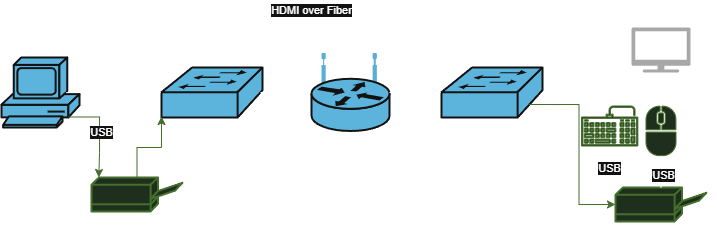
PC → HDMI to MPO OM3 Fiber Adapter (Source) + USB to MPO OM3 Fiber Adapter-> MPO OM3 2x6 to 1x12 Splitter → Fiber Cable through the apartment → MPO OM3 2x6 to 1x12 Splitter → HDMI to MPO OM3 Fiber Adapter (Display) + USB to MPO OM3 Fiber Adapter → TV + Powered USB 3.0 Hub.
These are the products used:
https://www.heyoptics.net/products/12f-smf-mtp-trunk-cable?sku=18055108642504641194893661
https://www.heyoptics.net/products/12-fiber-mpo-y-splitter-cable
https://www.heyoptics.net/products/optical-usb-cable
https://www.heyoptics.net/products/hdmi-arc-vs-optical
TLDR: Need a solution to connect 3x USB2.0 devices to a PC in another room without pulling additional cables.
Thanks to anyone kind enough to read through all that, appreciate any help.