I’ve been trying to look for a faster refresh monitor (mine only does 60hz) that doesn’t scream “GAMING” in all corners, and which back has to be white (one bedroom apartment). I’ve been looking and I found that the Dell S2725QC looks the part, but you have to “overdrive” the screen to achieve the desired refresh rate. Anyone has good recommendations of a monitor that looks nice that has a fast refresh rate?
It’s hard to tell from the spec sheet, but if it’s an IPS, I think a lot of Dells just use LG panels under the surface.
I use an LG Ultragear. They are “gamer” monitors, but you don’t notice any of those aesthetics from the front. Mine’s black though and I’m not sure if they make white variants. I do have another LG monitor that has a nice white back, but it’s an old 60Hz panel.
The Samsung one’s are pretty alright in my opinion. Don’t look too gamery and can be had in white with high refresh rate. Just don’t enable the RGB globe thing in the back and you’re good.
Monitors | Dell USA - https://www.dell.com/
some of the dell ultrasharp are 120hz and don’t look the gamer part.
Oh yeah! The Ultrasharps are good looking and can keep 120Hz with no trickery!! Think I got my new purchases in order!! Thanks!
Asus Pro Art lines of monitor should have some of your needs.
Its not going to be cheap though. It is for content creation, right?
TLDR: They are absolutely excellent office and creative displays, but do not expect fluid gaming to be similarly excellent experience. But we don’t have much choice outside overpriced clown designs, now do we?
Run a double check first with reviewers that actually do in depth measurements. Like tftcentral or rtings.
High refresh rate support alone guarantees very little in regard to motion clarity. Consider it like ssd up to speed metric in marketing materials.
Dell ultrasharps were and probably still are first class professional monitors, but panel speed was never their target metric or strong suit. And IPS black panels are slow.
You need to verify if chosen panel is actually fast enough to display 120 hz content within required time windows and if its pixel response time is uniform enough for all transitions (search the VA ghosting phenomenon for demosntrion how bad uneven transition times can be for end user).
Top tier ultrasharp panels are often not even fast enough to display 60 HZ content, since it does not matter for professional users.
EDIT: Case point demonstrating need for careful verification of published specs
Ultrasharp U32223QE Dell UltraSharp U3223QE - TFTCentral
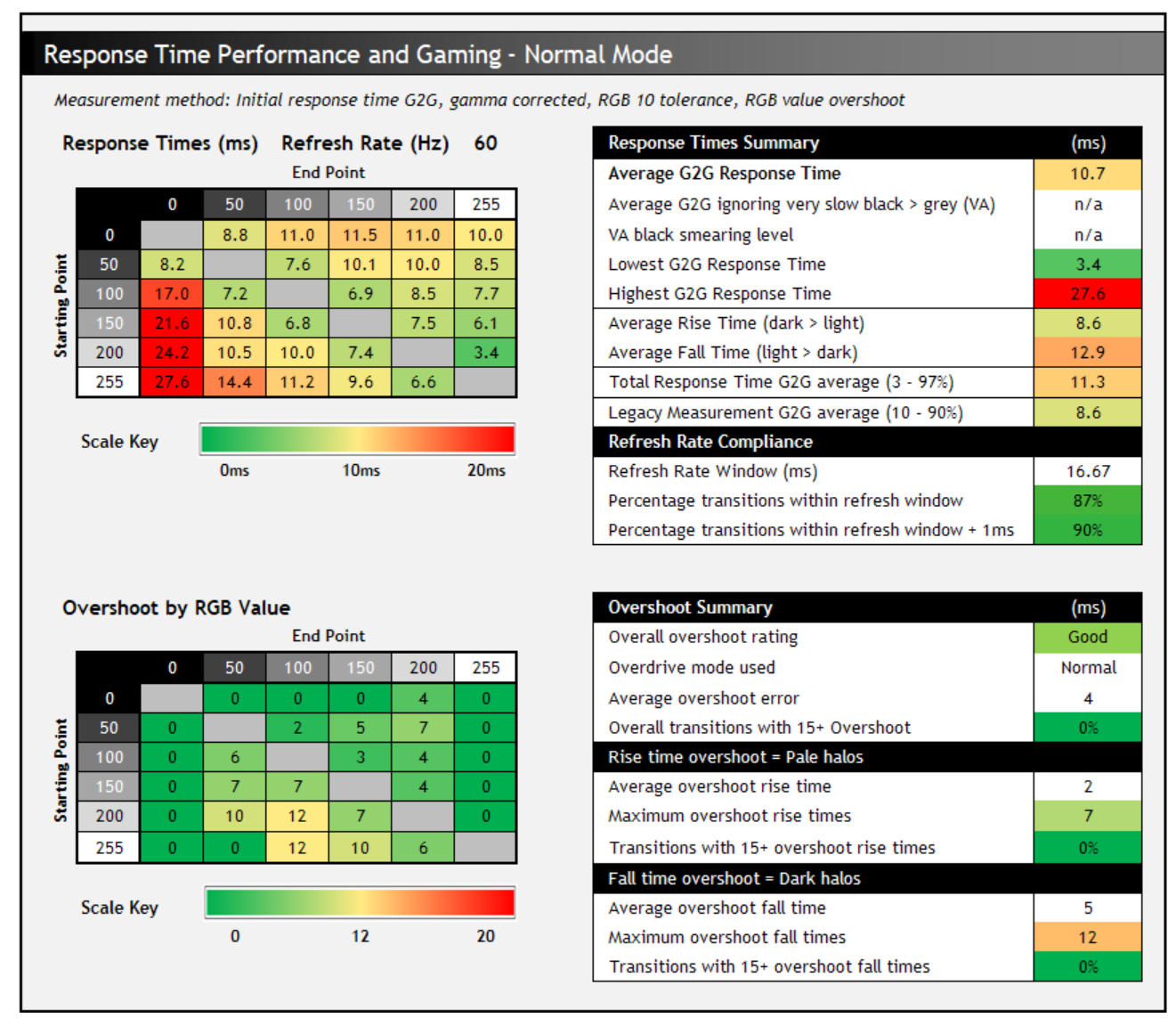
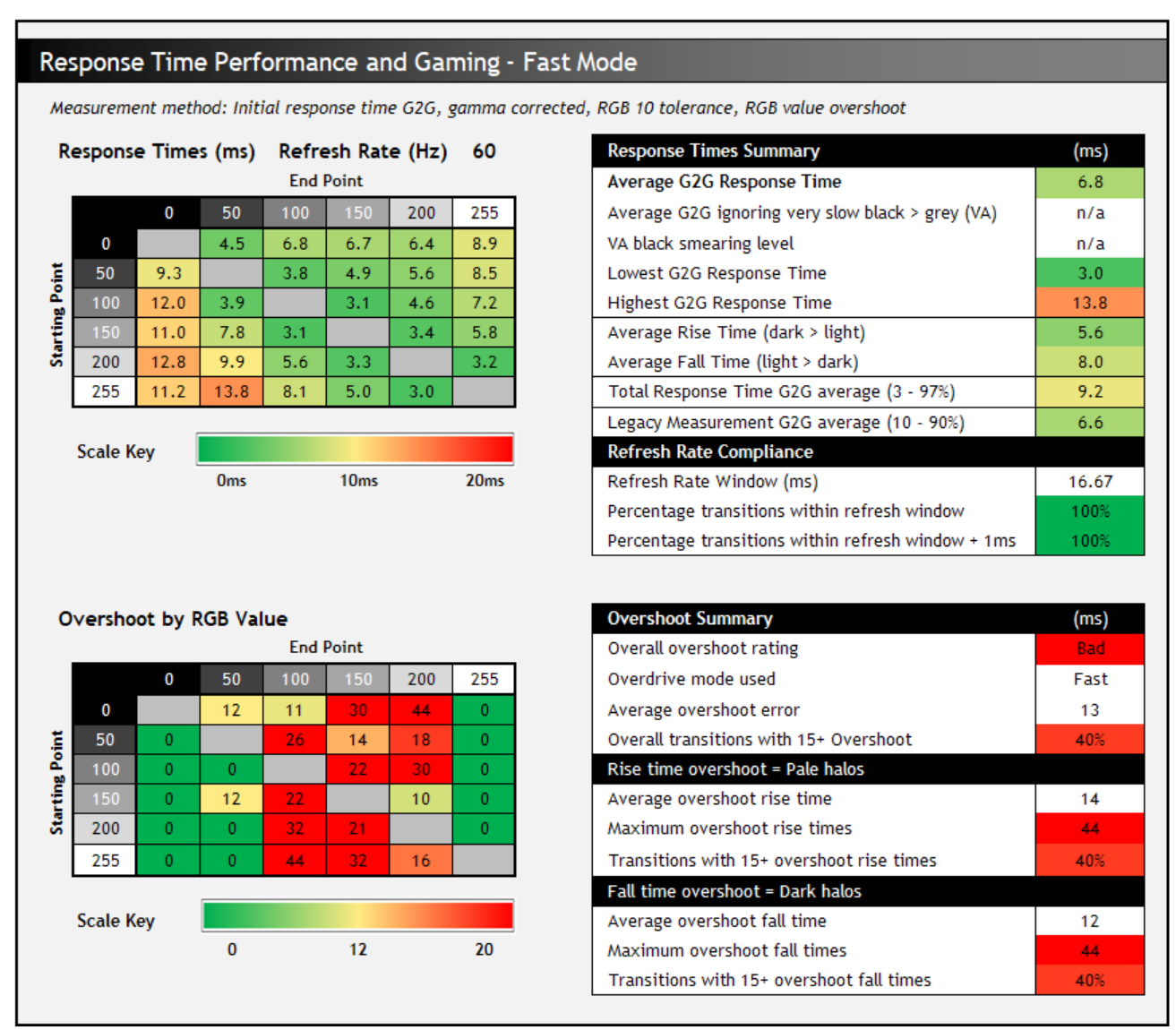
- critical response time windows fo 60 HZ is 16,6ms, any transition time above that is problematic
- without overdrive there will be visible smearing in off to any pixel transition in 60 HZ
- with overdrive pixels will react fast enough, but there will overdrive artifacts instead and its bad
U3225QE 4k 120 HZ modern monitor, same issues as above.
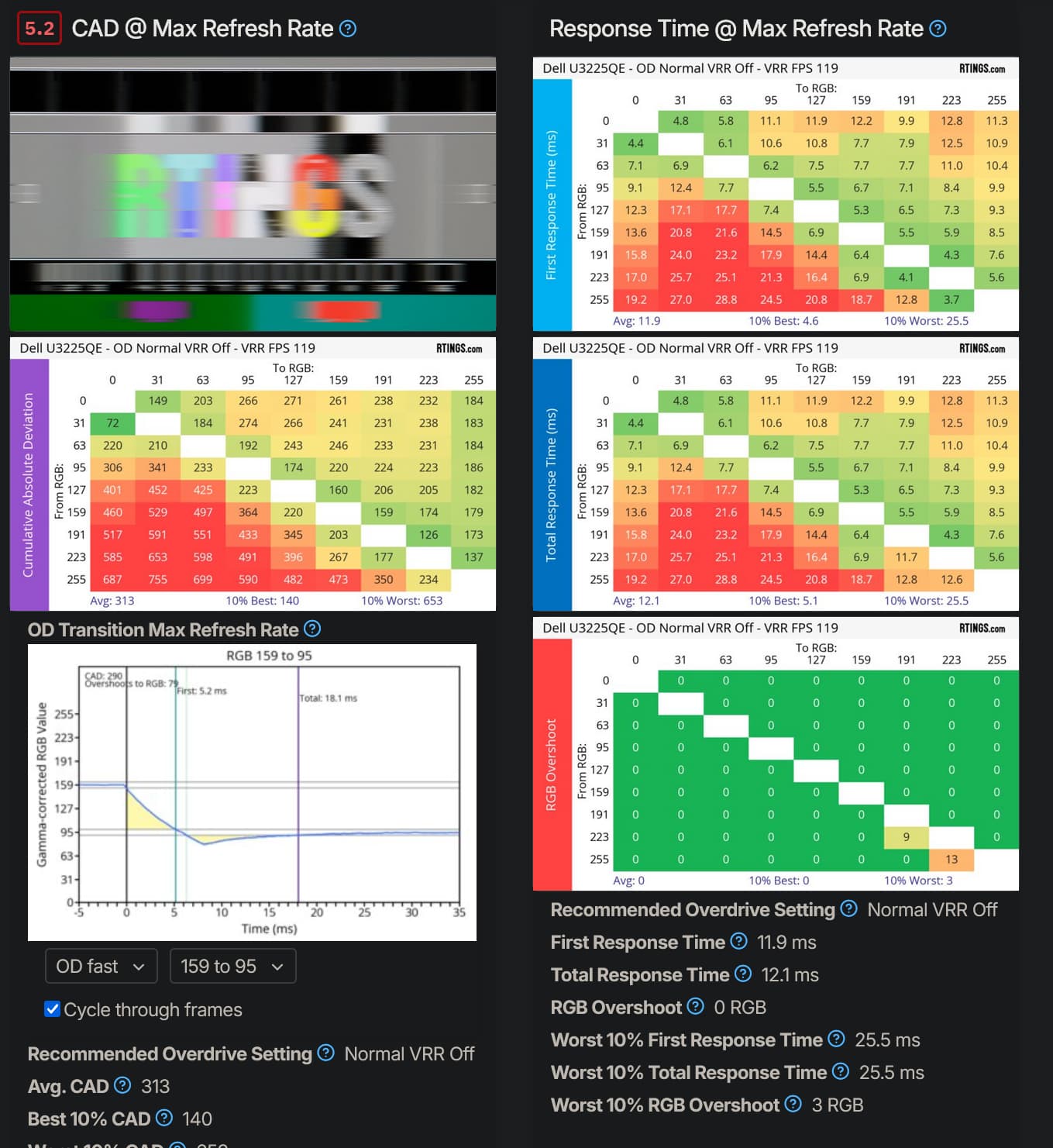
- even worse from response time perspective, pixel transition windows for 120 HZ is 8,3 ms, there will be a lot of visual artifact on very fast moving content
- overdrive does not increase response time enough and will create artifacts as well.
1 Like
My Gigabyte M32U is pretty tame.
What size/resolution are you looking for?
We are using the Samsung G9 here. In generally when you go to the larger monitors, the gaming stuff mostly fades away.
Definitely going to be an LG. I have an LG Ultragear and while the bezel is black, the back is white.
LG also makes panels for most, if not all, of the others.
I’m looking at a 27" screen. And between 1440p or 4k resolution. Not that picky honestly for that screen size.
I don’t see Ultragears going lower than 32", unless I’m looking at the wrong places.
@greatnull I will certainly have to have a read at the Dell Ultrasharp lineup - thanks for the detailed breakdown, definitively will guide my research! This means - I’ll keep on researching! 
really? They must have stopped making them as that is exactly what I have on my desk infront of me at the moment. Are you in the USA?
Nope! That must be why! Maybe I can search it by the Model No. What is the exact model you have?
If you are looking for excellent office monitor with better movement fluidity, then it will likely be excellent choice.
But if you are primarily set on excellent gaming monitor, then you might be disappointed.
Hence the warning.
But they are surprisingly affordable, my own UP3214Q costed 20-30% more almost decade ago than spiffy Dell U3225QE today.
EDIT:
As a sidenote, I sidegraded from UP3214Q (tftcentral review) to LG ultragear 27GL850-B (tftcentral review) for motion clarity. But build quality was pretty atrocious compared to Dell, and static image quality was massive downgrade (contrast, colour accuracy, colour vibrancy)
Re - ultragear, this is what some ips panels can do :
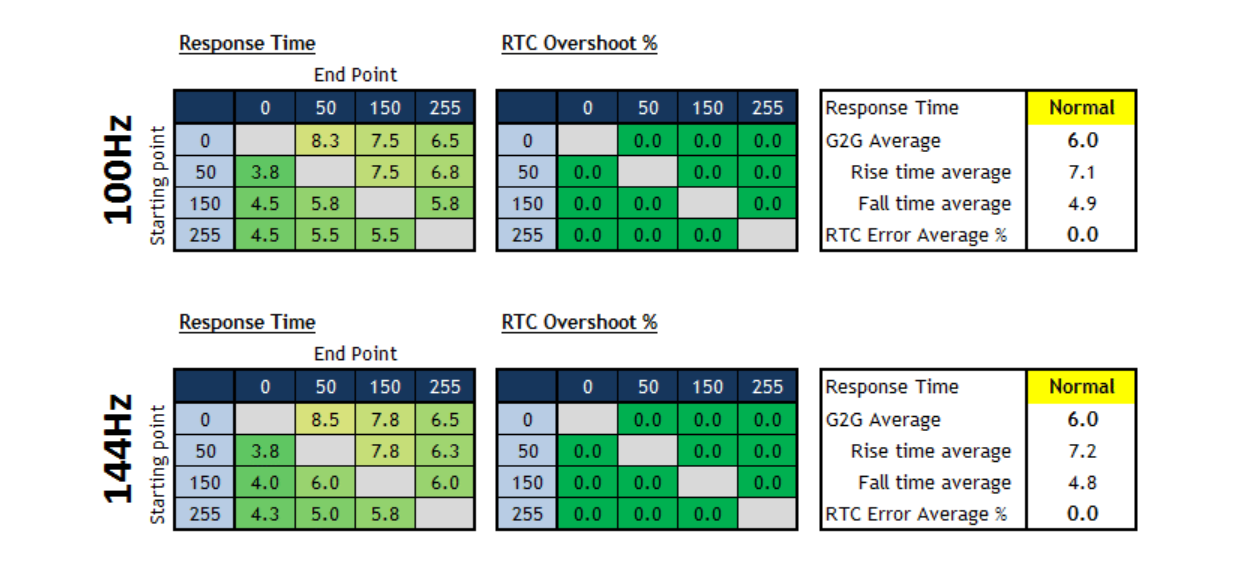
- almost all transition are within 6,9 ms time windows without use of overdrive
Overdrive artifact can create visual artifacts like this:

Excellent motion clarity though, but I verified via tftcentral first. Some ultragears were not even remotely as good as 27GL850-B back then despite identical marketing specs regarding motion clarity.
After that I chanced upgrade to LG 42’ C2 oled (tftcentral review), where I still remain. Oled is absolutely the best for motion clarity, but there are many costs and caveats.
Oled panel for comparison is perfectly capable of displaying even 1000 HZ signal, if there were a way to feed it to it:

I do NOT explicitly recommend, but neither do I dissuade from upgrade to oled TV as display, it just has headaches and caveats upon further caveats.
Although it doesn’t have a white back panel, I am looking atm at https://www.amazon.com/MSI-321URX-QD-OLED-pixels-QDOLED/dp/B0CP49MMVC, and I cannot say that it has that deranged look (although there is one small rgb element on the back, but I think you can turn it off, if not ducktape…).
LG 32GS95UE seems decent too, but pricing is high. Seem to be the oled gaming monitor from lg right now. Even subpixel layout has been improved for text clarity, eve if it still isnt ideal RGB layout.
Ref. review LG 32GS95UE Review - TFTCentral
I was just coming to say that I checked. Mine is an UltraFine, not an Ultragear. 27 inch, 4K, IPS, etc…
If I were getting a new monitor right, I would be getting an OLED though.
I just use a 42" OLED TV.
I’m using Alienware AW3225QF for a bit more than year. This is my first experience with OLED panels and so far it is giving me excellent colors and most important - no eye strain while looking into Visual Studio Code for long hours. Also curvature was not an issue so far. Even though OLEDs will burn out in time, but I may say that did not notice anything yet.
Before that I used a 55" 4k-144Hz TV from TCL (TCL 55C735). Overall experience was not bad, but absence of DisplayPort was really noticeable. Especially in my case - AMD GPU + Linux, which effectively locked me in HDMI 2.0 specs. DisplayPort to HDMI 2.1 adapters I tried behaved quite glitchy and gave blurred picture in most cases.
The BenQ MobiouZ lineup doesn’t look bad - even the Mobiuz name can be coloured out somehow