Is the gaming specific distributions, Nobara for example, much more performant in games than “regular” distributions like Fedora etc? I’ve understood that Nobara uses Fedora as it’s base but then alters a lot of stuff as well as bundles the Nvidia drivers in a seamless way. Could i then use something like Fedora Silverblue, install the Nvidia drivers myself and get sort-of the same experience? Or will i be missing out on a lot of frames by not using Nobara?
So does Fedora if you just enable third-party repos in the installer. It enables the rpmfusion-nvidia repo which is all that Nobara does regarding that anyway.
Silverblue is something very different then regular Fedora (Workstation or any of the spins). You can’t compare this to Nobara.
That said, technically you could.
Back to the original question: The “gaming focused” distros have always been more snakeoil then anything else. Performance in games is largely down to 3 things: The GPU driver version (and by extension the Kernel version), the Mesa version, and the Wine/Proton/DXVK Version, all of which can be upgraded anytime or in the case of Fedora are fairly up to date anyway.
I would be very surprised if in a 1:1 benchmark comparison you’ll get anywhere north of single-digit FPS improvements out of it.
gaming focused? no not really…
but saying that theres no real harm either.
mint for instance does most things but does gaming very well. so a decent enough replacement for windows.
debian running x11, can be made to run games at a comparable performance to windows give or take.
as it has nvidia driver support and a regularly updated kernel.
it will take a bit more config editing and finding dependencies.
but thats not that big a deal with apt support. (still way more involved than a msi installer, but linux is linux )
I’ve decided to just roll with Fedora Kinoite and install the nvidia drivers myself, and it was pretty much no hassle at all.
Firefox flatpak from Flathub also solves every issue with Hardware decoding when viewing videos etc.
Having a good time using Debian for my steam gaming , AMD GPU mind you. I found it easier than Windows, Steam is in the debian (non-free/contrib) repos, as were a few other packages I had to apt-get.
Been watching the rpm-ostree spins for a while, will have to give Kinoite a go at some point.
To answer OP, I’ve tried Nobara. It lacks polish as of mid January 2024 for both the official and GNOME variants. Things still break. Its great if troubleshooting gives you new knowledge and the satisfaction of a job well done (from fixing the issue).
Me, I’d rather have things work. IIRC someone from the Linux youtube space also tested that the performance and is only about 5% difference on the average, between Fedora and Nobara.
I’ve tried Nobara recently. The appeal for me was Linux HDR but since I’ve installed gamescope-session on Nobara, to get the “Steam Deck OLED” feels it crashes after a few patches and just exit back out to GDM (I was using the GNOME variant of Nobara). So with no HDR from gamescope-session, there was functionally no reason for me to Stay with Nobara.
If you’re fine with tinkering and PCs in general, no.
If you just want all your games to “just work”, and to never have to think about libraries or diagnose a problem, maybe. Depends on the distro.
It depends on the distros gui choice as well.
In most Gui’s its a tradeoff on performance vs visual polish on the desktop.
A prime example is the kde desktop.
Very pretty graphics but a bit of a resource hog.
With most of the os’s processes in the background unlike windows.
You can indeed customize any distro for gaming, but the results may not be to your liking.
Minimalist distros are generally very fast but leave a lot to be desired in appearance.
And even then may be a B!+(h to configure!
If you havent the experience in scratch building, then chose a distro already made for gaming and tweak it to your liking.
With graphics cards the speed of the gpu is important but not quite as important as the amount and speed of the cards onboard memory.
A fast card with a small cache of memory will make use of the motherboard memory and degrade overall performance.
Over clocking any processor or memory generates heat, under powering a processor can also generate heat.
The same with cooling fans to make them quieter.
You can tweak the fan speeds but its a tradeoff in noise vs efficiency.
If you havent tried it yet.
4mlinux is a neat distro specificly designed for gaming.
Anecdotally, the only issues I’ve hit with Pop were the steam store choosing the igpu instead of the dgpu, and Baldur’s Gate 3 not running in vulkan (but ran just fine in DirectX mode, lol). I don’t play esports games or currently play any games with anticheats though, so ymmv.
I wouldn’t doubt that Steam’s stuff is probably more polished though, it’s their main focus after all.
To the OP, though, I haven’t tried Nobara or Fedora to compare performance. AMD GPU and Pop has met my needs and ‘just works’, so far. They also have an iso with the nvidia GPU drivers baked in.
I have tested a few distros around the time of RHEL source code drama and Mint had 172fps in comparison to the rest 152-162fps in SOTTR from Steam out of the box. (13600kf+RX6800XT 1440p max graphics settings).
Well first of all that’s like… 2(?) years ago, but secondly just because you tested one title doesn’t make that a conclusive test.
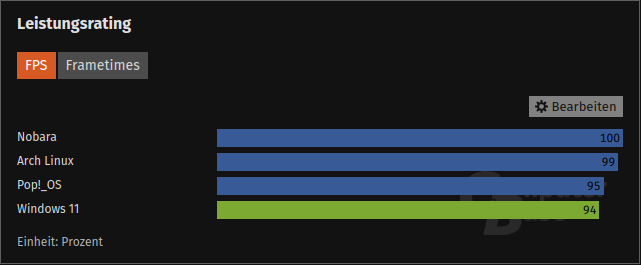
Check the diagrams in the article you listed. This is the overall performance rating over multiple titles:
4 fps isn’t even worth loosing a thought over, that’s well within margin of error.
And even the specific titles aren’t that far apart.
Regardless even that test is very limited in scope. 5 titles is nothing I would loose any thought over in terms of distro selection, there are more relevant parameters.
Still, double digit improvements are possible. This still stands. Couple of months passed and my tests confirm earlier findings.
But not all hope is lost. You can truly be distro independent now.
I have tried conty and it basically runs all games and looks like it is distro agnostic. I came back to pure 64bit Slackware (15.0, not current) as my daily driver and with conty I can play all games at close to max FPS possible on my hardware. I cannot play only one game - Battlefield 1.
EDIT: I can play Battlefield 1 on Slackware now and it actually works better than on Win 10, where it crashes randomly.
I run LMDE on my gaming PC and it runs Steam and my emulators just great. Nick from “The Linux experiment” ran some tests comparing Tuxedo OS to some “gaming focused” distros and found little difference.
If you are gaming on Steam, now a days it’s better to just run a distro you are comfortable with.
Also, I think it’s worth noting your experience will be different if you run an AMD or Nvidia GPU. You might want to run a gaming focused distro like Nobara if you are using Nvidia since they have good drivers pre installed. I use AMD so I don’t worry about that.
I’ve had a terrible time trying to do 3D acceleration on EndeavourOS on a hybrid Intel/Nvidia laptop. Finally got Firefox to do Video decoding by adding the intel-media-driver package and fiddling around with it for two days…
From what I understand about switching graphics drivers between Intel/Nvidia based on workload it’s going to be a nightmare.
I suspect that Arch Linux will be the base distro to use because Steam technologies are built against SteamOS Holo now. My theory is just that, nothing substantiated yet. I tried to run Rise of the Tomb Raider on my Fedora-powered “gaming” PC yesterday, and the framerate was absolutely unplayable. Not even lowering the graphics quality to the lowest setting had a proportionately significant impact and I couldn’t get the game to go above like 40 FPS average. I tweaked it a bit, messing with the command parameters and forcing it to use the Steam Linux Runtime to no avail (which is basically a compatibility layer for native titles since distros have 0 backwards compatibility as dependencies are updated. It’s a large reason why AppImages exist). Then I looked up its rating on https://protondb.com to see what other people did. People forced it to use Proton Experimental and Proton GE. I didn’t try that previously because the last time I tried to run the Windows version of Rise of the Tomb Raider on Linux was a horrible experience. Well, it ran amazingly - possibly with even less 1% lows and 0.1% lows than I used to get with the native version back in 2018. However, I noticed that someone running Arch Linux was able to get the native version to work with the Steam Linux runtime. I’ve been wanting to build a dedicated development/staging machine for awhile now and separating that work from gaming hardware, so I definitely want to test my hypothesis when I get the chance.
Did you run the native version or the Windows version through Proton?
Because the native version is hot garbage. IDK what the fuck they did but that shit is a dumpster fire dumped in gasoline.
If you haven’t gone far in the game yet all I can see is do not - I repeat do not - play the native version.
When I played it, the FPS was… well, questionable, and it would occasionally crash. The crashing is one thing, however it corrupted the save files and it is apparently also running under a debugger in the release version, which would OOM my system and straight up crash the X server.
I did get through to the end, however the last save file ended up getting corrupted at some point as well so I’m not even able to load my game and do the DLCs now.
Again DO NOT PLAY RotTR in the Linux-native version.
Then again I don’t actually know how well the Windows version runs (or at all) because Shadow of the Tomb Raider would refuse to run under Proton for me. It wanted to connect to some network services but couldn’t. The native version worked perfectly fine.
 )
) , AMD GPU mind you. I found it easier than Windows, Steam is in the debian (non-free/contrib) repos, as were a few other packages I had to apt-get.