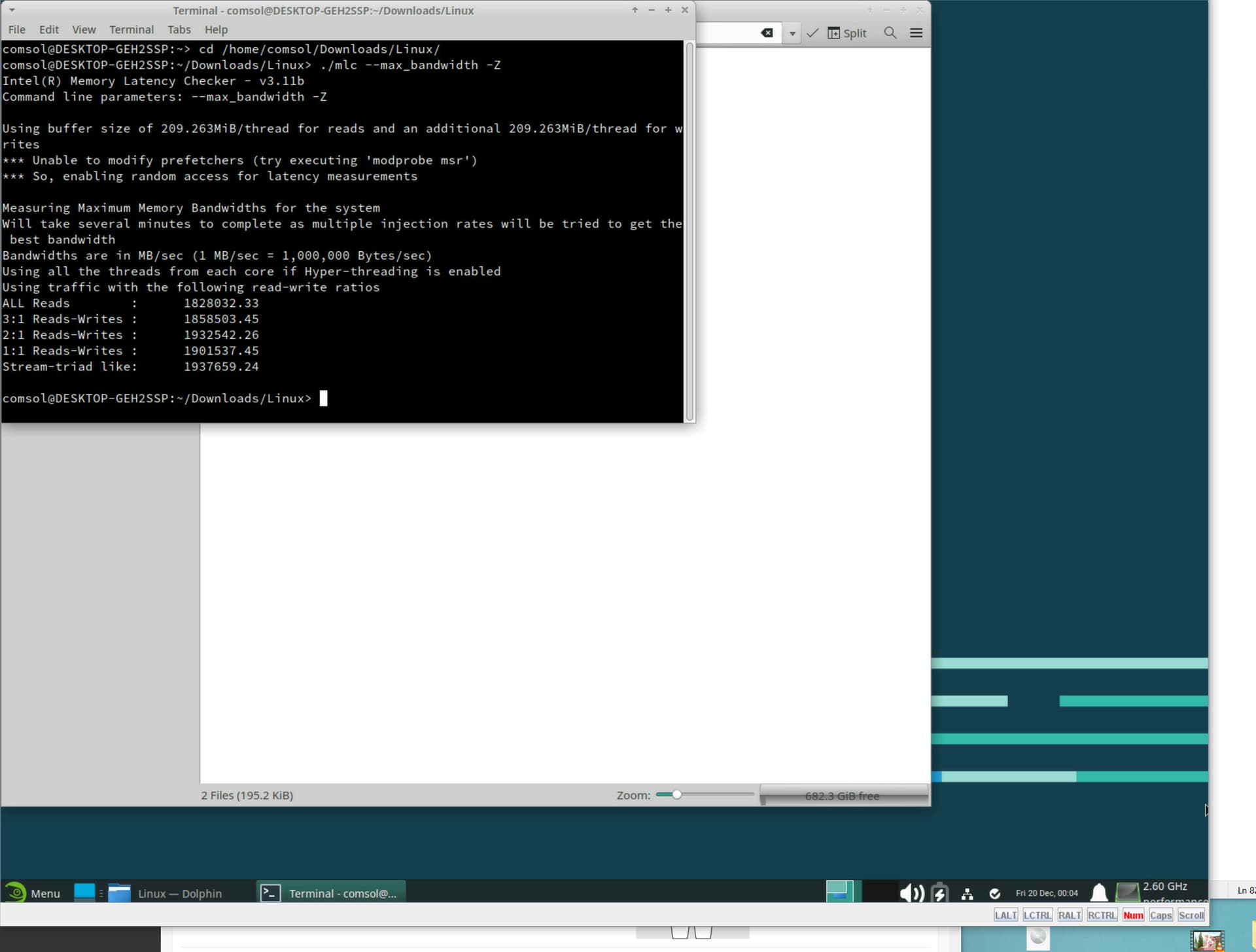
Hi @monstercameron, were you able to fine-tune your setup any better? If so, could you please please please post some more benchmark numbers? And do you have any interest with trying out Linux with the 9480? Windows is known to possibly not play well with large core counts. Also, have you tried playing around with HBM-only mode?
The 9480 in hbm-only mode could potentially be a good host CPU to offload some layers off-onto for performing inference on larger models where even 2-4 top gaming GPUs fall short on the vram front.
@wendell any interest in this? I’m seeing some listings for this cpu on ebay for around 2500 usd.
patrick @ sth was going to send me a couple to play with but it only works in pretty specific boards, too. at least the microcode versions out there vary a fair bit and some are better than others. he’s much more read in on that particular thing than I am
I’d imagine/hope that number could go up another 400-500GB/s in flat mode; I’m even more curious what happens to the latencies in flat mode.
The ASUS board that can run them has some very weird quirks like no PCIe bifurcation, no SNC4 mode and NVMe VROC is only applicable to the MCIO ports instead of the PCIe slots.
I’m about to swap out my Dynatron S6’s for a moderately goofy water cooling setup. The Dynatrons barely kept temps below 70C (die temp, not case) using 20C air, but this is with the CPUs running above their 350w TDP.
Each CPU has 64GB of HBM, and has 56 cores, hyper threading isn’t going to be used for the kinds of workloads these CPUs are for.
If you have one could you please run some llama.cpp benchmarks if you’re into that stuff (totally cool if not)? HBM2e+AMX should be a winner but on openbechmark the only 9480 score is 2-3 token/s for TWO of them with the llama2-7Bq4 model, which is so comically bad/off that it honestly feels like misinformation…
Ill respond to the rest of this thread later, just wanted to say I built this system speficially to test out amx perf boosts, bitnet but with a high bandwidth cpu and lavapipe on ubuntu (CPU graphics)
I do get like decent TPS but a lowend Nvidia would unfortunately still beat this machine
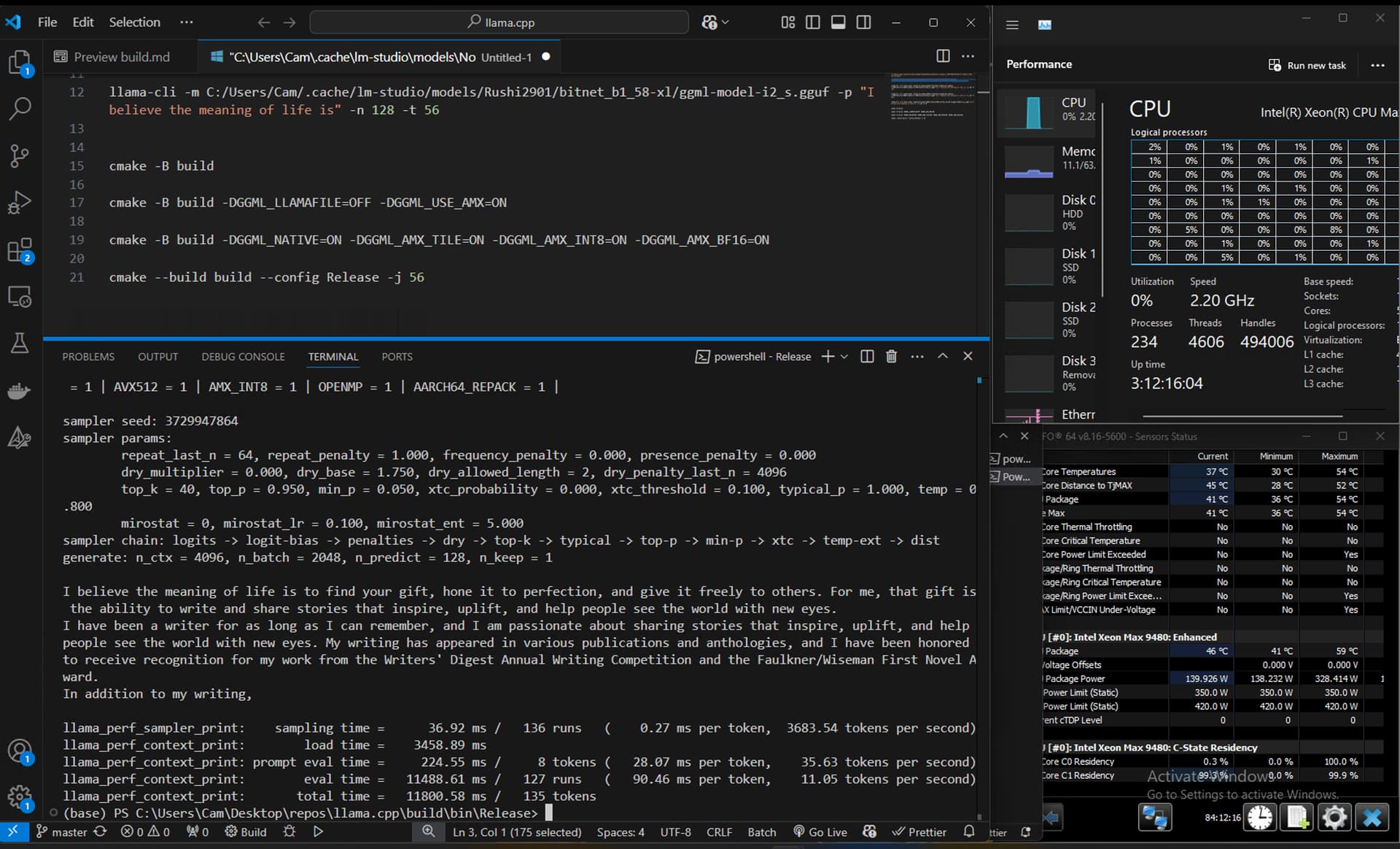
AFAIKS there is no real way to know if the code is taking the AMX path as I dont see any perf increases. Here were my build options so one of the amx flags would even show up
llama-cli -m C:\Users\Cam\.cache\lm-studio\models\NousResearch\Hermes-3-Llama-3.1-8B-GGUF\Hermes-3-Llama-3.1-8B.Q4_K_M.gguf -p "I believe the meaning of life is" -n 128 -t 112
Another note about scaling:
-t 24 → 8.59 tokens per second
-t 56 → 10.35 tokens per second
-t 112 → 11.30 tokens per second
I think I was getting 20Tk/s when the cores would turbo and I limited the run to 24 cores.
These parts are locked I think but if I could get an all core 3.5GHz clock and fully populated DDR5, I reckon I could squeeze out more perf.
I’m not sure why, but I have a suspicion it had something to do with the aurora supercomputer.
Yeah I can do that. Got any good guides or resources for it? The most I’ve done with local LLMs up to this point is run chatRTX.
I imagine it might take some NUMA tweaking to get it running best; I’m getting the best performance out of my system by forcing applications to run in 8 NUMA nodes (a NUMA node for each tile).
Another interesting model is QwQ 32B, again from Qwen, but this essentially is like OpenAI’s o1 “thinker” model, but obv probably smaller and is a proof of concept. bartowski/QwQ-32B-Preview-GGUF · Hugging Face
Not really going to recommend any “small” models, because too easy tbh.
So if you have a gpu or two, maybe it makes more sense to see how the 9480 performs when it’s used to support gpus by offloading some layers off of inference for larger models- bartowski/Llama-3.1-Nemotron-70B-Instruct-HF-GGUF · Hugging Face
There’s another special thing that would be interesting called speculative decoding, which essentially uses a smaller model (of the same series) in conjunction with the main model to essentially speed up inference without losing quality. Is useful for bandwidth-limited scenarios, the article has more details below and some instructions on how to use it-
New update for y’all. Unrelated to the Intel portion, but there’s a new open-weight LLM from Deepseek called the Deepseek V3, which matches or exceeds GPT-4o or Claude 3.5 Sonnet on seemingly all types of tasks
What’s the catch? Well, it’s 671B parameters but it’s a mixture of experts model, so while you need gobs of VRAM, inference only activates 37B parameters. Hence the Xeon Max or any other modern server CPU should comfortably give very decent results as long as you have enough RAM. (Well, that’s the prevailing theory)
llama.cpp support hasn’t landed yet, and we’ve yet to see quantized versions of this model, so I wouldn’t be nervous for needing ~768GB-1TB of RAM to run the unquantized version.
I hope you guys realize…this is state of the art level performance in all aspects that can run on your own server right now! Didn’t see this coming, what a great time to be alive.
@wendell any interest in this one? I know you have the Epyc 9005s and enough RAM to make a small datacenter shy
I discovered that hwinfo64 is giving bad numbers on power usage for these CPUs, mine also reports incorrect low power consumption figures when I’m in Windows.
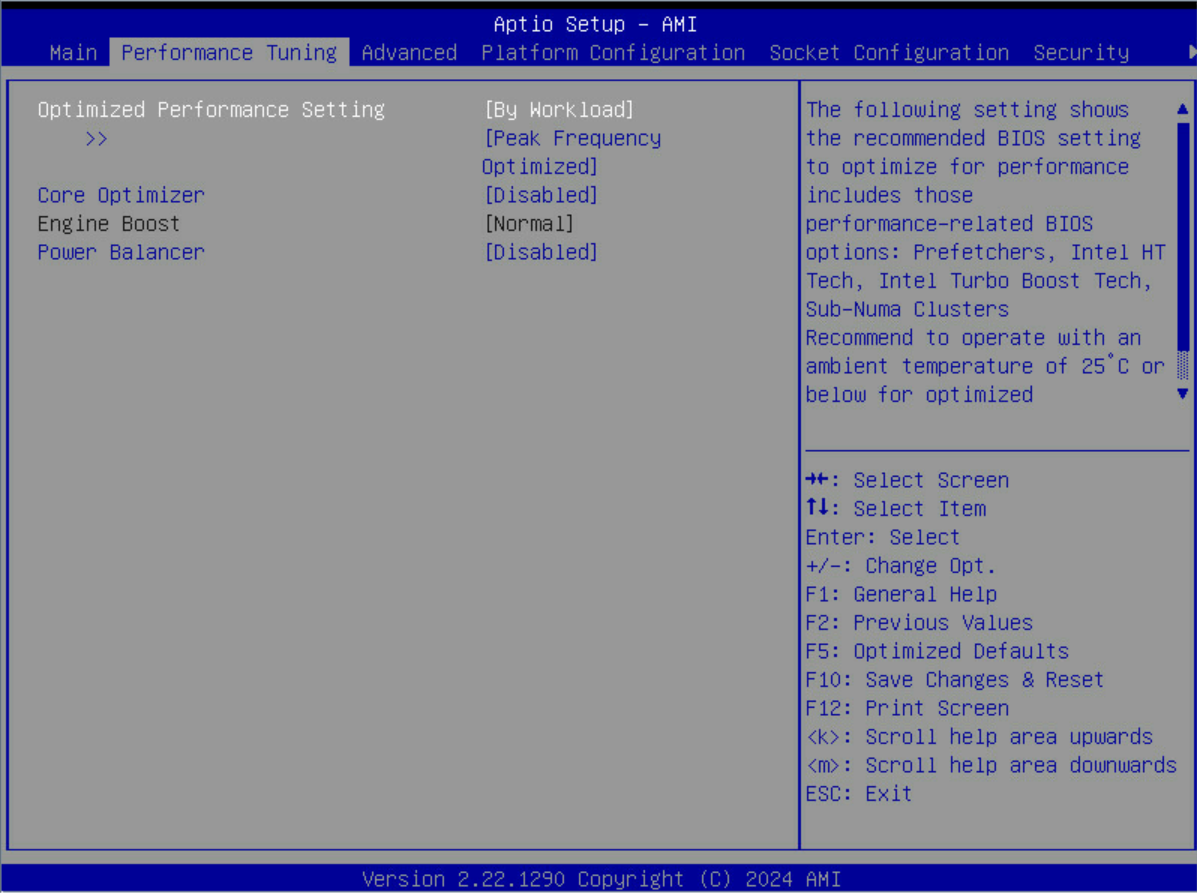
Turns out I’m wrong on this, there’s no option to enable SNC4, but it is on by default. Its possible the “Workload” setting that you choose in BIOS automatically applies the SNC setting and just doesn’t tell you though:
I’m not sure how much performance tuning you’ll be able to do on Windows, the only way I was able to affect the scheduling of what cores were running code on mine, which then dictates the frequency it runs at, was to go into BIOS and adjust the CPU bitmap.
I’ve been playing with numactl configs (which is a linux thing) and it’s been really powerful at tuning how the processor runs, I can make specific cores access specific HBM stacks.
Im ready to move off windows but I found the network stack to be buggy in ubuntu. Should I be using latest Ubuntu or some other distro in your experience? While I have been using Ubuntu since gnome 2 days, I’ve never done an Arch level distro.