Intel i915 sr-iov mode for Flex 170 + Updated for Proxmox 9 PVE Kernel 6.14.8

thanks for the suggestions,

  • cant disable TB - its used for my ceph high speed mesh network
  • no options in BIOS for rebar
  • sr-iov and vt-d working ok with the i915-dkms driver repo just fine

trying these drivers because it is impossible to use the i915-dkms driver AND use an AAD account or Microsoft account in the guest VM as a) the vm gets into infinite repair loop once windows hello is initialized b) switching from host cpu break the vGPU (but fixes the automatic repair loop issue). (aka i was hoping these drivers got me past what i documented on this reply proxmox-vGPU.md · GitHub)

maybe an issue with the NUC i13 …?
any idea how to identify what the rebar setting is via command line?

interestingly ASUS fnally started doing NUC firmware upgrades, they have released several this year, I will try updating…

–edit–
made no observable difference

i logged issue to kernel crash on promox 8.1 when starting VM with a VF attached · Issue #165 · intel-gpu/intel-gpu-i915-backports (github.com) we will see what they say

(i note this driver takes over the console too… does this mean one can output a VM to the console?)

–edit2—
tried adding i915.modeset=1 no difference with that either

–edit3–
i am pretty sure they are going to say iGPUs ‘not supported’… and that is the issue…

gen12/13 igpu SR-IOV support · Issue #143 · intel-gpu/intel-gpu-i915-backports (github.com)

Has anyone of you tried to enable sr-iov on desktop igpu and non-proxmox linux distribution?
Is mobile iGPU in minisforum machine architecturally different from desktop iGPU?

I mostly followed this guide but without proxmox specific parts.
My cpu should be really close to theirs, but I get a lot of errors while initializing VFs.

My testing enviroment:
Distro: Gentoo
CPU: intel i5-13500
iGPU: 00:02.0 VGA compatible controller: Intel Corporation AlderLake-S GT1 (rev 0c)
I’ve installed fresh linux-firmware directly from git.
I’ve tested kernel versions 6.1.81-gentoo-dist and 6.6.21-gentoo-dist

I’m getting some errors while initializing VFs

[  942.260053] pci 0000:00:02.1: [8086:4680] type 00 class 0x030000
[  942.260079] pci 0000:00:02.1: DMAR: Skip IOMMU disabling for graphics
[  942.260149] pci 0000:00:02.1: Adding to iommu group 21
[  942.260231] pci 0000:00:02.1: vgaarb: bridge control possible
[  942.260233] pci 0000:00:02.1: vgaarb: VGA device added: decodes=io+mem,owns=none,locks=none
[  942.260237] i915 0000:00:02.0: vgaarb: VGA decodes changed: olddecodes=io+mem,decodes=none:owns=io+mem
[  942.260314] i915 0000:00:02.1: enabling device (0004 -> 0006)
[  942.260340] i915 0000:00:02.1: Running in SR-IOV VF mode
[  942.261205] i915 0000:00:02.1: [drm] *ERROR* GT0: IOV: Unable to confirm version 1.9 (0000000000000000)
[  942.261240] i915 0000:00:02.1: [drm] *ERROR* GT0: IOV: Found interface version 0.1.9.0
[  942.261532] i915 0000:00:02.1: [drm] VT-d active for gfx access
[  942.261553] i915 0000:00:02.1: [drm] Using Transparent Hugepages
[  942.262114] i915 0000:00:02.1: [drm] *ERROR* GT0: IOV: Unable to confirm version 1.9 (0000000000000000)
[  942.262126] i915 0000:00:02.1: [drm] *ERROR* GT0: IOV: Found interface version 0.1.9.0
[  942.262463] i915 0000:00:02.1: GuC firmware PRELOADED version 0.0 submission:SR-IOV VF
[  942.262465] i915 0000:00:02.1: HuC firmware PRELOADED
[  942.266439] i915 0000:00:02.1: [drm] Protected Xe Path (PXP) protected content support initialized
[  942.266444] i915 0000:00:02.1: [drm] PMU not supported for this GPU.

upgrading firmware to latest changed this error from

GT0: IOV: Found interface version 0.1.4.0

to

GT0: IOV: Found interface version 0.1.9.0

For some reason my system seems to load GuC for tigerlake(?) platform

[drm] GT0: GuC firmware i915/tgl_guc_70.bin version 70.20.0

I’ve tried to replace this file with adlp_guc_70.bin but it hanged the system.
Any Idea why raptor alder lake igpu seems ton load older firmware?

Client ubuntu (23.10 6.5.0-27-generic) VM cannot initialize this VF. It also may require patched kernel.

6c-1195-4a29-af2d-1f161b330c79 ro quiet splash i915.enable_guc=3 vt.handoff=7
[    5.915352] i915 0000:05:00.0: [drm] *ERROR* Device is non-operational; MMIO access returns 0xFFFFFFFF!
[    5.981314] i915 0000:05:00.0: Device initialization failed (-5)
[    5.981319] i915: probe of 0000:05:00.0 failed with error -5

Some comment on phoronix and github suggests that this type of SR-IOV software virtual functions require client driver to be aware of virtualization. Getting this patched kernel to work on every accelerated VM seems like a pain on the ass until intel mainlines this feature (they’re ~6 months behind?)

Has anyone here tried to run this patched kernel module with A770? I’d want to try this out but state of drivers doesn’t look encouraging. I don’t know if I want to risk buying Arc.
1 Like

Patching this kernel module to accept this verion of guc seems to get rid of this error.

I had to do it both on hypervisor kernel and VM kernel but I still get no output from vainfo.

(log from VM)

dmesg |grep i915
[    0.000000] Command line: BOOT_IMAGE=/boot/vmlinuz-6.5.0-27-generic root=UUID=8c55c66c-1195-4a29-af2d-1f161b330c79 ro quiet splash i915.enable_guc=3 vt.handoff=7
[    0.011758] Kernel command line: BOOT_IMAGE=/boot/vmlinuz-6.5.0-27-generic root=UUID=8c55c66c-1195-4a29-af2d-1f161b330c79 ro quiet splash i915.enable_guc=3 vt.handoff=7
[    3.993116] i915: loading out-of-tree module taints kernel.
[    3.993180] i915: module verification failed: signature and/or required key missing - tainting kernel
[    4.182219] i915 0000:05:00.0: Running in SR-IOV VF mode
[    4.183566] i915 0000:05:00.0: [drm] GT0: GUC: interface version 0.1.9.0
[    4.184124] i915 0000:05:00.0: [drm] VT-d active for gfx access
[    4.184143] i915 0000:05:00.0: [drm] Using Transparent Hugepages
[    4.191792] i915 0000:05:00.0: [drm] GT0: GUC: interface version 0.1.9.0
[    4.223703] i915 0000:05:00.0: GuC firmware PRELOADED version 1.9 submission:SR-IOV VF
[    4.223707] i915 0000:05:00.0: HuC firmware PRELOADED
[    4.230807] i915 0000:05:00.0: [drm] Protected Xe Path (PXP) protected content support initialized
[    4.230812] i915 0000:05:00.0: [drm] PMU not supported for this GPU.
[    4.230921] [drm] Initialized i915 1.6.0 20201103 for 0000:05:00.0 on minor 1
[    6.918083] i915 0000:05:00.0: vgaarb: changed VGA decodes: olddecodes=io+mem,decodes=none:owns=none
root@vm-pc-q35-8-1:~# vainfo
error: XDG_RUNTIME_DIR is invalid or not set in the environment.
libva info: VA-API version 1.19.0
libva error: vaGetDriverNameByIndex() failed with unknown libva error, driver_name = (null)
vaInitialize failed with error code -1 (unknown libva error),exit
1 Like

Intel support page says 11-14th gen CPUs support sr-iov. At least in hardware.

https://www.intel.com/content/www/us/en/support/articles/000093216/graphics/processor-graphics.html

2 Likes

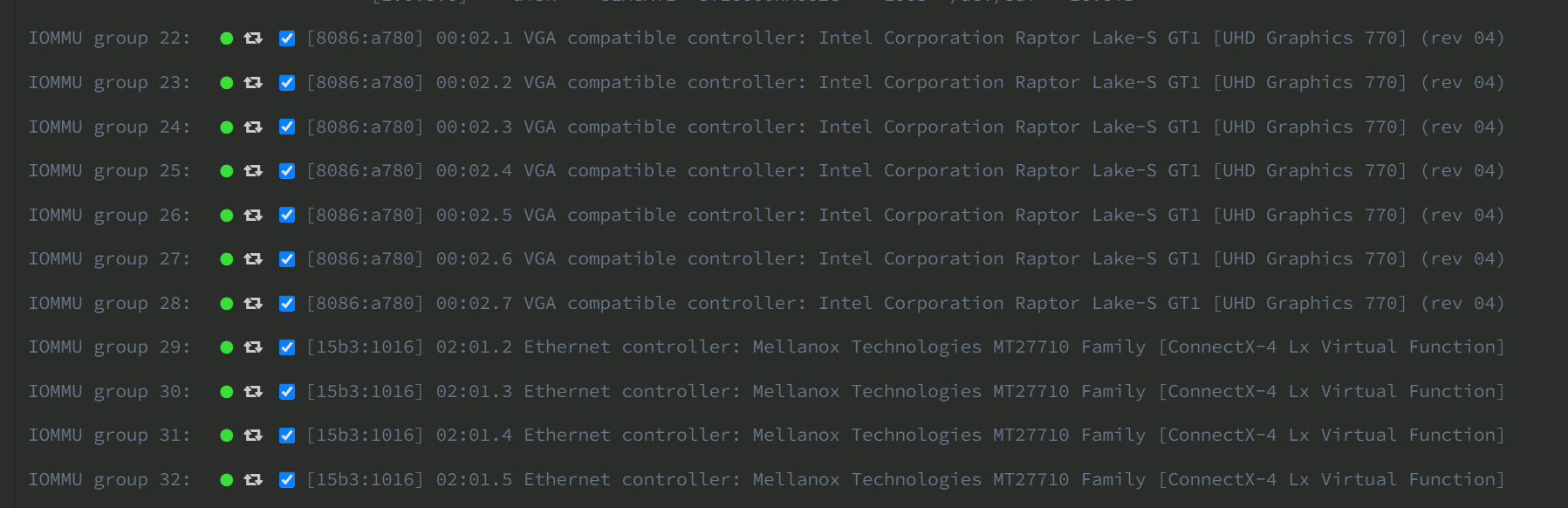
its not that offtopic but here is a snipped of all my sriov’ed devices in my Unraidserver. So Intels sriov with igpu works ezpz

2 Likes

Hey all, I have been trying to get this working with an Intel i5-1135G7 Rocket Lake and have been running into some issues. Before I continue can anyone tell me if they have managed to get this working with a Gen 11 Rocket lake iGPU as I do not want to waste my time continuing to work on this if it simply isn’t possible. I have searched high and low but I cannot seem to find a definitive answer though it seems some may have gotten it to work at least briefly in one way or another there is little information on how or what works and what doesn’t.

i have my eyes and ears open for any Intel sriov but for the 11th gen i did not see any working Units

its between GV-t and riov and listed under sriov but like i said there seems to be no working Units out there afaik.

Rocket Lake does not support SR-IOV. 11th gen is seperated in Tiger Lake and Rocket Lake and only Tiger and upwards supports it.

Hi Scyto, I ran into the same error with a NUC13ANKi5.

I have tried multiple kernels, firmware and repositories without luck. Most don’t build and the one that did ended up with this exact error.

Did you manage to find a solution?

Does this divide up the resources just like the method that was talked about with NVIDIA awhile back?

Like does this still make only a max of 8GB available if you have a 16GB on the GPU and a max vgpu of 2, whether or not you actually have 2 VMs on at the same time?

Yeah, that’s going to be the case here. Nvidia’s GRID driver has magic RAM slicing and partitioning power that hasn’t been developed yet for Intel, so you’re not going to be able to set or leverage non-equal VRAM allocations in the current state. Certainly an issue guest density per GPU is essential, but if your use case can work with 2/3 guests per GPU, I imagine all but the most demanding GPU tasks could be accomplished with adding more GPUs to your host.

Damn. My interest is more on a local setup using VMs for splitting things up and for scratch work areas than VDI.

So for me my ideal would be something like how modern VMs allow for dynamic ram allocation and overprovisioning. That way I could in theory split the GPU for 2 VMs running smaller programs but easily switch to a single one using the entire GPU for AI or something.

technically, this is available, only on vmware however.

1 Like

Does the release of proxmox 8.2 and kernel 6.8 have any affect on this? my understanding is the current dkms is only for kernels 6.1-6.5 at least for the iGPU configurations

2 Likes

I do not know about integrated GPUs, but just tested with intel flex 140
proxmox kernel 6.8.4-2-pve produces only these lines in dmesg

[    0.000000] Command line: initrd=\EFI\proxmox\6.8.4-2-pve\initrd.img-6.8.4-2-pve root=ZFS=rpool/ROOT/pve-1 boot=zfs initcall_blacklist=acpi_cpufreq_init amd_pstate=active amd_pstate.shared_mem=1 xe.force_probe='56c1' i915.force_probe='!56c1'
[    0.215219] Kernel command line: initrd=\EFI\proxmox\6.8.4-2-pve\initrd.img-6.8.4-2-pve root=ZFS=rpool/ROOT/pve-1 boot=zfs initcall_blacklist=acpi_cpufreq_init amd_pstate=active amd_pstate.shared_mem=1 xe.force_probe='56c1' i915.force_probe='!56c1'
[   29.132306] i915 0000:87:00.0: Your graphics device 56c1 is not properly supported by i915 in this
               kernel version. To force driver probe anyway, use i915.force_probe=56c1
[   29.132888] i915 0000:8a:00.0: Your graphics device 56c1 is not properly supported by i915 in this
               kernel version. To force driver probe anyway, use i915.force_probe=56c1
               use xe.force_probe='56c1' and i915.force_probe='!56c1'
               use xe.force_probe='56c1' and i915.force_probe='!56c1'

edit: to be clear I added these switches to the kernel cmdline and rebooted, but made no difference, still getting the same two lines in the logs

1 Like

Did you try just the xe switch or the other? I think you have to enable only one of them.

well, I did not try it one or the other, I read this forcing the modprobe to target the xe module and ignore the i915 module. note the exclamation mark.
I did try it the other way around, with the exclamation mark for xe, and not for the i915, with the same result.
In the meantime tried the ubuntu 24.04 desktop in vm, passedthrough the whole gpu and also a virtual function slice, and got same message in logs as under 6.8.4-2-pve kernel.
My guess that the driver was not upstreamed by Intel.
and lastly, the intel-gpu-backport driver does not build under 6.8.4-2-pve, just as this is also reported for the strongtz repo…

Does the release of proxmox 8.2 and kernel 6.8 have any affect on this? my understanding is the current dkms is only for kernels 6.1-6.5 at least for the iGPU configurations

The StrongTZ repo definitely won’t work on Kernel 6.8, and hasn’t worked since 6.7. Something about these kernels really changed how all this works.

(Kernel 6.8 seems to have changed enough that the Proxmox forum’s release thread is flush with broken hardware (new drivers needed) and generally unstable installs that had to revert to 6.5.)

In fact, due to an earlier patch, at this point it won’t even build and install on anything but the newest 6.5.13_5 kernel. (This version of the 6.5 kernel was added to the main PVE repos on the day Proxmox 8.2 was released. Prior to that, it was in pvetest.) See: Changed the signature of `drm_dp_calc_pbn_mode` by makazeu · Pull Request #152 · strongtz/i915-sriov-dkms · GitHub

My understanding from reading elsewhere is that the official SR-IOV support from Intel has not been mainlined yet. As for when this might happen, I’m not even going to try to guess. There’s a lot of rumors swirling around basically everywhere I’ve found any discussion of this. At one point Phoronix (sp?) ran an article that indicated it wouldn’t arrive until Kernel 6.9.

1 Like

trying to get this working with an Intel i5-1135G7 Rocket Lake

Rocket Lake does not support SR-IOV. 11th gen is seperated in Tiger Lake and Rocket Lake and only Tiger and upwards supports it.

There really is a gap in compatibility for VM passthrough at Gen 11. The Intel driver was refactored around the time of 11th Gen and split so that the newest driver in Linux’s drivers/i915 directory is the one being discussed here. The new driver matches the capability of the Xe-era hardware and can do SR-IOV passthrough. There are two older GitHub Repo’s in Intel’s space, Igvt-kernel (with matching forks Igvt-qemu & Igvt-xen) and gvt-linux. The code in the gvt-linux repository is compatible with Broadwell up to Comet Lake.

Relatedly:

Nvidia’s GRID driver has magic RAM slicing and partitioning power that hasn’t been developed yet for Intel

technically, this is available, only on vmware however.

Cheers for digging into SR-IOV on Xe, Wendell. The older Igvt-kernel and gvt-linux passthrough drivers had places to feed in EDID packets to configure connected monitors and to specify the allocated memory. Seems weird there isn’t some plumbing for these VF’s to let you configure this, but the code reads like it’s automatically set up. I guess you’d need an approach that pins memory by configuring maximum VF’s to n to get 1/n of (remaining?) available memory in the next virtual machine you create.

K3n.

1 Like