Infinite loading screen. New system to blame?

It’s been a week since I moved my system from 9900k to 13900k. The system does need a fresh install, but need to get to that mental state to actually do it.

But, for now, my question goes like this - is it possible that the hardware is somehow faulty?

This is a 13900k with CPU frame, a MSI z790 carbon latest bios (running with predefined Air-cool preset… 253w for PL1/2, 309a for ICCMax, 58seconds of turbo-boost). Kingston fury CL32 6000 32gb two plank with XMP 1(6000). PSU is a beQuiet 1600w dark power platinum rating.

And all of this is cooled in a custom loop with 85C for Cinebench r20, cpu-z and aida stress tests with close to 85, prime95, although staying in 75-85, but did trigger a few <1 second throttles.

Overall the system feels rock solid.

But once in a few days, when I fresh start a pc, it doesn’t pass the loading screen - doesn’t freeze or anything, but simply doesn’t load.

Today’s attempt at fixing was following an article, which basically said

D-Click on Command Prompt > Type this command and hit enter:
DISM /Online /Cleanup-Image /RestoreHealth

Once it finishes, type this command and hit enter:
sfc /scannow

Before running that I enabled logging for msconfig > boot. And the %SystemRoot%\ntbtlog.txt had quite a mess of 3000 lines with a ton of

BOOTLOG_NOT_LOADED @cpu.inf,%intelppm.devicedesc%;Intel Processor
BOOTLOG_NOT_LOADED @oem18.inf,%devicedescription%;NvModuleTracker Device
BOOTLOG_NOT_LOADED @oem27.inf,%nvidia_dev.1e07%;NVIDIA GeForce RTX 2080 Ti
BOOTLOG_NOT_LOADED @cpu.inf,%intelppm.devicedesc%;Intel Processor

After running the upper mentioned, the log reduced to 480 lines with close to zero of entries like that.

Apart from that, I disabled fast boot and memory fast boot in the BIOS.

But the thing is - I’ve read too much “13/14 gen problems” from the day 13th gen came out + plus the first time swapping the ILM… so I’m basically a bit paranoid that this not an OS problem.

Any ideas? (apart from doing that monumental step of doing a fresh install of an OS, which was installed in 2019 and survived 3 generation changes).

Thanks.
There are reasons I don’t upgrade often lol. I think you know your answer!

A fresh format and install is probably the first thing you should do. Just back up some of your stuff that you need and if you have a Microsoft account it should start to move the other stuff over as well after it gets to the os.

Always wise to get new drivers all download too before hand

We will look forward to seeing what happens.

1 Like

Maybe unrelated to your problem, but that those temps are terrible when you’re talking about custom water-cooling.

Can you share a few pictures of your system? Something else may be going on here.

Ummm. Those are stress tests. They are suppose to kick the cpu to the limit.

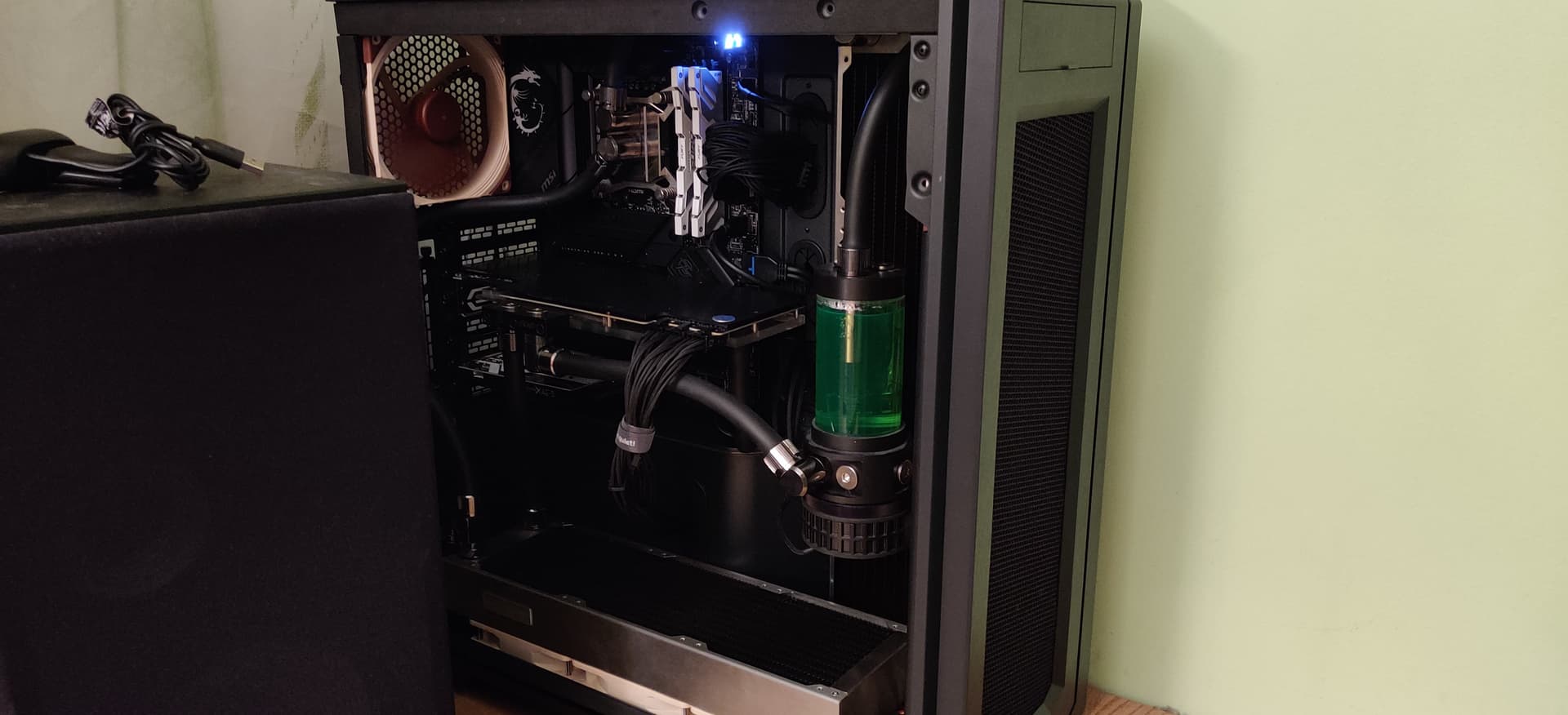
It would take effort on removing the glass panel. But its a Phanteks Entho Pro 2, a 480 and a 360 48mm heatkillers, heakiller 4 cpu block with backplate, thermal grizzly paste, and all 12 noctua fans

It was one of those Its finally time upgrades.

Yeah. Just need to find time and mood to actually sit and spend a full day for this.

At this point my concern is that it may be some hardware problem.

I must just be out of the loop (lol) with water-cooling modern hardware. That sounds like way plenty radiator surface area and high end gear otherwise. The thermal throttling is just confusing.

1 Like

Yeah, I get what you mean. When I first looped my 9900k I also thought that I would go from 90+ to 70 max. Nope, just moved the plank where the cpu usually sits and how much effort is needed to bring back those temps to normal after a deadlift stresstest/workload. And 13900k was said to be designed to go up to its limits. I can tweak it, but even at stress tests, according to hwinfo live monitoring, throttling was less than a second. The main thing with a custom loop is that it takes somewhere to 10 seconds to completely cooldown the cpu and gpu from those 90C temps(and make the 80C+ only a few second thing, pulling that heat away much more efficiently)

Before you do a format you could look at the motherboard and see if any of the capacitors are leaking or bulging. Easy enough to do.

Now that’s a scary thought.

Checked. All seems to be good.

1 Like

Well looks like a good time to purge that system and go for a format

Yup.

Taking bets if the issue will still somehow survive.

You will then know if it was the issue after a format instead of going through parts and reinstals of drivers.

Yeah, and the stupid thing is that I can’t reproduce it until it happens.

The feeling of inflating a balloon, which is about to pop.

FFS people, run basic stability testing first, its whole new OC build showing intermittent failures.
Of course any new component can be faulty, and running top of the line power monster with overclocked ram makes situation even more complex and prone to issues.

  • fresh install while not required is excellent idea, you should at very least purge all drivers related to older chipset and replace them with new ones.
  • run memtest86 from bootable iso with you current settings, it should not show any errors after few hours of testing
  • run various stability test offered by handy OCCT tool, it will scream if anything is wrong
  • disable XMP and restore all power, PL related setting to default values or intel stock if available. If unsure reset uefi to factory defaults
  • start removing components to bare minimum one by one
  • also check your event log

Unless you strongly suspect there was even that might have caused system files corruption,

DISM /Online /Cleanup-Image /RestoreHealth

sfc /scannow

are completely useless.,

checked

This is a fresh “out of the oven” system. Plugged the cpu, ram, components. Started the system.

BIOS found that this is the first run of the CPU and suggested a one of the profiles. I went with “Air cooled”, which is PL1/2 - 253w, ICCMax - 309a. No other tinkering was done apart from Boot order to the system drive and disable fast boot. Apart from selecting XMP 1 I did not touch anything.

The moment I could run Windows, this is what I did. Not for a few hours though. Only somewhere to 30 minutes.

So far I did only the CPU and Ram.

Maybe this would be something.

In order to read a bad event log, one must have experience reading a good event log.

That’s the thing. This has been happening in the morning only, and not even every day (but somewhere close to every second day). I do a reset, and poof - what problem? No problem.

Rebooting, turning off, running everything I can think of - nothing, works without even a hint of doubt or trouble.

Well, if this continues, will have to resort to this. But the most painful moment here is the custom loop.

Yes, if this continues (I’m already frustrated), this will be my next stop. That and NZXT Smart Device, which is controlling all of my 11 fans (when it’s suppose to take 9… but Noctua fans are specified to consume 50% of a normal fan).

Did a test run just now.

One hour of OCCT with everything cranked up to ELEVEN, followed without a timeout by a somewhere an hour of Cinebench R20 (with temps sitting between 83-88C).

At least the CPU and related seems to be in order. I would even think that RAM is OK too (I do have memtest downloaded if this darn thing happens again).


F*********************************************K!

I may have figured it out.

There was a post on reddit, which states the next

The only issue I’ve had consistently with the platform involves the I226-V ethernet adapter made by Intel that’s featured on a lot of the boards.

On my MSI board and second ASUS board (Maximus Hero) the ethernet adapter won’t work for the first 30 seconds or so after booting.

And I DO(did) have a network folder sitting in favorites in explorer.

1 Like

Yup, thats sneaky. If you were reporting same issue from enterprise machine, that would be the first thing I would recommend you to check. And fucked up GPO/login scripts.

i-225 and i-226 is the same lineage of red-headed stepchild of intel nics. If you have 2,5Gbe capable network, disable autonegotiation and force 1GBE link.

That should improve connection stability, but update drives and firmware just in case.

Re: your temperatures seems to be doing okay, or at least withing reasonable range, 13900k is OC pig. How big is your radiator and loop?

A 13900k + 2080Ti loop. For that I have a 48mm 480 and a 360. Plus the cpu frame, heatkiller 4 block with backplate, thermal grizzly paste and a swarm of Noctua a12x25 fans.

If this continues to be a problem, will just use a separate card I have.

It’s always the small thing that gives a headache. My last headache haunted me for 3 years or something. Changed everything. Then it turned out to be a corrupt filesystem on an ssd.

Regarding cooling there you are very well equipped, not much more to do here beyond active chiller/peltier or massive external block.

For comparison, I am running 7950x3d + 7900XTX on plain 320 x 140 x 28mm EKWB and piddly 5W alphacool pump :slight_smile:

What you could do for peace of mind is manually lower PPT/max power or whatever is intel equivalent. You might be able to get massive thermal power saving for middling loss of performance, i.e -15% power for -2% perf.

Assume that board OOBE setting are extreme OC and move on from there.