So back in the middle of June I spotted a strange silver square sitting along the side of the road just North of Redmond, Washington. Assuming it was trash, maybe a discarded candy wrapper, I did my duty to civilization and hurried over to scoop up the shining scrap and deliver it to the appropriate garbage receptacle. Upon laying my hand on it I realized it was solid metal! Moreover, it was a whole entire laptop! I brushed the dirt and detritus aside and- okay that’s enough story crafting. I got a prototype (EV1.5) of the yet-to-be-released Microsoft Surface Laptop Ultra with NVIDIA’s RTX Spark N1X inside, and have been playing with it for about a month now. Below is my “”“review”“” of this machine.

Microsoft and NVIDIA announced their upcoming partnership at CES right at the end of May with the reveal of the latest sub-variant in Microsoft’s Surface lineup; the Surface Laptop Ultra. This machine is being touted as the best for AI, creation, and gaming “for the next wave of Windows PC experiences” with a lot more emphasis on AI than any other aspect. In fact, on their own page, Microsoft essentially glosses over the creation and gaming aspects and jumps headlong into the benefits to AI.
“A new class of GPU for AI.”
“The cure for token anxiety.”
“Creative AI workflows.”
This is where I note that this device is VERY clearly not made for me. I am not using AI in my daily life. In fact I prefer NOT to use AI wherever it is suggested to do so. Need art? Hire an artist. Need a 3D model? Sit down and relearn Blender for the fourth time and actually attempt to improve a skill, then hire an artist. Editing some photos? I’ve got a 5 year old install of GIMP that works fine. Tinkering with music? Boot up the PowerMac G3 with the Ultralite Mk1 and an ancient version of Logic. Running low on creative ideas for stories? Pick up a book or watch literally anything Brennan Lee Mulligan and Co. do in their D&D campaigns for some inspiration. You probably get the idea at this point.
I do want to game though, and I have had my fair share of gaming capable laptops over the years. A Thinkpad T61p with the genuinely quite decent (for its time) Quadro FX 570M, an Alienware M15X-R2 that I upgraded to an i7 Extreme and AMD 6990M, then an M17X-R2 that I took even farther to an R9 M290X and dual SSDs, and finally a 2019 Macbook Pro 16 with the quite potent RX 5600M (once two of the Core i9’s cores are disabled to give the poor RDNA1 chip some power budget to work with). I enjoy some gaming on the go, to say the least, and the premise of this fairly sleek all-NVIDIA Surface with a GPU akin to an RTX 5070 definitely has my attention.
Unfortunately, gaming was not on the menu just yet. This machine came loaded with relatively ancient WoA “Game Ready” drivers from November 2025, 591.33, and they are very clearly not feature complete. Much of my library would indeed load without any specific tweaking required however the performance is not yet up to par. Watching what’s happening during a 3D load using NVIDIA’s internal NvMon tool I can see the GPU clock bouncing erratically between 1500 and 2300MHz with massive frame stutters in rhythmic 6-second intervals. Performance of the GPU is identical on battery, or with the 64W or 105W power limits, and it almost feels as if the drivers are set to rather bluntly cap power here to keep the true performance under wraps or avoid a specific weakness of this hardware revision. My opinion is more toward the latter, as in GPGPU benchmarking when using the increased power limits on A/C power I saw a very consistent full-system crash running 32-bit and 24-bit integer tests. These tests don’t pull a ton of power, about 35W, but they seem to trip the system up every single time they are attempted. Certain games would also yield a random full system crash such as Helldivers 2 when run for more than a few minutes. To me this suggests a quirk of this particular sample and likely not an issue with the design itself.
While drafting this “review” NVIDIA released the 616.00 preview driver build that introduced CUDA 13.4 as well as updated OpenGL and Vulkan feature support. The most important thing I noticed with this driver is just that it exposes a few more details in NvMon about boost state and PCI-E link configuration. I reran the same tests on the new driver and didn’t notice any drastic difference in performance or stability, the stutters at the ‘Best Performance’ power mode are ever present and changing the GPU TGP slider doesn’t seem to do anything yet. One thing that was very apparent on the new driver however was a big drop in efficiency. The SoC idle power in both ‘Best Performance’ and ‘Balanced’ power modes increased at the desktop, 23W and 12W respectively. Meanwhile ‘Best Power Efficiency’ idles at 7-8W where ‘Balanced’ used to idle. Another quirk not fixed is that after about an hour of use in “Best Performance” mode the screen locks up and won’t refresh despite the system still running.
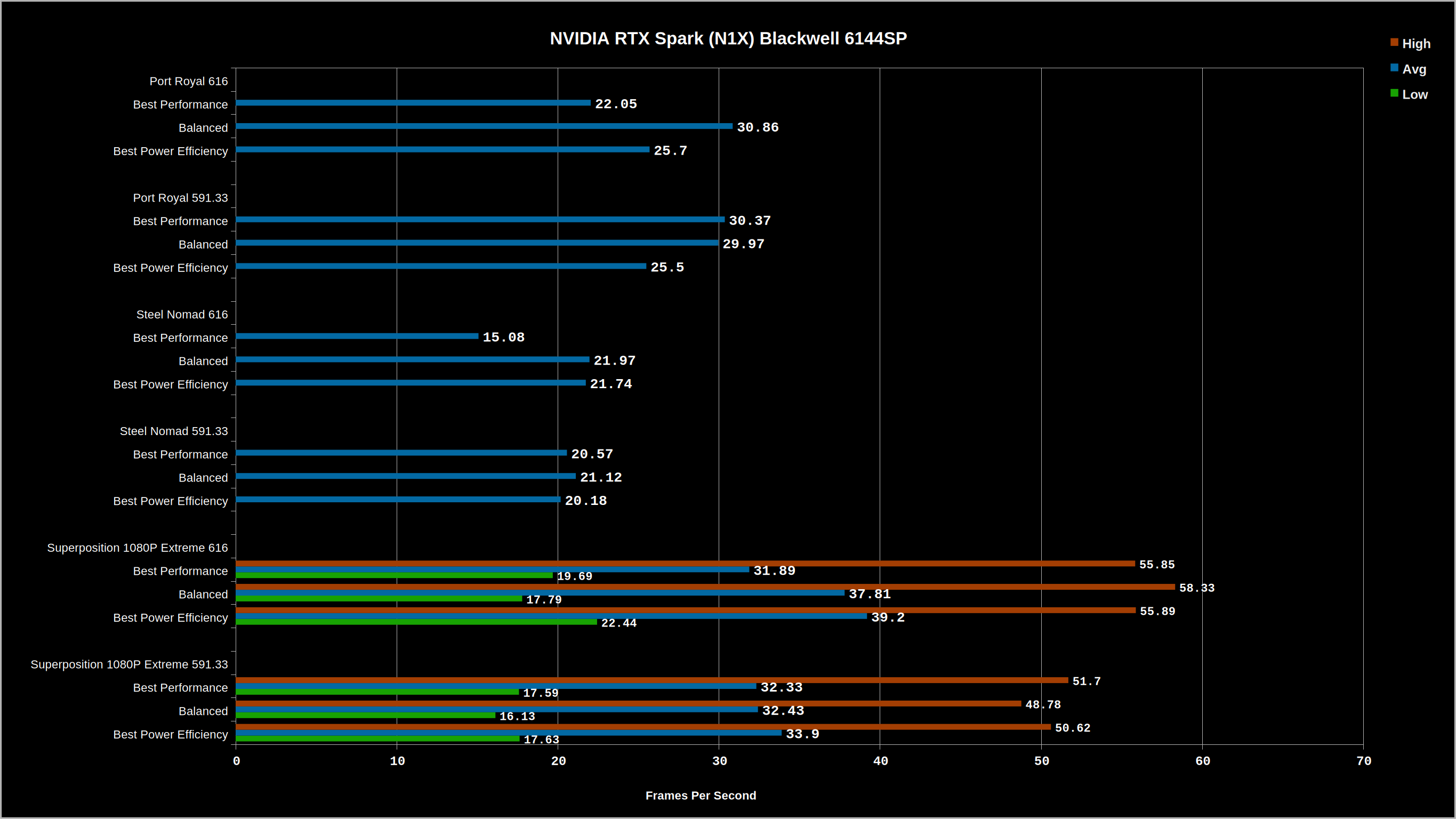
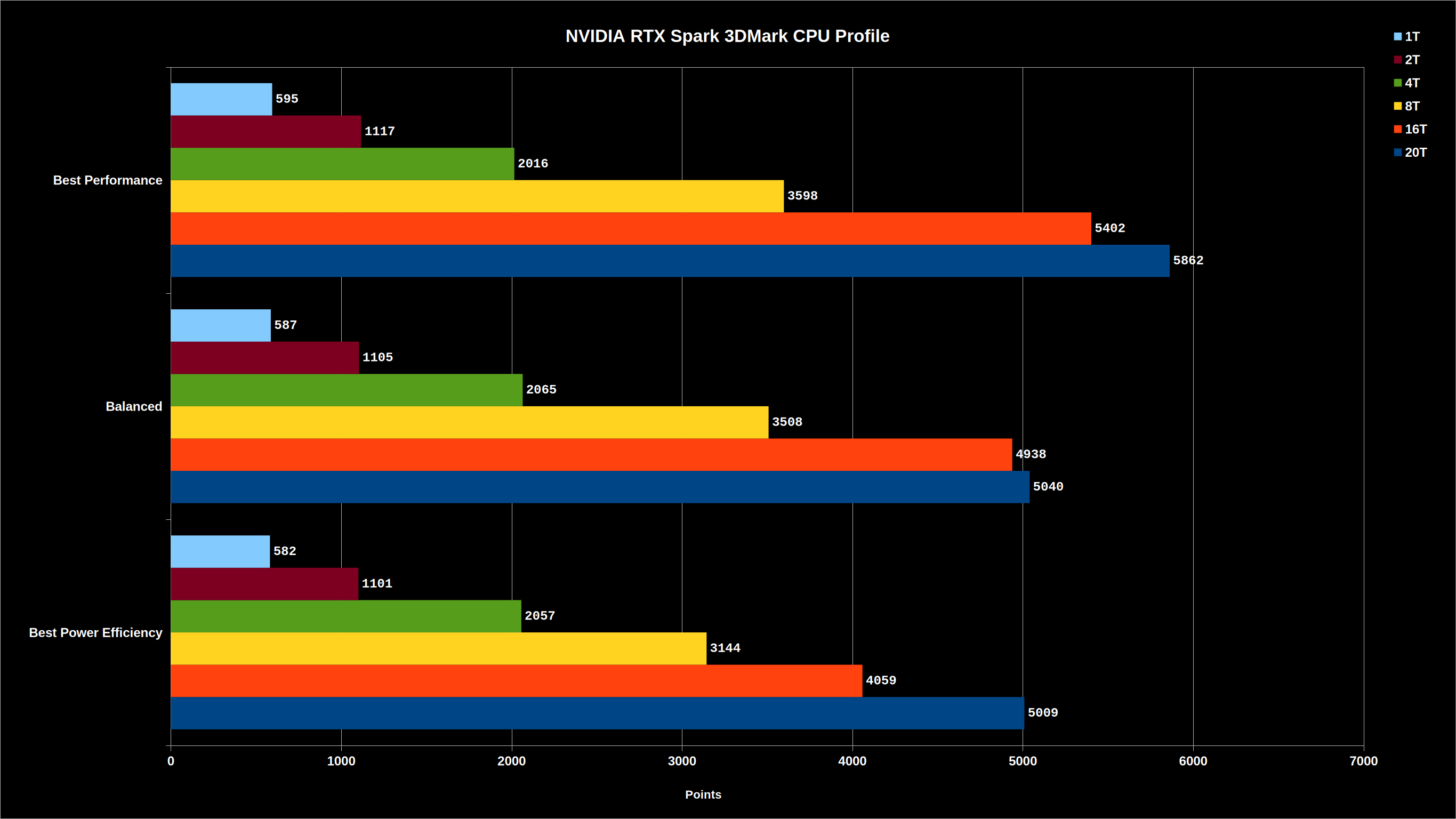
With the release of the new driver however I can now run quite a bit more testing on the chip itself, or so I thought… I grabbed the Phoronix Test Suite which includes some AI benchmarks to satisfy the WCCFTech and VideoCardz commenters that moaned loudly about my Cinebench 2026 benchmark from a couple weeks ago not being appropriate because, “gamers don’t know what this machine is good for!” Well, let’s test what this machine is supposedly good for. I chose to run tests in “Balanced” mode here because “Best Performance” was constantly crashing the machine while providing almost zero measurable improvement for an extra 8-12W of power draw. Clearly this unit does not have the headroom, I assume that will be fixed in retail ready units.
Spoiler: it’s not actually that good. Not yet, anyway.
For one thing despite containing the new CUDA 13.4 framework, none of the models in the test suite would run with CUDA and instead only (barely) ran the Vulkan Compute variants as well as CPU BLAS. Each CUDA attempt would report a zero-sum result after a few seconds and time out while I watched the SoC and specifically GPU power in NvMon drop to zero for the duration of these run attempts. Once it switched back to Vulkan the GPU would fire up and chug down about 40W. I went back and forth with a few attempts to fix this but eventually gave up and just collected data from a few tests that would actually run and provide results.
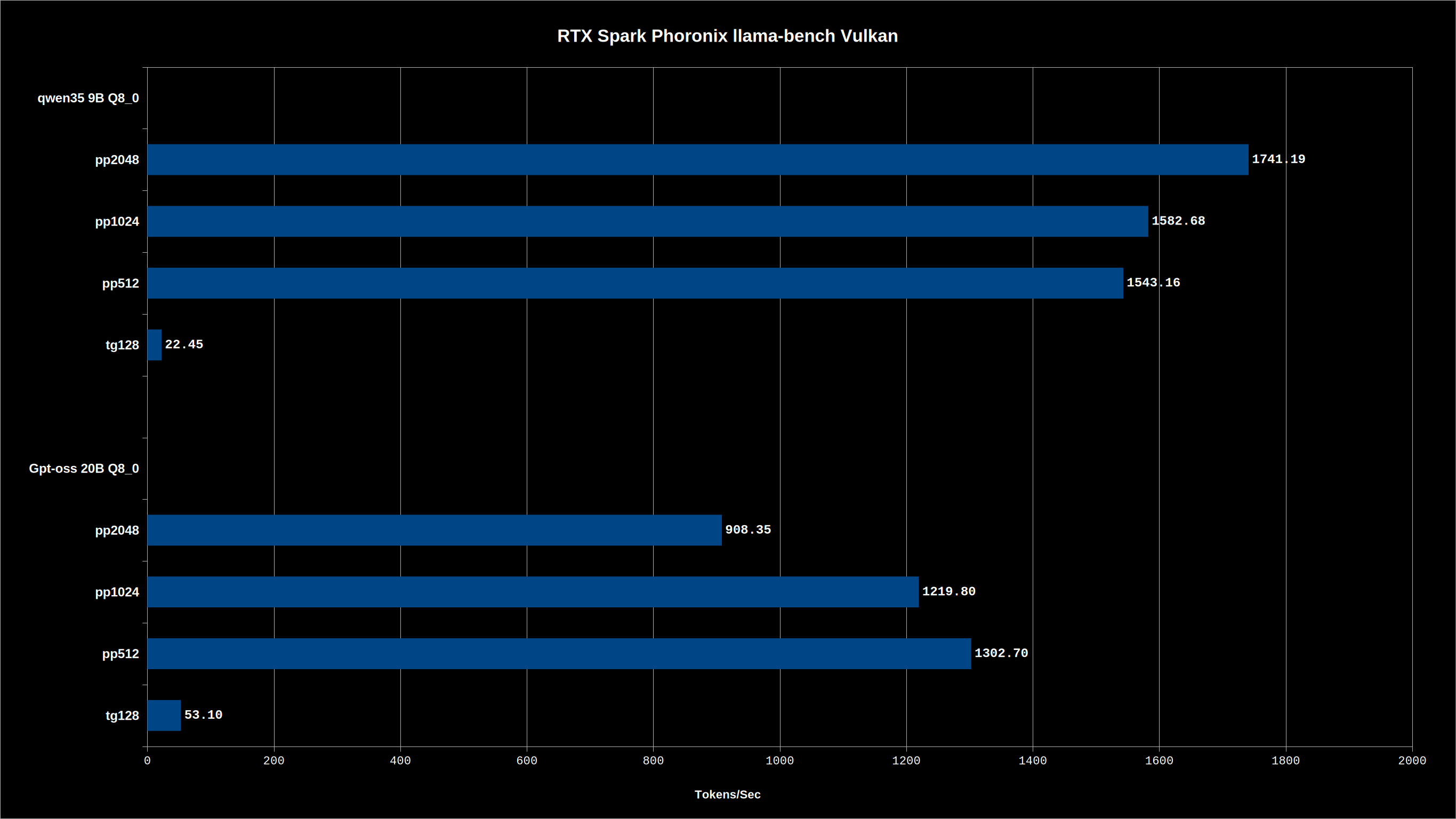
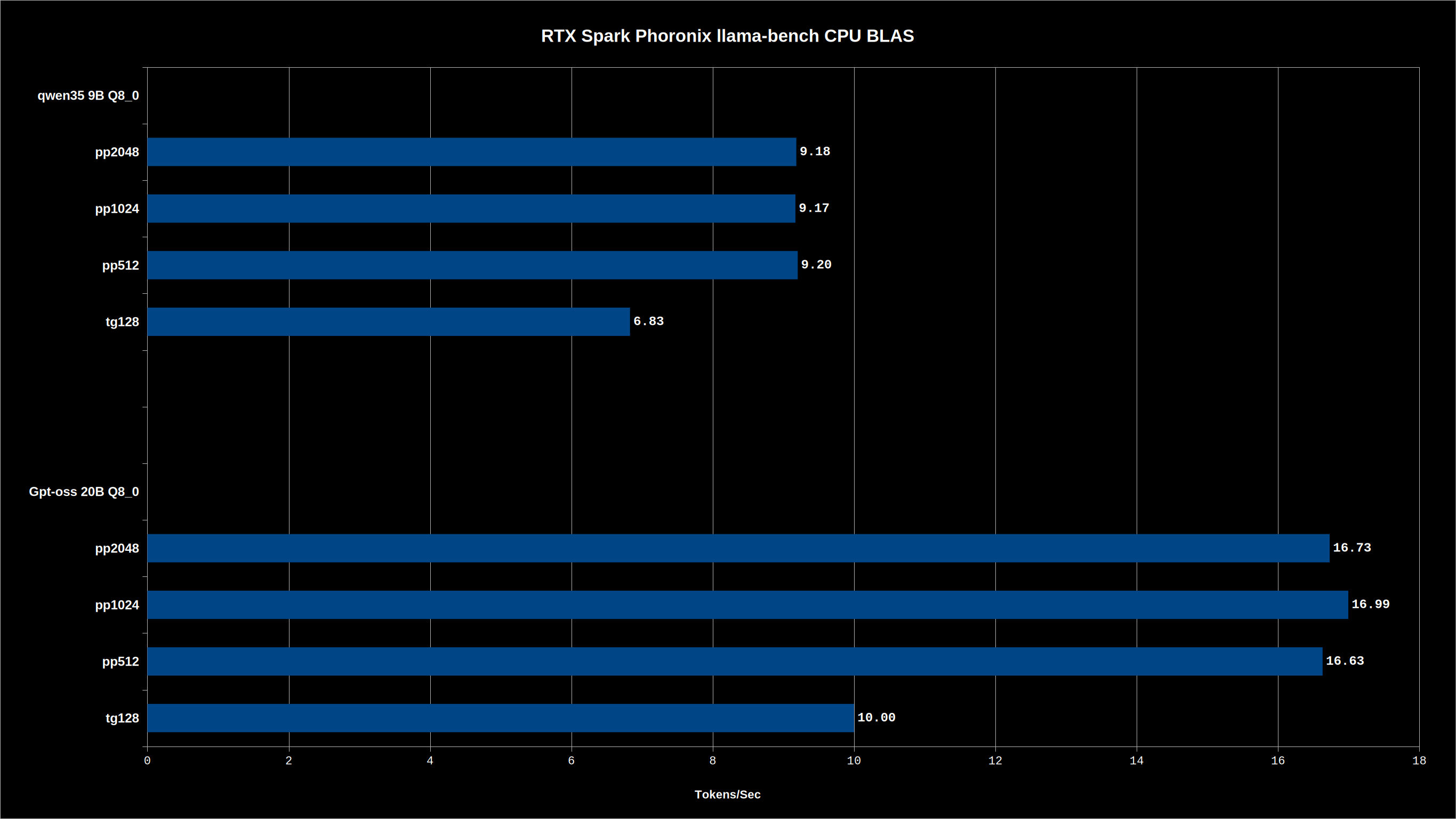
As seen here this machine is scoring in a pretty low percentile of overall results. I’m going to chalk all of this up to a combination of user error (though I literally just ran the benchmark as provided) and what we’ll call “prototype related chicanery” where the unfinished state of the machine is likely not ready for this kind of workload. Hell, I’d bet that these results I’m sharing here are exactly why RTX Spark has been stuck in development hell since late last year despite DGX Spark, physically identical silicon, being out and in volume retail channels.
Now let’s look at some ‘general user’ workloads like 3D rendering, everyone’s favorite! Except for the aforementioned comment section dwellers, but what can you do about them… They’re never happy.
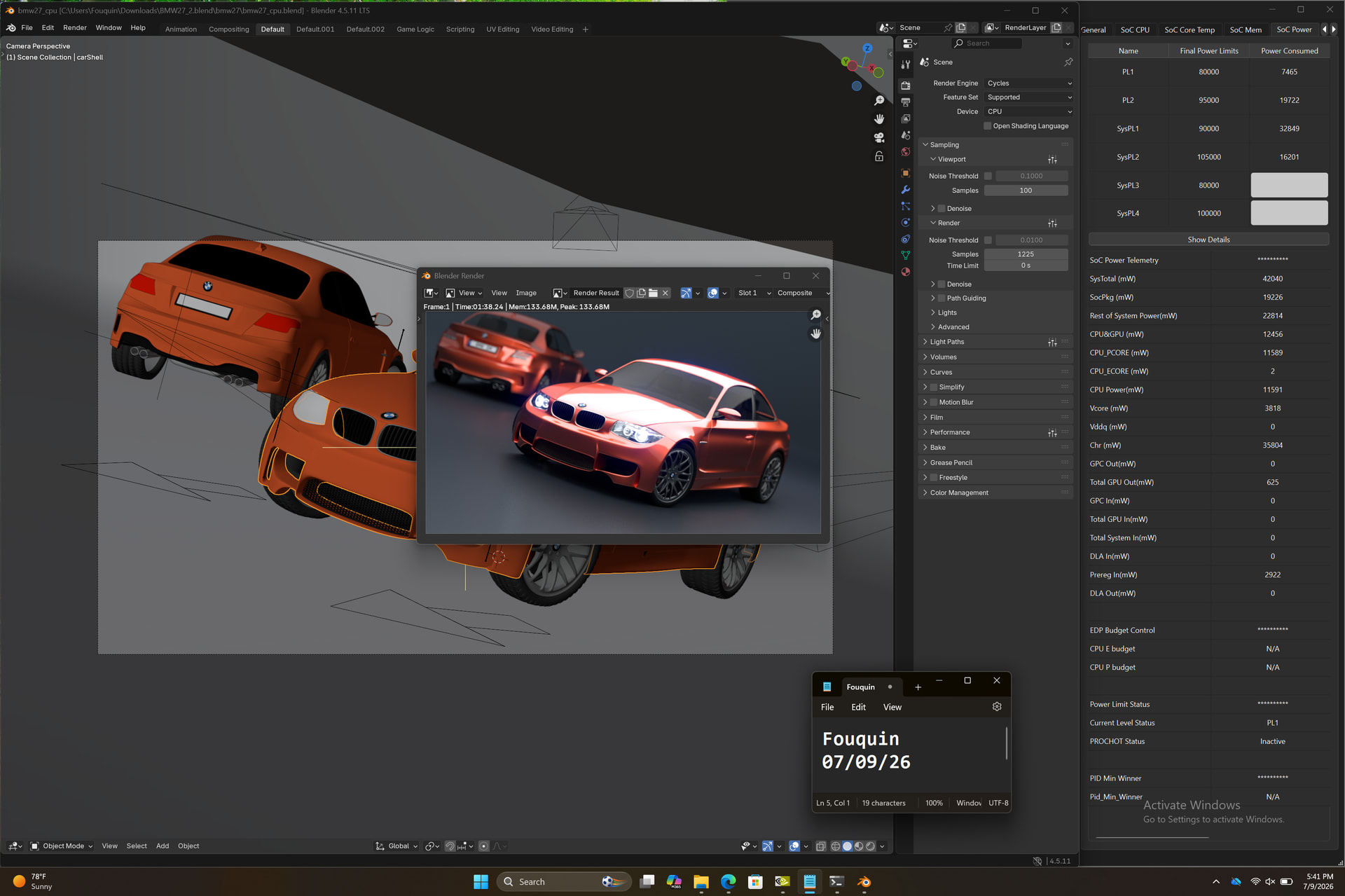
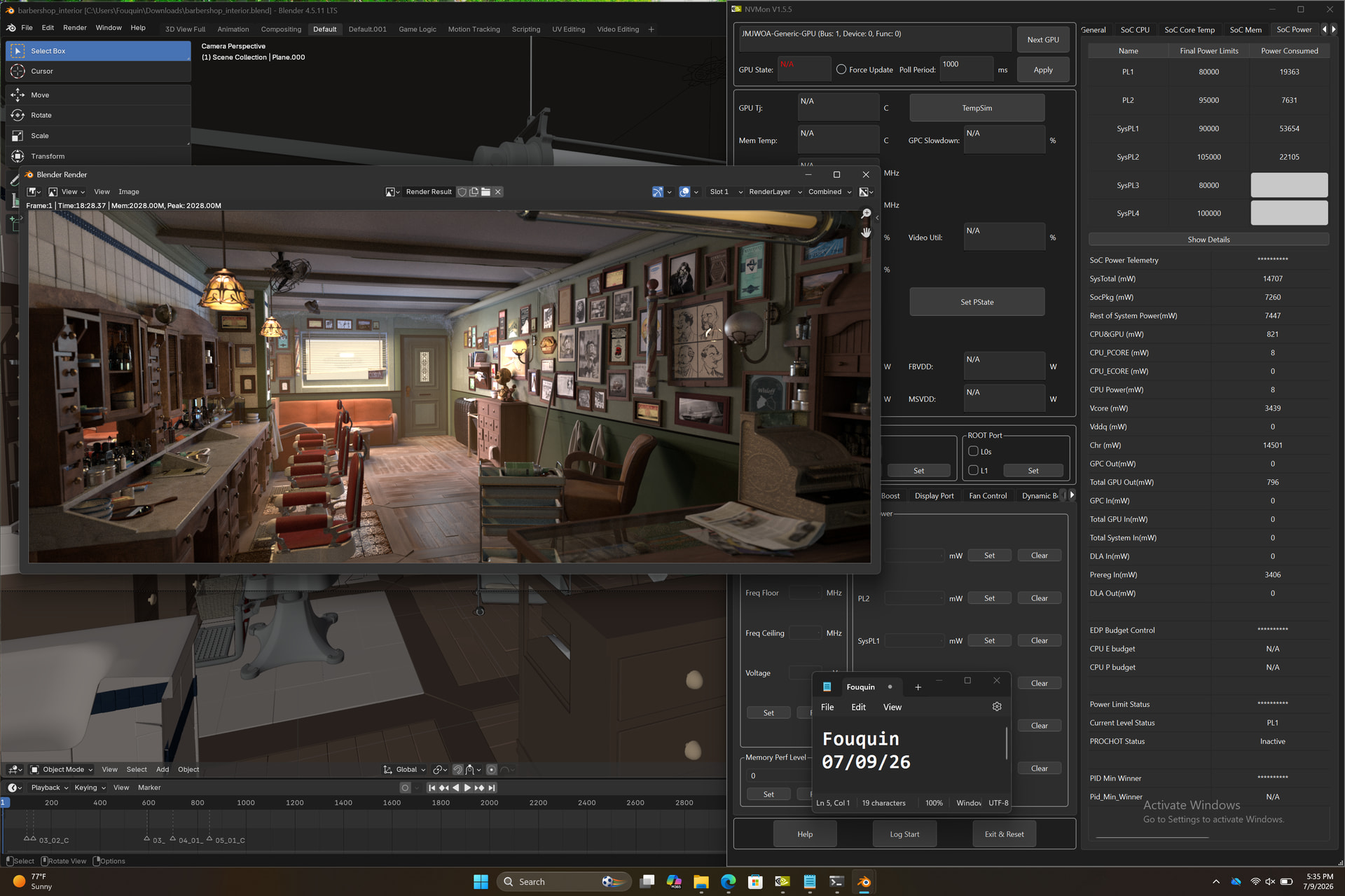

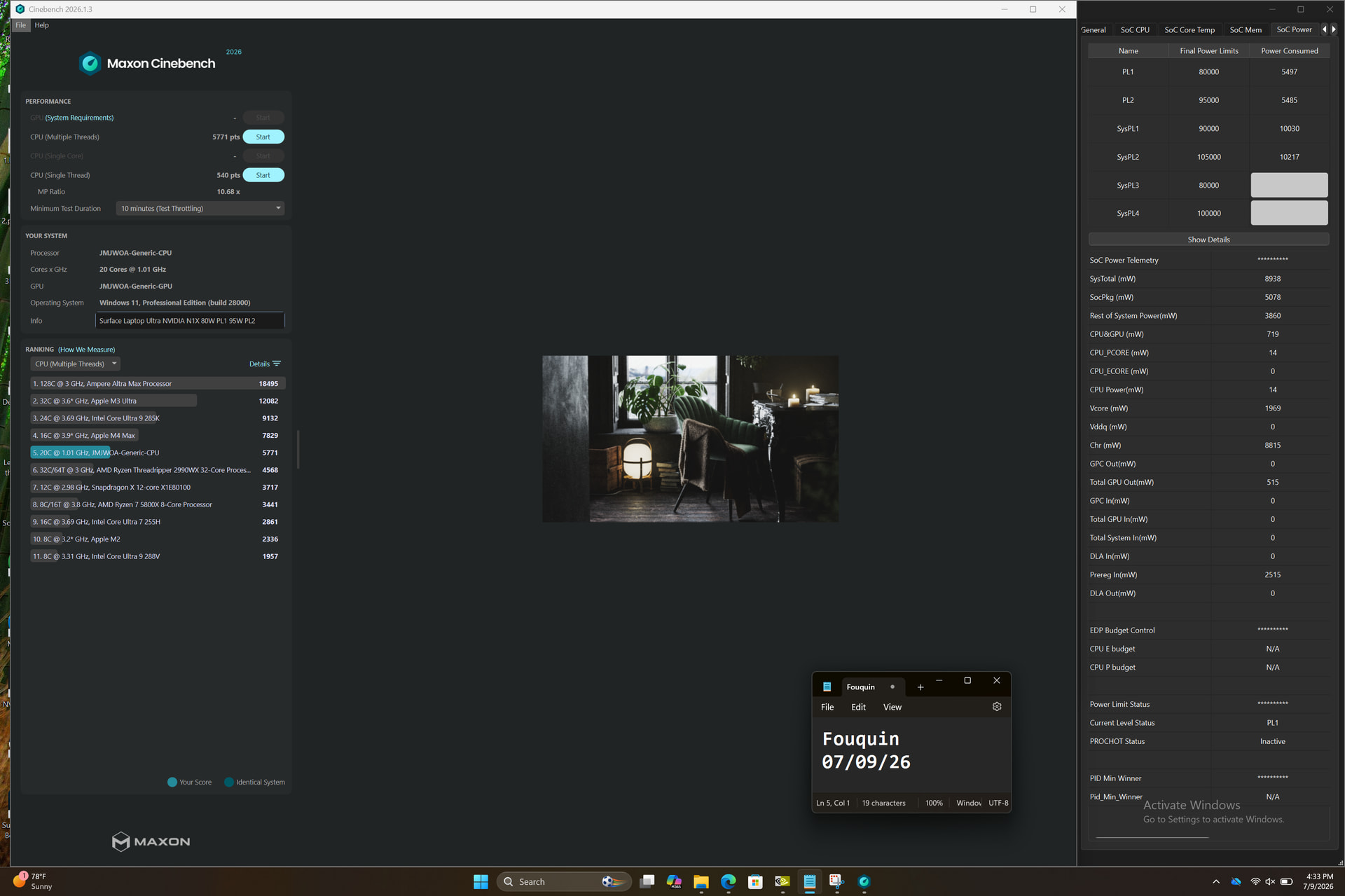
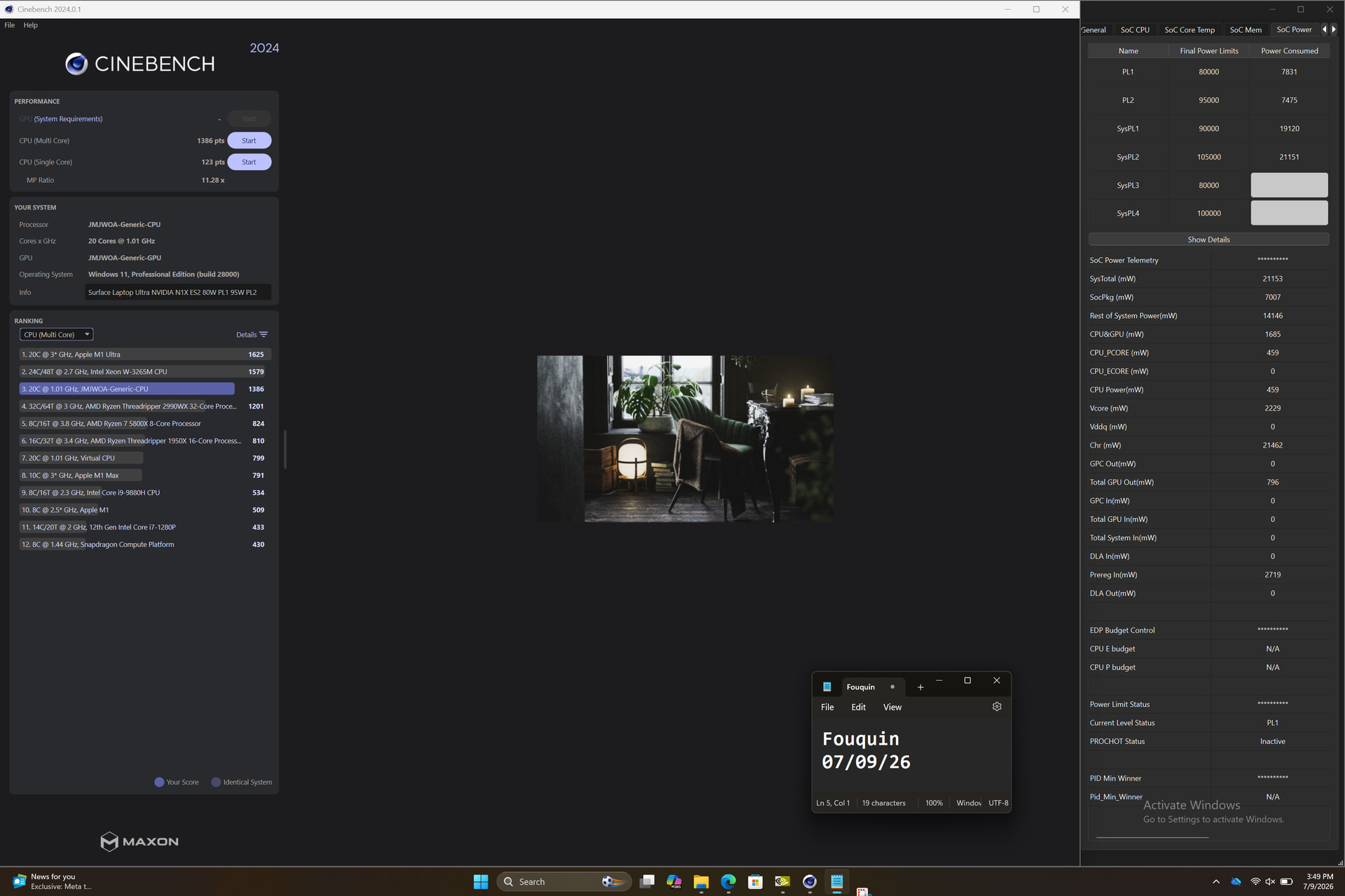
Okay with performance numbers out of the way I should talk more about the machine itself. For those that care about what is probably going to be one of the most expensive laptops that isn’t a dedicated gaming machine to launch this year…
Verdict, simplified: I love the look and feel of this laptop.
To expand a little bit: the keyboard is not as crisp as my Macbook but holy crap is it nice to type on. Genuinely I am very happy that somebody that isn’t Apple has figured out how to do laptop keyboards. The key travel is short but punchy, the resistance is very smooth but semi-linear, and wobble of the switch is non-existent. There is a tiny bit of wobble of the keycaps themselves, barely perceptible, but it hasn’t made a difference on recording a keystroke on an edge-strike. The switch mechanism is stiff enough that even catching the corner of a key can result in a full keystroke. It very much still has the feel of a rubber dome switch though, it’s not mechanical feeling in any way. It’s too bumpy and soft, but at least it’s not overtly mushy. Certainly not as snappy as on the Macbook, but not unpleasant either. Just… Different.
The keyboard has a dynamically adjusted backlight that uses an ambient light sensor near the camera to adjust. The backlight dims and eventually turns itself off to save power, and it uses the camera itself to activate when you approach the machine. I found out it used the camera because when I disabled the camera the old fashioned way by sticking a piece of gaffer tape to it, the dynamic keyboard backlight no longer dynamically backlights. It still lights up when a key is pressed, but it acts confused for a moment and flits through a few different brightness levels before it realizes that you are in fact there and typing. It then levels off to the ambient light level (or the manual brightness if set.)
The screen in this unit is probably not exactly what the retail units will receive. This prototype houses a 3270x2180 (3:2) panel seemingly made by LG, but it has some weird issues. For one, the local dimming zones are massive and easily noticeable around the cursor. For two, the display is listed as G-Sync compatible but support for it is not enabled in the driver (though toggling it is possible and it results in a big “GSYNC TEST MODE” watermark that also notes that the feature remains disabled). For three, the passive circuitry for the touch input is insanely loud. So while I’m sure the display specifications will not change, the revision or implementation of this display will change. Finally, there’s some pretty bad color banding even in HDR mode which means a lot of windows have a vignette around them and many gradients are painfully visibly broken up.
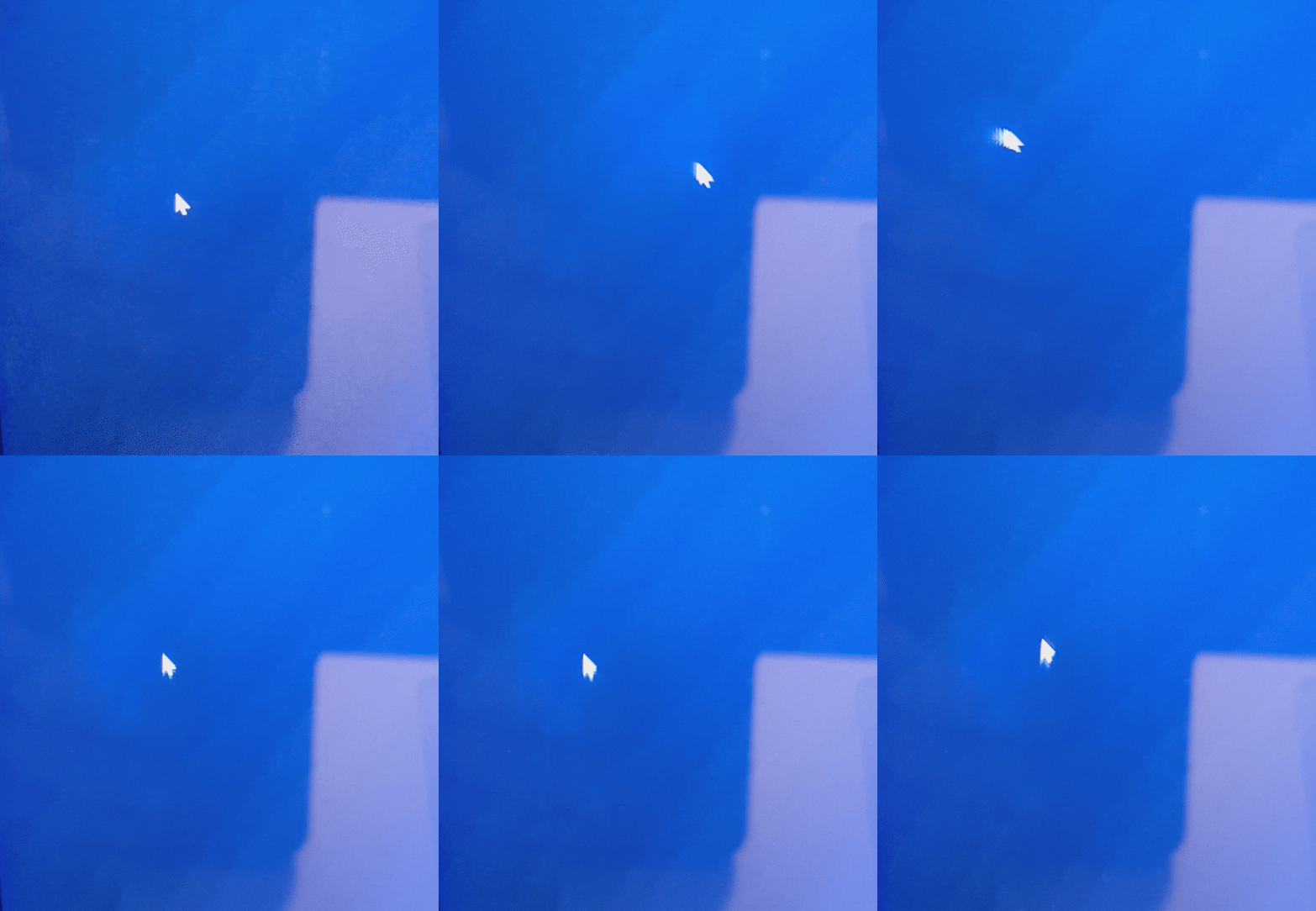
A very grainy view of the less than stellar LED dimming zones visible on every bright element of the display.
The overall chassis is chonky in order to house the heat-beast that is the RTX Spark SoC, and that chonkiness results in an extremely stiff key bed, touch pad, and palm rest. There is essentially zero chassis flex. If you go bending this thing looking for chassis flex, you’re asking for permanent damage because you’re going to need a vice. This is one area where it’s equal with a Macbook, it’s milled aluminum and that’s just what it feels like. The touch pad haptics are also equal with my older Macbook, and this even has better build quality than that machine with the touch pad actually level with the deck and not ever so slightly bowed up at the corners. Palm rejection is hard to gauge with this machine because the touch pad, as configured in the prototype, has an insane 1-2 second lag time before it will read any input. Though I bet it won’t be an issue on retail machines. Accuracy is a non-issue, and the multi-touch gestures are as responsive and controllable as one could ask for.
The display lid is super chonky just like the main chassis and adds considerably to the thickness of the laptop. Not that I mind or anything. This display gets warm and all that extra thermal mass means you won’t feel the burn as badly as say on the back of one of Dell’s 14” Precision laptops with the 3.5K touch panel. The hinge mechanism is also fantastic, though the classic “one finger open” test is a bit hard to accomplish because the amount of lip you get to lift from is absolutely minuscule and there’s no cutout otherwise to lift from. I simply pinch the corners with my thumb and index finger and open it that way, like an old physically-latched ThinkPad. It opens smooth and doesn’t lift itself off the desk, so I still call that a win.

The extent of the lid-lip you are given to lift from.
Beyond the exterior Microsoft’s announcement page ended with a note on serviceability which, I’ll admit, does seem to have some thought put into it with four pop-out rubber feet and magnetically attached (plus screws under the feet) bottom panel. However, the many snap-on thin aluminum sheet panels covering all the primary components (even encasing the SSD) means actually attempting to service the laptop will lead to much bending and/or breaking. Exceptionally small and presumably important SMDs are placed around the edges of some of these covers, where you may want to attempt to pick and pry at the tabs, and thus are at risk of being scraped away and lost forever. I managed to remove the cover above the APU and cooling system screws via a piece of very tacky tape stuck over the entire panel and then brought to a point in a makeshift handle. This did remove the panel, it also bent the crap out of it. The same trick did not work for the cover below the main cooling and APU chamber as it has a very subtle dotted pattern that breaks up the surface area that the tape can adhere to, and you cannot overcome the latching power of the many tabs holding the cover in place. I gave up at this point as causing any irreversible damage to an unreleased prototype was not on my to-do list.
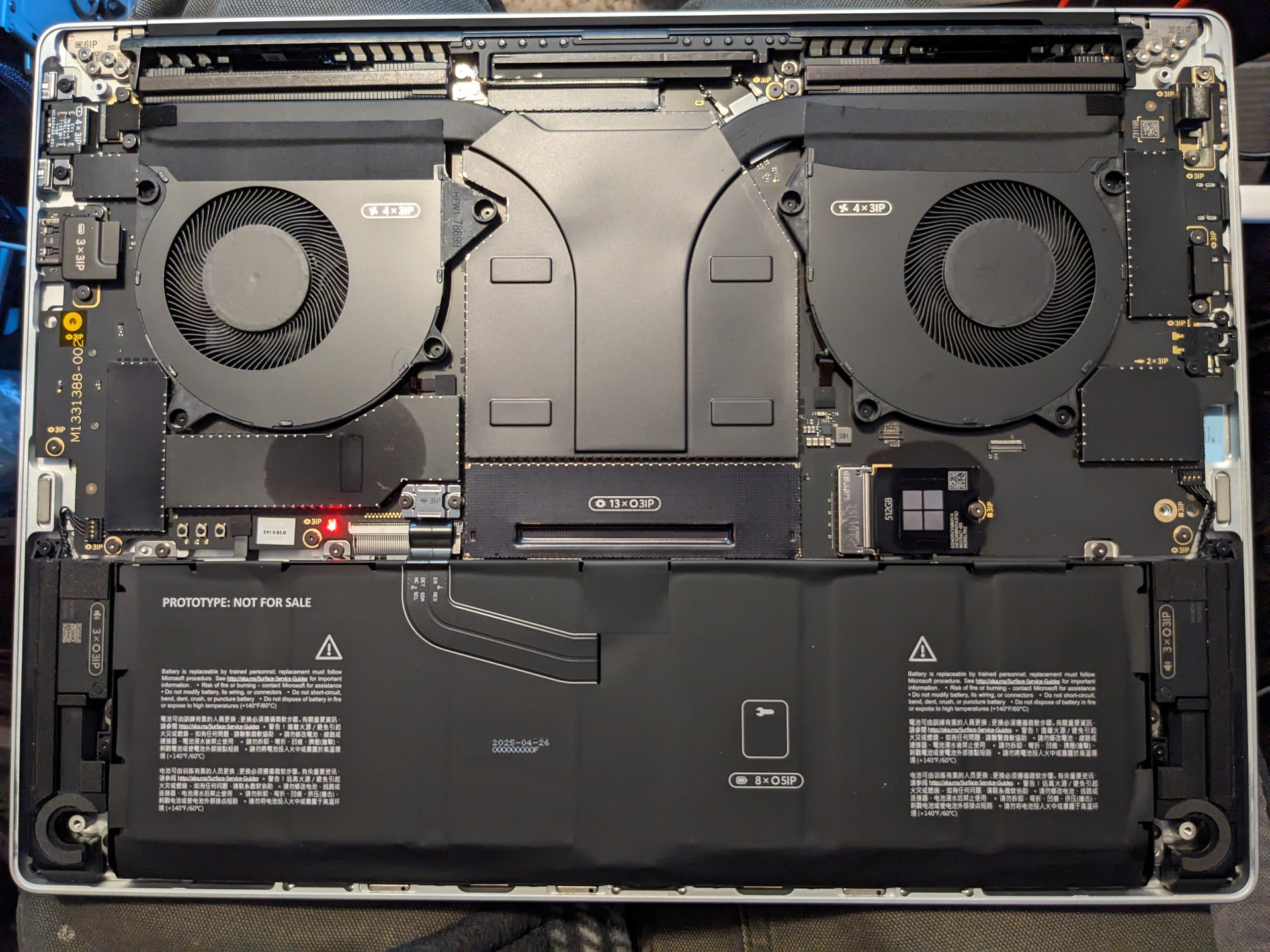
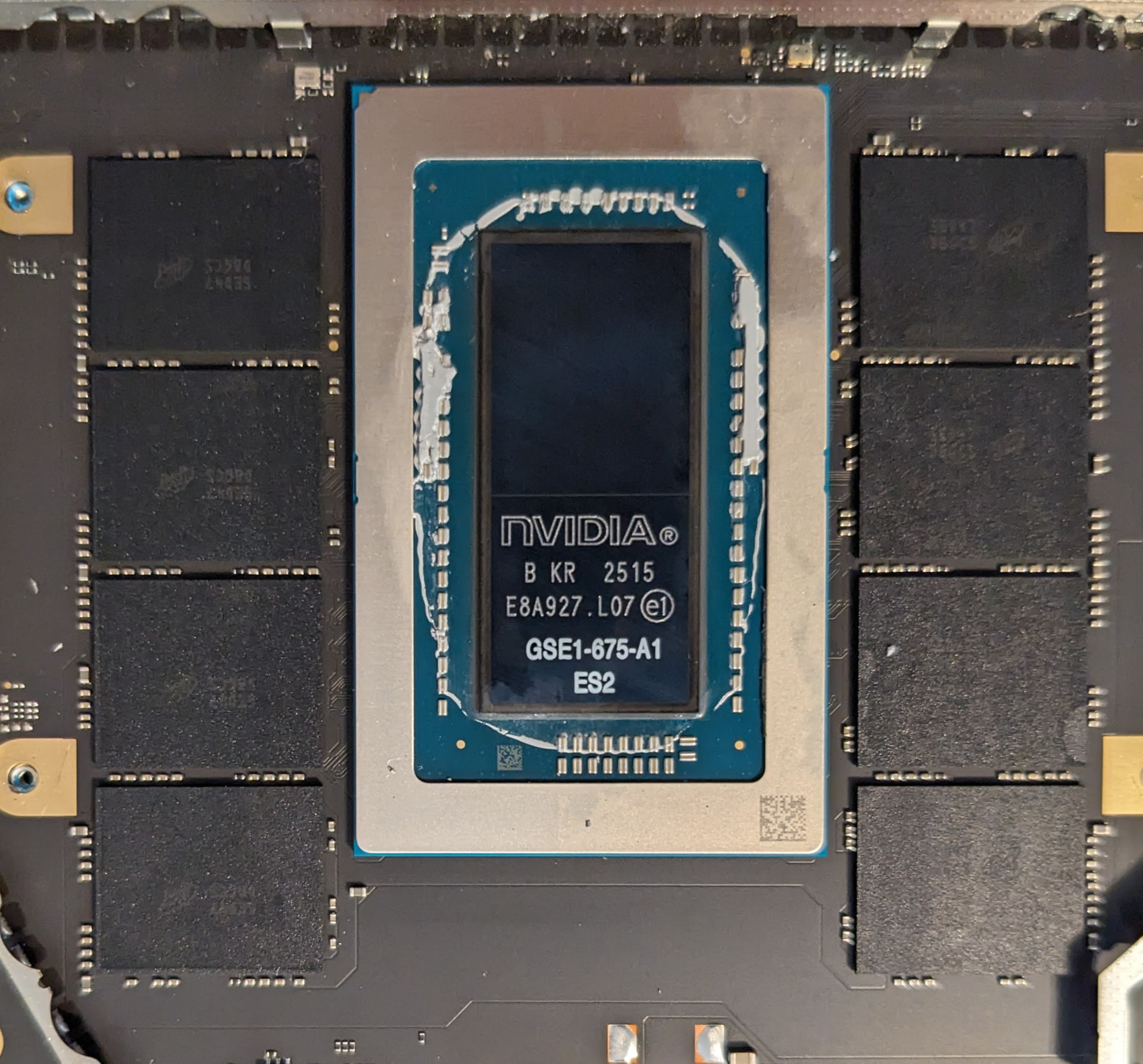
At the very least the SSD can be mostly wiggled free, but on my first attempt the shell split apart between my fingers and came out in three pieces. Substituting the included 512GB drive for a 2TB drive was a success and the machine booted no problem from a clone of the original disk image on that third-party SSD.
A final note here on the thermal performance because I know I’ve mentioned the power and thermals a few times: on the “Balanced” and “Best Power Efficiency” settings the CPU cores will push themselves up to about 38W until some number of the X925 cores hit 98-100C, then the fans will ramp up to accommodate. The fans aren’t adjustable on this unit (at least none of the settings that should adjust them have done so) and they wait to kick on until after a few seconds of throttling occurs. However they do keep the cores all running at 35-37W and around 2.6GHz. Under the “Best Performance” power setting the fans don’t kick on any sooner, but the cores can pull 44-50W and will run at around 2.8GHz when they reach 100C, pushing the absolute limits. The Blackwell GPU actually runs the coolest here, touching 90C in spike loads but capable of reaching 2-2.2GHz clock speeds in the 80-88C range with the fans running. Max-Q is enabled on this GPU so it is power throttling way before it ever thermal throttles on the default “50W” TGP, and in its current state that yields about 1550-1950MHz as the true operating clock range. 50W is in quotes there because aside from what NvMon limits the TGP range to I just have to infer what the GPU’s share of the power is based on what the SoC PL2 and SysPL4 ratings and readings are. The top end is 105W, but PL2 maxes out at 95W and doesn’t allow more than 75-80W in a normal “Balanced” power scenario.
If I had to guess I’d say Microsoft is going to sell this configuration (24GB, 48SM, 512GB SSD) for at least $2799 in positioning against the Macbook Pro 14 with M5 or M5 Pro, and the halo tier 128GB model will probably start no lower than $4499 for the privilege of having the “portable AI powerhouse.” They probably want to compete with the M5 Max Macbook Pro, and that would actually be pretty fair pricing considering what Apple just raised their prices to. Unfortunate, really, because in any other market this would be such a nice sub-$2000 machine at this spec. I’m not personally holding my breath that these machines can actually catch up to an M5 Pro or Max even once all the kinks are worked out. Maybe in some hyper-specific CUDA accelerated LLM that NVIDIA hand tunes for WinARM users. Performance comparisons aside though this is far from a bad machine, and I bet that it’s going to be exactly what somebody wanted from a WinARM machine that maybe wasn’t sold on the Snapdragon models. I’m going to keep using it (unless they figure out which unit I’ve got and lock me out) and I look forward to the retail version for comparison.
I may update this article with more findings and benchmark data, it will be under an EDIT tag and be posted below this line if so.