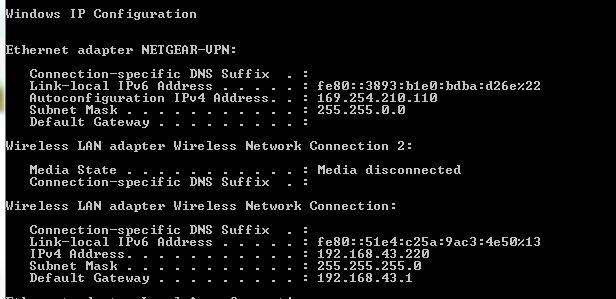
I attempted to set-up the VPN settings in my Netgear Nighthawk router, however, when I connect to the VPN server the ip I get is 169.254.210.110 and Subnet Mask is 255.255.0.0. I am assuming the Open VPN Client is not finding the DHCP server to receive a 192.168.1.XXX ip from the VPN Server? I tried both UDP and TCP, but I am still getting the same IP issue. To test the VPN connection I tethered my cell phone to my laptop I then went to a friends house to connect. I can connect, but I still receive the same IP issue. I also tried ipconfig /release then /renew without any luck. So now I am seeking help. For the sake of my question I changed the settings back to default and start from scratch. I posted two photos so show router settings and ipconfig results that I uploaded to photobuck(hopefully the pics show).
My VPN Settings in the Netgear Nighthawk router are the follow(default settings):
It would be helpful if you outlined your topology exactly and told us exactly what you wanted to accomplish. I'm assuming your trying to connect, using say a laptop, from outside your network into your LAN by using your router as VPN server. Generally, on these forums when we say to put a VPN on a router, that means to use the router as a VPN Client. Do you actually want it to connect to your LAN to access LAN resources or just want it to bounce your traffic out from the starbucks LAN onto the internet? Or did you want it to have some anonymity while you're at home? Clear objectives make everything less confusing to try to figure out >.<
It looks like the router only supports TAP configurations tho so I don't think you actually have an option (which means your home network will always be accessible using that router's VPN server feature) or at least that's the impression I get from the manual, unless it has an option to switch the TAP config to TUN that is.
In unrelated news. DD-WRT does have QoS. It's eveil I say! EEEVIL! Eve. And L. No idea about 802.11ac.
Section 12 on Page 137 of the manual starts explaining how to set up the VPN server. It might be that you're getting an address conflict (unlikely) and I've heard issues with some VPN servers needing a 10.x.x.x address scheme to work before (odd issue). So I'd recommend changing your home address scheme to a different one than the network you're connecting from.
Remember that if you happen to have 2 routers and 2 computers, you could totally daisy chain them (with the nighhawk the one furthest from the internet) so you wouldn't need to go over to your friends house constantly to test different configurations.
How did changing the address scheme to a 10.x or a 172.17.x.x go? Do you have a second router laying around to simplify troubleshooting? Could always set a static IP on the TAP adapter after you're connected and try to ping stuff on your network to see if you're connected but that DHCP has issues.
How did changing the address scheme to a 10.x or a 172.17.x.x go?
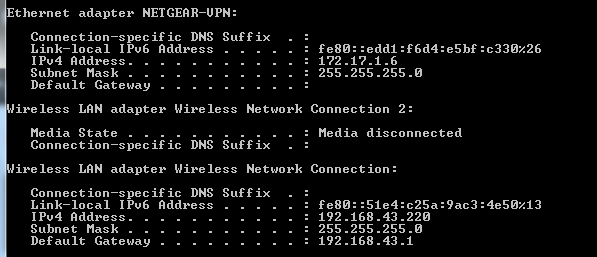
I changed the routers lan settings to 172.17.x.x. I tethered my cellphone to my laptop to test VPN sinse I do not have another router to use. I am now receiving an IP :)
ipconfig results:
To test this further. I attempted to connect to my friends VPN. His router is the default configuration of 192.168.1.XX. I replaced my VPN config files with his VPN config files. I am still having the 169 IP issue and subnets are different.
Sounds like you have things under control. I'll let you handle the rest of the troubleshooting unless there's something you are stuck on. I'd have him change his address scheme temporarily to see if that fixes the issue. Consumer level routers don't like routing 192.168.x.x addresses I've noticed.
Agreed. As for routing/core network appliances I don't think I'll ever be able to find a better option than pfSense. The best part is that if the community wants something to happen, it usually gets put into a release fairly quickly. The support for it is also great. My little ITX pfSense box is my favorite router ever.