I really need help, this is driving me insane, I can’t have a conversation with my friends while I have this problem.
So I have the sennheiser pc 363d headset, the mic volume has to be set 100 volume or I can’t be heard. However windows 10 keeps automatically turning down my mic volume from 100 to 90 and lower making me mute.
Is there a way to stop Windows 10 from turning down my mic volume?
I'm experiencing this too, though my machine is a Windows 8.1 device, and the auto-updates to Win10 have enabled this 'auto-volume' madness.
In my case you will lose the volume icon on the taskbar, when the 'auto-volume' caper is in full swing.
Go to the little volume thing in the corner of the system tray, Right click, Communications tab, Set to do nothing.
Also for @Schwarz_Wolf
Could be wrong though.
2 Likes
It is set to "do nothing" It is whenever I talk windows turns down my mic until people can't hear me.
Try Recording tab > Select your mic > Properties > Advanced > Uncheck the box that says "Allows programs to take control of this device" or whatever it is.
1 Like
Unfortunately that didn't work.
What application is doing this? I remember Skype doing this to me for weeks till I killed it.
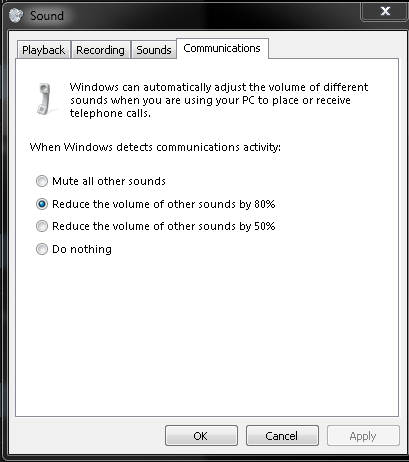
change this to "Do nothing" lmao.
The issue is that only modifies receiving end. He has issues with transmitting.
EDIT: If Skype is screwing with you, Tools > Options > Audio settings. Uncheck the box "Automatically adjust microphone settings"
Happens to most applications I use, mainly Discord and Skype. I mainly use Discord for voice chat, but if I can convince my friends to get on Skype I'll try your fix.
If you want an alternative to Discord, try and get your friend on TeamSpeak 3 or Mumble. We have multiple community host (and non-teksyndicate affiliated) servers you can jump on.