I’ve managed to put a Ryzen 7900 under a NoFan CR-80EH and it keeps overheating when it’s running Telegram and Google Chrome on Fedora 39 with KDE.
This CPU’s clock is pretty much a random number generator. It sets the clock anywhere from 3GHz to 5GHz and then it’s no surprise that it’s idling at 63C - should be 58 or less - at least that’s what I have with Ryzen 2700 and it’s literally bulletproof. Only difference is, the 2700 is well behaved and runs at a constant clock of 3.2GHz, while the 7900 does whatever the hell it wants.
I’ve observed that:
the 7900 will reliably overheat in BIOS settings with a constant clock of 3.7GHz for no discernible reason
the 7900 can reliably run a KDE session that either has Telegram open, or Google Chrome, but not both
I’m fine with a downclock, it’s the amount of cores and AVX-512 that I really sought out with this upgrade. Is there any way to disable all the unhinged clockwork shenanigans? What are these things even called nowadays? I remember there used to be AMD Cool’n’Quiet which ironically did literally nothing, and Intel SpeedStep which would downclock by 50% for powersaving.
P.S. The BIOS settings where it asks for CPU frequency do nothing. I’ve set it to 3200MHz and the BIOS still says it’s running at 3700MHz.
Thank you all for the replies! PBO has already been disabled. I’ve disabled CPB as well. For what it’s worth, this is happening on a MSI Tomahawk X670E. Editing any of the BIOS settings feels like defusing a damn bomb. I’ve just barely managed to save the settings before CPU hit 95C. I’ve also found a strange setting where it says the CPU will try to run according to some TDP metrics. I’ve chosen 65W, but it was a crapshoot, so I’ve selected 45W.
What is the cooling solution for your CPU specifically? It has been found that AM4 solutions aren’t always compatible due to the Z-height difference of the IHS coming from AM4 to AM5, which AMD really tried to mitigate.
IF it is the cooling solution, then you may just need a (very thoroughly on your end) verified replacement. Air cooled, liquid cooled, whatever; not everything is truly compatible even if the manufacturer says that it is. Manufacturer in this case not being AMD or Intel, the cooler manufacturer (Noctua, Arctic, DeepCool, etc.)
AND not everything that works on Intel works on AMD. A good resource (and the only that I’ve personally seen recently) that tests coolers on BOTH platforms is Hardware Canucks.
Yes indeed! The NoFan CR-80EH needs a proper struggle-snuggle in order to make up for the Z-height difference. The bolts that secure the cooler to the motherboard must first barely latch onto the screws, and only when you have all 4 latched, you screw them tight. If the screws were just 2mm longer, that wouldn’t have been an issue.
Now that you mentioned this I remember that Lisa Su personally claimed that AM4 coolers will be forwards-compatible with AM5. Very interesting.
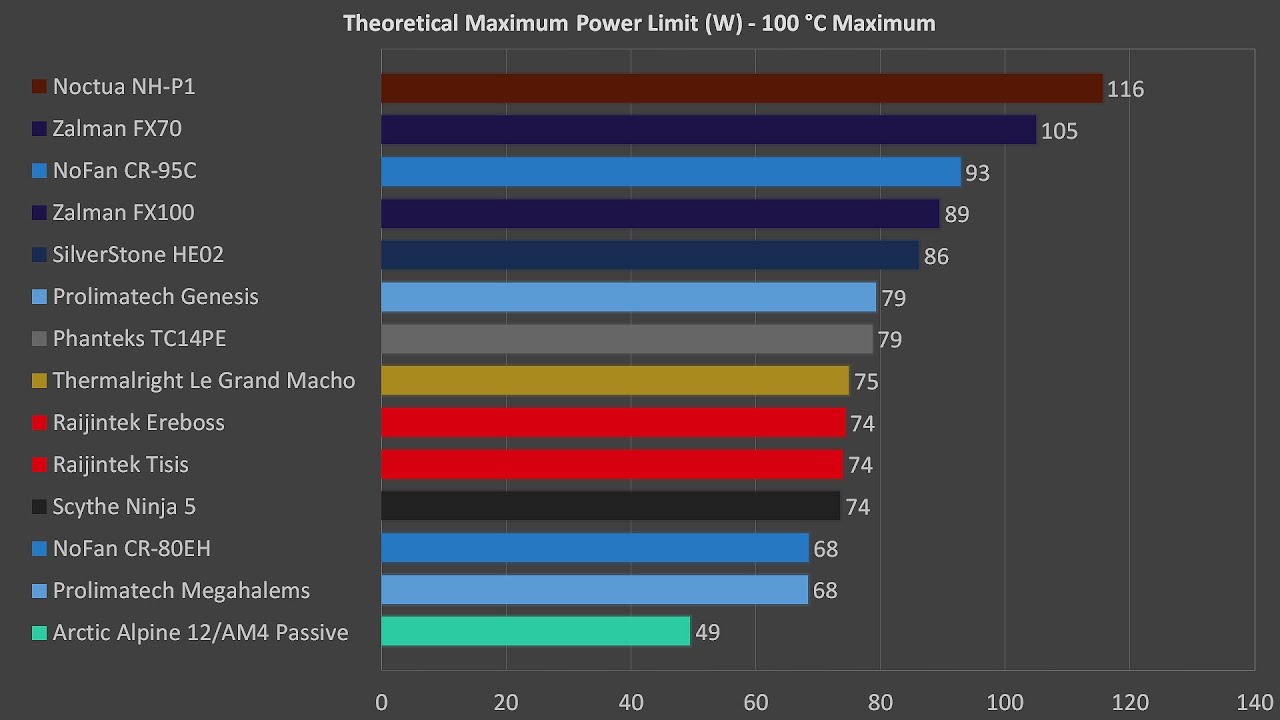
I heard Noctua NH-P1 is a good fit. There’s even a test of this exact combination of cooler and CPU on club386_dot_com. I’ve emailed them both, so we’ll see what happens.
Id put a hand on that cooler you have and see if it is blazing hot or not. If not, the CPU isnt making proper contact with it and that is why you are overheating so badly. If it is then you probably need a lot more case airflow for a passive CPU heatsink like that. Despite its 80w claimed capability, that is probably with enough airflow over it that you would be better off with a normal cooler that comes with a 120mm fan anyway.
I touched it and it’s definitely hot. Half-painful, half-annoying, all irritating to touch.
See the case is, no pun intended, that this cooler doesn’t need an air flow other than up if it’s cooling a 2700 or 5700X. All 3 CPUs are rated at 65W TDP, so if this rating was true for the 7900, it would work fine in the same conditions. And I would like to avoid fans.
Most top name brand coolers are, because AMD tried to work with them personally. Some brands, like Noctua, offered FREE mounting kits with proof of purchase, so Lisa Su wasn’t wrong, but no cooling solution manufacturers were named… for liability reasons. US company, US technicalities. It’s “technical.”
Thank goodness we’re talking CPUs and coolers and not calling the ambulance. BTW I’m still waiting for the damn thing to reboot. I’ve disabled memory retraining for a good measure… what kind of tomfoolery is memory training? We didn’t need this gimmick in 2004, the RAM just passed POST or it didn’t
I have a Ryzen 7900 on MSI x670e Carbon. With PBO off, it only max out 65W TDP (without IOD from HWInfo). It is bullet proof, rock stable.
Regarding the temp, AFAIK, all Ryzen 7000 experience high IOD Hot Spot temperature no matter the SOC voltages and cooling solution. My IOD Hot Spot is at 49C at idle with only 1.1V SOC while the CCDs temps are about 32C (360mm AIO). There must be something wrong about the IOD design. I probably will jump to Ryzen 9000 when they are released merely because this issue.
Okay, I’m going to take a step back here and we all should have asked this from the beginning: what is your full system hardware and the operating system that you’re running?
Either change the case to be more airflow focused and tune fan curves to be as quiet as you and your wife like OR try a Noctua NP-H1. Even that, depending on your workloads might not be enough.
What country are you in? I would highly suggest a high airflow case from either Phanteks or Fractal Design… tune the fans as needed.
Also disable EXPO, it automatically overclocks parts of SOC and fabric, giwing you at least +20w of baseline power draw depending how much asus overvolts it.
If I remember correctly they went way too far with it.
I am on custom water loop 7950x3d and expo off achieved 15W drop baseline and -10C effective.
If you need expo for performance, configure it custom with manual voltages.
EDIT: My own result year back on gigabyte b650 board
With this many issues I’m not sure if I won’t be returning all the AM5 merchandise. From my past experience with hardware retailers I almost expect them to throw a fit if it doesn’t come back with the same BIOS it came with to me. If I update, I can also expect the BIOS will superficially pretend downgrading is impossible. I know it isn’t, I used some AMI tool way back when to restore to an older BIOS to re-enable PCI passthrough on MSI Gaming Plus X470.
EXPO is disabled by default.
I’m keeping the unquoted remainders of the replies in mind, thank you all, that’s very informative
bios update cannot be legally used to void your warranty, so dont worry about that
double check your bios setting about expo and auto overclock, go over everything
setting frequency to some fixed point is not reliable way to lower power consumption, that option you mentioned trying (power target/power limit/eco mode), is the correct way to achieve that.
cpu will then try to maximize performance within target power envelope.
5.48 Ghz is expected and within spec
If you are getting thermal throttling on 65W real TDP cpu during normal operation, you have poor thermal contact between cpu and heatsink or very insufficient cooling
Do you have to use NoFan CR-80EH and are you using it bare, or with additional fan?
CR-80EH is also on avoid list from fanlesstech, as cost cut strongly inferior replacement of legacy model. Also OEM has been disolved since, and had reputation for fudging TDP rating of earlier models too.
if I am reading review data correctly, 80 variant has maximum theoretical coolikg potential of 66W@100C, which means its wholly insufficient for 60W ryzen.