After some research, I can’t see the forest through the trees anymore with the way I want to build my setup. I was hoping the kind forum users could help out? I’m basically trying something similar to Linus’ build where he can acces his pc throughout the house
Budget (including currency): I’d rather buy nice than buy twice, but the budget isn’t infinite. I’m planning on using proper Cat6 cables for everything, later they will be in the walls
I want to move my current pc into a server rack. Later I will add a NAS and NVR onto it but for now I’m just interested in the pc part.
I want to use my 1 home-pc from each location with the following demands
Receive the highest possible framerate (1440p @ 165 / 4k@120)
Have a dedicated (Wireless) keyboard, mouse and headset. (This can happen easily with a usb3.0 cat6 extender I think.)
SERVER RACK PC
→ Office upstairs (Office work and serious gaming / VR capable?)
→ Desk downstairs (casual gaming and office work while not being shutt off from my girlfriend)
→ Living room TV (HDMI) (gaming / VR capable)
The pc consists of
-
ASUS TUF GAMING Z790-PLUS WIFI ( 4x USB 3.2-Gen1 Type A / 2x USB 3.2-Gen2 Type A / 1x USB 3.2-Gen2 Type C / 1x USB 3.2-Gen2x2 )
-
a 4080 Noctua (2x Native HDMI 2.1a / 3x Native DisplayPort 1.4a / HDCP Support Yes (2.3).
-
13th Gen Intel(R) Core™ i7-13700K
-
32 GB Ram
I have basically 2 ‘flows’ of thinking after my research, but I’m not sure if I actually need certain KVM hardware or i can just make it way simpler by just hardlining all my cat6 cables and extenders directly into pc and just duplicating my display. I’m also a bit confused as to the location of the KVM switch. Is it in the server rack or at each location? I think I just don’t quite understand KVM’s and their usecase.
I have included a visual flowchart because that’s the way I think and may be usefull for you guys as well.
OPTION 1: With KVM in the mix
- Video: KVM
- USB Devices: KVM or cat6 usb 3.0 extender to each location
OPTION 2: Duplicating display across all locations all the time

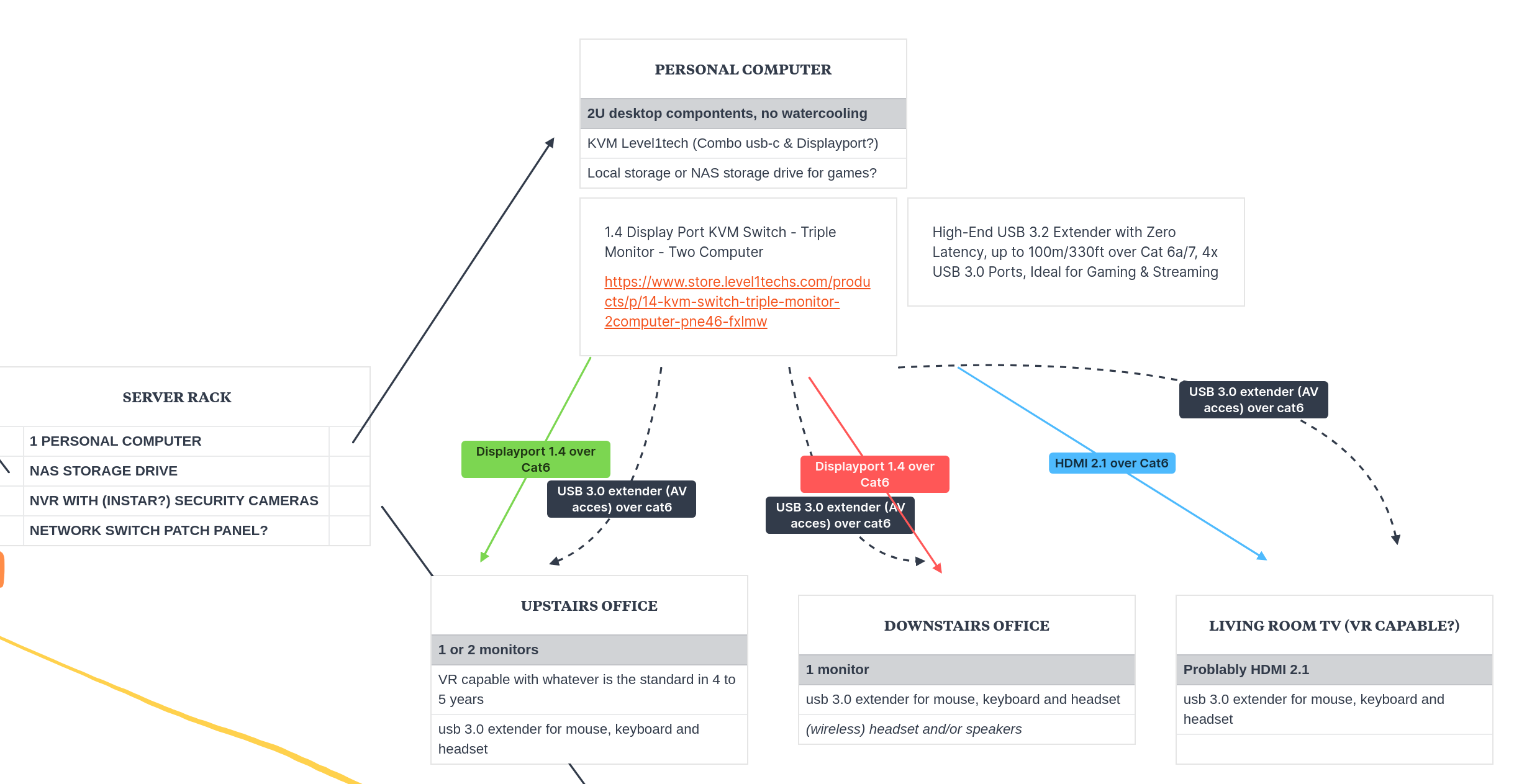
- Video: cat6 Displayport and hdmi cables into the pc and straight to each location
- USB Devices: Cat6 usb 3.0 extender to each location
Thanks to everyone in advance for any type of feedback you can provide