Help Wanted: EPYCD8; No POST after 7351 to 7282 Upgrade

Description

I’m at my parents house messing with the server. I have an Asrock Rack EPYCD8 board that isn’t handling the CPU upgrade from 7351 to 7282 well. Doesn’t post, IPMI shows no signal.

I have to go home on the 3rd of January and there’s a lot more for me to do before I go.

Parts

AMD - EPYC™ 7282
ASRock Rack - EPYCD8
DDR4 DIMM - SK Hynix - 2133MHz 64GB 8x [HMAA8GL7MMR4N-TF]

Status Currently

Not posting, No error code

What I’ve tried

  • Single ECC DIMM
  • Single Gaming DIMM
  • Waiting
  • Reseating the CPU
  • Going Back to Old CPU
  • Inspecting the socket
  • Wiping the CPU Pads
  • Reset System via IPMI remote KVM
  • Clearing CMOS

Solution

CPU was dead, 2/8 DIMM Slots also dead

How sure are you that the PSB fuse hasn’t been blown on the Rome CPU? AMD introduced locking Epycs to specific motherboards in that generation.

2 Likes

Good point but I made sure to ask the vendor before I bought and boutht two. The other one is working in my ROMED-2T board.

1 Like

What BIOS version? 7002 ROME CPU’s seem to be only supported by BIOS version 2.10 and higher. https://www.asrockrack.com/general/productdetail.de.asp?Model=EPYCD8#Download

1 Like

update IPMI with old CPU and do not maintain configuration when updating
update BIOS with old CPU and do not maintain configuration when updating

Install new CPU
pray

IPMI showing no signal is very alarming and typically indicative of an incompatible CPU or no CPU present.

I’ve received vendor locked EPYC’s, the IPMI still works but the CPU and RAM does not populate under hardware inventory.

I currently have

BMC Firmware Version 2.20.00
BIOS Firmware Version P2.40
PSP Firmware Version 0.7.0.6E
Microcode Version 08001227

Thanks I’ll give that a shot

Would it help to downgrade the BIOS?

I was always curious what the behavior would be, does the display output show anything when trying to boot a locked CPU?

It’s possible it might; but I would have expected any lingering config problems that prevent booting to be fixed by clearing the CMOS.

Does the machine boot if you put back in the old CPU? It sounds like it doesn’t, but I just wanted to be sure.

New one doesn’t boot or show anything.
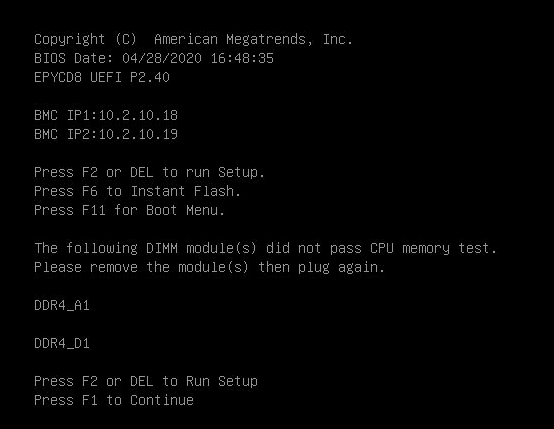
Old one does post except now it’s showing errors on memory slots A C D. These seem to be the slots themselves not the DIMMs.

{2AFBCF87-FE3F-4FB5-A657-603290FB940D}

OS disk also seems to be messed up… Damn. I’ve been planning this for a year and this is totally askew from what I expected.

hmmm, that makes it sound like it might have something to do with the CPU installation method. The retention/cooler screws are properly torqued and everything seems seated correctly?

you get no graphics output with a vendor locked EPYC
cannot get into the UEFI from the terminal
can cycle the num lock for a brief period then it goes unresponsive in whatever state it was last when it stopped

IPMI still functions on both Gigabyte and Supermicro boards

suspect dead or vendor locked

Reseat CPU
clear CMOS
reset all settings in UEFI and IPMI (reflash when you can)
Reseat RAM DIMMs

I never recommend this unless mission critical to prod.

What OS?

Windows will flip shit if the machine has set boot attempt flag but failed boot 3 times

1 Like

Yeah used the specified torx tool with the specified torque cut off

Thanks for that completed most of this list.

What I needed to do was test this in the other motherboard so I can be sure it’s not dead

From all my troubleshooting, it’s either a dead/locked CPU or it’s grossly incompatible on a low level with anything but Micron DIMMs.

1 Like

For some reason could it need every CPU power pin populated?

That’s typically a MoBo memory controller compatibility issue not CPU

I’d say it’s very locked but you said half of the CPU’s from the same vendor were working?

So I’d bet 1 worked, 1 was dead (not locked)

That kinda stuff happens when shipping used hardware.
Sucks, but it’s almost as if the silicon becomes MORE brittle and susceptible to breakage when used and mishandled.

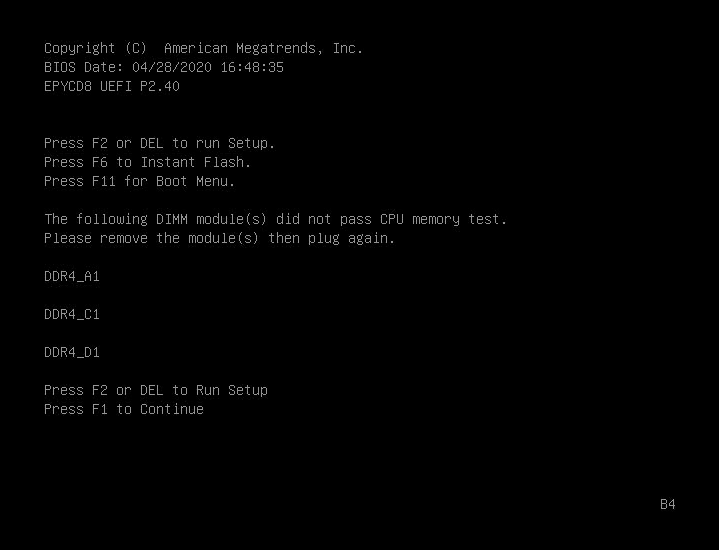
Thanks. Is there a way for me to either ignore or get more info on the memory test that keeps failing on DIMM A & D

I’ve cleaned the pads to be sure they’re making good contact

{320A8423-9EF6-485C-A083-8B1879F00A87}

Run MemTest
is the easiest way
Is your memory all matched DIMMs?