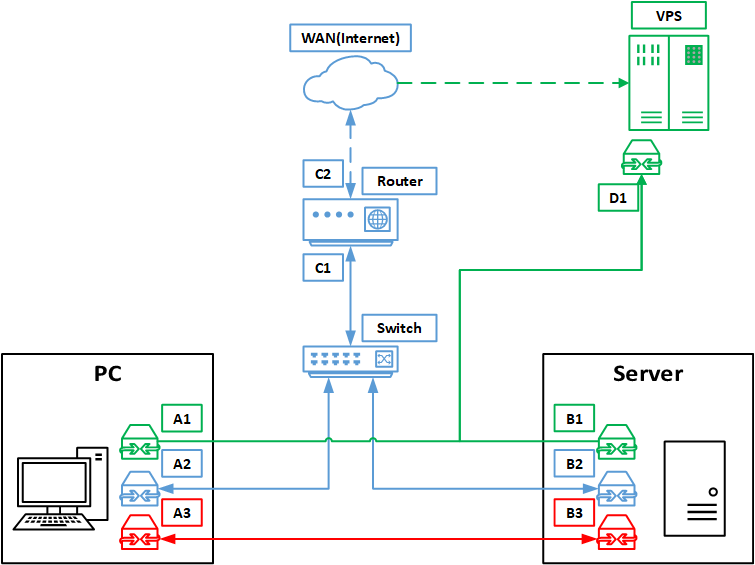
Network mainly consists of PC (Win10), Server (WinServer2019), VPS (Ubuntu 22) working as a VPN server. There are some other devices connected to the switch and the router, but those can be omitted.
Red link is 40GBit DAC connection (IPoIB), blue links between PC, Server, Switch and Router are all 2.5Gbit. Green link is the VPN connection (SoftEther server)
Server also has a DNS server for name resolving for apps hosted on it, so that they can be accessed by name on local LAN and VPN.
Right now, if I turn on the VPN connection on my Server - it starts generating around 50-60Mbit/s of downlink load, while nothing actually happens on it. Connection to the same VPN on the PC works ok, no weird loads generated.
I suspect that didn’t set up the routing and adapter settings correctly.
What I need is:
When VPN connection is turned off - PC/Server connects to the WAN as usual.
When VPN connection is turned on - PC/Server routes all WAN traffic through the VPN server.
Both should still be reachable on the blue LAN.
If red DAC is on-line traffic between PC and server should go through it (optional, this link being totally independent is ok)
Cloning routing setup from the PC didn’t work
Could the downlink spam behavior be caused by the DNS server running on the Server, or by it being a domain server?
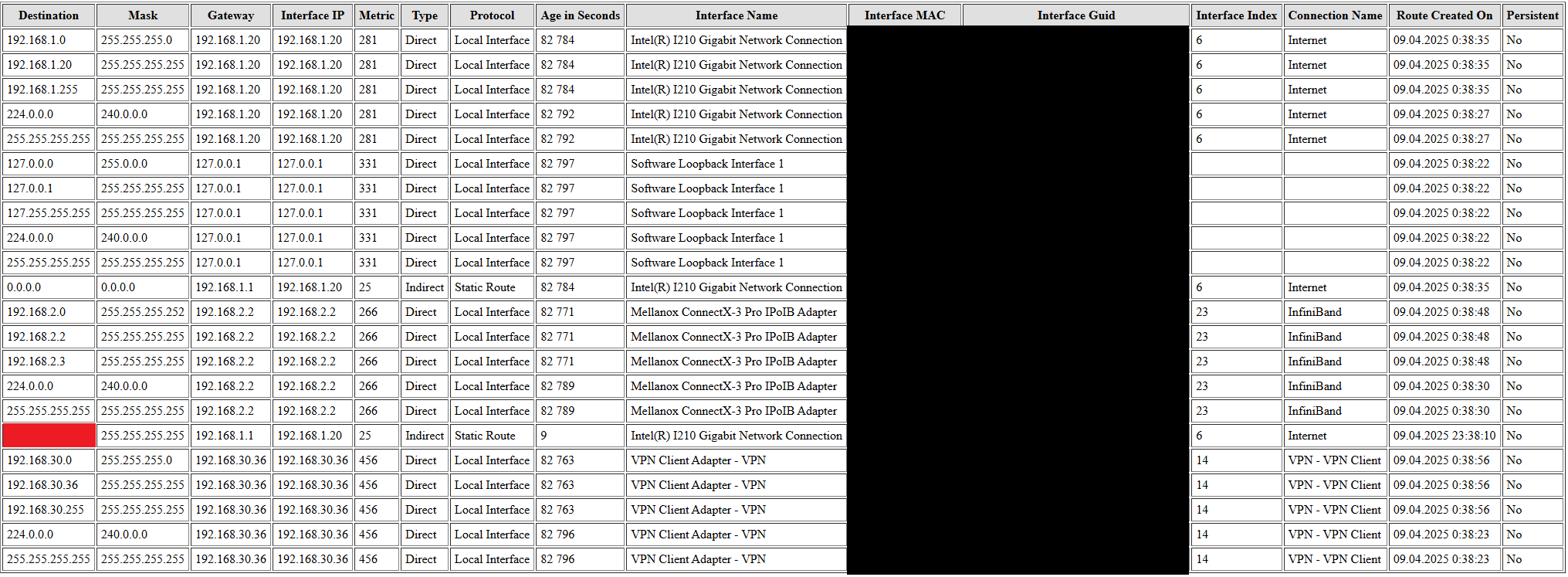
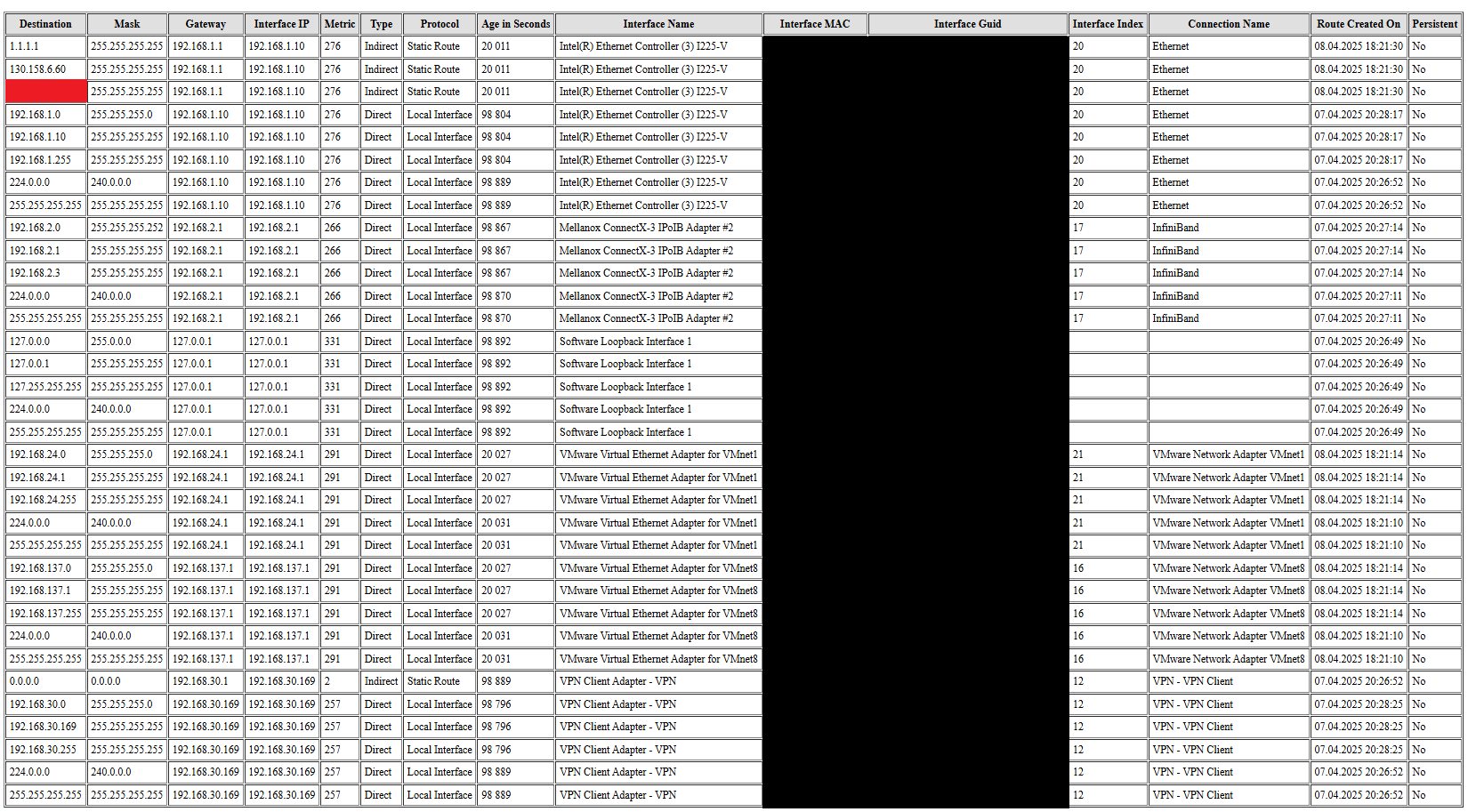
Ok i guess the question i would pose is what is the routing tables on each computer(pc, server, vps)? It sounds like traffic is crossing between your networks when you don’t want it to.
Also what is your traffic routing goals? What services should go over what network, when?
Right now Server has Navidrome, HFS, INPX, SMB file sharing, DNS server (maybe something else I forgot to mention). Goal is for all of them to be reachable on both the blue LAN and green VPN net. Navidrome was happy to run on a named address, which was then translated by the DNS.
Oh, and i plan to host Hyper-V VM’s on it too. So those should be reachable through both LAN’s too.
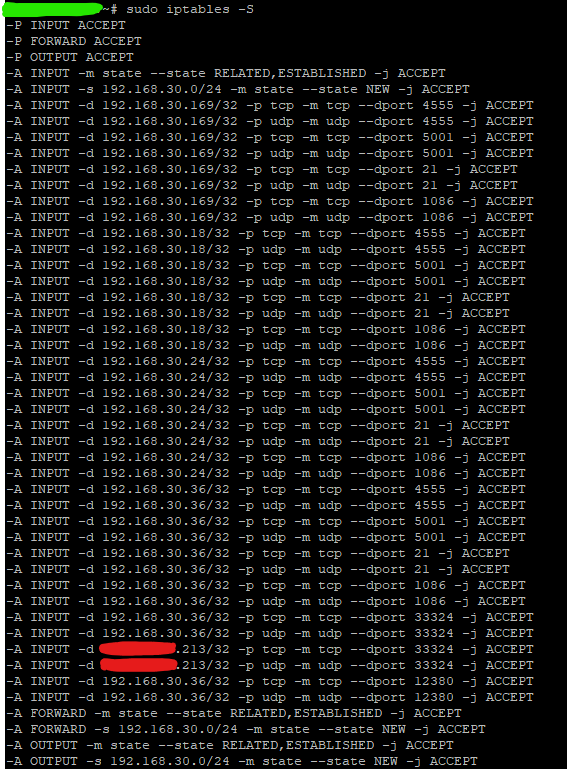
For the vps which is linux it would be sudo iptables -S for firewall rules, and sudo ip route for routing table.
as for the windows devices, i think a screenshot of the windows firewall rules related to accepting and forwarding packets from an iterface is what we are after. Sorry i’m not particularly familiar with windows server firewall.
Really we want to see what the routes are and where the firewall is directing the traffic.
Windows firewall list is like 100+ entries for both inbound and outgoing connections, same for PC and Server
I think all of them were created by programs automatically.
Ok, so on your vps, you have the two rules -A FORWARD -s 192.168.30.0/24 -m state --state NEW -j ACCEPT and -A FORWARD -m state --state RELATED,ESTABLISHED -j ACCEPT which together alow trraffic coming from your pc or server across the vpn tunnle to be forwarded onto the internet via your vps, and also allow the return traffic to get forwarded back acrosss the vpn tunnel to your pc or server. Is this the intended behavior. For this to be used there would need to be a recipricol rule somewhere on your pc or server directing traffic going to the internet across the vpn, to get to the internet. This is not uncommon, bascily any paid vpn software like PIA nordVPN … all set a rule like this.
Hopefully someone with more knowlege of exactly what to check on the windows side can chime in here. But i would check your vpn softwares settings, and double check your firewall and forwarding rules on the windows devices.
Again im not an expert on all things windows, hopefully someone can correct me if im wrong here, but domains are a windows thing for windows active directory. I believe your powerhouse.subnet is the domain network containing the ips of all netorks that the domain applies to, or in other words the ip ranges. so 192.168.30.0/24, 192.168.1.0/24, and 192.168.2.0/24 networks that span across three adapters. An active directory server can set firewall rules for windows computers inside its domain. So yes if your using active directory and have set rules to apply to users or computers, it can be changing your firewall and routing.
The bottom line is no it should not be directly responsible, and the subnet is not a bridge network adapter, or we would have seen it have a defined ip and routes in the routing table.
Your problem is with defined routes, forwarding on those routes, and your firewall settings. My suspicion is that on your server for some reason you have a rule set to forward all traffic including the local traffic to the vpn server first. On linux with firewall software like ufw apply rules using iptables, and you can look at the priority of different routes, and generally the local network route remains the highest priority despite vpn software generally setting 0.0.0.0/0 to go to the vpn server wich is all ip address space including public and private. My problem is i dont know where to tell you to look for this on windows. to confirm your forwarding rules.
After I bricked my win server 2019 install with my attempt to remove active directory, I switched to win server 2025.
I changed nothing in my routing or firewall. I only copied the softether client config, that’s it.
The downlink traffic generation bug is still there.
Not surprised, i believe your problem has something to do with how softether is applying networking rules, on activation of the vpn, specifically the priority its assigning in comparison to other rules.
P.S. have you given wireguard a try? If you want a nice web interface for generating client configs and keys, try running wireguard-ui in a docker container. Amazingly simple to use.
It was my first choice before the protocol got effectively blocked. Then i briefly moved to Outline (which didn’t create a LAN, so i abandoned it). Softether is my current one for the last couple of years.
Ooh boy, that’s a whole another can of worms I’ve got into recently, not relevant to this topic.