I ordered an HD7950 from a 2nd hand retailer and they sent me a 7970 but the fans don't move under 85%, Is there a fix for this?
I prefer not to run the fans at 85%
Return isn't a problem, they messed up and the cards faulty but If I can get it working I'd like to.
I just need to replace the fans?
Thanks in advance
Just going to ask, you've visually inspected that the fan's aren't working below 85%?
yup, 1 second spin-up on a cold boot only, then dead under 85%
I don't know if I want to spend £12 on new fans but if I return and try again I probably wont get such a nice card
It's possible the fans are non original and require too much amperage. Can you tell if they are original to the card?
Fun fact: Having absolutely the same issues with my Sapphire Toxic 270X. It's just that it's only one of the 3 fans, the GPU have. Honestly, I have no idea how to solve that issue, but I have also personal interest in this topic...
The fans are original msi wavy ones but have a cludgy dust build up near the edge as if the oil has been released into the wild
If they are packed with dust on the inside that would certainly increase the amount of amps it would take to spin them... Try cleaning them?
disassemble?
Visible dust bunnies have been removed, do you mean deeper cleaning?
Yeah like physically inside where the motor is... I'm not familiar with those exact fans, they might not pop off .. You may have to get creative, maybe use compressed air or something. Unless if it's 100% sealed then I doubt that's the issue in that case.
http://www.aliexpress.com/item/2pcs-lot-POWER-LOGIC-PLD08010S12HH-75mm-DC-12V-0-35A-4Pin-Dual-Fans-Replacement-Video-Card/32271072997.html?spm=2114.40010308.4.9.yAWZZC
They are these things except with a lot more fine yellow dust involved (evidence of a smoker)
The blades move with a light blow (out of the lung/mouth contraption) so I'm not sure dust is the issue or that new fans will help,
Might be worth hooking some up though to see what happens, Cheaper frozr II compatible ones though, can bodge them to fit the mounting holes
http://forums.guru3d.com/showthread.php?t=382423
I'd recommend trying a different graphic driver to see if that's the problem and if not and you have to get intrusive with the card, send it back for a replacement since it was advertised as working and isn't.
I would just return it. I have seen this a few times with 7970s and r9 280x and its definitely a hardware problem. Probably something to do with the fan controller but i am not really certain. It's still worth trying different drivers just to be sure, but i don't think it will make a difference.
I was just suggesting it incase it was a bug in the software.
Ive tried it on a mac also so its not a driver thing, I'm thinking of attaching the fan from my gtx970 if the plug fits (nope), to see what happens there, If nothing then controller it is and sadface
found an adapter in my MK-26 box, gonna try it
spins a 140mm fan no problem, so in this case its the fans
GPU fan is harder to replace, except RMA but that's if its still under warranty but highly doubtful since you have 7970. However, if you plan on keeping the card get a ARCTIC Accelero Xtreme 7970 Cooler for it which is out of production but a couple still float around Ebay.
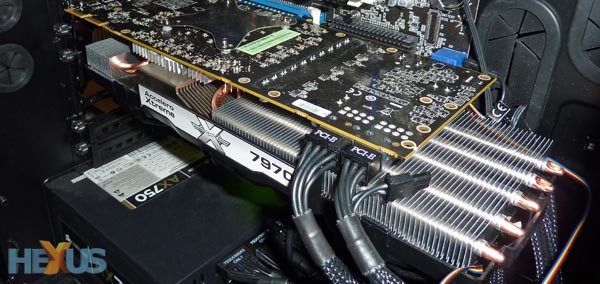
I got the frozr II fans which I can glue to the broken mounts for the frozr III fans but yes, I have to take the heatsink off to wire it up pretty otherwise messy.
I've had an MK-26 Black sitting in a box since I had a stock R9 290 a couple of years back but didn't use it so if I did use an aftermarket it would probably be that but no, This 7970 will be flashed for mac use (lower clock) and wont need so much cooling