Hardware/Software/Network Questions for First Homelab Build in Supermicro CSE-846

I am building my first homelab (backup/storage/Jellyfin/whatever-I-might-think-of-in-the-future) server that will run TrueNAS SCALE and, since I don’t have experience in any of this, would really appreciate your guidance on the questions below. The questions cover different stuff so if I need to make separate topics for each please let me know.

Here’s the part list:

  • Chassis: Supermicro CSE-846 with the BPN-SAS-846TQ backplane (found it on FB marketplace, essentially what kickstarted this project)
  • Motherboard: ASRock Rack ROMED8-2T
  • CPU: AMD EPYC Rome 7532 (32-core, 2.4-3.3 GHz, 200W TDP)
  • RAM: 128GB, 4x Micron MTA36ASF4G72PZ-3G2J3 (32GB DDR4 3200 CL22)
  • GPU: Sparkle Intel ARC A310 Omni View (4GB GDDR6, 50W TBP)
  • Boot drive: Intel Optane M10 32GB
  • Second NVMe drive: Samsung 990 Pro 2TB
  • Storage drives: 6x Seagate Exos X24 ST24000NM000H 24TB (certified refurbished, plan on using them in a double-parity RAIDz vdev)
  • PSU: be quiet! Dark Power 14 850W
  • CPU Cooler: ARCTIC Freezer 4U-M Rev. 2
  • Fan wall: 3x Phanteks T30-120

Here’s what it looks like:
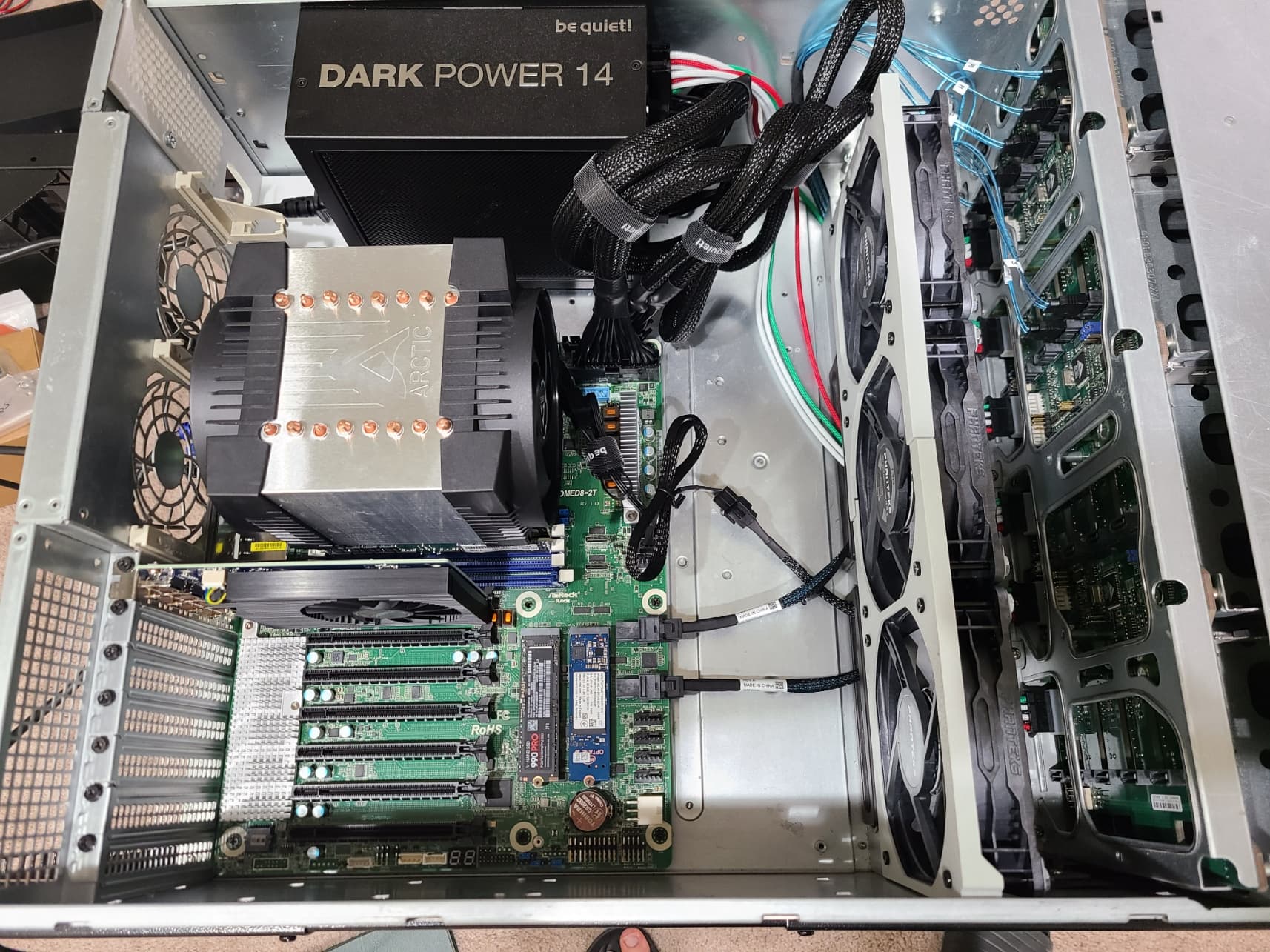
Here are my questions:

  1. I couldn’t install the two back fans because the cage interfered with the CPU cooler. I can probably get smaller 3D printed cages, but is there any point in installing them?

  2. I ran 4 passes of Memtest86 and did not get any errors. Also ran s-tui’s CPU stress test for an hour and everything was ok (temps were at ~65C @1000 RPM with the CPU output ~160W). Are there any stress tests I should run?

  3. What can I use the 990 Pro for? Should I use it for SLOG or L2ARC given how much RAM I have? Can I use it for some sort of caching? Tbh I’ve had that drive for quite a while and didn’t know what to do with it so I just put it in there. I have a second M10 that I could put in there instead and mirror the boot drive for redundancy but uptime is not that big of a concern for me.

  4. The BIOS and IPMI interfaces have loads of options that I have no clue about and ASRock’s documentation (the 128-page BCM manual) isn’t really good. Is there any resource I can look for that provides some explanation for this stuff? Is there anything I need to change from the default values to get better performance out of the system?

  5. The only thing I could find in the BIOS after some digging was the cTDP, should I leave it at auto or set it manually? Does auto max out at 200W or something lower? Will the CPU ignore cTDPs higher than 200W?

  6. The motherboard seems to support both open and closed loop fan curves. Which one would you recommend? Will the closed loop fan curve have some annoying ramp up and down behavior? I want to ideally keep the CPU temps below 70C while keeping the system as quiet as possible.

  7. I also want to keep drive temps below 45, but my understanding is that that cannot be done through the motherboard and has to be done through the OS, is that correct?

  8. Finally, I would like some guidance on how to set up my network and secure it (I really don’t know much about networking tbh). Right now, the IPMI port is connected straight into my wifi router and on the same network as my PC, phone, and TV. My IoT devices (smart lights, basically) are connected to a guest network. My router is ASUS AXE7800.

Thanks!

Welcome and congrats on the homelab build. Couple questions that may help eventually.

  1. Does the chassis have the dual redundant power supplies and the rest of the power delivery circuit? If so you’d be better served using these instead of putting another consumer PSU inside the case which may cause airflow and heat issues as the PSU wont have any fresh air to intake and may overheat and underperform.

  2. Do you have the fan walls (there should be two for the drive bays)? If you do you may need to use those instead of the consumer fans that are in there now. The Supermicro fans will move much more air and are what the chassis was designed for originally. Putting in the drive blanks in any bay that doesn’t have a drive populated is also a really good idea (not sure if the trays you have came with them but you can 3D print them as well if you don’t want to purchase)

3). Was the motherboard shroud included with the 848? It’s pretty important for airflow in those chassis to have the shroud installed to help with airflow (especially if your using any zones in your fan setups, though I’m not sure the ASRock supports that)

  1. Are you planning on adding drives in the future? I ask because the 846 is a pretty expensive chassis to run for 6 drives. You’ll be a around 80-100watts with just fans. That’s before any MB or CPU or compute loads. If you really like the Supermicro chassis (which I personally do) then you could always flip this one and get an 826 (2u version of this chassis).

5). Is noise and heat a consideration with the location of this server? These are loud and hot, no way around it sadly (well not and have proper airflow and keep temps withing spec anyway). Supermicro does make a “SQ” (SuperQuiet) line of fans and PSUs that can help tame the noise but these chassis are not something I would ever call quiet.

Again congrats on the build and having an environment to tinker and grow. Please don’t take these questions as criticism but rather as hurdles I faced when I was building out my first couple supermicro servers. Happy homelabbing.

How is your energy bill? 'Cuz running this monstrosity will have it skyrocket PDQ :money_with_wings: :roll_eyes:

Given you’re new to this, put this project aside for the time being and start with cheaper stuff. Find an old(er) workstation (Dell, HP, Lenovo) like 10-12th gen Intel, load it with RAM, add drives and away you go. Cheaper and quieter, as well as less power use.

These are valid questions, happy to answer, just to note that I haven’t installed the drives yet. My general approach to this was to build something that I can use long-term (I’ve been using the same laptop for the past 9 years, still going strong!), so I tried to avoid proprietary stuff and go with standard parts that could be replaced later on if needed.

The chassis was pretty bare bones when I got it, as you can see in the image below. No fan wall, PSUs, or PDU, just a SM PWS-665-PQ double-taped to the side wall, which I took out and gave away (wasn’t working when I tested it, I may have damaged it when trying to get it off the wall with a crow bar :smiley: ).

The PSU I have is pretty efficient and quiet (based on the Cybenetics report here), the fan doesn’t come on until it’s putting out 400W which I doubt would happen often since the GPU uses 50W at most, and even then it is super quiet (<20 dB).

The T30-120s are pretty much on par with, or even better than, the Noctua iPPCs and can go up to 3000 RPM. Compared to the stock FAN-0127L4s, they have higher air flow (100.9 CFM @ 3000 RPM vs 72.5 CFM @ 7000 RPM) and higher static pressure @ 3000 RPM (7.37 mmH2O vs ~5.1 mmH2O). The only advantage the stock fans have is they can go up to 7000 RPM and produce 27.6 mmH2O static pressure, but at those speeds they are super loud. Given the newer Exos drives are more efficient (~7W on average vs 10W for some older drives like the Exos 7E8), I’m hoping these would be able to handle the heat. If they can’t, my plan is to add a fan wall to the front of the case to double the static pressue, or alternatively stack those behind the ones already in the fan wall (I do need to find longer fan screws though).

(Update: I put one of the drives in the bottom right bay so it’s not in front of a fan (the rest empty), and in Ubuntu first wrote a 100GB folder with 400K files to it and then started writing zeros to it with dd for about 2 hours (~1.5 TB). The drive temp settled at 38C and the CPU temp was at 37C @ 75W, with all fans @ 1000 RPM and the loudest thing being the drive itself. Now, I know enough about heat transfer to know a good chunk of the drive’s heat is getting dissipated through the adjacent open bays. Still, I think I may be able to manage the temps and keep the system quiet.)

I don’t have the blanks but my plan is to block the unused bays (and the holes on the sides) with electrical tape. As you mentioned, an alternative would be to 3D print blanks like these, but I don’t have a 3D printer so I’ll have to see how much these would cost on CraftCloud.

I don’t have the shroud, but isn’t that for when the CPU is being passively cooled? For my case I think the CPU fans would be able to just suck in the air coming out of the fan wall, am I wrong in assuming that?

I do plan on adding drives in the future. I went with the 846 even though it’s much harder to find compared to 826 or 847 because it has a lot more room which translates to quieter operation (I can use 120mm fans that don’t have to run as fast as the ones in a 2U chassis).

I don’t follow your 80-100W calculation though. The drives are at max 9W each (6W idle, 7W average during random read/write) and the fans 5W at max. The CPU uses 50-200W and the GPU 0-50W (I have it there mainly for media transcoding, which is not that often), so a rough estimate of the power use would be (let’s say mobo + CPU cooler uses 50-100W, though this is probably an overestimation):
min: 6x6 (drives) + 3x2 (fans) + 50 (CPU) + 0 (GPU) + 50 = 142W
ave: 6x7 + 3x3 + 100 + 10 + 60 = 218W
max: 6x9 + 3x5 + 200 + 50 + 100 = 419W
max (all bays full): 24x9 + 3x5 + 200 + 50 + 100 = 581W

The server will sit in my living room for the time being so noise has been a consideration. As mentioned above, I went with the 846 and the PSU and fans that I selected with noise in mind. I have not installed the drives yet but without them it was pretty quiet even under load, but I imagine that would change with the drives blocking the air flow.

I’m in the US so electricity is rather cheap (at least for now, we’ll see what all this AI datacenter crap does to those prices). For the average power consumption of 218W (see the calculations above) it would be ~$25 a month which I’m fine with.

I’m not really inclined to go that route because of the proprietary nature of those machines, they may be cheaper now but in the long run I think replacing the parts would cost more. I also don’t think they would be that much more efficient in a meaningful way.

That calc is for that chassis setup with supermicro fans per manufacturer spec.

I wish you the best on your journey. I tried a similar setup and under load it did not work well in thermals or performance for me. I now run a few 826 chassis and all the components are happy and humming along. Though my rack lives where noise isn’t a concern. Depending on the workload you may never see these issues.

Thanks, appreciate your advice. If you have any guidance on the questions in the first post as well I’d love to hear it.

Your questions regarding the motherboard, bios, and ipmi functions will all be in the manual for the board. I’m not really familiar with the Asrock Rack boards but they usually have good documentation. As for the networking and system admin stuff, how deep are you looking to go with your learning? Are you looking to get any certifications or more just a general understanding and the abilities to setup your environment? Two equally rewarding paths but they lead in different directions.

I would say the latter, this is just a hobby and I primarily want to set up my environment.

Tom at the Lawrence Systems youtube channel has some very nice tutorials on Truenas and Networking. That may be a nice place to start if you enjoy the video learning route.

1 Like

FYI this Supermicro front panel cable adapter exists. Supermicro uses a couple different widths of ribbon cable for that, but the beginning pins are the same so if yours is the wider one you can just cut the end out of the connector.

1 Like

Thanks! This would be handy, though the ROMED8-2T mobo I’m using has the pins to the side so I’ll probably have to take out the entire thing :frowning: