So i have a very weird and frustrating issue that i have been trying to solve for about a week now. i have been posting about this on the LTT forum because i have had
The symptom:
Virtual Machine running on server has terrible CPU performance
The possible root cause:
Hardware assisted virtualization is not working. but is enabled in bios and hardware supports it
Here is some back ground on the setup
The server in question
Dell PowerEdge R730xd
- 2 Xeon e5-2640 v4 10 core 20 thread cpus (20 cores 40 threads total)
- 128gb of DDR4 ECC RAM @ 2133 MHz
- Nvidia Quadro M2000 4gb vram (not used by server but instead passed through to the VM using DDA in hyper v, more on that later)
- OS: Windows Server 2019
- 512gb SATA SSD for OS and VMs
- 8TB of HDD storage
- All Virtualization settings are enabled on the motherboard BIOS
- BIOS has been updated to most recent version
The settings for the virtual machine ( the one and only virtual machine on the system)
- 4 Virtual Processors (i have tried using 1 or 2 instead to totally rule out over allocation because that is 99% of peoples problem that i have encountered in my research. it made a negative impact on performance)
- 16gb of Ram (no dynamic allocation)
- Guest OS: Windows 10 Pro
- i have enabled Guest Services in the integration services settings
- no checkpoints have been made on the VM
- Generation 2 VM
- 128gb Virtual Disk (fixed size not dynamically expanding. i was not using this at first. so i had to convert the virtual disk to fixed size from dynamically expanding
- GPU pass through using Microsoft DDA. VM has full access to Quadro M2000
The use case for the host server is a security camera NVR ( i have temporally disabled Blue Iris to make sure that is not a contributing factor.) the NVR is getting 8 camera streams and also running a local AI server for Vehicle/People detection. All camera footage is being written to a different drive then the Virtual Machines and Host OS are running on. Again i want to stress i have completely turned off the NVR software and AI detection server to rule this out as a contributing factor. turning it off makes no difference to CPU performance on the virtual machine.
The use case for the virtual machine is to run applications that are not compatible with MacOS (i know, i know. please don’t recommend that the macs go away i cannot win that war.) unfortunately the application in question only runs on x86 Windows and lots of people have apple silicon MacBooks which can virtualize and emulate x86 windows but at absolutely terribly slow speeds. The requirements of the application required a discrete GPU so i need a hyper visor capable of GPU pass through. thus Hyper V
what i have learned so far
Thanks to some help on the LTT forum someone was able to help me determine that Hardware Assisted Virtualization is not working. i ran the following power shell command and got this output.
Get-ComputerInfo -property “HyperV*”

What is really really strange about this is that if i disable virtualization in the BIOS then this is the output i get.
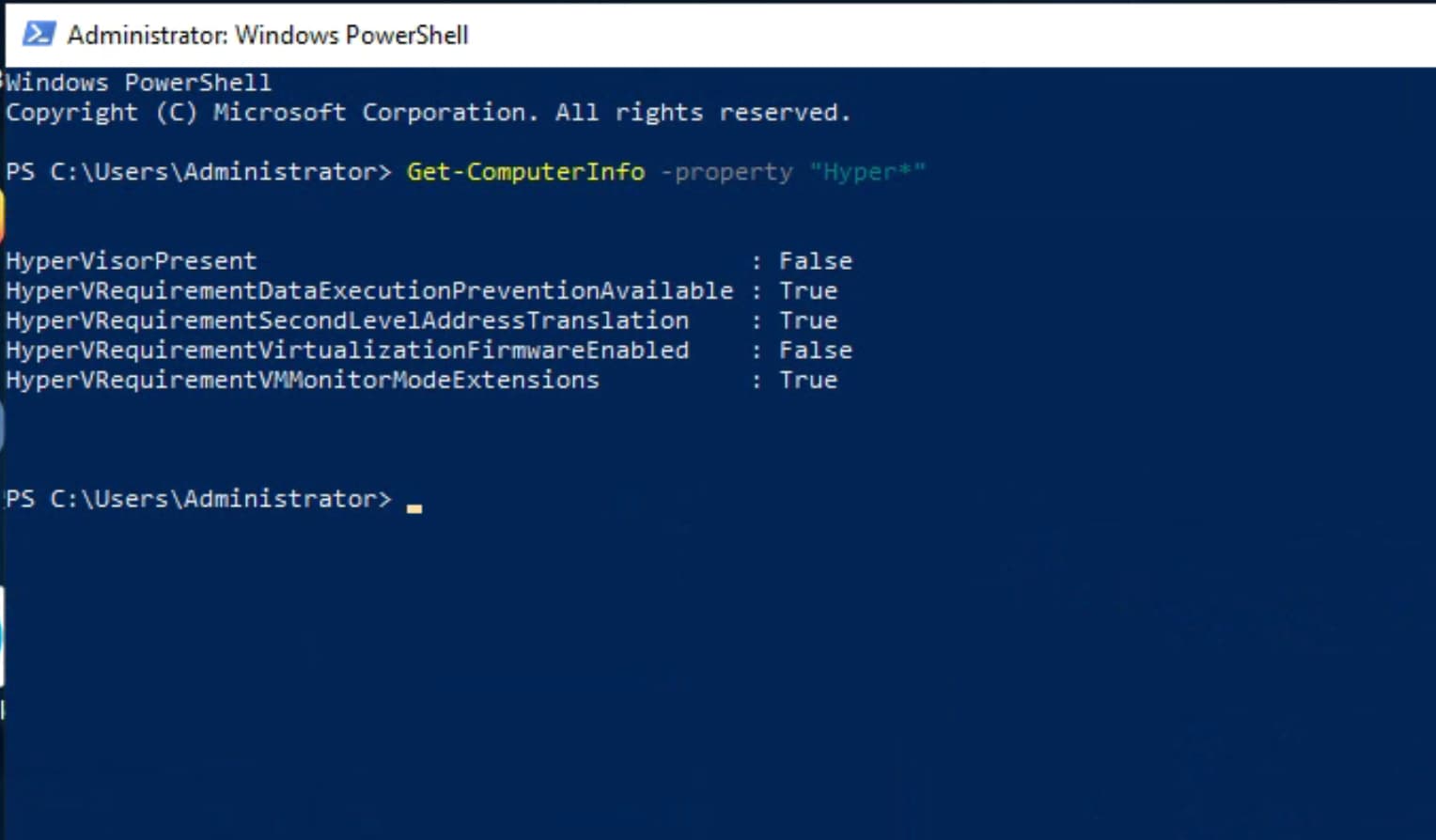
My understanding is that to fix my problem i need pretty much everything on that list to show true. but i cant seem to figure out what the issue it.
i’m hoping by posting this over here it will get a few extra eyes on it. i am really stumped and not sure what to do next. if anyone is interested in some more back ground on the problem i will link to the original thread on LTT forum. i have included anything i think is relevant in this post but you never know i guess.