After doing a clean install of Windows in my GPD Win 4 (2025 model). I’ve noticed that I had audio popping issues every now and again. And after updating all the drivers to specific versions, the laptop would crash. I’ve sorted it all out and here’s a quick guide on how to do a clean Windows install, and sort all the audio issues!
- Nuke all the partitions and install Windows! By default, Windows 11 Home is bundled with the device, so you can just run the generic installer off the Media Creation Tool and it should work
- Download and install the latest drivers from AMD! This should get you up to speed for the most part.
- Open
Device Manager- For those peskyUnknowndrivers, you should download the ones provided by GPD on their support page. And while you’re at it, you may want to grab those DTS:X drivers too! - Right click every
Unknowndevice in Device Driver, select Update Driver, and point the driver search to the unzipped driver folder
If you leave things at this point the device will work, but you will see that there are pops every now and again when you start up the device, and that sometimes you won’t have any audio at all until a random point in time of using the device. If you run into this situation you can do the following:
- Download the latest
AMD High Definition Audio Controllerfrom Microsoft Update Catalog. Pick the version that is from 2/18/2019 (latest available) and is around 50KB (the 9.6MB ones have compiling and testing information, we don’t need that). - Extract the CAB file with 7zip. You should get an extraction warning that you can dismiss.
- Open
Device Manager, browse to yourAudio inputs and outputs, select the availableSpeakersand open the menu optionView > Devices by connection. You should see something similar to this screenshot.
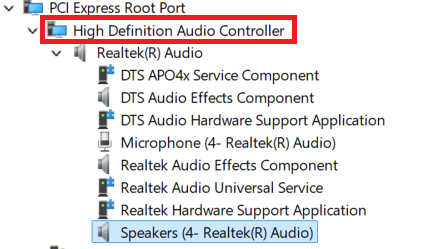
- Right click the highlighted
High Definition Audio Controllerand selectUpdate driver - Browse to the folder where you extracted the CAB file and let Windows install those drivers
- Open the
Registry Editorand browse to the keyComputer\HKEY_LOCAL_MACHINE\SYSTEM\CurrentControlSet\Enum\PCI\VEN_1022&DEV_15E3&SUBSYS_########&REV_##\#################\Device Parameters\Interrupt Management\MessageSignaledInterruptProperties. It is important that the device after PCI is calledVEN_1022&DEV_15E3 - Once there, update the registry key
MSISupportedto 1 - Restart!
Why the last bit? GPD, in their infinite wisdom, has decided to configure the devices in such a way that does not align with a regular clean installation. There are IRQ issues (yes, even to this day) that prevent Windows from detecting new devices (hard crash) and shutting down the computer because of these conflicts. This setting will force the driver to work in a different IRQ, and should resolve all these issues. Was able to find this out from this other forum: System interrupts, Latency, HDaudbus.sys | Sysnative Forums
And that should be it! Enjoy your cleanly wiped GPD Win 4!
PS: Yes I know I can run Steam OS, not doing that right now.