“don’t use btrfs” post, or at least don’t use raid on btrfs.
RAID1 (and 10) are fine and btrfs’ best use cases. It’s RAID5/6 you want to stay away from.
I’ve rocked varying BTRFS single, RAID10, and RAID1 setups over the years, and BTRFS RAID1 is vastly superior to BTRFS on mdadm raid1. Particularly on SSDs, which is what I have mostly done recently
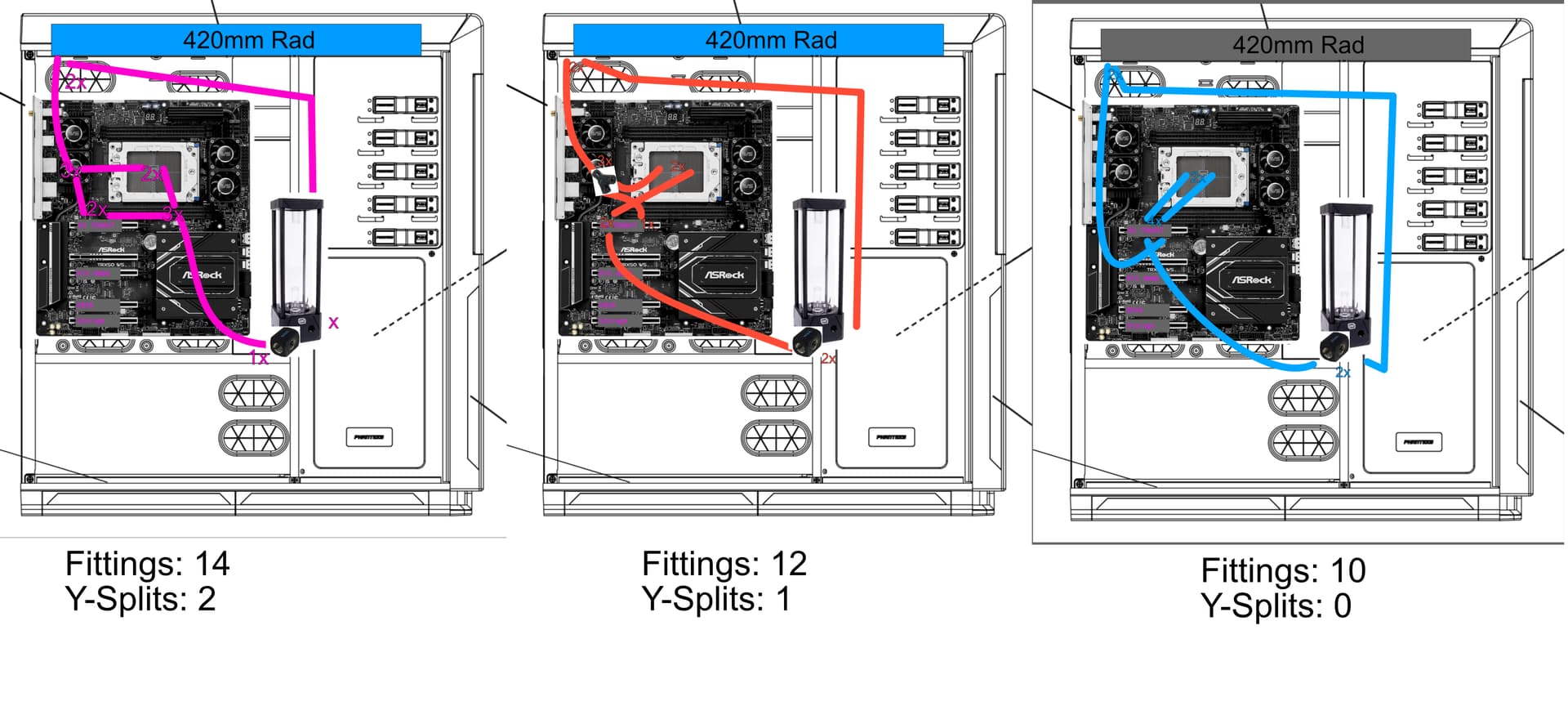
Watercooling planning time
Since the GPU-waterblock is currently two months away availability wise, I was thinking:
What if I parallel GPU and CPU, this way I can close two valves to keep the (missing) GPU block out of the loop for the moment.
Then I have Pump → Y-splitter → GPU & CPU → Y-splitter → Radiator
Is this dumb?
Edit:
Does it make sense to watercool the memory? I’ve read elsewhere on this forum, that >60°C on the memory can reduce stability.
I’d probably do quick disconnects, and then just rearrange things rather than use a splitter. If I’ve got to mess with things later I’d rather do that and not have to worry about the drop in flow rate.
As for memory, if you’ve got 8 ddr5 dimms at some crazy speed, then maybe? Otherwise, probably not worth the trouble.
The few Quick-Connects I looked at all make an effort not to mention flow rate. Parallel CPU and GPU would be less resistance to flow compared to series, series with QDC’s sound like a lot of flow restriction.
I’d be worried about the flow balance between the CPU and GPU blocks if you split the flow. Without a way to fine tune the flow between the two blocks it would be hard to make sure the GPU block gets the right amount of the flow through it, too much flow might go through the CPU block robbing the GPU of cooling.
That 60C figure is for Hynix A-die… which I think the RDIMMs you listed are. Hynix M-die is supposed to have a flat “stability curve” up to 80C.
I’d only be worried about water cooling memory if you have a really memory intensive workload, most of the “common” compute tasks don’t hammer the memory very hard so they don’t get a chance to overheat.
Also the memory you listed is 1Rx4, so it only has half the DRAM chips of the higher density DIMMs (that probably do need water cooling) which means roughly half the heat output.
The final reason for not water cooling the memory is I don’t think any company is making heatspreader/blocks for DDR5 RDIMMs. The RDIMMs have tall inductors on one side that make them incompatible with most or all of the DDR5 UDIMM heatspreader/blocks.
I don’t remember where I read it, but I was under the impression about a year ago when I did my loop that Koolance had the lowest pressure drop QD fittings.
Avoid the availability-issue during setup, and then run into a long-term issue. Would not be great.
Assuming even flow distribution, I would guess that during symmetric loading the temperatures would be better for both parts.
I am probably overthinking this…
Should be fine then. Worst case, I fabricate some bracket and point some small fans at the sticks.
Funny that. I looked at them really hard after @redocbew brought QDC’s up.
I intend not to repeat the struggle of two friends and put a drain valve on the reservoir, because 20 bucks is worth not having to invert 20 kg of expensive!
Build-log to accompany this planning thread should start soon™ (will link HERE)
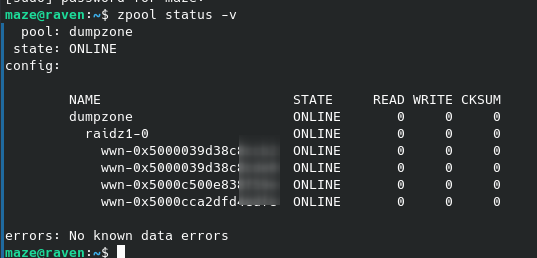
I think I looked into this enough to know that I want to add the disks by UUID, which I got using ls -lh /dev/disk/by-id/
The 4 disks should end up in a raidz1
If I am reading the archwiki right, then the command
These four disks are meant to serve as a general “stick this here, work on it or leave it sitting there”-area, a local copy of the (soon) to be acquired-holding project-ssd.
Since you called it dumpzone I’m guessing it’s a bulk storage pool. The datasets for the pools you’ll be actively working from are more likely spots for tuning, but yeah it doesn’t hurt to group things in datasets even if you leave them all at defaults for now.
The data that will get dumped in there is as heterogeneous as it gets, like I said above, will read into it!
Can always have my old machine and/or the NAS copy over here again.