So, back in the day (about 4 years ago) in the wake of this video:

A number of folks, myself included, bought the Gigabyte WRX80-SU8-IPMI motherboard and the Gigabyte GC-ALPINE-RIDGE-rev-20 Thunderbolt 3 Add-In card and built our systems.
There were a number of challenges with these systems, documented in quite a few (now long-closed) threads, e.g.:
https://forum.level1techs.com/t/threadripper-pro-build-gigabyte-wrx80-su8-ipmi-advice
https://forum.level1techs.com/t/gigabyte-wrx80-su8-ipmi-experience
https://forum.level1techs.com/t/gigabyte-wrx80-multiple-gpu-d4-post-error-yes-above-4g-is-enabled
https://forum.level1techs.com/t/trpro-3975wx-gigabyte-wrx80-not-posting-error-code-62
A good summarization of much of the confusion experienced getting everything working with this board can be found in this quote:
And, ultimately, we were left with a lot of guesswork and trial and error:
I got my board working ‘well enough’ – sticking various PCIe adapters in almost every slot – and it served as my work machine for about 5 years (running pretty much 24x7, running various sorts of lab experiment in a VM or container, etc.)
I recently retired the system from work and brought it home, which added a new desire for the system to do S3 Sleep – but, once I set things up for Sleep, I suddenly starting experiencing all sorts of new system problems:
- the system wouldn’t always wake up from sleep (especially an idle sleep – wake from a manually invoked sleep usually worked fine)
- in the middle of working on something, the system would sometimes freeze, with the video on, and the BIOS error code showing 30, as if some kind of odd power management event occurred and hung the system.
Looking in Windows logs, I likewise saw all sorts of hardware looking failures like USB devices hanging, NVMe detaching, NIC PCIe freakouts, Thunderbolt and TPM errors, e.g.:
| Event ID | Provider | Example Device / Driver | Category | Likely Problem Domain |
|---|---|---|---|---|
| 219 | Kernel-PnP (WUDFRd) | Omnikey, YubiKey, Plantronics | USB user-mode driver timeout | USB / WDF stack timing |
| 10111 | DriverFrameworks-UserMode | HID OMNIKEY 5022 | User-mode driver crash | USB device crash on resume |
| 157 / 51 | disk | NVMe SSD | Surprise removal / I/O error | PCIe / NVMe power or lane drop |
| 405, 72 | mlx5 | Mellanox ConnectX-4 Lx | Firmware EQ dump / PCIe reset | NIC firmware / PCIe L1/L2 timeout |
| 9006 | nhi | Thunderbolt controller | PCIe / L1SS / NHI failure | Thunderbolt L1SS / ASPM timing bug |
| 41 | Kernel-Power | System | Unexpected reboot marker | Result of hang/freeze |
| 7009 | Service Control Manager | Intel TPM Provisioning | Service timeout after boot | Secondary symptom |
Researching these symptoms, I typically found ‘quick fixes’ that centered around disabling power management features – like disabling ASPM/L1SS in BIOS, disabling PCIe link power management, and USB Selective Suspend in the powercfg profile, setting “problem” devices to disable “Allow the computer to turn off this device to save power”, etc. – (none of which fixed the problem, and none of which were actually required once I found the root of the problem.)
Now at home, with a more leisurely schedule to solve the puzzle, I kept banging my head against the problem until I figured it out and got everything working right – and now I can reboot to Windows 10, Windows 11, Ubuntu 24, etc. and everything, including the Thunderbolt is always there, working, and stable, even for sleep and wake up.
So, here’s what I learned – probably not a great help for the system integration problems of 5 years ago, but these are still pretty competent systems for today – and maybe there’s some useful informative generic knowledge here, especially about some PCIe details that aren’t part of typical parlance.
Lessons Learned:
Lesson 1.
PCIe memory mapping can make or break your system!
While 128 PCIe lanes are cool and all, PCIe memory mapping is important – and the BIOS settings for proper memory mapping of complex systems (including >4G Decoding, Re-Size BAR, etc.) don’t happen by default.
Here’s the PCIe BIOS settings I finally had success with to get a working PCIe memory mapping:
Above 4G Decoding: Enabled
Re-Size BAR Support: Enabled (this setting didn’t appear on earlier BIOS versions)
Hot-Plug Support: Enabled (supposedly this help leave allocation room for inserted Thunderbolt PCIe devices)
However, to get these settings, you first need:
CSM Mode: Disabled
UEFI Mode: Enabled
And, to get these settings, you first need:
Set the On-board Video mode from Legacy to UEFI.
So, there’s at least a couple BIOS changes and reboots to get things ready for advanced hardware set-ups.
The caveat is: if you load up your system with advanced resource demanding PCIe adapter hardware – like GPUs, high speed NICs, etc. – BEFORE these settings are in place, your PCIe memory allocation will likely fail and your boot will hang.
Here’s a PowerShell script and its output that shows my system’s final PCIe memory mapping, including a flag for devices using the >4G space – like the >4G space using on-board X550 10GbE NICs, my NVIDIA A4000 GPU, a Mellanox ConnectX-4 Lx, and some PCIe Root Ports. If I tried to boot the system with these devices without the >4G and Re-Size BAR enabled, my system would hang and I’d have to start pulling out devices to get back to a working boot up.
PowerShell:
# Enumerate all PCI devices and their memory allocations, marking >4G vs <4G

# Get all PnP devices on PCI bus
$devices = Get-WmiObject Win32_PnPEntity | Where-Object { $_.PNPDeviceID -like "PCI*" }

# For each device, walk associations to Win32_DeviceMemoryAddress
$result = foreach ($dev in $devices) {
    $resources = Get-WmiObject -Query "ASSOCIATORS OF {Win32_PnPEntity.DeviceID='$($dev.DeviceID)'} WHERE ResultClass=Win32_DeviceMemoryAddress"

    foreach ($res in $resources) {
        $start = [uint64]$res.StartingAddress
        $end   = [uint64]$res.EndingAddress

        [PSCustomObject]@{
            DeviceName = $dev.Name
	    DeviceID   = $dev.DeviceID
            StartHex   = ('0x{0:X12}' -f $start)
            EndHex     = ('0x{0:X12}' -f $end)
            RangeMB    = "{0:N0}" -f (($end - $start + 1)/1MB)
            Above4G    = if ($start -ge 0x100000000) {1} else {0}
        }
    }
}

# Sort and output
$result | Sort-Object {[uint64]($_.StartHex)} | Format-Table -AutoSize -Wrap
Output on my system:
DeviceName DeviceID StartHex EndHex RangeMB Above4G
---------- -------- -------- ------ ------- -------
PCI Express to PCI/PCI-X Bridge PCI\VEN_1A03&DEV_1150&SUBSYS_11501A03&REV_04\4&3B45B31E&0&001B 0x0000000A0000 0x0000000BFFFF 0 0
PCI Express to PCI/PCI-X Bridge PCI\VEN_1A03&DEV_1150&SUBSYS_11501A03&REV_04\4&3B45B31E&0&001B 0x0000000A0000 0x0000000BFFFF 0 0
PCI Express Root Port PCI\VEN_1022&DEV_1483&SUBSYS_14531022&REV_00\3&3AA59A3&0&1B 0x0000000A0000 0x0000000BFFFF 0 0
PCI Express Root Port PCI\VEN_1022&DEV_1483&SUBSYS_14531022&REV_00\3&3AA59A3&0&1B 0x0000000A0000 0x0000000BFFFF 0 0
PCI Express Root Port PCI\VEN_1022&DEV_1483&SUBSYS_14531022&REV_00\3&2411E6FE&0&09 0x0000C6200000 0x0000C69FFFFF 8 0
PCI Express Downstream Switch Port PCI\VEN_10B5&DEV_8749&SUBSYS_874910B5&REV_CA\CA870010B5DF0E0098 0x0000C6200000 0x0000C69FFFFF 8 0
PCI Express Downstream Switch Port PCI\VEN_10B5&DEV_8749&SUBSYS_874910B5&REV_CA\CA870010B5DF0E0098 0x0000C6200000 0x0000C69FFFFF 8 0
PCI Express Root Port PCI\VEN_1022&DEV_1483&SUBSYS_14531022&REV_00\3&2411E6FE&0&09 0x0000C6200000 0x0000C69FFFFF 8 0
ASMedia USB 3.20 eXtensible Host Controller - 1.10 (Microsoft) PCI\VEN_1B21&DEV_3242&SUBSYS_14881103&REV_00\6&1CF564B6&0&00980009 0x0000C6200000 0x0000C69FFFFF 8 0
ASMedia USB 3.20 eXtensible Host Controller - 1.10 (Microsoft) PCI\VEN_1B21&DEV_3242&SUBSYS_14881103&REV_00\6&1CF564B6&0&00980009 0x0000C6200000 0x0000C69FFFFF 8 0
PCI Express Upstream Switch Port PCI\VEN_10B5&DEV_8749&SUBSYS_874910B5&REV_CA\UCA870010B5DF0E0000 0x0000C6200000 0x0000C69FFFFF 8 0
PCI Express Upstream Switch Port PCI\VEN_10B5&DEV_8749&SUBSYS_874910B5&REV_CA\UCA870010B5DF0E0000 0x0000C6200000 0x0000C69FFFFF 8 0
PCI Express Downstream Switch Port PCI\VEN_10B5&DEV_8749&SUBSYS_874910B5&REV_CA\CA870010B5DF0E0090 0x0000C6300000 0x0000C63FFFFF 1 0
PCI Express Downstream Switch Port PCI\VEN_10B5&DEV_8749&SUBSYS_874910B5&REV_CA\CA870010B5DF0E0090 0x0000C6300000 0x0000C63FFFFF 1 0
ASMedia USB 3.20 eXtensible Host Controller - 1.10 (Microsoft) PCI\VEN_1B21&DEV_3242&SUBSYS_14881103&REV_00\6&11A24C1B&0&00900009 0x0000C6300000 0x0000C63FFFFF 1 0
ASMedia USB 3.20 eXtensible Host Controller - 1.10 (Microsoft) PCI\VEN_1B21&DEV_3242&SUBSYS_14881103&REV_00\6&11A24C1B&0&00900009 0x0000C6300000 0x0000C63FFFFF 1 0
ASMedia USB 3.20 eXtensible Host Controller - 1.10 (Microsoft) PCI\VEN_1B21&DEV_3242&SUBSYS_14881103&REV_00\6&D66B696&0&00880009 0x0000C6400000 0x0000C6407FFF 0 0
ASMedia USB 3.20 eXtensible Host Controller - 1.10 (Microsoft) PCI\VEN_1B21&DEV_3242&SUBSYS_14881103&REV_00\6&D66B696&0&00880009 0x0000C6400000 0x0000C6407FFF 0 0
PCI Express Downstream Switch Port PCI\VEN_10B5&DEV_8749&SUBSYS_874910B5&REV_CA\CA870010B5DF0E0088 0x0000C6400000 0x0000C6407FFF 0 0
PCI Express Downstream Switch Port PCI\VEN_10B5&DEV_8749&SUBSYS_874910B5&REV_CA\CA870010B5DF0E0088 0x0000C6400000 0x0000C6407FFF 0 0
PCI Express Downstream Switch Port PCI\VEN_10B5&DEV_8749&SUBSYS_874910B5&REV_CA\CA870010B5DF0E0080 0x0000C6500000 0x0000C65FFFFF 1 0
PCI Express Downstream Switch Port PCI\VEN_10B5&DEV_8749&SUBSYS_874910B5&REV_CA\CA870010B5DF0E0080 0x0000C6500000 0x0000C65FFFFF 1 0
ASMedia USB 3.20 eXtensible Host Controller - 1.10 (Microsoft) PCI\VEN_1B21&DEV_3242&SUBSYS_14881103&REV_00\6&2130FA3B&0&00800009 0x0000C6500000 0x0000C65FFFFF 1 0
ASMedia USB 3.20 eXtensible Host Controller - 1.10 (Microsoft) PCI\VEN_1B21&DEV_3242&SUBSYS_14881103&REV_00\6&2130FA3B&0&00800009 0x0000C6500000 0x0000C65FFFFF 1 0
PCI Express Downstream Switch Port PCI\VEN_10B5&DEV_8749&SUBSYS_874910B5&REV_CA\CA870010B5DF0E0058 0x0000C6600000 0x0000C66FFFFF 1 0
PCI Express Downstream Switch Port PCI\VEN_10B5&DEV_8749&SUBSYS_874910B5&REV_CA\CA870010B5DF0E0058 0x0000C6600000 0x0000C66FFFFF 1 0
ASMedia USB 3.20 eXtensible Host Controller - 1.10 (Microsoft) PCI\VEN_1B21&DEV_3242&SUBSYS_14881103&REV_00\6&2BEA4E21&0&00580009 0x0000C6600000 0x0000C66FFFFF 1 0
ASMedia USB 3.20 eXtensible Host Controller - 1.10 (Microsoft) PCI\VEN_1B21&DEV_3242&SUBSYS_14881103&REV_00\6&2BEA4E21&0&00580009 0x0000C6600000 0x0000C66FFFFF 1 0
ASMedia USB 3.20 eXtensible Host Controller - 1.10 (Microsoft) PCI\VEN_1B21&DEV_3242&SUBSYS_14881103&REV_00\6&2AD62B0&0&00500009 0x0000C6700000 0x0000C67FFFFF 1 0
ASMedia USB 3.20 eXtensible Host Controller - 1.10 (Microsoft) PCI\VEN_1B21&DEV_3242&SUBSYS_14881103&REV_00\6&2AD62B0&0&00500009 0x0000C6700000 0x0000C67FFFFF 1 0
PCI Express Downstream Switch Port PCI\VEN_10B5&DEV_8749&SUBSYS_874910B5&REV_CA\CA870010B5DF0E0050 0x0000C6700000 0x0000C67FFFFF 1 0
PCI Express Downstream Switch Port PCI\VEN_10B5&DEV_8749&SUBSYS_874910B5&REV_CA\CA870010B5DF0E0050 0x0000C6700000 0x0000C67FFFFF 1 0
ASMedia USB 3.20 eXtensible Host Controller - 1.10 (Microsoft) PCI\VEN_1B21&DEV_3242&SUBSYS_14881103&REV_00\6&1F3F2A06&0&00480009 0x0000C6800000 0x0000C68FFFFF 1 0
PCI Express Downstream Switch Port PCI\VEN_10B5&DEV_8749&SUBSYS_874910B5&REV_CA\CA870010B5DF0E0048 0x0000C6800000 0x0000C68FFFFF 1 0
PCI Express Downstream Switch Port PCI\VEN_10B5&DEV_8749&SUBSYS_874910B5&REV_CA\CA870010B5DF0E0048 0x0000C6800000 0x0000C68FFFFF 1 0
ASMedia USB 3.20 eXtensible Host Controller - 1.10 (Microsoft) PCI\VEN_1B21&DEV_3242&SUBSYS_14881103&REV_00\6&1F3F2A06&0&00480009 0x0000C6800000 0x0000C68FFFFF 1 0
ASMedia USB 3.20 eXtensible Host Controller - 1.10 (Microsoft) PCI\VEN_1B21&DEV_3242&SUBSYS_14881103&REV_00\6&3AF3911B&0&00400009 0x0000C6900000 0x0000C69FFFFF 1 0
PCI Express Downstream Switch Port PCI\VEN_10B5&DEV_8749&SUBSYS_874910B5&REV_CA\CA870010B5DF0E0040 0x0000C6900000 0x0000C69FFFFF 1 0
PCI Express Downstream Switch Port PCI\VEN_10B5&DEV_8749&SUBSYS_874910B5&REV_CA\CA870010B5DF0E0040 0x0000C6900000 0x0000C69FFFFF 1 0
ASMedia USB 3.20 eXtensible Host Controller - 1.10 (Microsoft) PCI\VEN_1B21&DEV_3242&SUBSYS_14881103&REV_00\6&3AF3911B&0&00400009 0x0000C6900000 0x0000C69FFFFF 1 0
PCI Express Upstream Switch Port PCI\VEN_10B5&DEV_8749&SUBSYS_874910B5&REV_CA\UCA870010B5DF0E0000 0x0000C6A00000 0x0000C6A3FFFF 0 0
PCI Express Upstream Switch Port PCI\VEN_10B5&DEV_8749&SUBSYS_874910B5&REV_CA\UCA870010B5DF0E0000 0x0000C6A00000 0x0000C6A3FFFF 0 0
Broadcom PCIe 8700 DMA Controller PCI\VEN_10B5&DEV_87D0&SUBSYS_87D010B5&REV_CA\CA870010B5DF0E0001 0x0000C6AF8000 0x0000C6AF9FFF 0 0
Broadcom PCIe 8700 DMA Controller PCI\VEN_10B5&DEV_87D0&SUBSYS_87D010B5&REV_CA\CA870010B5DF0E0001 0x0000C6AF8000 0x0000C6AF9FFF 0 0
Broadcom PCIe 8700 DMA Controller PCI\VEN_10B5&DEV_87D0&SUBSYS_87D010B5&REV_CA\CA870010B5DF0E0002 0x0000C6AFA000 0x0000C6AFBFFF 0 0
Broadcom PCIe 8700 DMA Controller PCI\VEN_10B5&DEV_87D0&SUBSYS_87D010B5&REV_CA\CA870010B5DF0E0002 0x0000C6AFA000 0x0000C6AFBFFF 0 0
Broadcom PCIe 8700 DMA Controller PCI\VEN_10B5&DEV_87D0&SUBSYS_87D010B5&REV_CA\CA870010B5DF0E0003 0x0000C6AFC000 0x0000C6AFDFFF 0 0
Broadcom PCIe 8700 DMA Controller PCI\VEN_10B5&DEV_87D0&SUBSYS_87D010B5&REV_CA\CA870010B5DF0E0003 0x0000C6AFC000 0x0000C6AFDFFF 0 0
Broadcom PCIe 8700 DMA Controller PCI\VEN_10B5&DEV_87D0&SUBSYS_87D010B5&REV_CA\CA870010B5DF0E0004 0x0000C6AFE000 0x0000C6AFFFFF 0 0
Broadcom PCIe 8700 DMA Controller PCI\VEN_10B5&DEV_87D0&SUBSYS_87D010B5&REV_CA\CA870010B5DF0E0004 0x0000C6AFE000 0x0000C6AFFFFF 0 0
PCI Express Root Port PCI\VEN_1022&DEV_1484&SUBSYS_14841022&REV_00\3&2411E6FE&0&41 0x0000C6B00000 0x0000C6BFFFFF 1 0
PCI Express Root Port PCI\VEN_1022&DEV_1484&SUBSYS_14841022&REV_00\3&2411E6FE&0&41 0x0000C6B00000 0x0000C6BFFFFF 1 0
AMD USB 3.10 eXtensible Host Controller - 1.10 (Microsoft) PCI\VEN_1022&DEV_148C&SUBSYS_D1021022&REV_00\4&11E52E50&0&0341 0x0000C6B00000 0x0000C6BFFFFF 1 0
AMD USB 3.10 eXtensible Host Controller - 1.10 (Microsoft) PCI\VEN_1022&DEV_148C&SUBSYS_D1021022&REV_00\4&11E52E50&0&0341 0x0000C6B00000 0x0000C6BFFFFF 1 0
High Definition Audio Controller PCI\VEN_1022&DEV_1487&SUBSYS_D1021022&REV_00\4&11E52E50&0&0441 0x0000C6CF0000 0x0000C6CF7FFF 0 0
High Definition Audio Controller PCI\VEN_1022&DEV_1487&SUBSYS_D1021022&REV_00\4&11E52E50&0&0441 0x0000C6CF0000 0x0000C6CF7FFF 0 0
AMD PSP 11.0 Device PCI\VEN_1022&DEV_1486&SUBSYS_14861022&REV_00\4&11E52E50&0&0141 0x0000C6CFE000 0x0000C6CFFFFF 0 0
AMD PSP 11.0 Device PCI\VEN_1022&DEV_1486&SUBSYS_14861022&REV_00\4&11E52E50&0&0141 0x0000C6CFE000 0x0000C6CFFFFF 0 0
AMD PSP 11.0 Device PCI\VEN_1022&DEV_1486&SUBSYS_14861022&REV_00\4&11E52E50&0&0141 0x0000C6D00000 0x0000C6DFFFFF 1 0
AMD PSP 11.0 Device PCI\VEN_1022&DEV_1486&SUBSYS_14861022&REV_00\4&11E52E50&0&0141 0x0000C6D00000 0x0000C6DFFFFF 1 0
PCI Express Root Port PCI\VEN_1022&DEV_1483&SUBSYS_14531022&REV_00\3&2411E6FE&0&19 0x0000C6E00000 0x0000C6FFFFFF 2 0
PCI Express Root Port PCI\VEN_1022&DEV_1483&SUBSYS_14531022&REV_00\3&2411E6FE&0&19 0x0000C6E00000 0x0000C6FFFFFF 2 0
NVIDIA RTX A4000 PCI\VEN_10DE&DEV_24B0&SUBSYS_14AD10DE&REV_A1\4&29025311&0&0009 0x0000CF000000 0x0000D00FFFFF 17 0
PCI Express Root Port PCI\VEN_1022&DEV_1483&SUBSYS_14531022&REV_00\3&36CB97A3&0&09 0x0000CF000000 0x0000D00FFFFF 17 0
PCI Express Root Port PCI\VEN_1022&DEV_1483&SUBSYS_14531022&REV_00\3&36CB97A3&0&09 0x0000CF000000 0x0000D00FFFFF 17 0
NVIDIA RTX A4000 PCI\VEN_10DE&DEV_24B0&SUBSYS_14AD10DE&REV_A1\4&29025311&0&0009 0x0000CF000000 0x0000D00FFFFF 17 0
High Definition Audio Controller PCI\VEN_10DE&DEV_228B&SUBSYS_14AD10DE&REV_A1\4&29025311&0&0109 0x0000D00FC000 0x0000D00FFFFF 0 0
High Definition Audio Controller PCI\VEN_10DE&DEV_228B&SUBSYS_14AD10DE&REV_A1\4&29025311&0&0109 0x0000D00FC000 0x0000D00FFFFF 0 0
PCI Express Root Port PCI\VEN_1022&DEV_1483&SUBSYS_14531022&REV_00\3&3AA59A3&0&1B 0x0000DA000000 0x0000DAFFFFFF 16 0
PCI Express to PCI/PCI-X Bridge PCI\VEN_1A03&DEV_1150&SUBSYS_11501A03&REV_04\4&3B45B31E&0&001B 0x0000DA000000 0x0000DAFFFFFF 16 0
ASPEED Graphics Family(WDDM) PCI\VEN_1A03&DEV_2000&SUBSYS_20001A03&REV_41\5&31D5795B&0&00001B 0x0000DA000000 0x0000DAFFFFFF 16 0
ASPEED Graphics Family(WDDM) PCI\VEN_1A03&DEV_2000&SUBSYS_20001A03&REV_41\5&31D5795B&0&00001B 0x0000DA000000 0x0000DAFFFFFF 16 0
PCI Express Root Port PCI\VEN_1022&DEV_1483&SUBSYS_14531022&REV_00\3&3AA59A3&0&1B 0x0000DA000000 0x0000DAFFFFFF 16 0
PCI Express to PCI/PCI-X Bridge PCI\VEN_1A03&DEV_1150&SUBSYS_11501A03&REV_04\4&3B45B31E&0&001B 0x0000DA000000 0x0000DAFFFFFF 16 0
ASPEED Graphics Family(WDDM) PCI\VEN_1A03&DEV_2000&SUBSYS_20001A03&REV_41\5&31D5795B&0&00001B 0x0000DB040000 0x0000DB05FFFF 0 0
ASPEED Graphics Family(WDDM) PCI\VEN_1A03&DEV_2000&SUBSYS_20001A03&REV_41\5&31D5795B&0&00001B 0x0000DB040000 0x0000DB05FFFF 0 0
PCI Express Downstream Switch Port PCI\VEN_1022&DEV_57A4&SUBSYS_14841022&REV_00\5&EFC8945&0&400019 0x0000DB200000 0x0000DB7FFFFF 6 0
AMD USB 3.10 eXtensible Host Controller - 1.10 (Microsoft) PCI\VEN_1022&DEV_149C&SUBSYS_148C1022&REV_00\6&3471E93D&0&03400019 0x0000DB200000 0x0000DB7FFFFF 6 0
PCI Express Upstream Switch Port PCI\VEN_1022&DEV_57AD&SUBSYS_00000000&REV_00\4&31A6B8A8&0&0019 0x0000DB200000 0x0000DB7FFFFF 6 0
PCI Express Root Port PCI\VEN_1022&DEV_1483&SUBSYS_14531022&REV_00\3&3AA59A3&0&19 0x0000DB200000 0x0000DB7FFFFF 6 0
PCI Express Root Port PCI\VEN_1022&DEV_1483&SUBSYS_14531022&REV_00\3&3AA59A3&0&19 0x0000DB200000 0x0000DB7FFFFF 6 0
PCI Express Upstream Switch Port PCI\VEN_1022&DEV_57AD&SUBSYS_00000000&REV_00\4&31A6B8A8&0&0019 0x0000DB200000 0x0000DB7FFFFF 6 0
PCI Express Downstream Switch Port PCI\VEN_1022&DEV_57A4&SUBSYS_14841022&REV_00\5&EFC8945&0&400019 0x0000DB200000 0x0000DB7FFFFF 6 0
AMD USB 3.10 eXtensible Host Controller - 1.10 (Microsoft) PCI\VEN_1022&DEV_149C&SUBSYS_148C1022&REV_00\6&3471E93D&0&03400019 0x0000DB200000 0x0000DB7FFFFF 6 0
AMD USB 3.10 eXtensible Host Controller - 1.10 (Microsoft) PCI\VEN_1022&DEV_149C&SUBSYS_14861022&REV_00\6&3471E93D&0&01400019 0x0000DB300000 0x0000DB3FFFFF 1 0
AMD USB 3.10 eXtensible Host Controller - 1.10 (Microsoft) PCI\VEN_1022&DEV_149C&SUBSYS_14861022&REV_00\6&3471E93D&0&01400019 0x0000DB300000 0x0000DB3FFFFF 1 0
PCI Express Downstream Switch Port PCI\VEN_1022&DEV_57A4&SUBSYS_14841022&REV_00\5&EFC8945&0&500019 0x0000DB400000 0x0000DB4FFFFF 1 0
Standard SATA AHCI Controller PCI\VEN_1022&DEV_7901&SUBSYS_79011022&REV_51\6&15989173&0&00500019 0x0000DB400000 0x0000DB4FFFFF 1 0
PCI Express Downstream Switch Port PCI\VEN_1022&DEV_57A4&SUBSYS_14841022&REV_00\5&EFC8945&0&500019 0x0000DB400000 0x0000DB4FFFFF 1 0
Standard SATA AHCI Controller PCI\VEN_1022&DEV_7901&SUBSYS_79011022&REV_51\6&15989173&0&00500019 0x0000DB400000 0x0000DB4FFFFF 1 0
Standard SATA AHCI Controller PCI\VEN_1022&DEV_7901&SUBSYS_79011022&REV_51\6&2DA3FC1B&0&00480019 0x0000DB500000 0x0000DB5007FF 0 0
PCI Express Downstream Switch Port PCI\VEN_1022&DEV_57A4&SUBSYS_14841022&REV_00\5&EFC8945&0&480019 0x0000DB500000 0x0000DB5007FF 0 0
PCI Express Downstream Switch Port PCI\VEN_1022&DEV_57A4&SUBSYS_14841022&REV_00\5&EFC8945&0&480019 0x0000DB500000 0x0000DB5007FF 0 0
Standard SATA AHCI Controller PCI\VEN_1022&DEV_7901&SUBSYS_79011022&REV_51\6&2DA3FC1B&0&00480019 0x0000DB500000 0x0000DB5007FF 0 0
PCI Express Downstream Switch Port PCI\VEN_1022&DEV_57A3&SUBSYS_14531022&REV_00\5&EFC8945&0&280019 0x0000DB600000 0x0000DB67FFFF 1 0
Intel(R) I210 Gigabit Network Connection #2 PCI\VEN_8086&DEV_1533&SUBSYS_E0001458&REV_03\D85ED3FFFF031A3800 0x0000DB600000 0x0000DB67FFFF 1 0
PCI Express Downstream Switch Port PCI\VEN_1022&DEV_57A3&SUBSYS_14531022&REV_00\5&EFC8945&0&280019 0x0000DB600000 0x0000DB67FFFF 1 0
Intel(R) I210 Gigabit Network Connection #2 PCI\VEN_8086&DEV_1533&SUBSYS_E0001458&REV_03\D85ED3FFFF031A3800 0x0000DB600000 0x0000DB67FFFF 1 0
Intel(R) I210 Gigabit Network Connection #2 PCI\VEN_8086&DEV_1533&SUBSYS_E0001458&REV_03\D85ED3FFFF031A3800 0x0000DB680000 0x0000DB683FFF 0 0
Intel(R) I210 Gigabit Network Connection #2 PCI\VEN_8086&DEV_1533&SUBSYS_E0001458&REV_03\D85ED3FFFF031A3800 0x0000DB680000 0x0000DB683FFF 0 0
PCI Express Downstream Switch Port PCI\VEN_1022&DEV_57A3&SUBSYS_14531022&REV_00\5&EFC8945&0&200019 0x0000DB700000 0x0000DB77FFFF 1 0
Intel(R) I210 Gigabit Network Connection PCI\VEN_8086&DEV_1533&SUBSYS_E0001458&REV_03\D85ED3FFFF031A3700 0x0000DB700000 0x0000DB77FFFF 1 0
PCI Express Downstream Switch Port PCI\VEN_1022&DEV_57A3&SUBSYS_14531022&REV_00\5&EFC8945&0&200019 0x0000DB700000 0x0000DB77FFFF 1 0
Intel(R) I210 Gigabit Network Connection PCI\VEN_8086&DEV_1533&SUBSYS_E0001458&REV_03\D85ED3FFFF031A3700 0x0000DB700000 0x0000DB77FFFF 1 0
Intel(R) I210 Gigabit Network Connection PCI\VEN_8086&DEV_1533&SUBSYS_E0001458&REV_03\D85ED3FFFF031A3700 0x0000DB780000 0x0000DB783FFF 0 0
Intel(R) I210 Gigabit Network Connection PCI\VEN_8086&DEV_1533&SUBSYS_E0001458&REV_03\D85ED3FFFF031A3700 0x0000DB780000 0x0000DB783FFF 0 0
PCI Express Upstream Switch Port PCI\VEN_8086&DEV_0B26&SUBSYS_00008086&REV_03\UFD6BB95929E9070000 0x0000DB800000 0x0000DB8FFFFF 1 0
PCI Express Upstream Switch Port PCI\VEN_8086&DEV_0B26&SUBSYS_00008086&REV_03\UFD6BB95929E9070000 0x0000DB800000 0x0000DB8FFFFF 1 0
PCI Express Downstream Switch Port PCI\VEN_8086&DEV_0B26&SUBSYS_00008086&REV_03\FD6BB95929E9070000 0x0000DB800000 0x0000DB8FFFFF 1 0
PCI Express Downstream Switch Port PCI\VEN_8086&DEV_15EA&SUBSYS_A2071458&REV_06\7D60ECE822B3020008 0x0000DB800000 0x0000DB8FFFFF 1 0
PCI Express Upstream Switch Port PCI\VEN_8086&DEV_15EA&SUBSYS_A2071458&REV_06\U7D60ECE822B3020000 0x0000DB800000 0x0000DB8FFFFF 1 0
PCI Express Upstream Switch Port PCI\VEN_8086&DEV_15EA&SUBSYS_A2071458&REV_06\U7D60ECE822B3020000 0x0000DB800000 0x0000DB8FFFFF 1 0
PCI Express Downstream Switch Port PCI\VEN_8086&DEV_15EA&SUBSYS_A2071458&REV_06\7D60ECE822B3020008 0x0000DB800000 0x0000DB8FFFFF 1 0
PCI Express Root Port PCI\VEN_1022&DEV_1483&SUBSYS_14531022&REV_00\3&3AA59A3&0&09 0x0000DB800000 0x0000DB8FFFFF 1 0
PCI Express Downstream Switch Port PCI\VEN_8086&DEV_0B26&SUBSYS_00008086&REV_03\FD6BB95929E9070000 0x0000DB800000 0x0000DB8FFFFF 1 0
PCI Express Root Port PCI\VEN_1022&DEV_1483&SUBSYS_14531022&REV_00\3&3AA59A3&0&09 0x0000DB800000 0x0000DB8FFFFF 1 0
Intel(R) USB 3.1 eXtensible Host Controller - 1.10 (Microsoft) PCI\VEN_8086&DEV_0B27&SUBSYS_00008086&REV_03\FD6BB95929E9070000 0x0000DB8F0000 0x0000DB8FFFFF 0 0
Intel(R) USB 3.1 eXtensible Host Controller - 1.10 (Microsoft) PCI\VEN_8086&DEV_0B27&SUBSYS_00008086&REV_03\FD6BB95929E9070000 0x0000DB8F0000 0x0000DB8FFFFF 0 0
PCI Express Downstream Switch Port PCI\VEN_8086&DEV_0B26&SUBSYS_00008086&REV_03\FD6BB95929E9070020 0x0000DB900000 0x0000DBAFFFFF 2 0
PCI Express Downstream Switch Port PCI\VEN_8086&DEV_0B26&SUBSYS_00008086&REV_03\FD6BB95929E9070020 0x0000DB900000 0x0000DBAFFFFF 2 0
Intel(R) Ethernet Controller (3) I225-LMvP #2 PCI\VEN_8086&DEV_5502&SUBSYS_02251AB6&REV_03\644BF0FFFF38A24E00 0x0000DB9FC000 0x0000DB9FFFFF 0 0
Intel(R) Ethernet Controller (3) I225-LMvP #2 PCI\VEN_8086&DEV_5502&SUBSYS_02251AB6&REV_03\644BF0FFFF38A24E00 0x0000DB9FC000 0x0000DB9FFFFF 0 0
Intel(R) Ethernet Controller (3) I225-LMvP #2 PCI\VEN_8086&DEV_5502&SUBSYS_02251AB6&REV_03\644BF0FFFF38A24E00 0x0000DBA00000 0x0000DBAFFFFF 1 0
Intel(R) Ethernet Controller (3) I225-LMvP #2 PCI\VEN_8086&DEV_5502&SUBSYS_02251AB6&REV_03\644BF0FFFF38A24E00 0x0000DBA00000 0x0000DBAFFFFF 1 0
PCI Express Downstream Switch Port PCI\VEN_8086&DEV_15EA&SUBSYS_A2071458&REV_06\7D60ECE822B3020010 0x0000DBB00000 0x0000DBBFFFFF 1 0
PCI Express Downstream Switch Port PCI\VEN_8086&DEV_15EA&SUBSYS_A2071458&REV_06\7D60ECE822B3020010 0x0000DBB00000 0x0000DBBFFFFF 1 0
Intel(R) USB 3.1 eXtensible Host Controller - 1.10 (Microsoft) PCI\VEN_8086&DEV_15EC&SUBSYS_A2071458&REV_06\7D60ECE822B3020000 0x0000DBBF0000 0x0000DBBFFFFF 0 0
Intel(R) USB 3.1 eXtensible Host Controller - 1.10 (Microsoft) PCI\VEN_8086&DEV_15EC&SUBSYS_A2071458&REV_06\7D60ECE822B3020000 0x0000DBBF0000 0x0000DBBFFFFF 0 0
PCI Express Downstream Switch Port PCI\VEN_8086&DEV_15EA&SUBSYS_A2071458&REV_06\7D60ECE822B3020000 0x0000DBC00000 0x0000DBCFFFFF 1 0
PCI Express Downstream Switch Port PCI\VEN_8086&DEV_15EA&SUBSYS_A2071458&REV_06\7D60ECE822B3020000 0x0000DBC00000 0x0000DBCFFFFF 1 0
Thunderbolt(TM) Controller - 15EB PCI\VEN_8086&DEV_15EB&SUBSYS_A2071458&REV_06\7D60ECE822B3020000 0x0000DBCBF000 0x0000DBCBFFFF 0 0
Thunderbolt(TM) Controller - 15EB PCI\VEN_8086&DEV_15EB&SUBSYS_A2071458&REV_06\7D60ECE822B3020000 0x0000DBCBF000 0x0000DBCBFFFF 0 0
Thunderbolt(TM) Controller - 15EB PCI\VEN_8086&DEV_15EB&SUBSYS_A2071458&REV_06\7D60ECE822B3020000 0x0000DBCC0000 0x0000DBCFFFFF 0 0
Thunderbolt(TM) Controller - 15EB PCI\VEN_8086&DEV_15EB&SUBSYS_A2071458&REV_06\7D60ECE822B3020000 0x0000DBCC0000 0x0000DBCFFFFF 0 0
PCI Express Root Port PCI\VEN_1022&DEV_1483&SUBSYS_14531022&REV_00\3&3AA59A3&0&1A 0x0000DBD00000 0x0000DBDFFFFF 1 0
PCI Express Root Port PCI\VEN_1022&DEV_1483&SUBSYS_14531022&REV_00\3&3AA59A3&0&1A 0x0000DBD00000 0x0000DBDFFFFF 1 0
AMD USB 3.10 eXtensible Host Controller - 1.10 (Microsoft) PCI\VEN_1022&DEV_148C&SUBSYS_D1021022&REV_00\4&1FDE7688&0&0341 0x0000F4900000 0x0000F49FFFFF 1 0
PCI Express Root Port PCI\VEN_1022&DEV_1484&SUBSYS_14841022&REV_00\3&11583659&0&41 0x0000F4900000 0x0000F49FFFFF 1 0
AMD USB 3.10 eXtensible Host Controller - 1.10 (Microsoft) PCI\VEN_1022&DEV_148C&SUBSYS_D1021022&REV_00\4&1FDE7688&0&0341 0x0000F4900000 0x0000F49FFFFF 1 0
PCI Express Root Port PCI\VEN_1022&DEV_1484&SUBSYS_14841022&REV_00\3&11583659&0&41 0x0000F4900000 0x0000F49FFFFF 1 0
PCI Express Root Port PCI\VEN_1022&DEV_1483&SUBSYS_14531022&REV_00\3&11583659&0&1B 0x0000F4A00000 0x0000F4AFFFFF 1 0
PCI Express Root Port PCI\VEN_1022&DEV_1483&SUBSYS_14531022&REV_00\3&11583659&0&1B 0x0000F4A00000 0x0000F4AFFFFF 1 0
Standard NVM Express Controller PCI\VEN_1344&DEV_51C4&SUBSYS_40001344&REV_01\4&ECDAB9A&0&001B 0x0000F4A40000 0x0000F4A7FFFF 0 0
Standard NVM Express Controller PCI\VEN_1344&DEV_51C4&SUBSYS_40001344&REV_01\4&ECDAB9A&0&001B 0x0000F4A40000 0x0000F4A7FFFF 0 0
PCI Express Root Port PCI\VEN_1022&DEV_1483&SUBSYS_14531022&REV_00\3&11583659&0&1A 0x0000F4B00000 0x0000F4B03FFF 0 0
PCI Express Root Port PCI\VEN_1022&DEV_1483&SUBSYS_14531022&REV_00\3&11583659&0&1A 0x0000F4B00000 0x0000F4B03FFF 0 0
Standard NVM Express Controller PCI\VEN_144D&DEV_A80A&SUBSYS_A801144D&REV_00\4&37AEC4FC&0&001A 0x0000F4B00000 0x0000F4B03FFF 0 0
Standard NVM Express Controller PCI\VEN_144D&DEV_A80A&SUBSYS_A801144D&REV_00\4&37AEC4FC&0&001A 0x0000F4B00000 0x0000F4B03FFF 0 0
PCI Express Root Port PCI\VEN_1022&DEV_1483&SUBSYS_14531022&REV_00\3&11583659&0&19 0x0000F4C00000 0x0000F4C03FFF 0 0
PCI Express Root Port PCI\VEN_1022&DEV_1483&SUBSYS_14531022&REV_00\3&11583659&0&19 0x0000F4C00000 0x0000F4C03FFF 0 0
Standard NVM Express Controller PCI\VEN_144D&DEV_A80C&SUBSYS_A801144D&REV_00\4&2283F625&0&0019 0x0000F4C00000 0x0000F4C03FFF 0 0
Standard NVM Express Controller PCI\VEN_144D&DEV_A80C&SUBSYS_A801144D&REV_00\4&2283F625&0&0019 0x0000F4C00000 0x0000F4C03FFF 0 0
PCI Express Root Port PCI\VEN_1022&DEV_1483&SUBSYS_14531022&REV_00\3&11583659&0&0B 0x0000F4D00000 0x0000F4DFFFFF 1 0
PCI Express Root Port PCI\VEN_1022&DEV_1483&SUBSYS_14531022&REV_00\3&11583659&0&0B 0x0000F4D00000 0x0000F4DFFFFF 1 0
Standard NVM Express Controller PCI\VEN_144D&DEV_A80A&SUBSYS_A801144D&REV_00\4&2ED34831&1&000B 0x0000F4D00000 0x0000F4DFFFFF 1 0
Standard NVM Express Controller PCI\VEN_144D&DEV_A80A&SUBSYS_A801144D&REV_00\4&2ED34831&1&000B 0x0000F4D00000 0x0000F4DFFFFF 1 0
PCI Express Root Port PCI\VEN_1022&DEV_1483&SUBSYS_14531022&REV_00\3&11583659&0&0A 0x0000F4E00000 0x0000F4E03FFF 0 0
PCI Express Root Port PCI\VEN_1022&DEV_1483&SUBSYS_14531022&REV_00\3&11583659&0&0A 0x0000F4E00000 0x0000F4E03FFF 0 0
Standard NVM Express Controller PCI\VEN_144D&DEV_A808&SUBSYS_A801144D&REV_00\4&5F22ECF&1&000A 0x0000F4E00000 0x0000F4E03FFF 0 0
Standard NVM Express Controller PCI\VEN_144D&DEV_A808&SUBSYS_A801144D&REV_00\4&5F22ECF&1&000A 0x0000F4E00000 0x0000F4E03FFF 0 0
Standard NVM Express Controller PCI\VEN_144D&DEV_A808&SUBSYS_A801144D&REV_00\4&12F54805&0&0009 0x0000F4F00000 0x0000F4F03FFF 0 0
PCI Express Root Port PCI\VEN_1022&DEV_1483&SUBSYS_14531022&REV_00\3&11583659&0&09 0x0000F4F00000 0x0000F4F03FFF 0 0
Standard NVM Express Controller PCI\VEN_144D&DEV_A808&SUBSYS_A801144D&REV_00\4&12F54805&0&0009 0x0000F4F00000 0x0000F4F03FFF 0 0
PCI Express Root Port PCI\VEN_1022&DEV_1483&SUBSYS_14531022&REV_00\3&11583659&0&09 0x0000F4F00000 0x0000F4F03FFF 0 0
PCI Express Root Port PCI\VEN_1022&DEV_1483&SUBSYS_14531022&REV_00\3&3AA59A3&0&1A 0x0265D2800000 0x0265D2BFFFFF 4 1
Intel(R) Ethernet Controller X550 #2 PCI\VEN_8086&DEV_1563&SUBSYS_E0001458&REV_01\0000C9FFFF00000001 0x0265D2800000 0x0265D2BFFFFF 4 1
Intel(R) Ethernet Controller X550 #2 PCI\VEN_8086&DEV_1563&SUBSYS_E0001458&REV_01\0000C9FFFF00000001 0x0265D2800000 0x0265D2BFFFFF 4 1
PCI Express Root Port PCI\VEN_1022&DEV_1483&SUBSYS_14531022&REV_00\3&3AA59A3&0&1A 0x0265D2800000 0x0265D2BFFFFF 4 1
Intel(R) Ethernet Controller X550 PCI\VEN_8086&DEV_1563&SUBSYS_E0001458&REV_01\0000C9FFFF00000000 0x0265D2C00000 0x0265D2FFFFFF 4 1
Intel(R) Ethernet Controller X550 PCI\VEN_8086&DEV_1563&SUBSYS_E0001458&REV_01\0000C9FFFF00000000 0x0265D2C00000 0x0265D2FFFFFF 4 1
Intel(R) Ethernet Controller X550 #2 PCI\VEN_8086&DEV_1563&SUBSYS_E0001458&REV_01\0000C9FFFF00000001 0x0265D3000000 0x0265D3003FFF 0 1
Intel(R) Ethernet Controller X550 #2 PCI\VEN_8086&DEV_1563&SUBSYS_E0001458&REV_01\0000C9FFFF00000001 0x0265D3000000 0x0265D3003FFF 0 1
Intel(R) Ethernet Controller X550 PCI\VEN_8086&DEV_1563&SUBSYS_E0001458&REV_01\0000C9FFFF00000000 0x0265D3004000 0x0265D3007FFF 0 1
Intel(R) Ethernet Controller X550 PCI\VEN_8086&DEV_1563&SUBSYS_E0001458&REV_01\0000C9FFFF00000000 0x0265D3004000 0x0265D3007FFF 0 1
NVIDIA RTX A4000 PCI\VEN_10DE&DEV_24B0&SUBSYS_14AD10DE&REV_A1\4&29025311&0&0009 0x042000000000 0x042001FFFFFF 32 1
NVIDIA RTX A4000 PCI\VEN_10DE&DEV_24B0&SUBSYS_14AD10DE&REV_A1\4&29025311&0&0009 0x042000000000 0x042001FFFFFF 32 1
PCI Express Root Port PCI\VEN_1022&DEV_1483&SUBSYS_14531022&REV_00\3&2411E6FE&0&19 0x05E44E000000 0x05E451FFFFFF 64 1
PCI Express Root Port PCI\VEN_1022&DEV_1483&SUBSYS_14531022&REV_00\3&2411E6FE&0&19 0x05E44E000000 0x05E451FFFFFF 64 1
Mellanox ConnectX-4 Lx Ethernet Adapter PCI\VEN_15B3&DEV_1015&SUBSYS_000315B3&REV_00\4&307D3E5D&0&0019 0x05E44E000000 0x05E451FFFFFF 64 1
Mellanox ConnectX-4 Lx Ethernet Adapter PCI\VEN_15B3&DEV_1015&SUBSYS_000315B3&REV_00\4&307D3E5D&0&0019 0x05E44E000000 0x05E451FFFFFF 64 1
Mellanox ConnectX-4 Lx Ethernet Adapter #2 PCI\VEN_15B3&DEV_1015&SUBSYS_000315B3&REV_00\4&307D3E5D&0&0119 0x05E450000000 0x05E451FFFFFF 32 1
Mellanox ConnectX-4 Lx Ethernet Adapter #2 PCI\VEN_15B3&DEV_1015&SUBSYS_000315B3&REV_00\4&307D3E5D&0&0119 0x05E450000000 0x05E451FFFFFF 32 1
Lesson 2
PCIe Root Groups Matter (especially for sleep/wake stability)
Again, while 128 PCIe lanes are cool and all, PCIe Root Grouping is important to get everything working compatibly – some devices work better in PCIe Groups with some (similar) devices, and better when isolated from other (dissimilar) devices. From my experience, this seems especially relevant for sleep and wake, where devices with significantly different timings, or whatever, can trip up the wake process.
There isn’t much, or any really, explanation of PCIe Root Groups in the motherboard manual.
But, if you’ve ever looked at the output from HWINFO64, or under Linux a command like lspci -vvv -t -nn -q, you’ll see the PCIe Root Groups, e.g.:
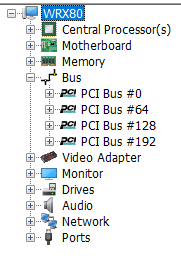
I figured out what PCIe Slot and motherboard devices end up in which PCIe Root Group in my system and documented it in the table below (yeah, it would be nice if this info were in the manual, or a schematic somewhere).
Anyway, you can kind of eyeball that:
- Bus Group 0 gets M.2_A/B, Slots 1, 2, 5, and a couple rear panel USB ports
- Bus Group 64 gets Slots 3,6, and another couple rear panel USB ports
- Bus Group 128 gets Slot 7
- Bus Group 128 gets Slot 4, the X550 10GbE ports, the Chipset devices (onboard audio, 1GbE NIC, a couple more rear panel USB ports, and the motherboard case USB headers), as well as the IPMI VGA adapter.
You might also notice I’ve set up my devices in groups so that:
- my GPU, in slot 7, is isolated in Root Group 128
- my more complex adapters – a PLX 8 USB controller adapter in slot 3, and a 25GbE NIC in slot 6 – are isolated in Root Group 64
- my Thunderbolt add-in card in slot 4 is grouped with other higher latency chipset devices.
- my storage devices – in M.2_A, M.2_B, slots 2 and 5 – are grouped together in Bus Group 0.
Once I organized the system like this – and with the BIOS config from Lesson 1 above – the system stabilized and now S3 Sleep and wake work flawlessly.
When I had complex adapters mixed with storage devices in Root Group 0, things were flaky. I’d guess back in the day, people having trouble with multiple GPUs might have needed the Re-Size BAR feature in later BIOS versions, and/or to keep their GPUs in slots 7, 3, and 6.
Anyway, hope that helps. I found none of this stuff explained in manual or other references. It was just experimenting and piecing together fragments of information from whereever I could find it.
Corrections or elaborations welcome!
| Bus | Slot/Component | Description |
|---|---|---|
| 0 | M.2_A | Samsung 990 PRO 2TB |
| M.2_B | Samsung SSD 980 PRO 2TB | |
| PCIe_1 | ---- (currently empty) | |
| PCIe_2 | PCIe to U.2 card with: Micron 7450 MAX | |
| PCIe_5 | ASUS Hyper M.2 PCIe 4.0 (using 4x4x4x4 bifurcation - for 4 NVMe) | |
| AMD Starship - USB3 XHCI Controller | Motherboard I/O Panel USB ports: Top/Left USB-C, USB-A | |
| 64 | PCIe_3 | Highpoint RocketU 1488C |
| PCIe_6 | Mellanox ConnecX-4 LX | |
| AMD Starship - USB3 XHCI Controller | Motherboard I/O Panel USB ports: Middle USB-A, USB-A | |
| 128 | PCIe_7 | NVIDIA RTX A4000 |
| 192 | PCIe_4 | GC-TITAN RIDGE TB3 AIC |
| AMD 500-Series Chipset | Motherboard I/O Panel 2 Intel I210AT GbE LAN AMD Matisse/Vermeer - USB3 XHCI Controller – Motherboard I/O Panel Realtek Audio – Motherboard I/O Panel USB ports: Bottom/Right USB-A, USB-A AMD Matisse/Vermeer - USB3 XHCI Controller – Motherboard Front panel USB headers: USB-C [F_USB32C] 4 USB-A [FUSB30_1,FUSB30_2] 2 AMD FCH-SATA AHCI |
|
| Intel X550 | Motherboard I/O Panel 2 10-GbE LAN | |
| ASPEED AST2500 | VGA, etc. |
