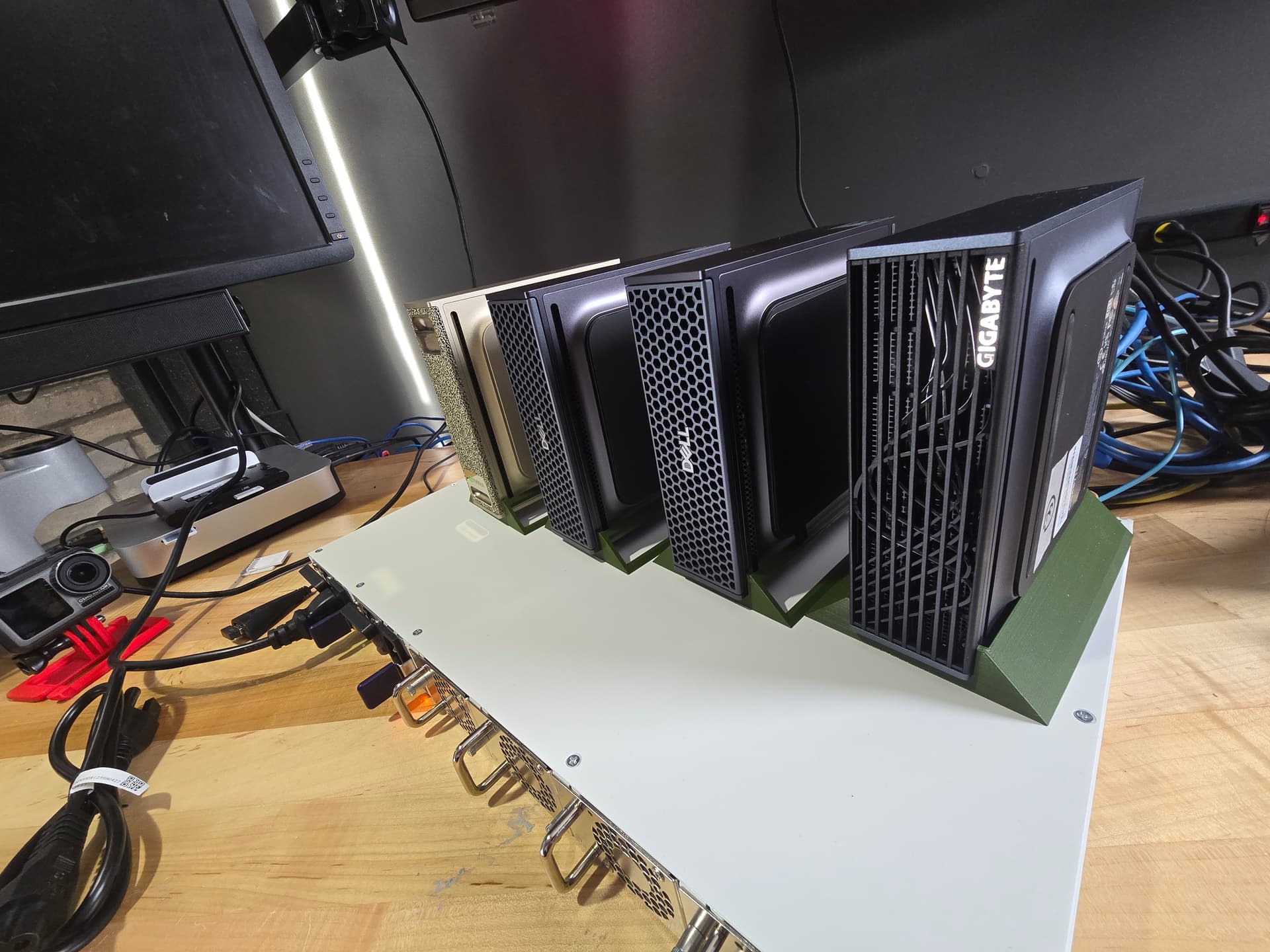
DGX Spark Specs
-
NVIDIA® Grace Blackwell Architecture:
-
NVIDIA Blackwell GPU & Arm 20-core CPU
-
NVIDIA® NVLink®-C2C CPU-GPU memory interconnect
-
128 GB LPDDR5x coherent, unified system memory
-
1000 AI TOPS (FP4) AI performance
-
Full stack solution, hardware & software, designed for AI developers
-
ConnectX-7 1x200G or 2x100G interface**
-
10G RJ-45 Ethernet Interface
** really should watch the video, its interesting, if slightly complicated. RoCE can achieve up to 200 gigabit! This is the first Spark I was able to really get the full software stack running to take advantage of that.
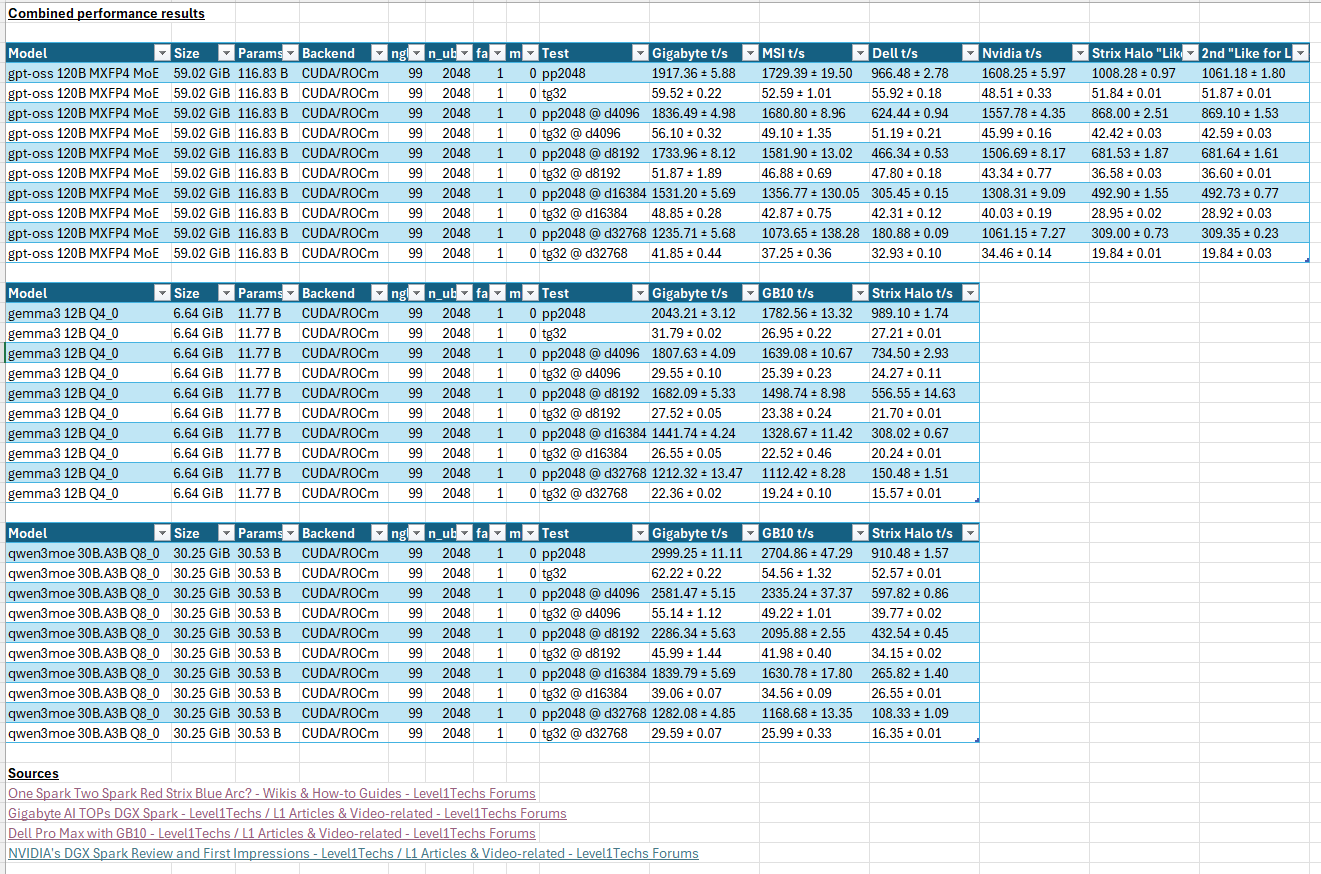
Benchmarks
GPT OSS 120b
./bin/llama-bench -m gpt-oss-120b-mxfp4-00001-of-00003.gguf -ngl 99 -mmp 0 -fa 1 -b 2048 -ub 2048 -p 2048 -n 32 -d 0,4096,8192,16384,32768
ggml_cuda_init: GGML_CUDA_FORCE_MMQ:    no
ggml_cuda_init: GGML_CUDA_FORCE_CUBLAS: no
ggml_cuda_init: found 1 CUDA devices:
  Device 0: NVIDIA GB10, compute capability 12.1, VMM: yes
| model                          |       size |     params | backend    | ngl | n_ubatch | fa | mmap |            test |                  t/s |
| ------------------------------ | ---------: | ---------: | ---------- | --: | -------: | -: | ---: | --------------: | -------------------: |
| gpt-oss 120B MXFP4 MoE         |  59.02 GiB |   116.83 B | CUDA       |  99 |     2048 |  1 |    0 |          pp2048 |       1917.36 ± 5.88 |
| gpt-oss 120B MXFP4 MoE         |  59.02 GiB |   116.83 B | CUDA       |  99 |     2048 |  1 |    0 |            tg32 |         59.52 ± 0.22 |
| gpt-oss 120B MXFP4 MoE         |  59.02 GiB |   116.83 B | CUDA       |  99 |     2048 |  1 |    0 |  pp2048 @ d4096 |       1836.49 ± 4.98 |
| gpt-oss 120B MXFP4 MoE         |  59.02 GiB |   116.83 B | CUDA       |  99 |     2048 |  1 |    0 |    tg32 @ d4096 |         56.10 ± 0.32 |
| gpt-oss 120B MXFP4 MoE         |  59.02 GiB |   116.83 B | CUDA       |  99 |     2048 |  1 |    0 |  pp2048 @ d8192 |       1733.96 ± 8.12 |
| gpt-oss 120B MXFP4 MoE         |  59.02 GiB |   116.83 B | CUDA       |  99 |     2048 |  1 |    0 |    tg32 @ d8192 |         51.87 ± 1.89 |
| gpt-oss 120B MXFP4 MoE         |  59.02 GiB |   116.83 B | CUDA       |  99 |     2048 |  1 |    0 | pp2048 @ d16384 |       1531.20 ± 5.69 |
| gpt-oss 120B MXFP4 MoE         |  59.02 GiB |   116.83 B | CUDA       |  99 |     2048 |  1 |    0 |   tg32 @ d16384 |         48.85 ± 0.28 |
| gpt-oss 120B MXFP4 MoE         |  59.02 GiB |   116.83 B | CUDA       |  99 |     2048 |  1 |    0 | pp2048 @ d32768 |       1235.71 ± 5.68 |
| gpt-oss 120B MXFP4 MoE         |  59.02 GiB |   116.83 B | CUDA       |  99 |     2048 |  1 |    0 |   tg32 @ d32768 |         41.85 ± 0.44 |
Gemma3 12b Q4_0
./bin/llama-bench -m /home/spark2/workspace/.cache/huggingface/hub/models--ggml-org--gemma-3-12b-it-qat-GGUF/snapshots/05c2df468ad7a0bb1284b3d6fe2bdf495a885567/gemma-3-12b-it-qat-Q4_0.gguf -fa 1 -d 0,4096,8192,16384,32768 -p 2048 -n 32 -ub 2048 -mmp 0
ggml_cuda_init: GGML_CUDA_FORCE_MMQ:    no
ggml_cuda_init: GGML_CUDA_FORCE_CUBLAS: no
ggml_cuda_init: found 1 CUDA devices:
  Device 0: NVIDIA GB10, compute capability 12.1, VMM: yes
| model                          |       size |     params | backend    | ngl | n_ubatch | fa | mmap |            test |                  t/s |
| ------------------------------ | ---------: | ---------: | ---------- | --: | -------: | -: | ---: | --------------: | -------------------: |
| gemma3 12B Q4_0                |   6.64 GiB |    11.77 B | CUDA       |  99 |     2048 |  1 |    0 |          pp2048 |       2043.21 ± 3.12 |
| gemma3 12B Q4_0                |   6.64 GiB |    11.77 B | CUDA       |  99 |     2048 |  1 |    0 |            tg32 |         31.79 ± 0.02 |
| gemma3 12B Q4_0                |   6.64 GiB |    11.77 B | CUDA       |  99 |     2048 |  1 |    0 |  pp2048 @ d4096 |       1807.63 ± 4.09 |
| gemma3 12B Q4_0                |   6.64 GiB |    11.77 B | CUDA       |  99 |     2048 |  1 |    0 |    tg32 @ d4096 |         29.55 ± 0.10 |
| gemma3 12B Q4_0                |   6.64 GiB |    11.77 B | CUDA       |  99 |     2048 |  1 |    0 |  pp2048 @ d8192 |       1682.09 ± 5.33 |
| gemma3 12B Q4_0                |   6.64 GiB |    11.77 B | CUDA       |  99 |     2048 |  1 |    0 |    tg32 @ d8192 |         27.52 ± 0.05 |
| gemma3 12B Q4_0                |   6.64 GiB |    11.77 B | CUDA       |  99 |     2048 |  1 |    0 | pp2048 @ d16384 |       1441.74 ± 4.24 |
| gemma3 12B Q4_0                |   6.64 GiB |    11.77 B | CUDA       |  99 |     2048 |  1 |    0 |   tg32 @ d16384 |         26.55 ± 0.05 |
| gemma3 12B Q4_0                |   6.64 GiB |    11.77 B | CUDA       |  99 |     2048 |  1 |    0 | pp2048 @ d32768 |      1212.32 ± 13.47 |
| gemma3 12B Q4_0                |   6.64 GiB |    11.77 B | CUDA       |  99 |     2048 |  1 |    0 |   tg32 @ d32768 |         22.36 ± 0.02 |
Qwen3 30b Q8_0
./bin/llama-bench -m /home/spark2/workspace/.cache/huggingface/hub/models--ggml-org--Qwen3-Coder-30B-A3B-Instruct-Q8_0-GGUF/snapshots/d2a13024f16ef1985cb8347c3dbad6114e0ecef6/qwen3-coder-30b-a3b-instruct-q8_0.gguf -fa 1 -d 0,4096,8192,16384,32768 -p 2048 -n 32 -ub 2048 -mmp 0
ggml_cuda_init: GGML_CUDA_FORCE_MMQ:    no
ggml_cuda_init: GGML_CUDA_FORCE_CUBLAS: no
ggml_cuda_init: found 1 CUDA devices:
  Device 0: NVIDIA GB10, compute capability 12.1, VMM: yes
| model                          |       size |     params | backend    | ngl | n_ubatch | fa | mmap |            test |                  t/s |
| ------------------------------ | ---------: | ---------: | ---------- | --: | -------: | -: | ---: | --------------: | -------------------: |
| qwen3moe 30B.A3B Q8_0          |  30.25 GiB |    30.53 B | CUDA       |  99 |     2048 |  1 |    0 |          pp2048 |      2999.25 ± 11.11 |
| qwen3moe 30B.A3B Q8_0          |  30.25 GiB |    30.53 B | CUDA       |  99 |     2048 |  1 |    0 |            tg32 |         62.22 ± 0.22 |
| qwen3moe 30B.A3B Q8_0          |  30.25 GiB |    30.53 B | CUDA       |  99 |     2048 |  1 |    0 |  pp2048 @ d4096 |       2581.47 ± 5.15 |
| qwen3moe 30B.A3B Q8_0          |  30.25 GiB |    30.53 B | CUDA       |  99 |     2048 |  1 |    0 |    tg32 @ d4096 |         55.14 ± 1.12 |
| qwen3moe 30B.A3B Q8_0          |  30.25 GiB |    30.53 B | CUDA       |  99 |     2048 |  1 |    0 |  pp2048 @ d8192 |       2286.34 ± 5.63 |
| qwen3moe 30B.A3B Q8_0          |  30.25 GiB |    30.53 B | CUDA       |  99 |     2048 |  1 |    0 |    tg32 @ d8192 |         45.99 ± 1.44 |
| qwen3moe 30B.A3B Q8_0          |  30.25 GiB |    30.53 B | CUDA       |  99 |     2048 |  1 |    0 | pp2048 @ d16384 |       1839.79 ± 5.69 |
| qwen3moe 30B.A3B Q8_0          |  30.25 GiB |    30.53 B | CUDA       |  99 |     2048 |  1 |    0 |   tg32 @ d16384 |         39.06 ± 0.07 |
| qwen3moe 30B.A3B Q8_0          |  30.25 GiB |    30.53 B | CUDA       |  99 |     2048 |  1 |    0 | pp2048 @ d32768 |       1282.08 ± 4.85 |
| qwen3moe 30B.A3B Q8_0          |  30.25 GiB |    30.53 B | CUDA       |  99 |     2048 |  1 |    0 |   tg32 @ d32768 |         29.59 ± 0.07 |
trtllm
Two Sparks vs Four Sparks
The nvidia website is quite good. In particular before doing anything here, one should have completed both:
- Connect Two Sparks
- NCCL for Two Sparks
.. it still applies, even for four sparks.
For the rest – this is covered in the video, but the ConnectX 7 nic seutp is a bit odd. You really only need one cable to connect two sparks together, and it is possible to achieve 200 gigabit of throughput between the two sparks via RoCE using nperf but there were some quirks I don’t quite understand. And the system needs to have the thermal and power budget to do so, which is part of what I was running up against in the past.
Patrick at STH has an excellent writeup and beat me to having an understanding of what I have been seeing in testing – mainly that it feels like its “merely” 100 gigabit even though the PHY can link up at 200 gigabit.
If you decide to do this, this troubleshooting command I came up with is insanely handy:
export OMPI_MCA_btl_tcp_if_include=enp1s0f1np1
export OMPI_MCA_oob_tcp_if_include=enp1s0f1np1

mpirun -np 4 -H 10.0.0.5:1,10.0.0.6:1,10.0.0.7:1,10.0.0.8:1 \
  --bind-to none \
  --mca btl tcp,self \
  --mca btl_tcp_if_include enp1s0f1np1 \
  --mca oob_tcp_if_include enp1s0f1np1 \
  -x LD_LIBRARY_PATH \
  -x OMPI_MCA_btl_tcp_if_include -x OMPI_MCA_oob_tcp_if_include \
  /bin/hostname
The IPs are of the 4 sparks I have in the pic, and it should emit all 4 hostnames:
spark-2903
spark-015f
aitopatom-c5bb
promaxgb10-6d1e
… This should run from all four sparks.
On to mpirun
mpirun -np 2 -H 10.0.0.5:1,10.0.0.6:1   --bind-to none   --mca btl tcp,self   --mca btl_tcp_if_include enp1s0f1np1   --mca oob_tcp_if_include enp1s0f1np1   -x LD_LIBRARY_PATH   -x NCCL_ALGO   -x NCCL_SOCKET_IFNAME -x NCCL_IB_DISABLE -x NCCL_IB_HCA -x NCCL_IB_GID_INDEX   -x NCCL_DEBUG -x NCCL_DEBUG_SUBSYS   /home/spark2/nccl-tests/build/all_reduce_perf -b 1K -e 128M -f 2 -g 1

declare |grep NCCL
NCCL_ALGO=Ring
NCCL_DEBUG=INFO
NCCL_DEBUG_SUBSYS=INIT,NET,GRAPH
NCCL_HOME=/home/spark2/nccl/build/
NCCL_IB_DISABLE=0
NCCL_IB_GID_INDEX=3
NCCL_IB_HCA=rocep1s0f1
NCCL_SOCKET_IFNAME=enp1s0f1np1
Note the NCCL_IB_GID_INDEX here 0 was faster than 3, but 3 was more stable across Real World Use. The word stable there is doing a lot of heavy lifting – it wasn’t unreliable – it just didn’t work in every non-benchmark scenario. i.e. just running a python program meant to use nccl as opposed to nperf benchmarks. nperf was consistently faster with NCCL_IB_GID_INDEX=0 and the only configuration where the benchmark would actually run near 200 gigabit via a single cable.
Achieving 200 gigabit with dual cables was way, way easier but much more of a pain to setup.
 show_gids rocep1s0f1 1
DEV     PORT    INDEX   GID                                     IPv4            VER     DEV
---     ----    -----   ---                                     ------------    ---     ---
rocep1s0f1      1       0       fe80:0000:0000:0000:4ebb:47ff:fe00:2905                 v1      enp1s0f1np1
rocep1s0f1      1       1       fe80:0000:0000:0000:4ebb:47ff:fe00:2905                 v2      enp1s0f1np1
rocep1s0f1      1       2       0000:0000:0000:0000:0000:ffff:0a00:0005 10.0.0.5        v1      enp1s0f1np1
rocep1s0f1      1       3       0000:0000:0000:0000:0000:ffff:0a00:0005 10.0.0.5        v2      enp1s0f1np1
n_gids_found=4
Fully-connected 3-way spark?
So with mpirun you can export environment variables to each host. If you go the 3-spark-no-switch route, you should NOT export the environment variables and it will be a bit of fun to make sure mpirun has a path back to each host from every other host. DNS is one possible way to do this. Manipulating the environment variables is another, not via the -x facility of mpirun is another.
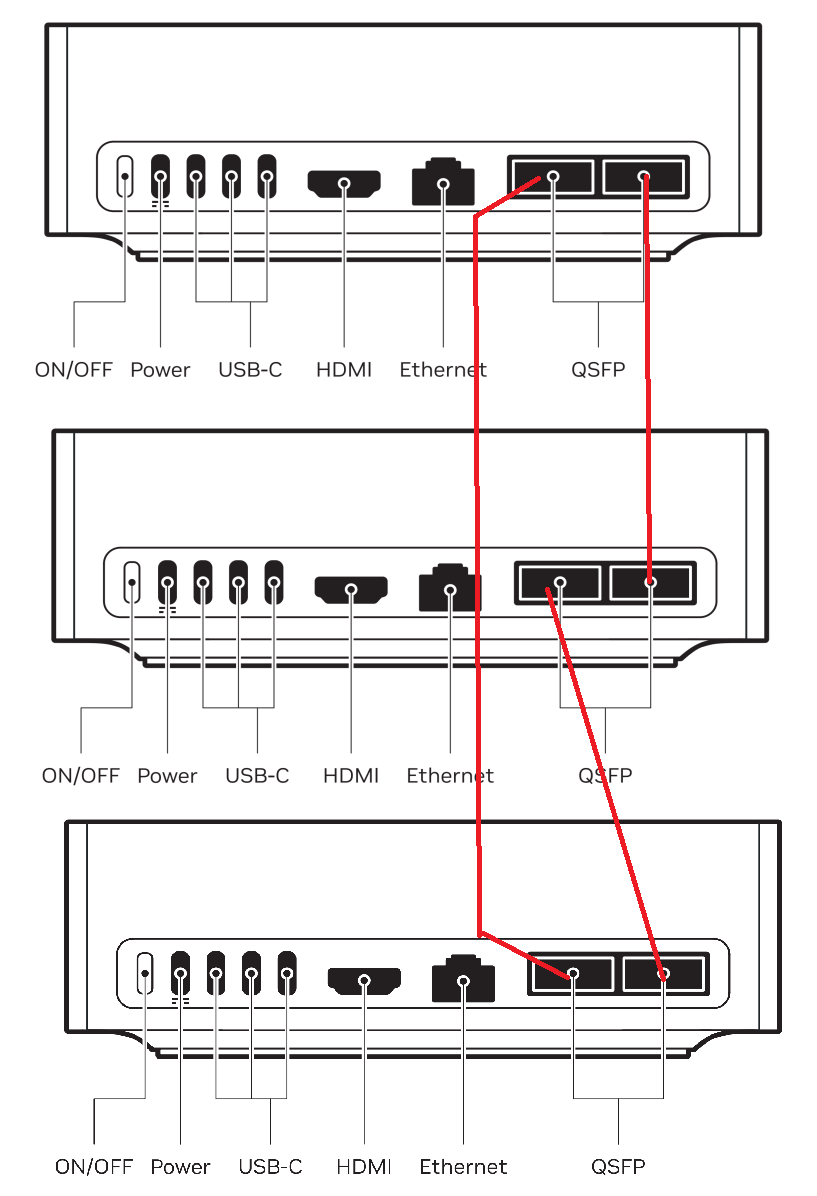
A 4-way cluster is easier, and given the cost of the switch that can do it (US$ ~1200 +/-) it seems like just buying the switch would be the way to go.
Mikrotik DDQ
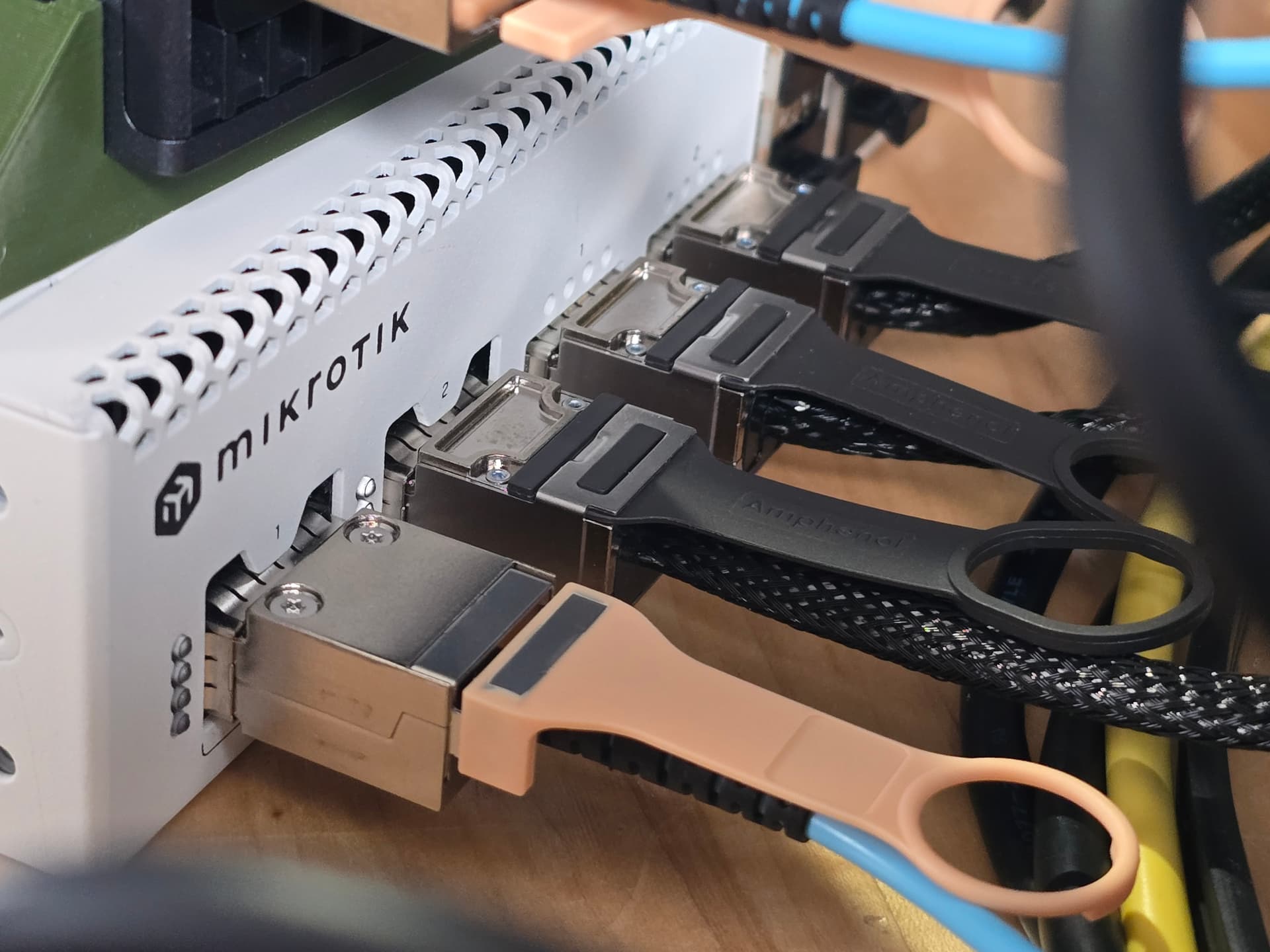
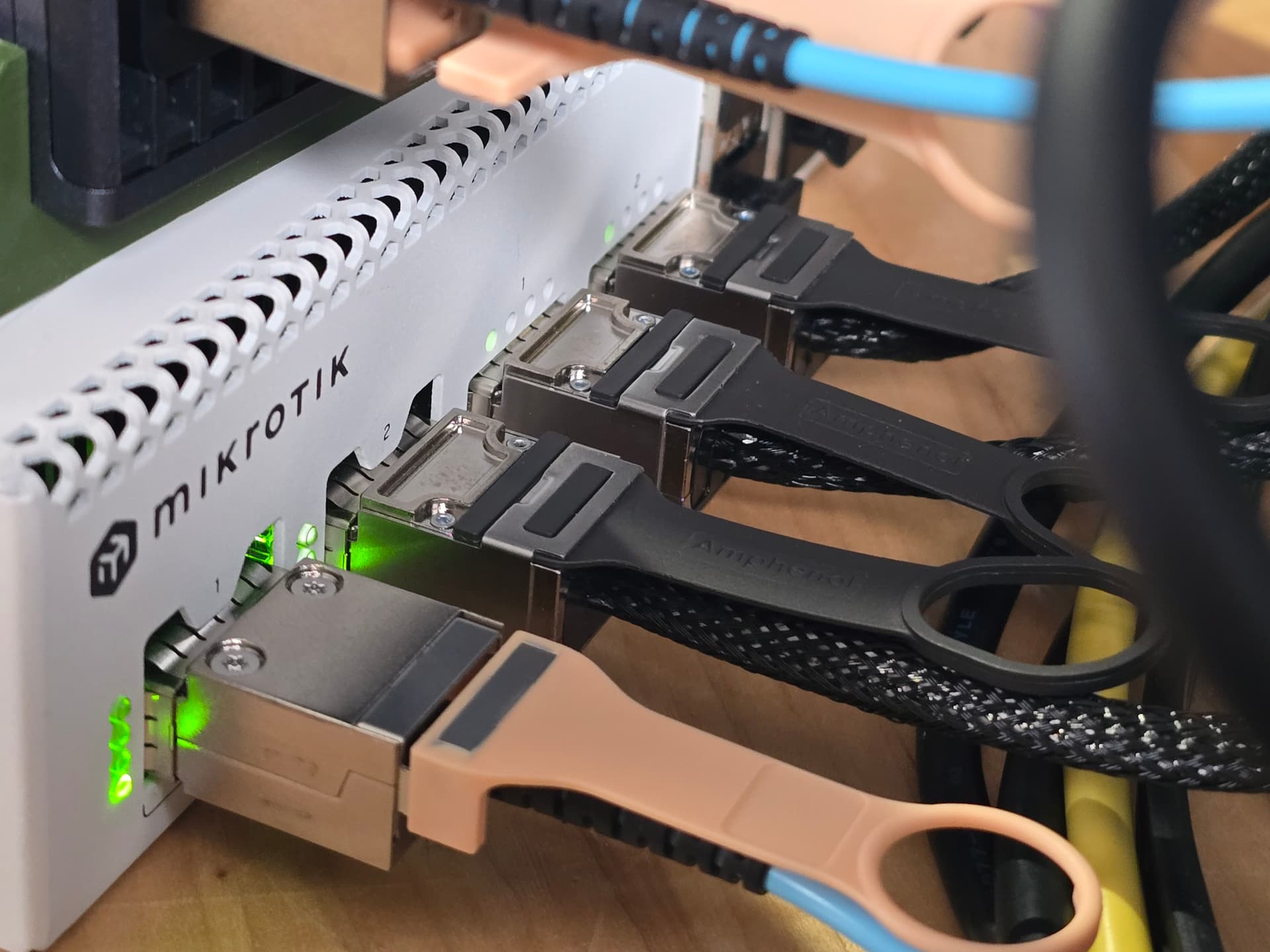
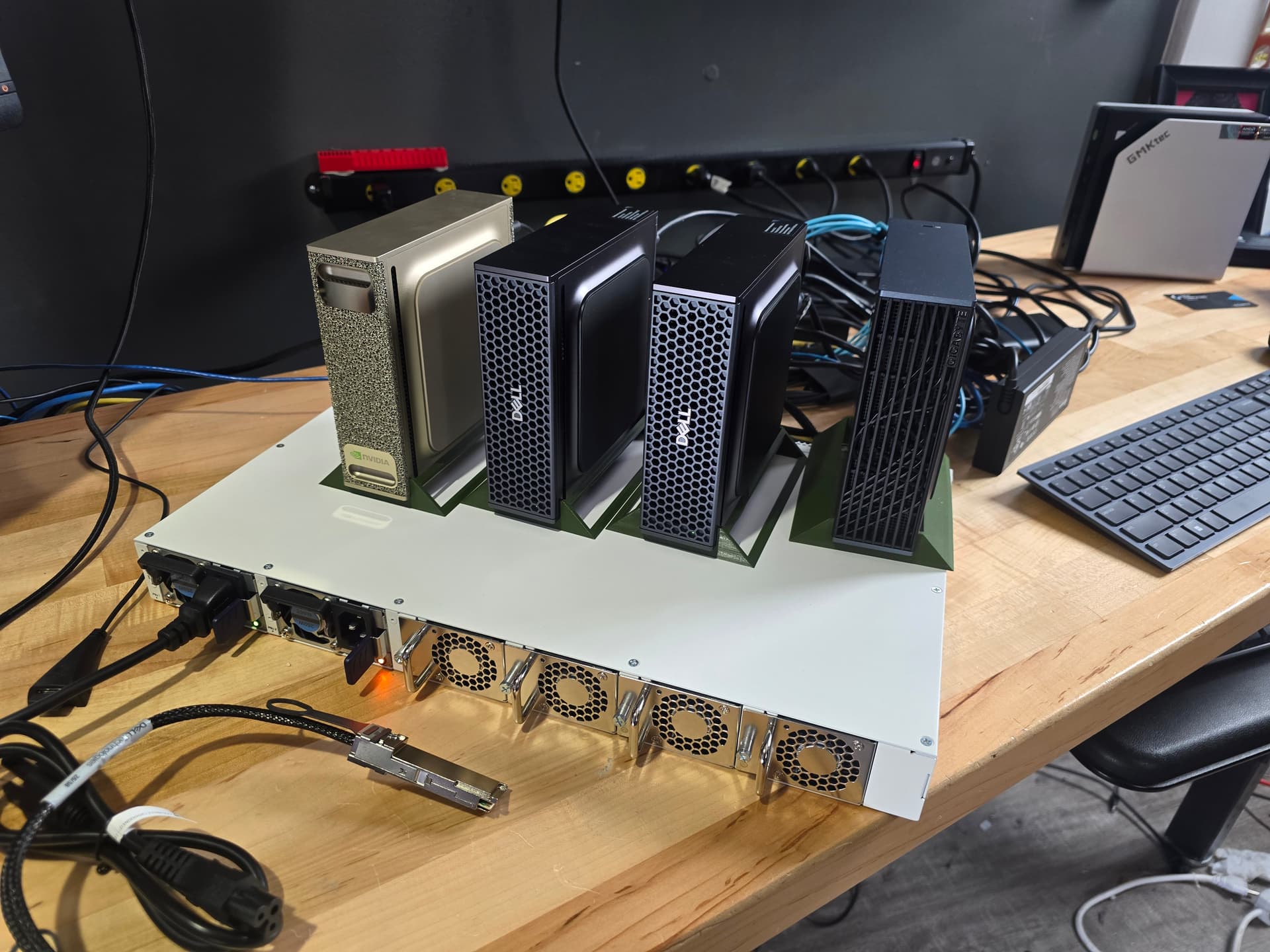
It has 2x400g and 2x200g ports. However the 200g ports here are not the same as the 200g ports on the spark, so 200g PHY link is not possible here as far as I’m aware.
However this is a convenient way to get 4x100G with RoCE fully working and reliable.
#
#                                                              out-of-place                       in-place
#       size         count      type   redop    root     time   algbw   busbw  #wrong     time   algbw   busbw  #wrong
#        (B)    (elements)                               (us)  (GB/s)  (GB/s)             (us)  (GB/s)  (GB/s)
        1024           256     float     sum      -1    65.82    0.02    0.02       0    49.83    0.02    0.03       0
        2048           512     float     sum      -1    65.03    0.03    0.05       0    37.79    0.05    0.08       0
        4096          1024     float     sum      -1    49.07    0.08    0.13       0    52.39    0.08    0.12       0
        8192          2048     float     sum      -1    55.79    0.15    0.22       0    96.72    0.08    0.13       0
       16384          4096     float     sum      -1    64.87    0.25    0.38       0    57.70    0.28    0.43       0
       32768          8192     float     sum      -1    77.88    0.42    0.63       0    76.10    0.43    0.65       0
       65536         16384     float     sum      -1    94.32    0.69    1.04       0   111.07    0.59    0.89       0
      131072         32768     float     sum      -1   138.24    0.95    1.42       0   122.70    1.07    1.60       0
      262144         65536     float     sum      -1   135.89    1.93    2.89       0   127.20    2.06    3.09       0
      524288        131072     float     sum      -1   171.19    3.06    4.59       0   182.09    2.88    4.32       0
     1048576        262144     float     sum      -1   344.45    3.04    4.57       0   335.25    3.13    4.69       0
     2097152        524288     float     sum      -1  1069.61    1.96    2.94       0   989.27    2.12    3.18       0
     4194304       1048576     float     sum      -1  1177.62    3.56    5.34       0  1173.89    3.57    5.36       0
     8388608       2097152     float     sum      -1  2273.46    3.69    5.53       0  2286.91    3.67    5.50       0
    16777216       4194304     float     sum      -1  3807.25    4.41    6.61       0  3770.08    4.45    6.68       0
    33554432       8388608     float     sum      -1  7684.88    4.37    6.55       0  7585.31    4.42    6.64       0
    67108864      16777216     float     sum      -1  14996.5    4.47    6.71       0  15015.5    4.47    6.70       0
   134217728      33554432     float     sum      -1  29964.3    4.48    6.72       0  30251.7    4.44    6.66       0
spark-015f:62731:62731 [0] NCCL INFO comm 0xca728b3bd5f0 rank 1 nranks 4 cudaDev 0 busId f01000 - Destroy COMPLETE
spark-2903:90540:90540 [0] NCCL INFO comm 0xc0b99e7c7ca0 rank 0 nranks 4 cudaDev 0 busId f01000 - Destroy COMPLETE
# Out of bounds values : 0 OK
# Avg bus bandwidth    : 3.14116
Two Sparks via Mikrotik DDQ
================================================================================
                                           nperf 1.0.0 - NCCL Benchmark
================================================================================

Configuration:
  Operation:     allreduce
  Data Type:     float32

P2P Matrix:
          GPU0
  GPU0      X

--------------------------------------------------------------------------------
      Size       Count    Time(us) Algo BW(GB/s)  Bus BW(GB/s)    Status
--------------------------------------------------------------------------------
      1 MB      262144      240.97          4.05          4.05        OK
      2 MB      524288      452.94          4.31          4.31        OK
      4 MB     1048576      428.80          9.11          9.11        OK
      8 MB     2097152      786.64          9.93          9.93        OK
     16 MB     4194304     1567.72          9.97          9.97        OK
     32 MB     8388608     3115.24         10.03         10.03        OK
     64 MB    16777216     6191.63         10.09         10.09        OK
    128 MB    33554432    12019.78         10.40         10.40        OK
    256 MB    67108864    23770.17         10.52         10.52        OK
    512 MB   134217728    47229.28         10.59         10.59        OK
      1 GB   268435456    94190.60         10.62         10.62        OK
      2 GB   536870912   188035.21         10.64         10.64        OK
      4 GB  1073741824   375677.22         10.65         10.65        OK
      8 GB  2147483648   751073.84         10.65         10.65        OK
     10 GB  2684354560   938762.25         10.65         10.65        OK
--------------------------------------------------------------------------------

Summary:
  Peak Bus Bandwidth:    10.65 GB/s
  Average Bandwidth:     9.48 GB/s
  Total Data:            259.99 GB
  Total Time:            25.42 s
  Total Iterations:      150
Four Sparks via Mikrotik DDQ
--------------------------------------------------------------------------------
      Size       Count    Time(us) Algo BW(GB/s)  Bus BW(GB/s)    Status
--------------------------------------------------------------------------------
      1 MB      262144      813.64          1.20          1.80        OK
      2 MB      524288      828.67          2.36          3.54        OK
      4 MB     1048576     1492.76          2.62          3.93        OK
      8 MB     2097152     1538.99          5.08          7.61        OK
     16 MB     4194304     2782.44          5.62          8.42        OK
     32 MB     8388608     5142.55          6.08          9.12        OK
     64 MB    16777216     9878.05          6.33          9.49        OK
    128 MB    33554432    18752.20          6.67         10.00        OK
    256 MB    67108864    36372.87          6.87         10.31        OK
    512 MB   134217728    71677.51          6.98         10.46        OK
      1 GB   268435456   142136.31          7.04         10.55        OK
      2 GB   536870912   282898.67          7.07         10.60        OK
      4 GB  1073741824   564561.03          7.09         10.63        OK
      8 GB  2147483648  1127757.02          7.09         10.64        OK
     10 GB  2684354560  1409350.07          7.10         10.64        OK
--------------------------------------------------------------------------------

Summary:
  Peak Bus Bandwidth:    10.64 GB/s
  Average Bandwidth:     8.52 GB/s
  Total Data:            259.99 GB
  Total Time:            37.80 s
  Total Iterations:      150
Tree vs Ring in NCCL, but Ring seems much better than Tree in our use case.
[0] NCCL INFO Connected all trees
[0] NCCL INFO Enabled NCCL Func/Proto/Algo Matrix:
     Function |       LL     LL128    Simple   |          Tree           Ring  CollNetDirect   CollNetChain           NVLS       NVLSTree            PAT
    Broadcast |        1         2         1   |             1              0              0              0              0              0              0
       Reduce |        1         2         1   |             1              0              0              0              0              0              0
    AllGather |        1         2         1   |             1              0              0              0              0              0              0
ReduceScatter |        1         2         1   |             1              0              0              0              0              0              0
    AllReduce |        1         2         1   |             1              0              0              0              0              0              0
Two Sparks via single 200gb cable
--------------------------------------------------------------------------------
      Size       Count    Time(us) Algo BW(GB/s)  Bus BW(GB/s)    Status
--------------------------------------------------------------------------------
      1 MB     1048576      519.80          1.88          1.88        OK
      2 MB     2097152      600.40          3.25          3.25        OK
      4 MB     4194304      864.10          4.52          4.52        OK
      8 MB     8388608      559.65         13.96         13.96        OK
     16 MB    16777216      916.99         17.04         17.04        OK
     32 MB    33554432     1758.86         17.77         17.77        OK
     64 MB    67108864     3605.96         17.33         17.33        OK
    128 MB   134217728     6881.75         18.16         18.16        OK
    256 MB   268435456    13125.85         19.05         19.05        OK
    512 MB   536870912    25254.50         19.80         19.80        OK
      1 GB  1073741824    49174.30         20.34         20.34        OK
--------------------------------------------------------------------------------

Summary:
  Peak Bus Bandwidth:    20.34 GB/s
  Average Bandwidth:     13.92 GB/s
  Total Data:            19.99 GB
  Total Time:            1.62 s
  Total Iterations:      110

================================================================================
Curiosuly, the “old way” ib_write_bw doesn’t post performance
ib_write_bw -R -d roceP2p1s0f1 -i 1 -x 1 --report_gbits --run_infinitely (server)
ib_write_bw -R -d roceP2p1s0f1 -i 1 -x 1 10.0.0.5 --report_gbits --duration 10 (client)
are the type of commands I also tried, for those curious.
 WARNING: BW peak won't be measured in this run.

************************************
* Waiting for client to connect... *
************************************
---------------------------------------------------------------------------------------
                    RDMA_Write BW Test
 Dual-port       : OFF          Device         : roceP2p1s0f1
 Number of qps   : 1            Transport type : IB
 Connection type : RC           Using SRQ      : OFF
 PCIe relax order: ON
 ibv_wr* API     : ON
 CQ Moderation   : 1
 Mtu             : 1024[B]
 Link type       : Ethernet
 GID index       : 1
 Max inline data : 0[B]
 rdma_cm QPs     : ON
 Data ex. method : rdma_cm
---------------------------------------------------------------------------------------
 Waiting for client rdma_cm QP to connect
 Please run the same command with the IB/RoCE interface IP
---------------------------------------------------------------------------------------
 local address: LID 0000 QPN 0x05b8 PSN 0x6e4021
 GID: 254:128:00:00:00:00:00:00:78:187:71:255:254:00:41:05
 remote address: LID 0000 QPN 0x04f4 PSN 0x39e820
 GID: 254:128:00:00:00:00:00:00:254:76:234:255:254:249:66:89
---------------------------------------------------------------------------------------
 #bytes     #iterations    BW peak[Gb/sec]    BW average[Gb/sec]   MsgRate[Mpps]
 65536      1057050          0.00               92.37              0.176176
---------------------------------------------------------------------------------------
This is showing a perfectly fine 92.37 gigabit, which is about what I’ve come to expect under most scenarios outside the 108-200 gigabit “ideal” scenarios that a single port can deliver.
For clustering sparks for inferencing, at least, the network latency and bandwidth is not the bottleneck and there is little practical difference between 100ish and the full 200 gigabit. The lower latency of direct attach (vs via switch) makes more of an impact in overall performance.
The four spark thing was so interesting to look at while testing the Gigabyte version of the DGX Spark that will be its own video.
TODO link it here