CIFS MOUNTING HOW-TO:
Here’s how to achieve higher throughput for your samba shares than the method your file manager uses. This directly uses your kernel’s mounting system, rather than your file manager’s GVFS (Gnome Virtual File System) type that adds massive user-space overhead and buffering limits.
MAKE MOUNTPOINTS:
Enter the following into your terminal:
sudo mkdir -p /media/user/yourdirectoryname
do this for each shared folder you want.
MAKE CREDENTIALS FILE FOR FSTAB:
Open your / directory as root, navigate to /etc/
NOTE:If you don’t allready do so, enable viewing of hidden files in your file manager.
Create a new text file called .smbcredentials in /etc and add the following:
username=yoursambausername
password=yoursambapassword
domain=YOURSAMBADOMAIN
Save the file and move to the next step
MAKE FSTAB ENTRIES:
Still as root and still at /etc/ go to your fstab file and add the following at the end:
//SAMBASERVERIPADDRESS/SHAREDDIR/ /media/user/yourdirectoryname cifs credentials=/etc/.smbcredentials,file_mode=0777,dir_mode=0777,_netdev,nofail,x-systemd.automount 0 0
Do this for each network share folder you have, if desired.
Save changes to your fstab and proceed to next step to reload and mount your shares
RELOADING FSTAB TO FILE MANAGER:
Enter both of these commands into your terminal:
sudo systemctl daemon-reload
sudo mount -a
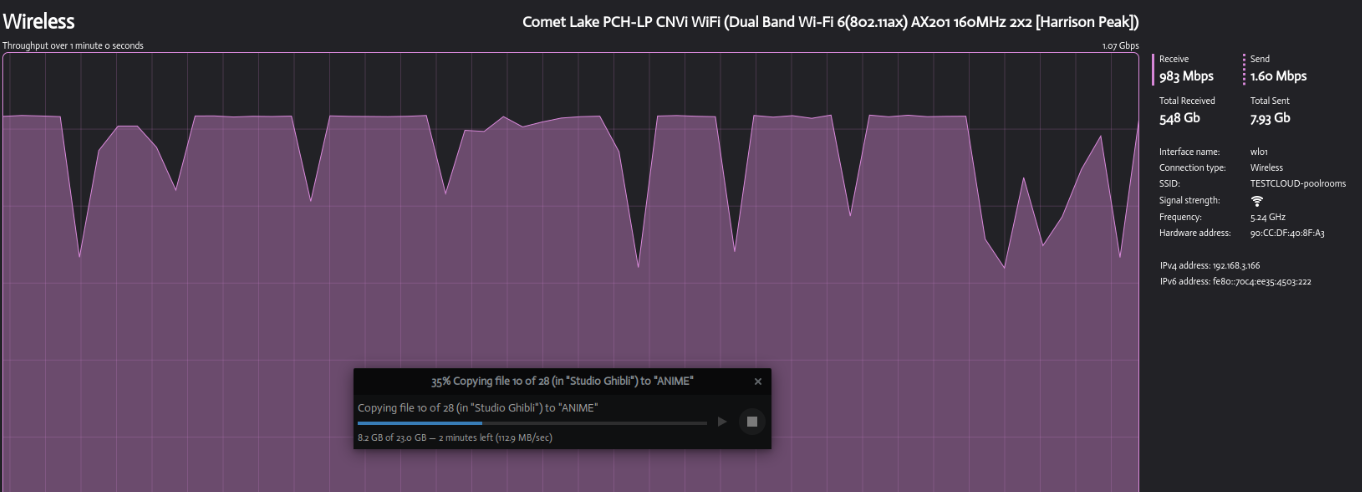
You’ve sucessfully performed a CIFS mount and should have way higher throughput for network file transfers.
Results:
GVFS MOUNT:

CIFS mount: