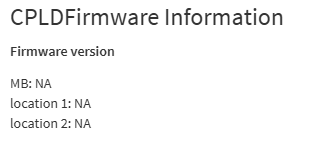
I picked up a secondhand G492-Z51 and everything runs great. However, there is a lingering alarm for EXT_FAN 5 being at 0RPM. EXT_FAN 5 isn’t even plugged in and the header is empty at the moment, the server never came with one fitted. I have EXT-FAN 1-4 populated already and they are running and reading fine.
Troubleshooting done:
Tried setting the thresholds all to 0; didn’t work
Updated the BMC Firmware to latest (August 2025); didn’t work
Moved EXT_FAN4 to EXT_FAN5 header; fan spins and works but now i have two alarms for fans 4 and 5.
After some googling and talking to my old friend Claude, i think the TAC pin on the header is possibly faulty? I’d hate to have to send it off to be soldered. Is there any way to just exclude the fan sensor from the BMC? I’ve already sent a ticket to Gigabyte for the issue but I’m not expecting much since the box is out of warranty and I bought it second hand.
I’ve done some additional triage via IPMI commands. And, the reason this is an issue is because it (or something) appears to be triggering all the fans to 100%, all the time. A very annoying problem to have, for me and my neighbors.
I’ve set the lower thresholds to both 0 as well tried an apparent MegaRAC trick of setting them to 17920 but that doesn’t work. (power cycled to confirm)
I’ve also tried removing the sensor via CLI and that also does not work.
After disabling the sensor, doing a cold-reset of the BMC flips it back, normal and expected behavior.
Set thresholds to 0, Disabled the sensor, did not do a cold reset of the BMC but did power cycle the system, the fans dip down and then ramp right back up again. EXT_FAN5 still shows as a disabled sensor and sensor reporting is clear. I wish i knew why the system was initiating “full send” mode all the time and SEL logs are clear and clean. I’m just about at my wits end with this issue.
More troubleshooting…I feel the slow decline towards insanity right now…
I spent a bit more time digging into why the system wants to cosplay as an airport and everything so far has come up trumps. Diddly squat.
After excluding EXT_FAN5 from the sensor list, lowering it’s thresholds and making sure that it does not show up as an active alarm in BMC/IPMI, the system is still pegged at 100%, until i restart it. (not the BMC). When i restart the system with all of the above, it dies down until something causes it to ramp right up to 100%, sensor board is clear. So, it got me thinking, maybe this isn’t the culprit?
Looking at the list of devices under fan and temperature, i saw PSU’s 1 and 2 were labeled as “Critical”. It seems Gigabyte doesn’t like having them present but not plugged in. I removed them but that just gave me a different critical alarm. Fine, I’ll plug them in Gigabyte.
root@Tower:~# ipmi-sel ID | Date | Time | Name | Type | Event 1 | Jun-17-2026 | 11:10:14 | SEL | Event Logging Disabled | Log Area Reset/Cleared Unknown SEL Record Type: 4h Unknown SEL Record Type: 4h 4 | Jun-17-2026 | 11:10:56 | Sensor #0 | System Event | OEM System Boot Event 5 | Jun-17-2026 | 11:11:16 | Sensor #0 | System Event | OEM System Boot Event 6 | Jun-17-2026 | 11:12:39 | Sensor #34 | OS Boot | boot completed - boot device not specified root@Tower:~# ipmi-sensors --output-sensor-state | grep -vi nominal ipmi-sensors --sensor-types=Fan ipmi-sensors --sensor-types=Temperature ID | Name | Type | State | Reading | Units | Event 53 | EXT_FAN5 | Fan | N/A | N/A | RPM | N/A 71 | GPU0_PROC | Temperature | N/A | N/A | C | N/A 72 | GPU3_PROC | Temperature | N/A | N/A | C | N/A 73 | GPU1_PROC | Temperature | N/A | N/A | C | N/A 74 | GPU4_PROC | Temperature | N/A | N/A | C | N/A 75 | GPU2_PROC | Temperature | N/A | N/A | C | N/A 76 | GPU5_PROC | Temperature | N/A | N/A | C | N/A 77 | GPU8_PROC | Temperature | N/A | N/A | C | N/A 78 | GPU6_PROC | Temperature | N/A | N/A | C | N/A 79 | GPU9_PROC | Temperature | N/A | N/A | C | N/A 80 | GPU7_PROC | Temperature | N/A | N/A | C | N/A 81 | SLOT13_M2_G_TEMP | Temperature | N/A | N/A | C | N/A 82 | SLOT12_M2_G_TEMP | Temperature | N/A | N/A | C | N/A 86 | NVMeG0_TEMP | Temperature | N/A | N/A | C | N/A 87 | NVMeG1_TEMP | Temperature | N/A | N/A | C | N/A 88 | CPU0_FAN | Fan | N/A | N/A | RPM | N/A 89 | CPU1_FAN | Fan | N/A | N/A | RPM | N/A 90 | CX6_1 | Temperature | N/A | N/A | C | N/A 91 | CX6_2 | Temperature | N/A | N/A | C | N/A ID | Name | Type | Reading | Units | Event 37 | BPB_FAN1 | Fan | 21900.00 | RPM | 'OK' 38 | BPB_FAN2 | Fan | 21750.00 | RPM | 'OK' 39 | BPB_FAN3 | Fan | 21750.00 | RPM | 'OK' 40 | BPB_FAN4 | Fan | 21900.00 | RPM | 'OK' 41 | BPB_FAN5 | Fan | 21750.00 | RPM | 'OK' 42 | BPB_FAN6 | Fan | 21900.00 | RPM | 'OK' 43 | BPB_FAN7 | Fan | 21750.00 | RPM | 'OK' 44 | BPB_FAN8 | Fan | 21750.00 | RPM | 'OK' 45 | BPB_FAN9 | Fan | 21750.00 | RPM | 'OK' 46 | BPB_FAN10 | Fan | 21750.00 | RPM | 'OK' 47 | BPB_FAN11 | Fan | 21600.00 | RPM | 'OK' 48 | BPB_FAN12 | Fan | 21750.00 | RPM | 'OK' 49 | EXT_FAN1 | Fan | 25950.00 | RPM | 'OK' 50 | EXT_FAN2 | Fan | 25050.00 | RPM | 'OK' 51 | EXT_FAN3 | Fan | 25950.00 | RPM | 'OK' 52 | EXT_FAN4 | Fan | 25200.00 | RPM | 'OK' 53 | EXT_FAN5 | Fan | N/A | RPM | N/A 88 | CPU0_FAN | Fan | N/A | RPM | N/A 89 | CPU1_FAN | Fan | N/A | RPM | N/A ID | Name | Type | Reading | Units | Event 56 | CPU0_TEMP | Temperature | 22.00 | C | 'OK' 57 | CPU1_TEMP | Temperature | 27.00 | C | 'OK' 58 | DIMMG0_TEMP | Temperature | 22.00 | C | 'OK' 59 | DIMMG1_TEMP | Temperature | 20.00 | C | 'OK' 60 | DIMMG2_TEMP | Temperature | 22.00 | C | 'OK' 61 | DIMMG3_TEMP | Temperature | 23.00 | C | 'OK' 62 | CPU0_DTS | Temperature | 78.00 | C | 'OK' 63 | CPU1_DTS | Temperature | 73.00 | C | 'OK' 71 | GPU0_PROC | Temperature | N/A | C | N/A 72 | GPU3_PROC | Temperature | N/A | C | N/A 73 | GPU1_PROC | Temperature | N/A | C | N/A 74 | GPU4_PROC | Temperature | N/A | C | N/A 75 | GPU2_PROC | Temperature | N/A | C | N/A 76 | GPU5_PROC | Temperature | N/A | C | N/A 77 | GPU8_PROC | Temperature | N/A | C | N/A 78 | GPU6_PROC | Temperature | N/A | C | N/A 79 | GPU9_PROC | Temperature | N/A | C | N/A 80 | GPU7_PROC | Temperature | N/A | C | N/A 81 | SLOT13_M2_G_TEMP | Temperature | N/A | C | N/A 82 | SLOT12_M2_G_TEMP | Temperature | N/A | C | N/A 83 | INLET_AIR_TEMP | Temperature | 21.00 | C | 'OK' 84 | HIC_TEMP_0 | Temperature | 36.00 | C | 'OK' 85 | HIC_TEMP_1 | Temperature | 38.00 | C | 'OK' 86 | NVMeG0_TEMP | Temperature | N/A | C | N/A 87 | NVMeG1_TEMP | Temperature | N/A | C | N/A 90 | CX6_1 | Temperature | N/A | C | N/A 91 | CX6_2 | Temperature | N/A | C | N/A 95 | PSU1_HOTSPOT | Temperature | 30.00 | C | 'OK' 96 | PSU2_HOTSPOT | Temperature | 29.00 | C | 'OK' 97 | PSU3_HOTSPOT | Temperature | 29.00 | C | 'OK' 109 | RAID_TEMP | Temperature | 0.00 | C | 'OK' 111 | VR_VCORE_P0_TEMP | Temperature | 18.00 | C | 'OK' 112 | VR_VCORE_P1_TEMP | Temperature | 20.00 | C | 'OK' 113 | VR_VSOC_P0_TEMP | Temperature | 27.00 | C | 'OK' 114 | VR_VSOC_P1_TEMP | Temperature | 26.00 | C | 'OK' 115 | VR_DIMMG0_TEMP | Temperature | 21.00 | C | 'OK' 116 | VR_DIMMG1_TEMP | Temperature | 24.00 | C | 'OK' 117 | VR_DIMMG2_TEMP | Temperature | 24.00 | C | 'OK' 118 | VR_DIMMG3_TEMP | Temperature | 21.00 | C | 'OK'
No more alarms, at all, ever. Fan speed? Yep, still 10000%.
The ticket on Gigabytes side is still progressing, they’ve simply asked me for the BMC and BIOS details, which i may as well share here as well incase someone knows why my server is possessed.
Thanks for your reply mate. I thought I was going to be talking to myself for a while longer
I really hope it’s not a hardware issue since that makes it a tad harder to find IMO. There are no more indicators of any issues on the BMC. Fingers crossed Gigabyte come through with something I haven’t tried yet.
Another update. I removed the entire GPU power rail daughter board to remove the possibility of the TAC line on the board being the issue. I fully expected the system to alert out the wazzooo but it didn’t. Instead, it gave me the same EXT_FAN5 0RPM alarm I’ve been facing the entire time.
It didn’t mention EXT fans 1 through 4, which were now not connected to a board that was no longer there. So, where is this mystery EXT_FAN5 connector? Are there two? is the sensor cooked? Is it even a sensor? Where are my pants?
I’ve attached an extract of my SEL logs (after a clear and an AC power cycle) as well as voltage, temp and fan readouts. Also, a verbose readout of the fans. I noticed that EXT_FAN5 has a sensor number of 193, a far jump from the sensor number’s of EXT-FAN’s 1 through 4. (172-175). I expected if it was a consecutive FAN header as it describes, it would follow consecutive sensor numbering. This would explain why when i plugged a fan into the only EXT_FAN5 header in the system, it had no effect on the alarm.
I’m not sure if this is indicative of a custom BPB_CPLD or not. I’ve given all this information to Gigabyte and they’ve escalated my case.
I took another angle into my investigation and it sits pretty solidly with me that the baked on firmware that’s sitting in my ePROM or somewhere is non standard.
Hint 1: In the FRU information, the chassis part number, chassis serial number, board part number, product part number and the asset tag numbers are ALL “123456789…AB”
Hint 2: Looking at Redfish configs directly, EXT_FAN5 is sitting on it’s own in the thermal config, seemingly on purpose. (right at the end, after the CPU Fan’s?)
Hint 3: EXT_FAN5 is being driven by ‘arrFanSensor’ and even with the fan removed from the driving force in the form of a custom-copied fan profile, everything still ramps up to 100% (compared the two fan profiles in config and sensor number 193 is not included in my copy)
If anyone on this forum has a G492-Z51 that behaves normally, I would very much like to talk to you about extracting the same data I extracted from mine so I can compare differences between Gigabytes Redfish config.
Something else that crossed my mind is that this box may have been a government asset prior to me owning it and that could explain why it’s been de-identified to such a degree. before you ask, the seller I bought it off has not gotten back to me but i have reached out to them for more information on their involvement in the prior history of the box. I’ll let you know if the feds rock up and want it back I guess.
I’ve found a physical lead that could lead me down the garden path, or could not. I need help Identifying the means with another example, one I’m hoping to find on this thread.
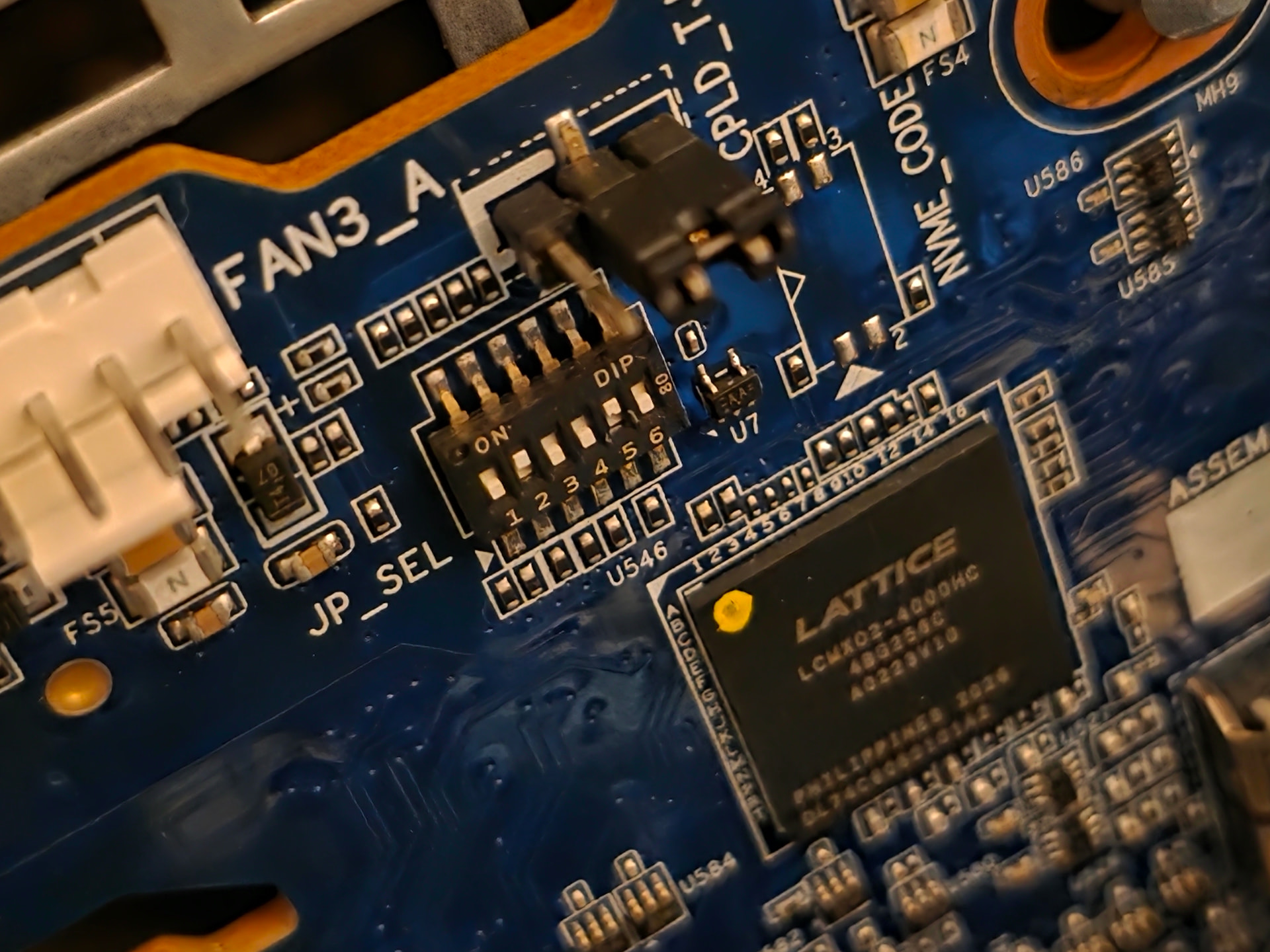
This is the CPLD 6-point DIP switch (The Lattice chip is the CPLD) and i suspect the DIP positions are hard coded bits to tell the chip what to expect as far as how many fans the system does or doesn’t have.
The board is a CBP20C2 (part no: 9CBP20C2NR-00) and I would very much like to compare against another board in a known working or even factory configuration. I havn’t been able to find a reference image yet and my ticket with Gigabyte is still in an escalated state. (I wish i could add to the ticket while it’s pending?)
I’ll ask on the ServeTheHome Forum as well but if anyone here has the same backplane or same system, it would be a great help at fault-finding.
While the G492-Z51’s manual doesn’t have a note regarding the JP_SEL jumper, the manual for the R162-Z10 does. And, it explicitly leads to an NvME/SAS/SATA storage config with split modes etc. So, the Dip Switch is most likely a dead-end. But, I still want to talk to someone with the same system regardless. The more I can find out about a known working chassis, the better.
As it turns out, i could have saved myself a lot of drama had I not rolled up the BMC to the latest firmware. Gigabyte shut the ssh daemon down on the last revision of their firmware, potentially as an EOL process. Once I’d found firmware that I could roll back to, this was trivial and I now have root access.
Gigabyte have been pretty useless, pestering me to reflash to the newest firmware on cooldown until the server sets itself alight. Rather than help me, their canned response is “EOL”. I fully understand their statement but they need to understand, i wouldn’t be talking to them if i didn’t absolutely have to.
Shoutout to Index of /support/FW for the firmware! If you’re looking at this thread and looking for a known-working firmware candidate to roll your G492-Z51 back to, it’s in the /MB/GIGABYTE/IPMI/AST2500/ directory. I’ll be keeping a copy of this firmware on my dev environment so reach out to me if you need it beyond that.
This is just a short update and I’ll provide another one later because I’m very likely looking down the barrel of a custom firmware flash to remove this headache of an issue and I wanted to ask the community before proceeding if anyone else has done something like this on a Gigabyte server before.
In a nutshell, it was EXT_FAN5 and we re-classified it as a “FAKE_FAN”. Once that was done, the issue went away. We’re sitting pretty on 7k RPM on all fans, nice and quiet (by comparison).
The actual chain of events however is much, much longer than that. But, without Claude Code, it would have actually taken me years to resolve. So, big thanks to Claude Code on this one.
With that said, absolutely EVERYTHING was validated at least twice during the entire process. While i ultimately did give Claude the reigns, guard rails were in place and this server was contained to a development environment while Claude had root-level access. Say what you will about giving an AI root-level access but it genuinely saved me a lot of time. And, given the overwhelming response i gained across all social mediums (sarcasm), i wasn’t left with much of a choice.
The documents have all been scrubbed and sanitized but some of them are still specific to my work with Claude (there is a TOMORROW reference in there when it was far too late at night/early in the morning to have the server cosplaying as an airport) but overall, it’s all there.
I hope to GOD this helps someone else because it drove me mad. I’ll be marking this thread as a resolved now.