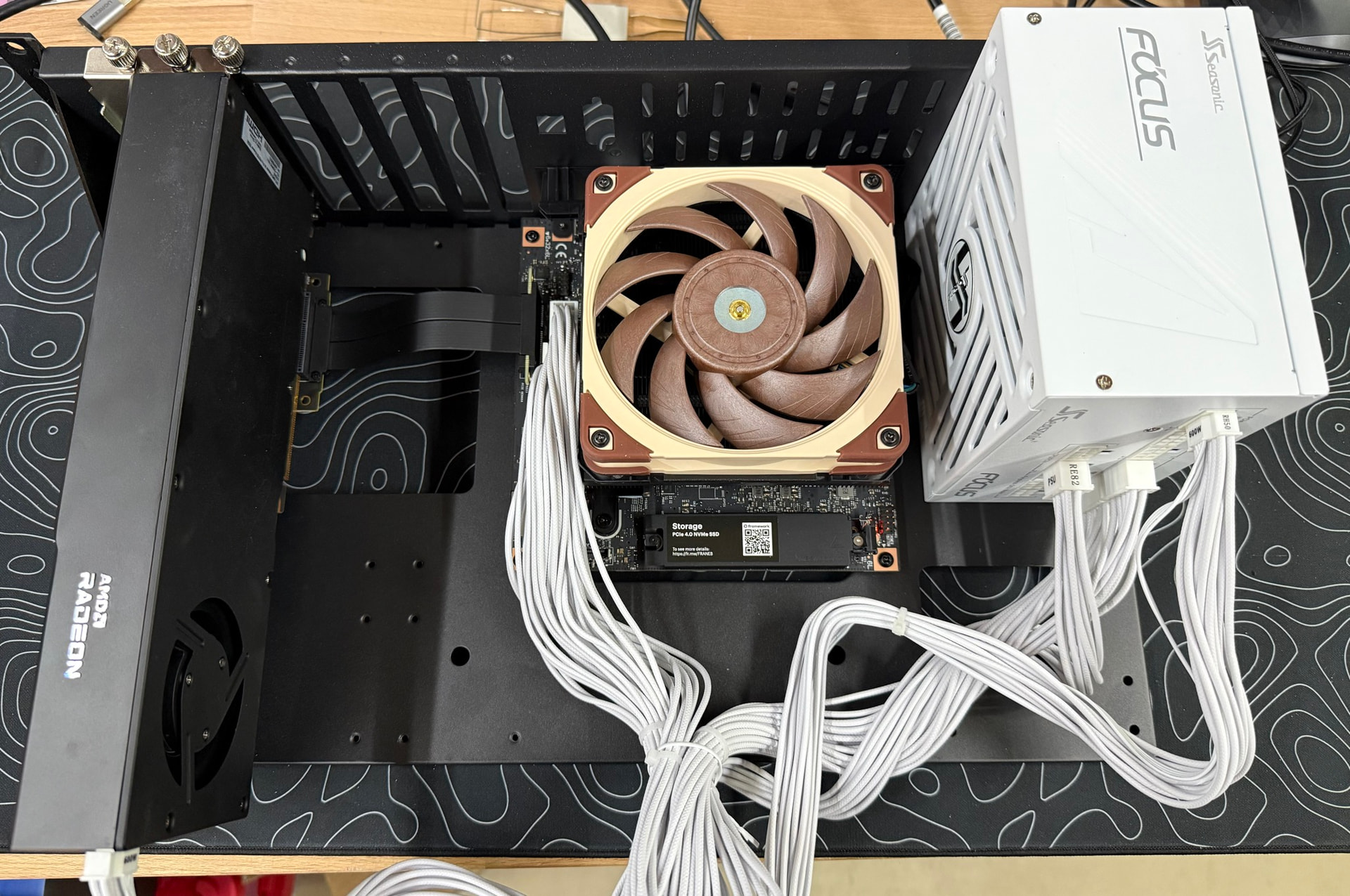
I’m running a similar setup, though without the bridge card, so it’s not as fast between the two GPUs, but also may avoid some of the problems. Notably, I didn’t need a pci=realloc command.
I had a LOT of issues with resets on the GPU in the x4 slot (connected over oculink) until something changed recently - maybe the updated firmware, maybe a new Kernel, new drivers, I’m not sure, but I was getting resets every time I tried using that card. Interestingly, the card attached to the M.2 slot always worked without any reset issues.
Since my latest updates I’m not seeing any resets in either gpu.
No surprise, my kernel command line on Fedora 44 using kernel 7.1.12 is very similar (unrelated bits removed): amdgpu.aspm=0 iommu=pt amdgpu.gpu_recovery=1 amdgpu.runpm=0 ttm.pages_limit=31457280 amdgpu.gttsize=122880
I think I could probably remove the gpu_recovery line now, but haven’t bothered.
I set the max iGPU memory size to 120GB so I could fit deepseek-v4-flash UD-Q4_K_XL model using the draft model as well.
I posted some photos of my setup over at the framework forum, so I’ll just link to that instead of reposting:
I’m not sure I follow. Expert weights calculations during decode are bandwidth bound, so they should be calculated on the device they belong to (iGPU in this case) as it has the fastest access to them. For batch processing they will be copied to dGPU (compute bound). If this is the only problematic read that fails p2p mapping, then disabling op offload may help (--no-op-offload or set GGML_OP_OFFLOAD_MIN_BATCH to a large value).
Not sure why no variant completed a benchmark - it might be P2P error related. Dual channel DDR-4 memory can easily achieve 8.5 tok/s for 10B active parameters (experts on cpu, rest on gpu), so there should be more than enough bandwidth for unified memory on Strix Halo system on 6B active parameters model.
As for P2P - while this is large part of this experiment it can probably be disabled for Qwen 3.8 Flash Next test. With -sm layer communication between devices is minimal. Lack of direct communication may not be visible in the final results. If disabling P2P would allow iGPU to hold only expert weights (not the whole layers) it may be worth a try.
There is no Q4_K_M quant from Unsloth for Qwen3.8-Flash-Next-GGUF . For 4-bit only UD-IQ4_XS and UD-Q4-K_XL are available. Q4_K_M files are just MTP heads, not the whole model.
As people ask for Qwen 3.8 Flash Next benchmarks it is probably worth to remind everyone that this is not just a new model, it is a new architecture. It means that benchmarks from today will have different results from benchmarks done a week ago, or a week from now.
The model has day-0 support on llama.cpp. It calculates outputs correctly, but this architecture is not fully implemented yet. Some important features (like sparse attention) are not there and once implemented they will change some benchmark numbers significantly.
So, I started working on something very similar about a week ago. I got one R9700 working, just using the 4x slot on the framework board. 49 tok/s, 682 tok/s prefill at 32K - double the stock 24 tok/s and 2.5x prefill on Qwen-3.5-122b.
Last night I just got 3.8-flash-next working well, ~45 tok/s with MTP and prefills at 1,000+ tok/s.
Well I guess I can post proper links for some reason. Edit the .com part to see them
Here’s the repo and some rough docs:
github[com]/sixvolts/llama-halo-hybrid
Absolute crazy coincidence, you used the same bench/rack thing, which has rack ears with this mod:
Yeah I have a strix halo + r9700 and tried them out I did manage https://www.localmaxxing.com/en/runs/cmt9atxro00qnli01zrvsc346 but again that was peak but still being able to run this model on this setup it was still way faster than every other iteration of trying to run it on this hardware, so I can vouch for it at least for ‘chat’ still to slow imo for agentic work
Benchmark numbers are pointless if the model and parameters are incapable of producing quality work. A Q2 model with 8k context? Good luck getting any real work done with that.
Sure, but I think that misses the point a bit. This is a forum full of people who like to tinker, experiment, and see what they can squeeze out of the hardware they actually have.
Most people here aren’t sitting on 192GB of GPU VRAM or dropping tens of thousands on workstation GPUs just to run the “proper” configuration. Trying Q2, limited context, weird hardware combinations, and seeing what works is part of the fun - at least for me and I thought was the majority of this forum - If we need to be super wealthy and elitist to have fun with AI then IMO we’ve lost touch and need a reality check - even Wendell’s comment in the video (17:15) about that irked me.. not all of us can afford quad rtx pro 6000’s… or get free ASUS gpus delivered in the mail..
Maybe I am the minority but I still enjoy to just tinker and go “Can I make this run, and how fast does it go?”
I’m very much in the “tinker on a budget” category too. At the moment my machine is an i7-10700 (32GB DDR4) with a Radeon RX6900XT (16GB). I’m trying to get a 128GB Strix Halo system, but not having much luck with GMKtec/FedEx (lost package saga)
When it comes to experimentation, what I am advocating for is documenting the usefulness of that tinkering. For example, you get good numbers from a Q2 @ 8k ctx model. That is great if you actually have a use case for that model. If you do, please share. For example add “and it’s great for classifying objects in my Immich collection because…”.
This is probably most useful in the low Q, low ctx cases, because the published cards for models typically characterise their ability at full BF16 and max ctx. At Q8 and max ctx, most models will still perform close to those expectations. That’s unlikely when you scale a model down to Q2@8k. If you still get useful work after scaling it back that much, it would be interesting to know what that workload is.
This is where we can grow as a community, informing each other and sparking ideas.
I peak at around 45 tok/s, and in “real workflows” I see 25–30 tok/s, which feels fast enough for my use cases so far.
I’ve enjoyed finding ways to get a 304B LLM running on my modest ~$3.2k hardware. I paid $1,699 for my Bosgame M5 128GB AI Max+ 395 and $1,500 for the R9700 (running M.2 > OCuLink). Lucebox has also done some awesome things with their Strix + R9700 AIO box.
What they’ve done in finding the fastest Q2 tok/s — I agree that’s mostly a brag number and not realistic for normal workflows. But the work they’ve done splitting the model to strike a really good balance between preserving enough quality and getting great performance is, to me, worth looking at if you own a Strix Halo + dGPU and like to tinker.
Peteru - I’ll explain my use cases later, looking forward to your impressions of your Strix Halo whenever you get it, hope it all gets hashed out, sounds frustrating.