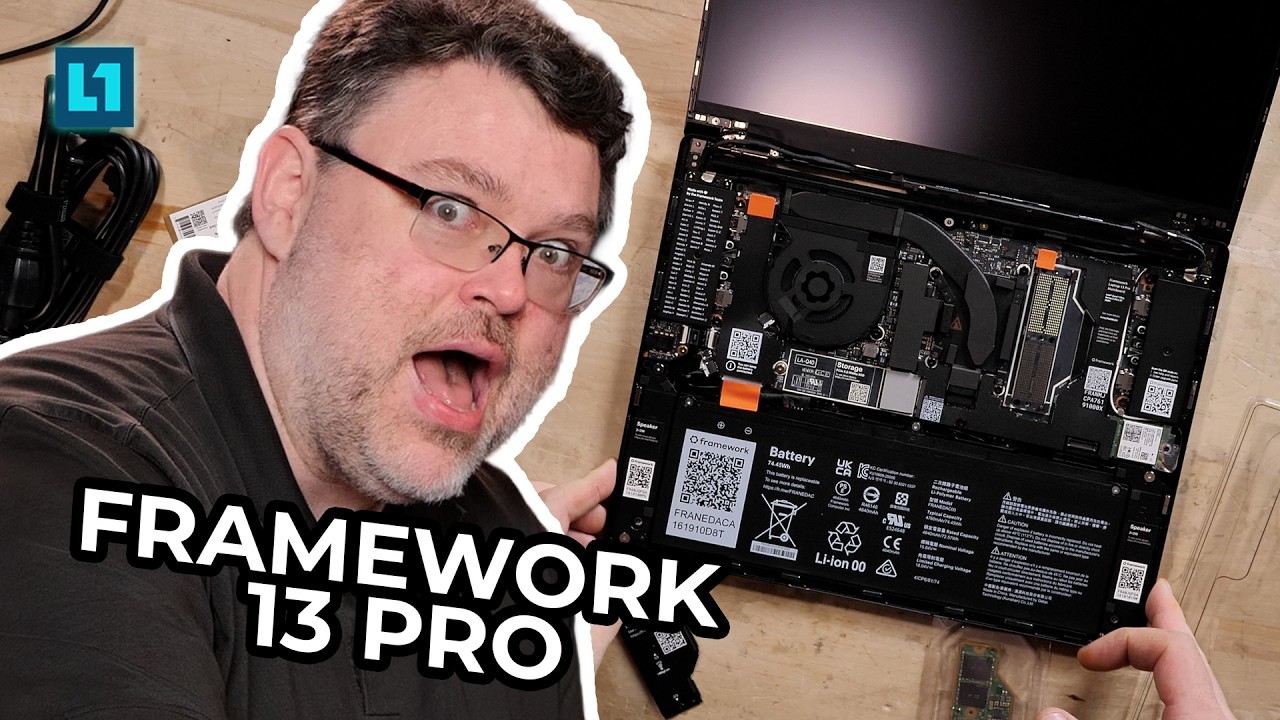
Framework 13 Pro (Core Ultra 358H X7) (35w)

Bottom Line

This is one of the best “thin and light” laptops I have ever used for a work context. Stiff “real” build-quality, upgradability and not one single sleep/wake failure in my ~ 7 days of testing so far (kernel 7.1).

The new haptic touchpad Linux experience is second to none.

It can be picky with power modes (performance, balanced, power saver) and depending on your USBc charger
Display

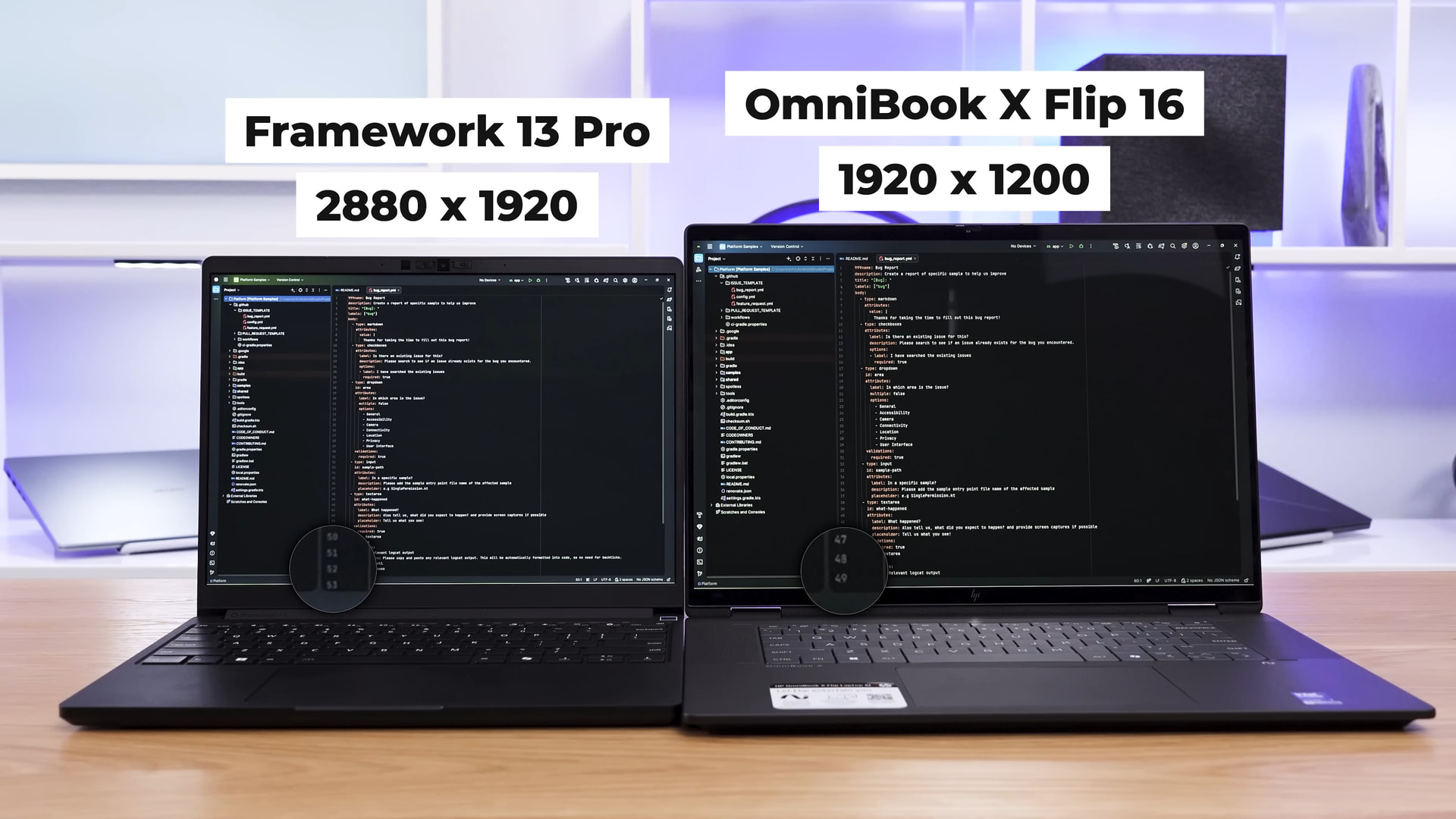
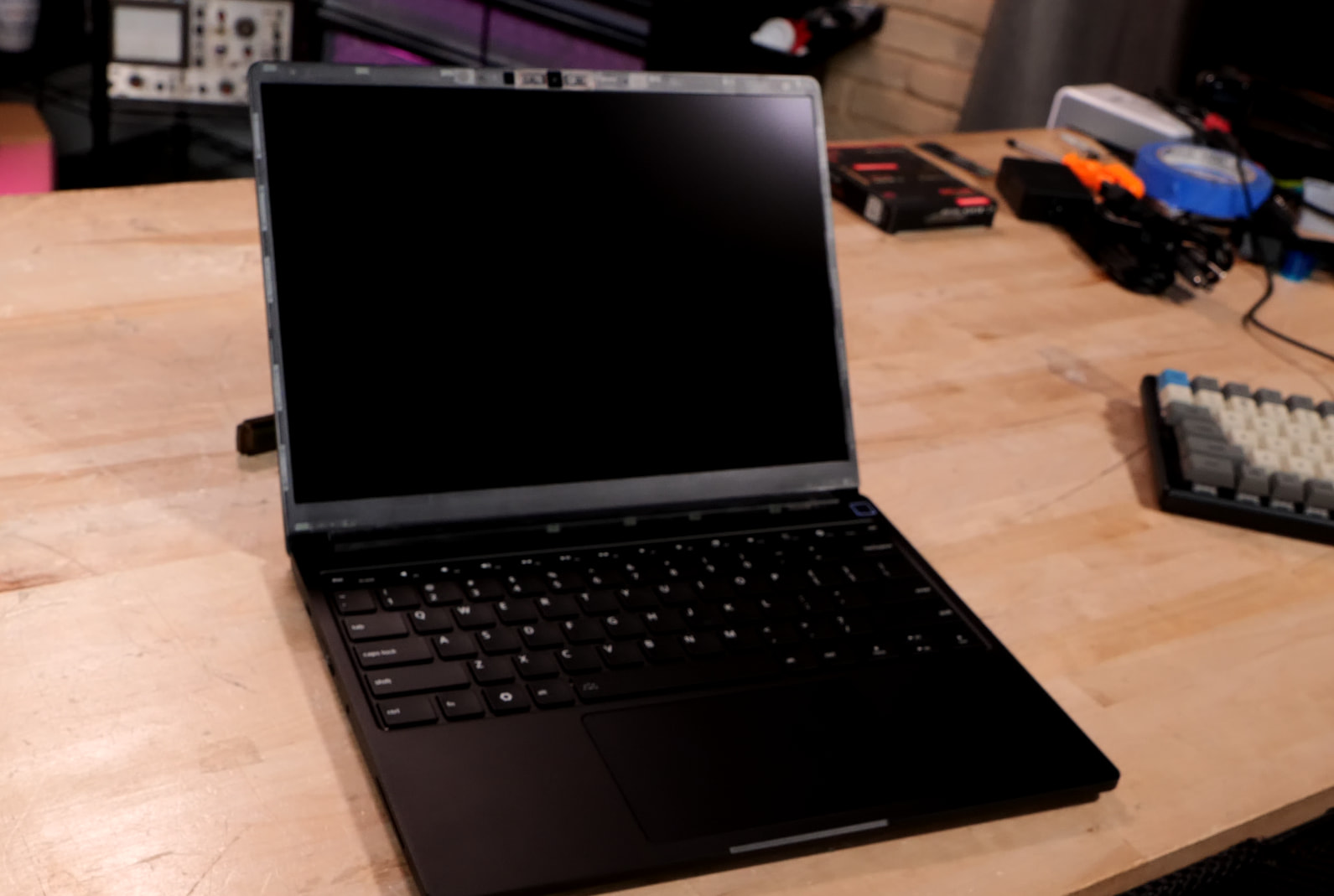
This display is a custom 13.5" 3:2 touchscreen display with a resolution of 2880×1920. I have no doubt crazy rando hackers are going to take this display and build cyberdecks around it. It’s great in low light, daylight, you name it. 700 nits max brightness ANd a matte surface. Framework nailed this one imho.

Webcam

The webcam is MAX 1080p. It’s not great.

I would call it bog-standard. The microphone is above average, imho, however.

Gaming?

On battery, it’s limited to 15w. I can play Monster Train 2 for 4.5 hours, which is nice. It’s not really a gaming laptop but it can play older titles at 30-45 fps.

Cyberpunk is playable at upwards of 60fps @ 1080p if you’re willing to run medium graphics settings and use a little bit of upscaling.

Battery

What’s the secret to good battery life? Run powertop and it’ll tell you what processes and configuration you need to change in order to get the best battery life. I mostly didn’t use the p-cores at all, which is why the performance is so surprising.

Thunderbolt 4? New Framework Modular IO

The name of the game is redrivers and retimers. They did a great job here. Thunderbolt works fine; check out the video. iommu=pt is the key to solid passthrough and no kernel oopses.

These modules also have a new design for signal integrity, hence why DP2.1 passthrough is now also possible. Exciting!

I used the Razer Chroma X2 TB5 dock with both a 5060Ti and an an RTX 6000.

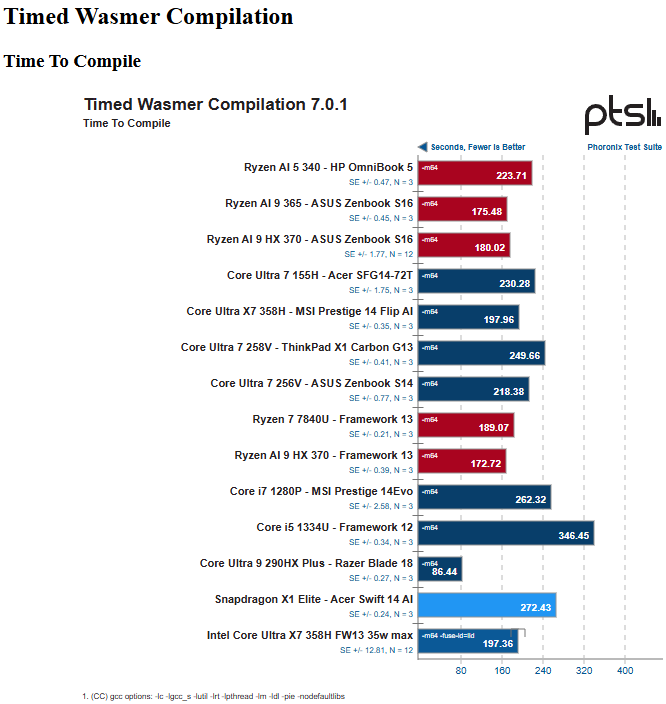
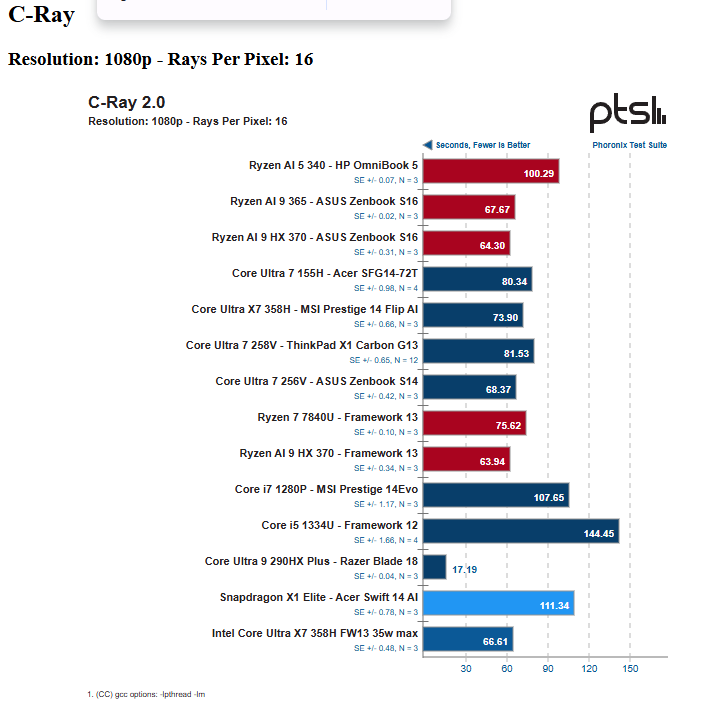
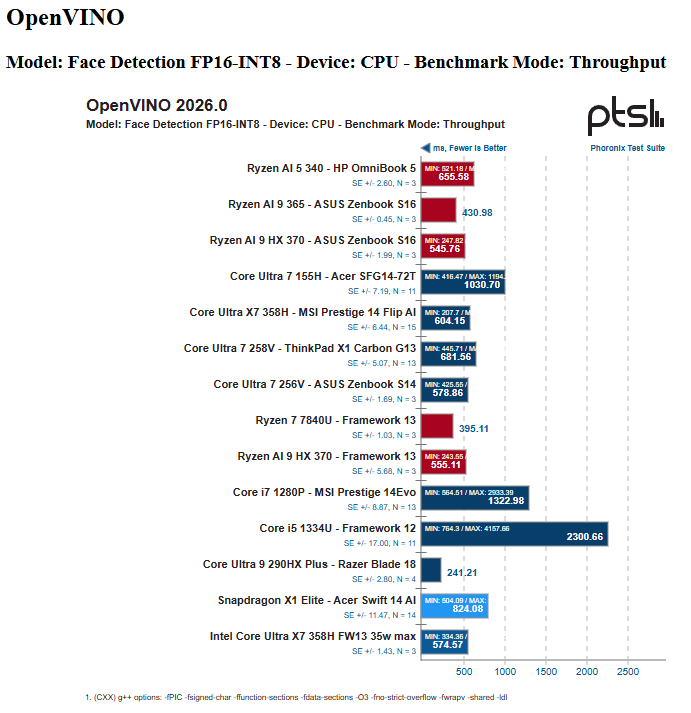
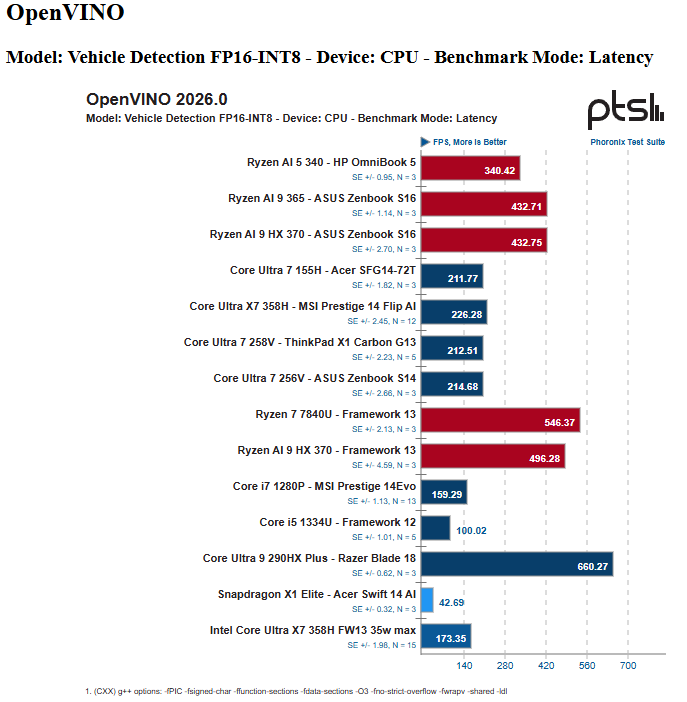
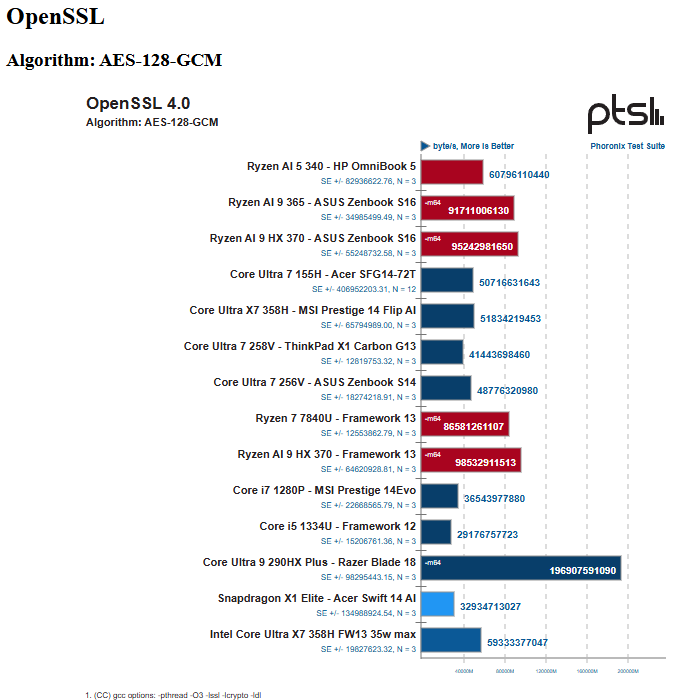
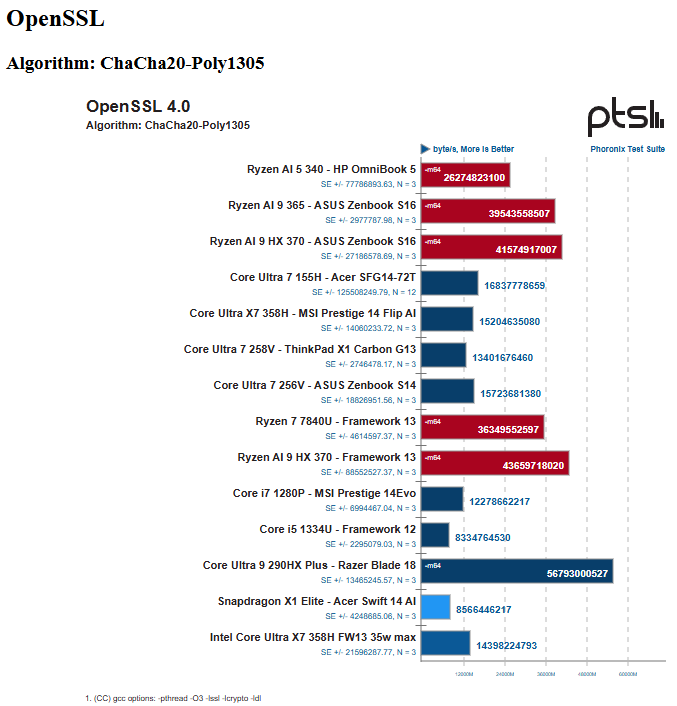
Benchmarks (@ 35w)
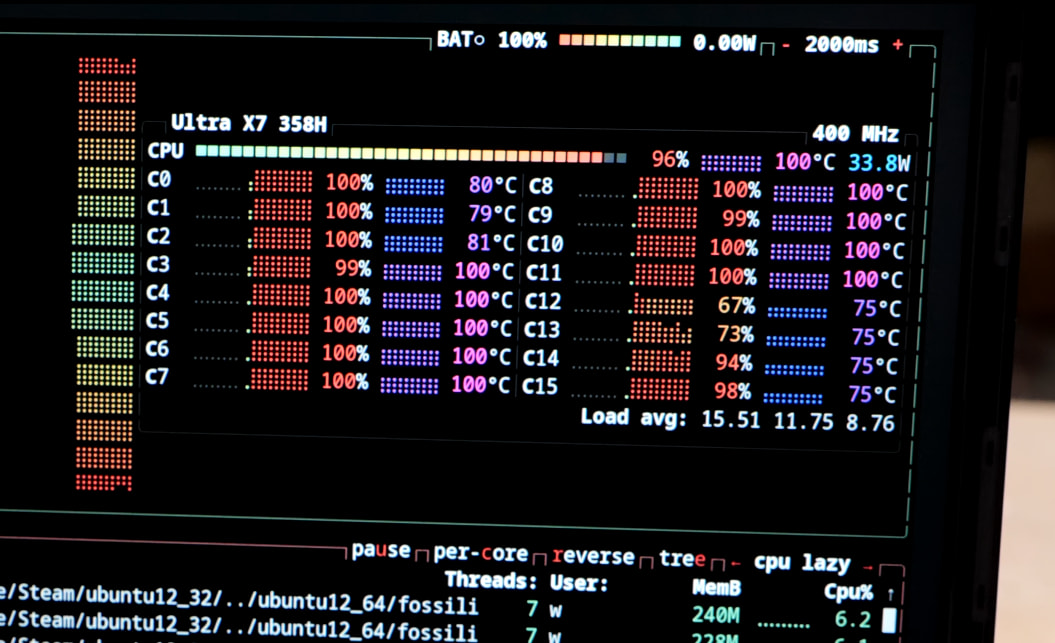
More Phoronix Benchmarks Here: TODO

Pricing

LPCamm2 memory availability is rough.
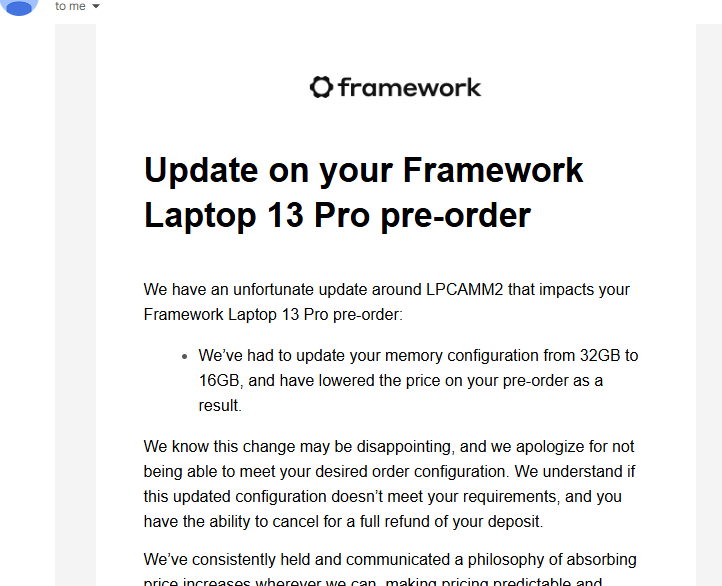
As-tested with 32gb memory, but I did get the notice

Corporate Fleet?

I mentioned in the video that it feels “Thinkpad like” in build quality. This is the first FW laptop that I would, without hesitation, recommend for corporate fleets. It’s that well built.

They maybe Always had the edge for repairability. But now? It’s a whole new world.

8 Likes

more coming in a sec, paste fail on my part, trying to pull where I worked on this on the plane :smiley:

2 Likes

Can you tell Framework to finally offer a HDMI 2.1 port to not need a double-dongle combination of USB-C-to-USB-C DP>HDMI 2.1 if you want to hook up your Framework laptop to an UHD TV with 120 Hz without having to endure chroma subsampling?

Remember even Apple went back on removing the HDMI port on their MacBook Pro models.

1 Like

I’m a current Apple user and have been considering switching so a more serviceable and open stack instead. I was holding out on pre-ordering, mainly on the concern that the battery life claims being sourced from testing on windows had me a bit worried, but this truly seems like the safe haven.

I assume with only 15w on battery that under typical web browsing that the chassis doesn’t get all that warm? I read before that the previous 13 had some issues with thermals/fans.

at 15w it gets warm, but not crazy, and that’s only gaming. 15w is only 4-5 hours.

for non-gaming workloads you’re typically way under 10w. at 10w you’re still getting 7+ hours of battery life.

This is the first linux laptop I’ve ever used that feels truly all-day-batterylife.

3 Likes

How hot does the lpcamm2 memory get under load?

I notice that I can’t even memtest on the Asus NUC 15 Pro line at work because they overheat with 5600MT memory. So, I’ve been a bit obsessed with the temperature memory runs at in various devices. I saw that the SPD temp does show up in sensors.

Questions from me:

  1. Can you comment on where the screen size + resolution would fit in comparison to the following:
    • thinkpad 15.6 inch@1920x1080
    • macbook 14 inch@2560x1600
    • macbook 16 inch@2066x1329
    • USB portable monitor 16 inch@2520x1680
    • Framework 16 inch@2560x1600
    • in theory it is a 13.5 2880x1920 display so would it fall in between the 2 macbooks?
  2. With a higher resolution on a smaller screen, do you have to crank up display scaling?
  3. What is your workflow when you use this on the go? Is it just mostly writing video scripts and notes on the go?
  4. If you code, what is your workflow/layout? Full screen editor with virtual desktops to switch between?
  5. Do you still use Cosmic’s window tiling when you are coding on the go?
  6. How it feels to have 2 code files open side by side?

From one big monitor user to another, I’m curious to hear if you can work off a small screen and if the 3:2 ratio + higher resolution makes up for the smaller dimension.

When I am at home, I like having a code window take up the bottom 1/4th on my 43 inch 4k monitor and use the rest of the free space for reference, music, and chats

When I am on the go or working on the floor, my workflow is having a editor open on one half/third and reference material / chat / browser on the side on my 16 inch macbook. To not feel cramped, I set my 16 Mac to 2066x1329.

If I am camped out in a room, I can work with 16", 2520x1680 QHD portable monitor.
https://www.amazon.com/gp/aw/d/B0BM96WZMC?smid=A1ZJB2TYUK06Y9

My other 15.6 1080p Thinkpad feels really cramped at a 16:9 ratio. At the office, 1080p 24 inch monitors feel even more cramped than my 15.6 laptop

Bought a FW 13 this year with 64 gb of SODIMM, got an ok price, but its a bit painful that they don’t have a transitional sodimm option for the ultra 3, given the current memory prices (and lack of availability) and the clear advantages of the ultra 3 series in terms of battery life. Hope they consider bringing out a motherboard with at least the X5 that takes sodimms, but I am not counting on it :frowning:

Nice to hear that this laptop is that good (and is repairable)!

I like to see a repairable tablet-PC even if it has to be as thick as my Surface Pro 2 was. We got a Framework 12 but the screen quality is just not good enough. The colors and all. I don’t feel like I need top performance these days now because even an R7 8840U is still quite fast so I ain’t bothered by Framework 12’s choice of CPU (though single channel memory is a bit sad).

If I could get something like that I’d replace my Minisforum V3 for it.

FYI, this didn’t come out on Floatplane. i didn’t realize this video came out till I checked it subscription page on YouTube. I usually watch your video on Floatplane, instead.

oops! ty for heads up. being fixed now.

1 Like

it got answered by the just josh video. It’s about as dense if not more dense than my 15 inch 1920x1080 thinkpad


timestamped comparison below

I decided to pre-order the x7 358h 32gb ram variant and plan on getting a ssd separately. Man pci gen4 ssds have gotten more expensive

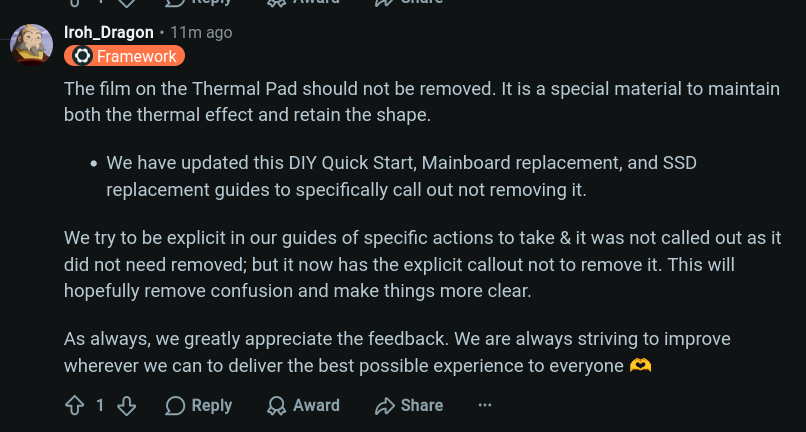
The official guidance has been updated to say NOT to remove the film on the thermal pad. Just a heads up. Perhaps a pinned comment on the video is warranted.

Yep did that, my bad. Though curiously the thermals are better at least initially

2 Likes

It’s like I told them, one does not simply spend their whole life trying to remember to remove the peel, only to expect that it should stay because it doesn’t explicitly say remove lol.

1 Like

Anyone had any luck doing sr-iov on the X358H with this?

I did find this guide for doing it ubder proxmox which makes mention of the new xe driver and pantherlake but haven’t found a direct example GitHub - Upinel/PVE-Intel-vGPU: This is a step-by-step guide to enable Gen 12/13 Intel vGPU using SR-IOV Technology so up to 7 Client VMs can enjoy hardware GPU decoding · GitHub

If not, I’ll have a bash anyway my framework is expected some time next month.

Hoping to get it working for a hw accelerated winslop VM for use with a 3d scanner.

1 Like

How has the laptop been after I assume you have been daily driving this laptop if you have not moved on to the Chuwi laptop. Specifically wondering if you have tried a newer Fedora on this I read this Phoronix article saying that specifically Fedora was underperforming. Curious if you could go into a bit more of an investigation into this?

Not Wendell, but Phoronix did do a follow up on that where switching to ppd closed the gap. I found the same in my own two week follow up after testing what he did.

This was an interesting read! Sadly I got my pre-order in quite late so mine is not coming till October so have been scouring the internet looking for how people felt about this laptop considering the price and so far it looks worth it.

Thanks!

1 Like

Looking to upgrade and need a machine that will render 4k video at decent rates. currently rocking the FW13 7040u with 32gig of single channel memory and it is about 4+ times slower that the actual video file when rendering.

Is the FW13 Pro better at this or am looking at the FW16 or something else? OR should I just upgrade to dual channel memory?

To keep this on topic, how is the 4k video rendering on the FW13 Pro?