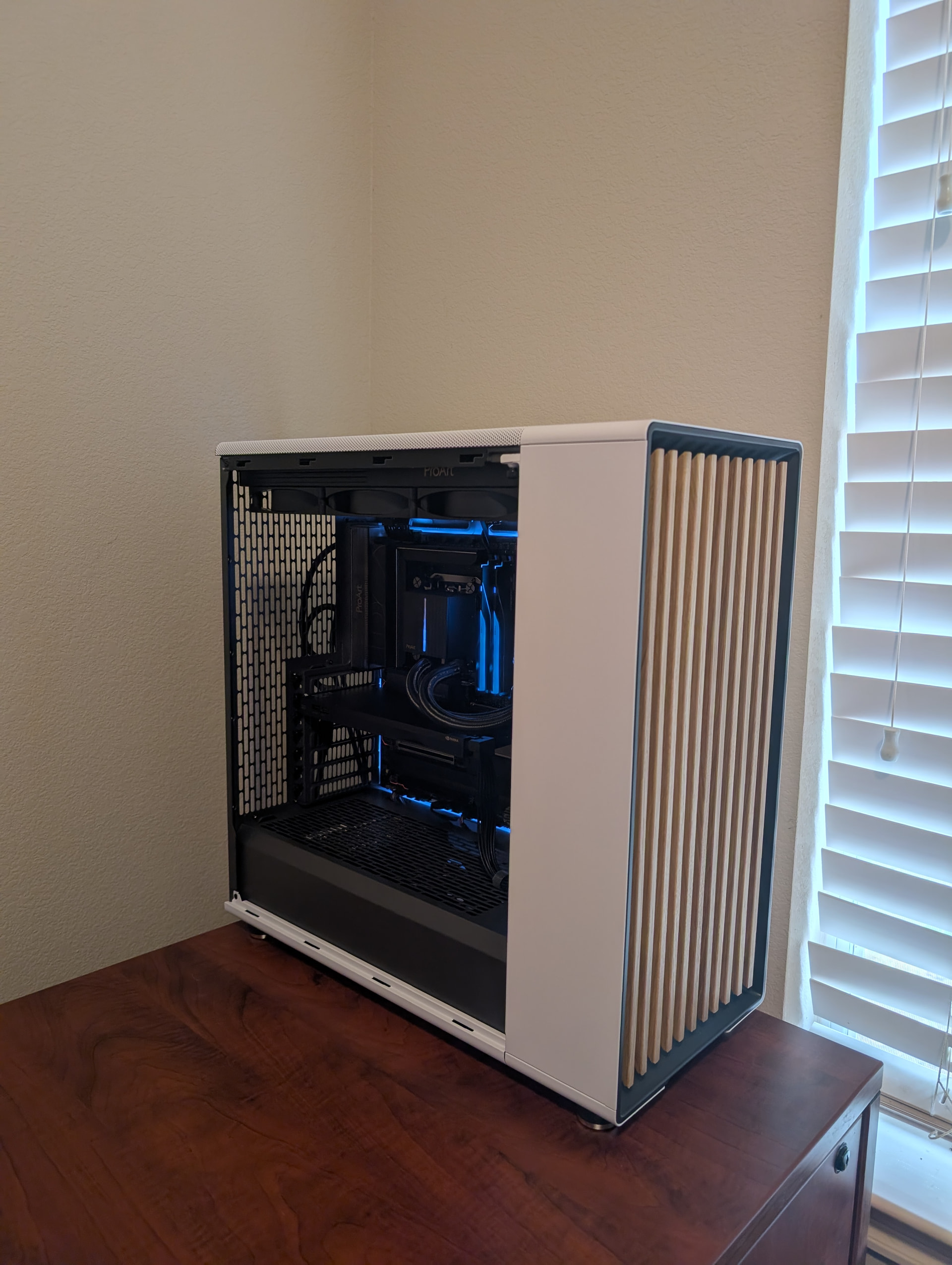
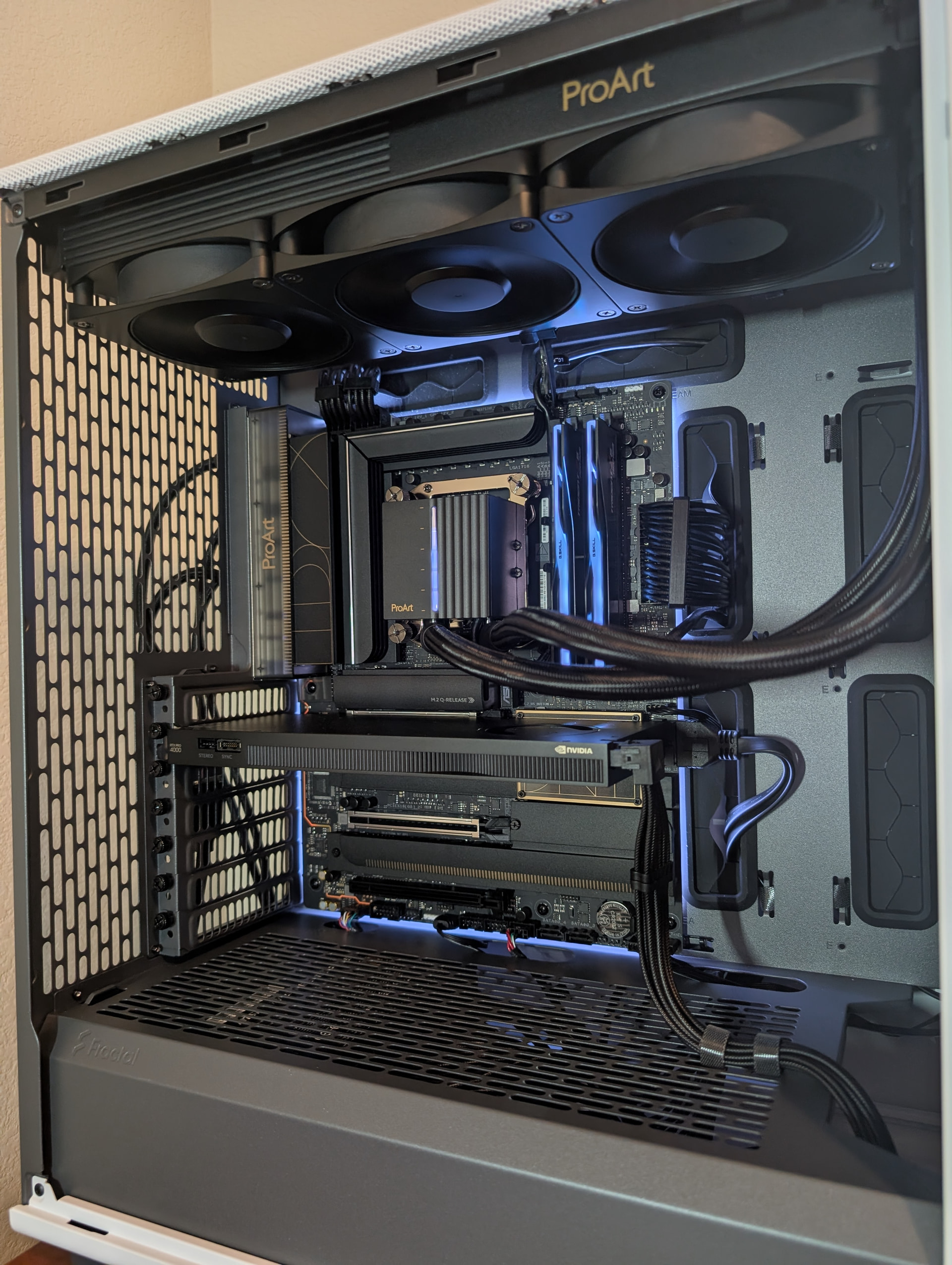
I currently have a Dell Precision workstation i5 14500, dual T1000 (8gb), 64 gb ram. It’s fine but the warranty will be up this December. I’m looking to build a new workstation with an eye towards running a local LLM and trying to incorporate it into my daily file management tasks.
Current Workload: Irrigation design using Land FX that runs within Autocad. Mostly 2D, some 3d but not much. Video editing using Davinci Resolve. I’m thinking about setting up a local LLM to run file management. It could turn into more but I have to be very guarded on how I can incorporate it into my workflow.
I’m currently a one man show so training an “assistant” on repetitive but time consuming tasks could be beneficial. But I don’t know how far it would go.
Upgradeability is a concern. With the cost of everything being bonkers it’s difficult. I think everything but the GPU is about the best I can do and hope for having a system that can keep up for the next 3-4 years.
The motherboard can support dual A4500’s and I think they can be connected via NVLink if I would want to expand and add another a year or two down the road. That is if I start using AI more.
I did look at the B70 Pro but I need the driver stability. My current machine stays on 24/7 and this one more than likely would as well.
Homelab:10gb network, 1-Terramaster F4-424 Max, 1-Terramaster F2-425 (backup NAS) each NAS backs up to individual SSD’s. All work is performed on the F4-424 Max.
What cpu cooler did you have in mind? The stock intel one (if you have one) will be insufficient to keep the core i9 cool. I suggest a larger dual tower thermalright peerless assassin air cooler, or at least a 280mm rad liquid cooler.
Edit:
The other thing is your backup nas should be offsite somewhere. In case of fire,flood,theft,etc.
I was planning on a large air cooler since it would be on 24/7. I have an Arctic AIO on my gaming setup but its shut off unless I’m gaming. I had to replace the stock fan with a larger tower cooler on my current workstation due to thermal throttling.
I backup daily offsite. The redundant NAS is more for incremental hourly backups. I swap the SSD’s out on a monthly basis offsite. If something happens to all that and I lose everything, well I need to move on to something else.
I’ll def look into that cooler. I need to figure out what will fit.
I did a comparison of dual A4500’s and a single Pro 4000. I would only add an additional A4500 if I needed it but I’m just not sure how much bandwidth I’d need since I havent gotten to that point yet. The biggest difference is dual A4500’s pull 400 watts and the Pro pulls 140 watts.
I track my homelabs energy usage and it runs ~$1.25/day with a solid days worth of design with my current setup. I don’t really want that to go any higher.
AM5 is the king of upgradability platforms right now. Seems to be at least two more generations to be had (e.g. Zen 4 - Zen 7), though Zen 7 is not yet 100% confirmed, it seems to be what they are aiming for.
Since your MB is pretty pricey already, paying $450+$450 for a CPU and $450+$450 for the motherboard is not a fun place to be in. Then again, does it matter if you plan to use this in the interim and ride what you have until AM6 is released by 2030-something? The 285K seems to be the best CPU we will ever get on the FCLGA1851 socket.
Intel most definitely still have an edge in productivity software. This is because Adobe and other companies have heavily optimized for the Intel architecture, and those optimizations are paying off big time for Intel right now. This is slowly changing but not enough to move the needle for Workstations under AM5 - Zen CPUs will keep kicking butt, but until Adobe et al optimize for Zen, Intel will always have that edge.
All of this tells me that upgradable CPU really isn’t worth the switch to AM5 for your use case, so yes, Intel is the way to go even if you pay more for now.
As for your power bill… Dual A4500 will bring up your power considerably. Single A4000 Blackwell will not. Also, training LLMs takes less power than you think, these days. For instance:
Requires: 9060 XT with 16 GB VRAM and 64 GB RAM to get decent performance - possibly enough for your use case.
As far as the upgrade path Autocad is pretty terrible software. In my experience, once you are 3-4 years beyond the latest update, it becomes painfully slow and error ridden. Crashes increase which leads to loss of data and more importantly time. Hence my redundant backup setup and process.
I am currently on a licensed version of Autocad but will be forced into a subscription at my next upgrade which is at the end of the year. I’m not sure if having the latest version of the software on older hardware will help or hurt the crashing and poor performance issues. In the past I have just replaced the machine when the issues become a problem.
I do agree on the Intel. I think four years may be the max I go before looking to upgrade. At that point I’d probably just replace the machine.
I need to research the Pro 4000 a bit more but that may be the ticket for my setup. Much lower power usage and it should still do what I need it to do on the AI side. I just don’t know what that would take at this point since I haven’t researched the models. Cart before the horse and all that. Thanks for the tips.
I spoke with tech support for the FX software and it looks like there’s a path to make things possibly work with AI within it. Which is very interesting. So I think the single Pro 4000 card would give me the most headroom and less power usage.
Sounds like it might be worth to look into FreeCAD or other competitors like Catia and Solid Edge / Solid Works then Why is it that every proprietary software turns to shitty business as soon as they think they have cornered a market… -_-;;
Unfortunately I have to use it. Land FX only runs within in. Well, I use FX CAD which is a special version of Autocad made for FX.
I think I have a little more defined plan. The twist is actually trying to train the AI on my workflow and have it perform some limited tasks in FX. I’m skeptical but willing to try. I love getting frustrated for no reason.
I understand your pain, but also, there are alternatives out there, and those are always worth keeping an eye on. A quick google search mention PRO LandScape, RealTime Landscaping and RealGreen. And of course, FreeCAD is rapidly finding it’s niche for Architects:
But I know nothing of this space or your particular circumstances here, so I will let you be the judge. My point is, there are alternatives, and you should keep an eye on those; ultimately sticking with what you know is a perfectly valid choice, too.
FOSS is nice in the sense you never have to worry about cops or lawsuits treating you like a criminal. Ernie Ball learnt this the hard way back in 2003:
Of course, FOSS is not always going to cut it, sometimes you are locked in to a certain software since it is the industry standard everyone uses and expects (like how everyone expects .docx files these days). Oftentimes the software is just not mature enough, and paying a developer to improve it is just not worth the effort.
So shop around once every other year or so. There might be better workflows out there. Worth looking around at least.
Land FX is pretty much the industry standard for at least the portion of the field I’m in. One of the main reasons I moved to Land FX 7-8 years ago is they were on a four year upgrade cycle with a set license cost. A set license cost for FX Cad, a yearly license fee for Land FX. Autodesk has since required the move to subscription based licenses that will affect me at my renewal the end of the year. I’m not happy on my software costs increasing. So if my only option is a sub license model, it may bring other software back into play.
The whole point of trying AI is to have it do one specific part of the design that takes up about 70% of the actual design time. If I can have it reduce the design time by 50%, that would be a huge time and cost savings. At this point I know enough about the software, it’s quirks, what it can and can’t do, that I might be able to get it to work with AI. A new software? Not so much.
But to your point, I do need to stay up on the newer products and research what’s out there. Hell, what I’m trying to do could already be offered in a different software.
After a ton of research over the weekend I’m going to go with the 9950X and AM5 for the upgrade potential. The 285k and 9950X are nearly identical for the workload. Not knowing just how much incorporation of a local LLM would be involved in the future, being on a platform with some upgrade potential I think is the best option.

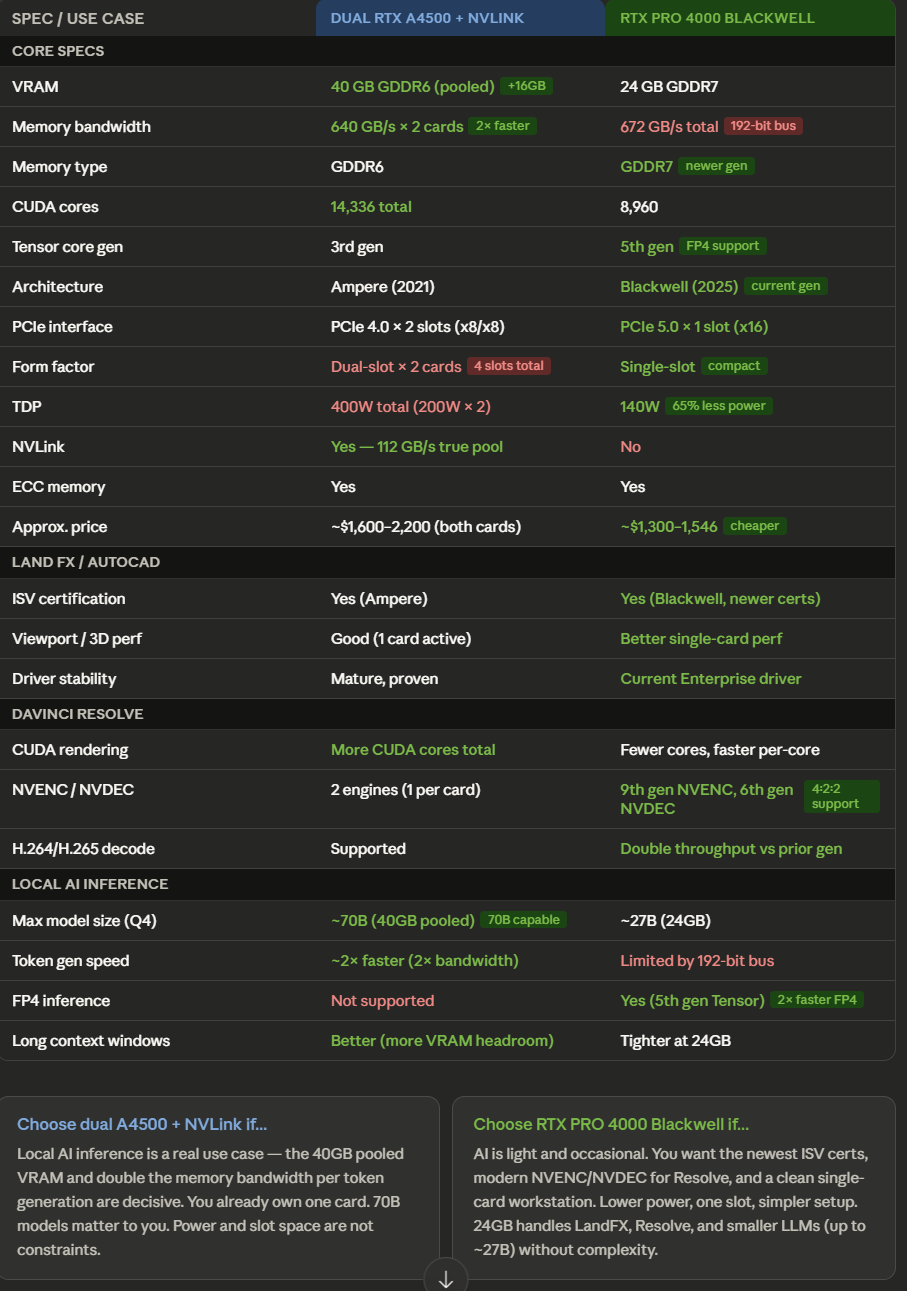
 I just don’t know what that would take at this point since I haven’t researched the models. Cart before the horse and all that.
 Why is it that every proprietary software turns to shitty business as soon as they think they have cornered a market… -_-;;