Firefox RAM problem

I have had a problem of Firefox using tons of RAM and not releasing it for the past few months (before I noticed it).
I have an ongoing bugzilla report with Mozilla but they can’t seem to figure it out.
Then I thought maybe one of my smart friends at L1T knows whats up.
I am sure it’s something dumb I did in Firefox settings.

I have ASUS Z490 mb, i9-10850K, 64GB RAM, 4TB SSD, Radeon 9070XT.

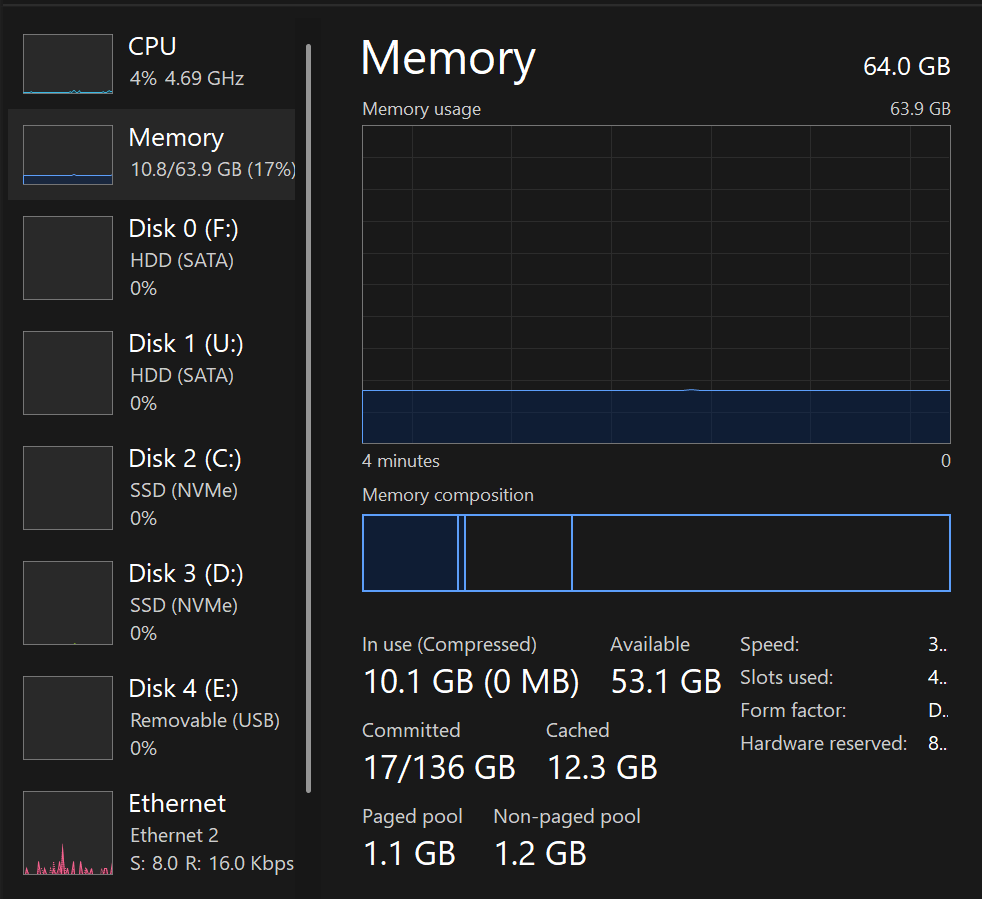
I noticed while gaming my RAM usage went from normal 12-20GB to over 60GB.
image
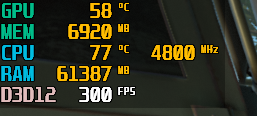
RivaTuner - Back4Blood

Further testing showed that Firefox is the culprit. It’s almost as if Firefox is recording every byte of data that I stream in some mystery file that can’t be erased in Windows. Is that what is called a memory leak? When a program doesn’t return memory it has used? It seems the only way to flush / clean Windows RAM is to reboot?

It kinda sucks to have to reboot a couple times a day when I want to do something other than web surfing.
Isn’t that ram number the amount back4blood is using?

so are you out of ram? or do you just want the number to go down? what happens if you launch something else does the number stay the same?

What is reported, vs what is used is a very tricky thing in regards to memory. A program giving back the memory is not the same as an os, fully taking it back and then dolling it out to something else. Point here is in a simple C program you can allocate and free a byte of memory but the os, may decide not to actually put the byte back in the free pool and leave it marked as dstined for the program despite the program clearly not using or wanting it any more. When you get into share memory like with graphics graphics drivers an other things this all get even more complicated. The purpose of this is that if the program wants a new byte the os does not have to search for a free byte it has one on tap. Lets not even get into garbage collected languages like JavaScript that web browsers use, and what is or is not done at the multiple layers.

1 Like

Are you sure it is FF that is gobbling all that RAM?

Are you sure the RAM usage reflect the memory actually hoarded by a process?

It is important to understand that the memory, in a modern OS, should be used to almost 100% This doesn’t mean the memory is allocated to processes, but that the OS is properly using the memory for caching.

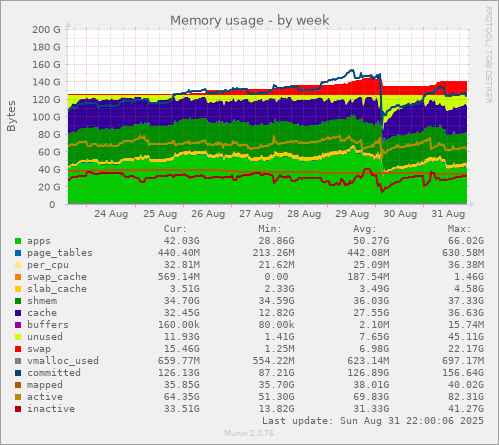
I don’t know proper tools, under MS Windows, to observe the memory usage. Here for the example, a snapshot of my main rig (128GB) memory usage:

image

You may estimate how much cost my FF (~400 open tabs) where it crashed. You’ll note that the system cache files (the upper band in marine blue), but that memory can be freed and assigned to processes on need. It’s a proper use of resources.

The behaviour you observe is expected.

Last note: the more you have RAM, the more FF will attempt to use. I didn’t find a proper way to make it believe there is less RAM available.

A memory leak is when a program doesn’t keep proper track of memory it allocated, leading to hoarding memory for it-self. But on a process’ death, the OS free all the memory allocated to that process.

3 Likes

There is much more to it than that.

RAM ain’t water to be syphoned back and forth between OS and processes without losses.

Each allocation can fragment blocks of available space, so if process does plenty of small allocations and then keeps some of them for various periods of time etc, it might make available heap look like a Swiss cheese.

Any other process that might want to make big allocation might find there is no suitable continuous block, even though the total free space might be much bigger.

Some things might be swapped out, but that has its own problems and limits.

1 Like

That’s kind of true, but FF is designed with this in mind, there is techniques to address this, from allocator (the jemalloc experiment is interesting on this account) to process spawning (for many years now, FF is herding a few processes that are supposed to die on a regular basis.

Of course I’m talking of fragmentation on a process level, not the OS, that would be a totally different discussion and not worth having it nowadays

1 Like

After I reboot to a clean system, Back4Blood will use 12GB RAM.

Normally my RAM usage hovers between 12-20GB.
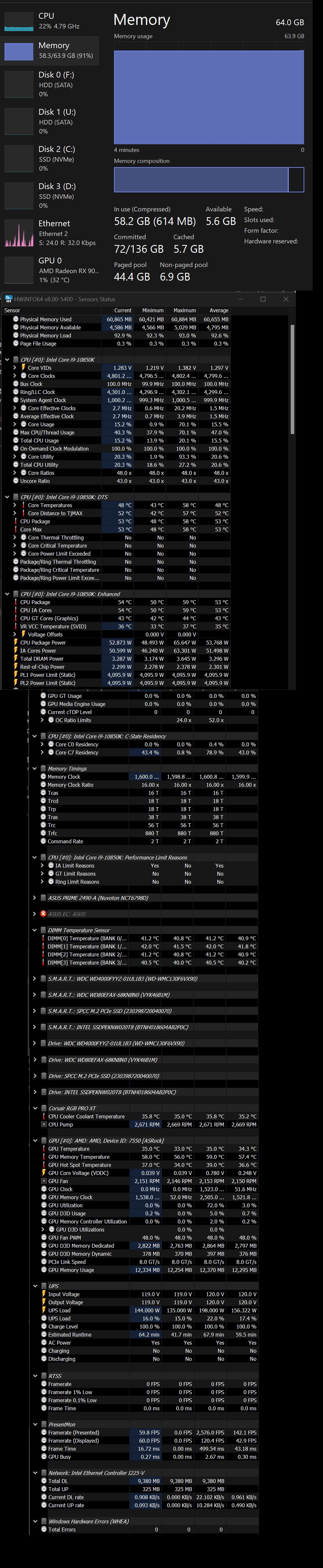
When I use Firefox for a few hours the usage steadily increases to over 60GB.
Closing Firefox does not reduce the used RAM. Windows stays over 60GB RAM used even after Firefox is closed. I looked for TSR apps and Start-up apps that may be steal resources and I didnt have much of that. I even tried killing as many processes in Task Manager as I dared and the RAM was still over 60GB?
If I launch a game the RAM increases a little bit (Like from 60GB in Windows to 62GB in Steam.) The RAM I am using doesnt add up. The processes added together are much less than the overall RAM being used. Once it gets full, my PC acts up.
I think it may be hitting the swap file and chugging, lagging, pausing.

HW info

I’m a bit surprised no-one has recommended using about:memory in Firefox. If you think Firefox is the issue, then about:memory will give you a breakdown of what is using all the memory in Firefox. Just put that in the address bar, click “measure” and you should get a nice heatmap telling you how the memory usage breaks down.

2 Likes

its not just you, Firefox has been doing this for YEARS, I have been observing this behavior on macOS at least since the M1 Mac came out, maybe longer.

afaict you just have to close Firefox completely every once in a while

I have had it creep up to >28GB RAM usage ; I leave Firefox open 24/7 for months at a time, basically I only close it when I do system OS updates that require reboot.

Does the Process Explorer app from sysinternals, allow you to terminate zombie threads not shown in windows task manager?

I really rated the suite of tools, and Microsoft didn’t seem to trash them when they embraced them years ago

Recent Firefox caught Machine Learning Cooties and … the best summary for reverting the change is by Don Marti: “Goddammit Mr Noodle!”

I run Nightly and restart about once per day, but this has made a difference to the snappiness of Firefox for me.

K3n.

1 Like

When this happens I just go and kill some firefox sub-process which has the biggest mem usage (well, maybe skip some crucial ones).
The worst that could happen is “gah! this tab has crashed!”

I found Firefox’ built-in performance/task manager unhelpful in these situations.

You sure it’s not just cached? That your usage only goes up to 62 gb from 60 after opening your game, makes me think it is indeed releasing the memory once it’s called for?

Tracked your swap usage?

Sorry, chiming in but fairly well outside my element here. Windows and such… not that I’d know that much more how Linux works under the hood, but I’ve left many many firefox tabs open for weeks on my laptop with only 16 gb of ram and it behaves just fine.

My suggestion to you - Floorp.

It’s an actually good FireFox based browser to which I switched half a year ago (I tried most of the FF browsers).

What makes this one special is the “put tabs to sleep” option, which you can configure.


Here’s some background from me.

I have a TV pc, running the 9900K with other parts, which were left from my upgrade. The system is running Win10, and started of with 16GB of Ram.

The system is a 24/7 (torrents and stuff), and I have multiple windows of FF running (youtube, some articles to read, movies to watch). And I mostly never close it.

After some time (the system was built last year) I noticed that opening something would basically begin the show of “Garbage collecting” (trying to free RAM).

Looked at task manager - nothing in particular. But I had experience with youtube being an ass developed software. So I closed FF - poof, ram consumption went fro 80% to 45.

Okay. Maybe 16gb of ram is not enough anymore. Will buy a 32gb kit.

After a few weeks, “the Frederick?!”. Same stuff. And yes, I am quite familiar with Windows reserving memory in a similar manner as Linux.

There I started googling. But for similar cases of FF. Turned out I was not alone. And its not even youtube. Its FF having memory problems (letting those javascripts and stuff run… even if it says that the tab is suspended).

So I switched to Floorp. Its been half a year maybe. I fully replaced FF on all my devices (also on a Linux work machine). And never stumbled upon this problem afterwards.


Small note. I recently was doing a Fedora re-install, and after installing Floorp I realized that I couldn’t find the option for sleeping tabs. Maybe it was some broken version, or the thing got moved somewhere. But still, I have it on my Linux machine, and the thing goes to Stand-by, with the browser sitting in the tasks.

I did not know about Floorp, will check it out, however I am somewhat reluctant regarding custom Firefox distros - due to my admin “hat”.

One can achieve similar results with plugins for Firefox:

  • Auto Tab Discard - unload tabs
  • Tree Style Tab - adds vertical tab toolbar
  • TST Tab Unloader - integrates the two above

Not that it is in any way “better” than Floorp - just another way to get there.

I spent a good few hours going through everything I could find. They either simply don’t work, or work, but don’t actually work… (or maybe have bad chemistry with the extensions I have).

I also have tried the “community/branch-offs” of both FF and Chrome over the years. And the “original” (I even disliked the SilverFox or what was it) was always the best.

But, for the moment, Floorp has won my favour. It simply implemented those things, which I always tried to address in original FF.

These extensions work for me - had been working for years now.

Whatever works for You - use it.
I am not trying to push / force anything, just sharing my solution/experience.

Hm. I believe I tried those (or I think I did). Maybe they don’t play along with stuff like SimpleTabGroups or something.

Tree Style Tab is most likely incompatible with any other addon which tries to interfere with tabs.
Some might work, but one would need to check TST’s docs.

Mozilla had me submit an ‘about:memory’ report. I was unable to read it (Binary Code)

Yesterday I did the “Nuke it from orbit, It’s the only way to be sure” option.

First I searched for duplicate files and did a backup. I prepared to wipe the Windows install.
Then I found that ‘Windows11InstallationAssistant.exe’ can refresh my Windows install and save my installed programs and data.

Seems to have fixed it, but that was last night. Need more testing.