Thanks so much for taking time to look! I’ve asked on the AMD community discord, and poking around still. It doesn’t look great, but I do wonder if newer firmware will take care of it or if it’s intentionally Epyc exclusive.
Check this out: I installed arch on another drive, the output is slightly different. It says that SEV is “unusable”
[aatchison@clay ~]$ uname -a
Linux clay 6.15.9-arch1-1 #1 SMP PREEMPT_DYNAMIC Sat, 02 Aug 2025 01:20:06 +0000 x86_64 GNU/Linux
[aatchison@clay ~]$ sudo dmesg | grep -i kvm
[    5.603660] kvm_amd: TSC scaling supported
[    5.603663] kvm_amd: Nested Virtualization enabled
[    5.603664] kvm_amd: Nested Paging enabled
[    5.603665] kvm_amd: LBR virtualization supported
[    5.603666] kvm_amd: SEV unusable (ASIDs 3257989615 - 1006)
[    5.603667] kvm_amd: SEV-ES enabled (ASIDs 1 - 3257989614)
[    5.603668] kvm_amd: SEV-SNP enabled (ASIDs 1 - 3257989614)
[    5.603833] kvm_amd: Virtual VMLOAD VMSAVE supported
[    5.603834] kvm_amd: Virtual GIF supported
[    5.603834] kvm_amd: Virtual NMI enabled
Wow that ASID range is busted, is that an underflow or something? I think the value range for that first number is 1 - 510, at least on my zen 4 tr pro board.
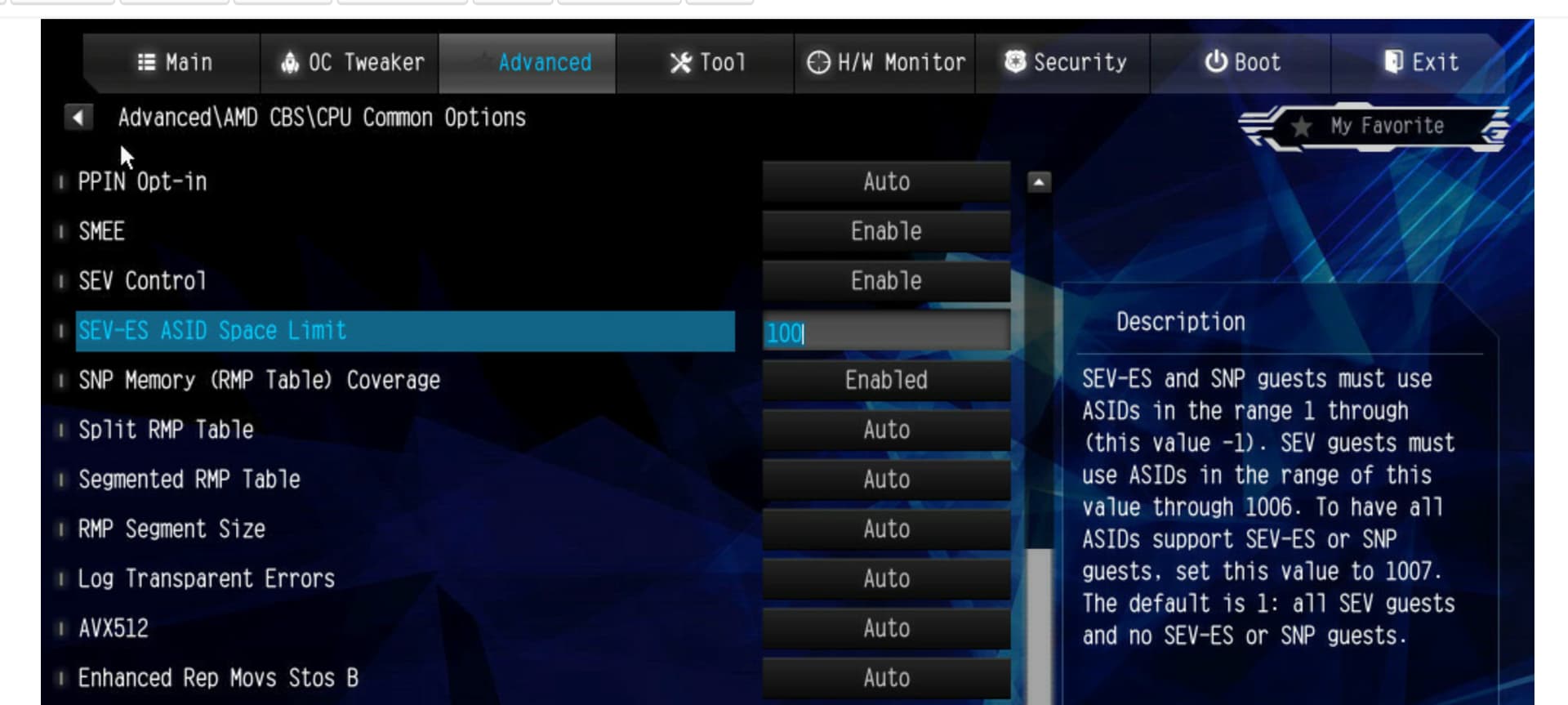
You have alot more BIOS options in there then I do. I wonder how many of those are ZEN 5 specific. if you do this
rmmod kvm_amd kvm ccp
then
modprobe ccp dyndbg==pmf
What do you see in dmesg?
1 Like
Looks like the same thing…
[ 1522.646339] ccp:psp_check_sev_support: ccp 0000:d8:00.5: psp does not support SEV
[ 1522.646348] ccp:tee_alloc_cmd_buffer: ccp 0000:d8:00.5: tee: ring address: high = 0x2 low = 0x4f148000 size = 32768
[ 1522.647393] ccp 0000:d8:00.5: tee enabled
[ 1522.647395] ccp 0000:d8:00.5: psp enabled
Dynamic debug on load… great to know!
1 Like
Interesting, I would open a ticket with the mainboard manufacturer as well. Was this advertised as to work with TR Pro or was it only advertised for Epyc?
1 Like
I did open a ticket with AsRock, I’m hoping they can either confirm or deny the theory. No answer yet from the AMD developer discord, but I’m not sure how many folks are really in there.
Threadripper PRO advertises “PRO Technologies,” and AI development. I would argue that creating secure applications for deployment is a big part of that, but I think they are expecting to use it as a literal workstation. I’m a weirdo that uses all my machines like they are servers. 
AMD Pro Technologies skew heavily towards the workstation also, with all kinds of supported trusted computing features, but SME is not one of them. Memory Guard, CCP engine, it’s all in there.
EPYC has a Cloud Computing section, which I immediately focuses on Confidential Computing.
https://www.amd.com/content/dam/amd/en/documents/epyc-business-docs/other/security-ebook.pdf
So, even though the internet at large seems to say that SME is only supported on EPYC and Ryzen PRO (I can’t find any mentions of Threadripper,) “PRO Technologies” include TSME at best. The chip may support the SEV features, but SME is disabled so that they don’t work.
That’s my theory.
I don’t know why, except for market segmentation, but EPYC is a much more capable and a better value than Threadripper for cloud hosting so I don’t expect anyone to be buying up thousands of them to try to game the system. 
It looks like I should have built that EPYC system after all!
Nah, I’m still super happy with this. Hoping I hear a yay or nay on this from a manufacturer so I can stop hoping.
I’m guessing Threadripper/PRO can support SEV/SEV-ES/SEV-SNP features. But AMD and board partners spent zero money on verification. You can help to find it out from vendors as a buyer.
Btw, SME/TSME does work on plain Ryzen processors. It’s nice. Sort of poor man’s ECC memory in my opinion.
2 Likes
In that case, I remain hopeful that it’s just early days on this one. 
Also, I don’t have a vendor… Unless you consider Microcenter and Central Computers, but judging by the max-Q thread… Maybe they could be helpful.
1 Like
If it is currently not working your biggest hope would be AsRock. They are the ones who can put together a new BIOS and have a direct line to AMD to troubleshoot any issues with this or verification steps needed. If they are willing to help and how much of a priority they’d put on it is a big question mark though.
3 Likes
Update from AsRock:
After confirmation with AMD, we can confirm that AMD SEV features are included in AMD POR but are still in the verification stage on the WRX90 platform.
At present, there is no specific schedule for when AMD SEV will become available on the WRX90 platform.
We appreciate your kind understanding.
A bit disappointing, but that’s something! I hope this is helpful for anyone following.
3 Likes
I’ll encourage from my end. I am happy cxl “works” as well as it does.
I really do think this is a key mistake intel made – only enabling features on server cpus. Devs love to play with features on a machine they run. So why not make the workstation parts the path to enablement? imho
3 Likes
Thanks Wendell!
I agree, I would love to be able to work on problems in the CC space without resorting to the cloud. Even then, it’s not easy finding a CC platform that will support GPUs that are needed in the AI space. All of this is front and center in their EPYC marketing.
Stepping stones.
Just enabling SME seems like a small ask, especially if it will work on Ryzen platforms.
1 Like
Still patiently waiting for any bios update. 


Has anyone tried on another motherboard or vendor? I would maybe consider switching at this point…
A similar system as this costs almost $10k a month on a cloud provider.
New WRX90 WS bios alert! hmm
“Add “Sync post screen” option in the BIOS setup.”
1 Like
I sympathize with your struggles. I had an BIOS issue with an ASUS board early this year and even found someone else on here who shared the exact same issue. Last update month ago was that ASUS forwarded this problem to AMD … I made my peace that I probably will never get a resolution for this and bought a different motherboard.
The new replacement board doesn’t have any OC features but other then that works as advertised.
I made the decision now to quickly verify with new hardware that the features I need are working or else send it back. I have no hope that issues that only affect some people will ever be fixed.
3 Likes
Yeah, it’s a bummer. Other than this feature this machine rocks and has replaced several other hosts. Luckily I have an environment I’m testing with at work now, but dangit!
EDIT: Yeah, it still hangs. No secret SEV fix in this one.
Another bios, another test 
IPMI webUI
1. Update AGESA to ShimadaPeak PI 1.0.0.1e.
2. Optimized memory compatibility.
3. Add "Disable Block Sid and Freeze Lock" option under BIOS\Security.
Nope, will continue to report.