ECC udimm or ECC rdimm for data integrity? Is ryzen 9 pro 5000 series good enough to perform scientific simulations?
-
All Ryzen CPUs (unfortunately only Ryzen PRO APUs) support Multi-bit ECC, meaning they can correct single-bit errors and detect multi-bit errors. This is the same as the “proper” Epycs and Threadrippers.
-
The difference compared to the “serious” large platforms is that if ECC has to correct memory errors these are only logged in the logs of the running main operating system (Windows, Linux whatever), not in an independently running BMC/IPMI that would survive a platform reboot.
-
But from small to large these BMC/IPMI solutions are full of bugs and shouldn’t be trusted at all.
-
ALL AMD AM4/AM5 motherboards only support unbuffered memory, even if you could physically plug in DDR4 RDIMMs into an AM4 motherboard. It won’t POST then. The only platform that could use DDR4 UDIMM or DDR4 RDIMM was Intel’s Socket 2011-3 back in the day. In the present DDR5 RDIMMs are physically different from UDIMMs so you can’t even install them on a motherboard intended for unbuffered DDR5 memory.
-
I’ve been using ECC on Ryzen since Ryzen 2000 in 2018, haven’t had any issues. And I also have a little HTPC-NAS using a Ryzen PRO 5750G and 128 GB ECC memory.
-
Be aware: MSI is the only motherboard manufacturer that doesn’t offer ECC functionality with Ryzen (F them!).
-
When choosing a motherboard for AM4 or AM5 be sure that the manufacturer lists support for unbuffered ECC memory in its specifications.
-
After building a system also always (!) verify that ECC is actually working, sometimes you have to change the ECC functionality in the BIOS from “Auto” to “Enabled”, Auto does not always mean enabled but means the option is set to what AMD considers to be the default option on the platform (which depends on marketing and product segmentation policies!). Very rare but it has happened : In the past BIOS updates were messed up that disabled ECC functionality, but that affected regular Ryzen as well as Ryzen PRO SKUs and had nothing to do with “official support”. That’s why it’s also important to check if ECC continues to work after a BIOS update.
How to check if ECC is actually working? I’ve been using two methodologies:
- I have very old DDR4 ECC UDIMMs from 2015 (DDR4-2400), I use them just for testing and run them overclocked at DDR4-3200, this basically forces a random but reliable generation of memory errors that have to appear in logs. If you take modern DDR4-3200 ECC memory you would have to further overclock them quite a bit which could lead to stability issues that aren’t caused by memory errors but the Memory Controller in the CPU/APU or the electrical quality of motherboard signal traces between the CPU socket and the DIMM slots, which is not reliable.
Note: I’ve never been able to overwhelm verified-to-be-working ECC memory while a system is running, meaning per critical time interval only a single-bit error occured which was successfully corrected.
- I’ve only been using AM5 since last year so I don’t have any old-AF DDR5 ECC UDIMMs I could overclock similarly to the first method with DDR4 so I got the paid version of PassMark MemTest86 which supports ECC error injection (support for ECC error injection has to be manually enabled in BIOS, AMD’s default behavior on AM4/5 is it being disabled), the free version of PassMark MemTest86 can detect and log naturally occuring ECC interventions but waiting for these to happen can be very tedious and time-consuming.
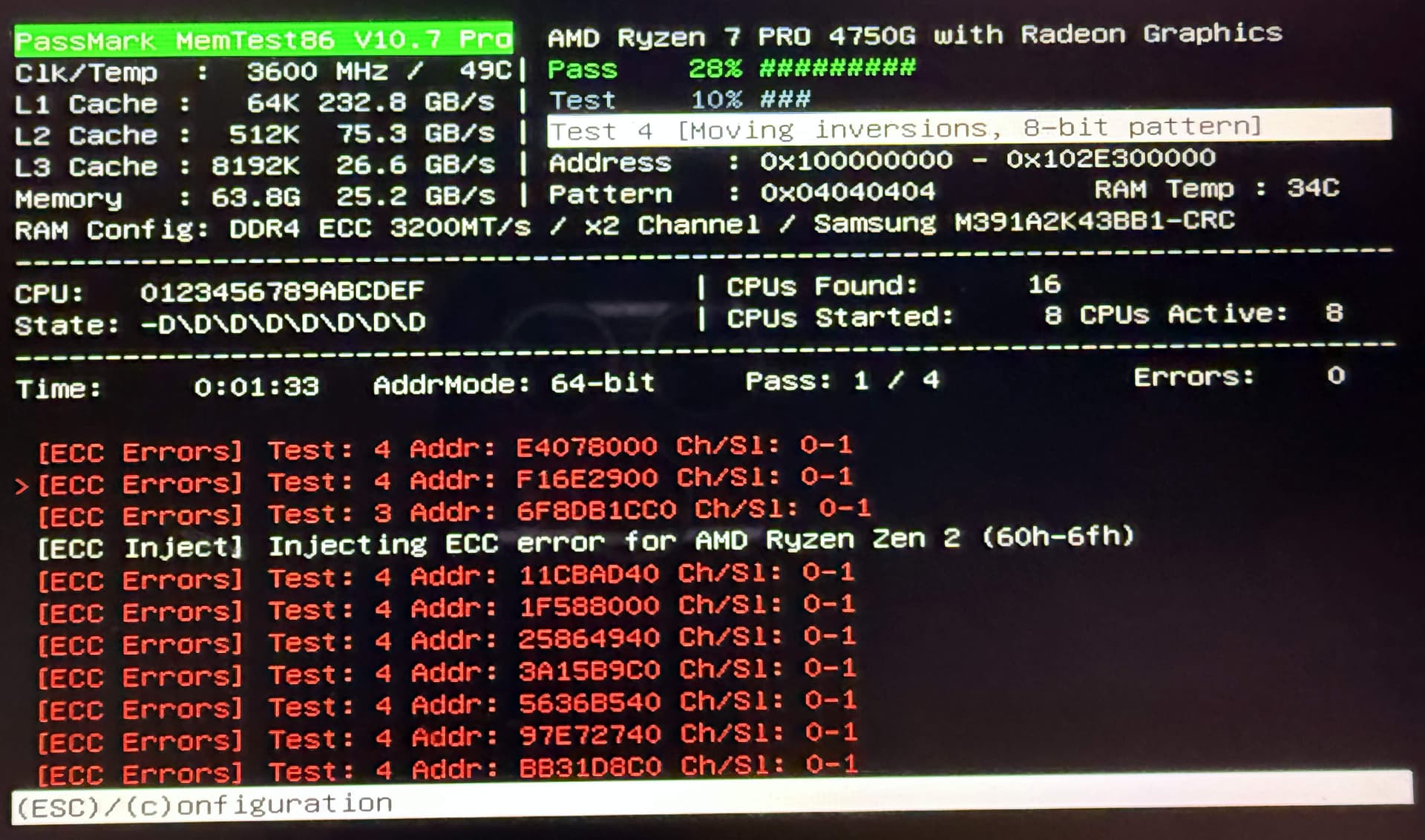
With the ECC Error Injection feature MemTest86 can willfully inject errors into memory and observe if the platform is correcting them as intended.
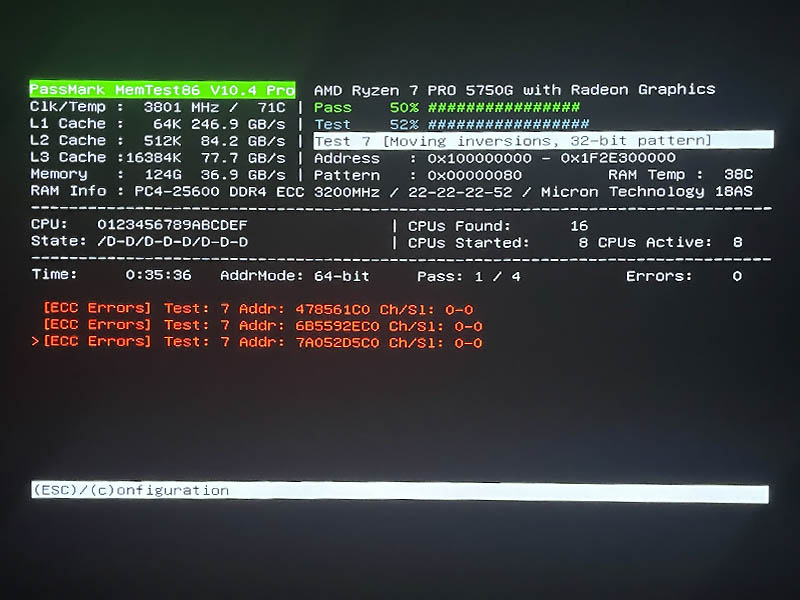
Example 1: “Natural” ECC when random memory errors occur:
Example 2: Testing ECC with ECC Error Injection:
Another note: Be sure to only use really well-built power supplies for serious systems, I’ve only been using Seasonic PX and TX PSUs. The quality of the power in a system can have a serious impact on its stability.
In my experience with ASRock, ASRock Rack, ASUS, Gigabyte and Supermicro motherboards based on consumer platforms ASUS has the best track record not Fing up ECC functionality, they are also the motherboard manufacturer with the best track record regarding long-time BIOS update support. Note: This is just looking at this puzzle piece, not at anything else like customer support in case of a hardware defect. But for me personally this kind of reliable support is the most important because I want to be able to operate hardware for 5-10 years without worrying about it having discovered firmware-level security vulnerabilities that can’t be fixed since the manufacturer doesn’t release BIOS updates for a specific model anymore.
6 Likes
Gigabyte’s documentation wavers between supporting and not supporting it. It’s given me the impression of not trusting it to support ECC across its entire AM5 lineup. But also, it produces boards with interesting features which would make it outstanding if not for the lack of mention of ECC support so I’m hesitant to rule it out completely―holding out hope it at least has under-the-table support for ECC.
I have their X670E Taichi which had IOMMU groupings messed up without warning after a BIOS update.
1 Like
I’d like to nitpick this alittle, back in early 2023, Asus (along with almost ever other AM5 motherboard manufacturer) put out several BIOS releases that broke ECC functionality on AM5.
I wasn’t monitoring all the manufactures BIOS releases back then, but Supermicro was the only AM5 motherboard manufacturer I know of that did not allow the broken ECC AGESA to release for it’s AM5 motherboards which tells me they are actually testing the functionality of their BIOS while the others aren’t.
6 Likes
That’s a glass is kinda half-full way of looking at it: Supermicro releases BIOS updates so infrequently that by chance they skipped an AGESA version that was delivered broken by AMD to the motherboard manufacturers 
3 Likes
We’ve been running AM4 scientific sims on non-ECC UDIMMs for years. Can’t say I see any reason to use ECC UDIMMs, much less spend up for an RDIMM platform just to get EC4.
If you’re skeptical of your ability to test memory reliability, non-ECC DDR5 UDIMMs arguably exceed bus EC4 in terms of risk mitigation. Since the protections are different they’re not interchangeable and conclusions can vary depending on the error mechanisms of concern.
Yeah, for AM4 and newer the Asus brand tax is steep compared to ASRock and a majority of the anecdotes I’m aware of run in favor of ASRock.
Out of all the people who’ve tried it around here that I can think of you’re the only one to find it actually works, though that might be DDR4 versus DDR5.
Not in DDR5 as those sockets support to EC8 chipkill rather than AM5 EC4 SECDED.
1 Like
It is entirely possible Supermicro missing the release window of the bad AGESA updates, I think the affected period of time was only a couple weeks.
Subjectively the quality of ASUS hardware does feel superior to me though… maybe not their software though.
Objectively, I hit enough Asus hardware issues in AM4 to drop them. So not sure how AM5 compares. Balance of threads here does suggest Asus’s problem rate runs above their market share, though.
Can’t exactly speak to the software side as I’ve never needed to use ASRock’s or MSI’s and haven’t built Gigabyte in a while. The potential for Windows Update to push BIOS updates that install Armoury Crate does mean our security policies prevent a return to Asus mobos for the foreseeable future. Maybe if Asus stops defaulting to that and invests enough in trustworthy computing to get their CVEs to a reasonable rate and nature. But it’s not looking like upper management’s had a reason to care imposed on them yet.
I should clarify I was referring to ASUS’s workstation, server and maaybe Proart motherboards when I was admiring the hardware quality. I have no doubt the cheaper consumer stuff is not the best.
I think there was an outlier with their recent Threadripper boards which had trouble at launch but part of the problem was AMD and the other part people not knowing how to install CPU + cooler correctly.
WRX90E-SAGE? Recent-ish comments on threads here have been that after 1.5 years of BIOS updates it’s finally at launch quality. Though technically that’s not a hardware issue.
WRX90 WS Evo and MH53-G40 presumably sell in lower volume but the reported problem rate on them seems lower than just that. TRX50-SAGE also seems better.
Server boards I lack familiarity with, though ASRock Rack doesn’t appear nearly as solid as their desktop boards.
Yeah that’s the one. This is me spitballing, but I suspect there were signal integrity issues with so many memory channels on the 8 channel platform that AMD tried to bandaid/refine with BIOS updates; the socket was only “supposed” to be for 6 memory channel CPUs.
The 4 channel TR platform seemed much more solid.
My problem with Asrock Rack boards is that their availability is terrible long, or even medium term; the boards will be available for a couple week or month window and then never again. Also Asrock Rack isn’t the greatest about supplying BIOS updates to the boards for very long.
…They do however make some very interesting boards that others aren’t making, like their deep mini-ITX boards.
I can’t speak for other people but…
- I just check the specifications of parts I buy
- Look at every menu in an UEFI and manually set ECC-related options as desired
But I have experienced that many people that are ignorant about a topic don’t seem to realize they’re ignorant (cough, Hardware Unboxed’s motherboard ECC testing) and consider their point of view to be absolute. I try to always mention if I’m uncertain about something.
Have been testing ECC Error Injection with Zen 2, 3, 4 and 5 and the only thing I’ve noticed is that Passmark MemTest86 recognizes Ryzen 9000 CPUs as Zen 4, possibly because Ryzen 7000 and 9000 have the same IO Die which contains the memory controller:

I don’t know, Asrock Rack isn’t that shabby when it comes to releasing updated BIOS for their relatively recent boards. I got the latest BIOS revision for that TSA security mitigation that only popped up a couple of weeks ago for my 3 year old ROMED8-2T motherboard for my Zen 3 Epycs.
1 Like
Sloppy programming. They already have identified the cpu correctly as Zen 5 Family 1AH cpu. No reason for them to then identify the memory controller as belonging to Family 19H Zen 4.
my experiences with Asus ROG and ProArt motherboards with ECC has all been good so far
if you are worried, maybe consider buying from Amazon since they tend to have the most lenient return policies
Are the injected errors also detected/reported by MemTest86?
Yes,
on all my systems MemTest86 completely works as intended.
On the photo you see MemTest86 injected 5 errors. If those weren’t corrected then the “Errors: 0” counter on the right side of the screen would increase.
But does memtest86 report [ECC Errors Detected] as in the image in this reddit thread? Edit: Or as in your images earlier in this thread!
If not, either the errors were corrected but ECC error reporting doesn’t work, or the injection itself doesn’t work. And you cannot know which it is.
That is, when correctable errors are detected, corrected and reported correctly memtest86 reports [ECC Errors Detected] without increasing the error counter.
The red error logs are “natural” memory errors that got corrected by ECC. On that last photo with the 9800X3D no such errors occured.
On the earlier photo I tried to overwhelm ECC memory by having it generate errors with memory overclocking/undervolting and hit it with MemTest86’s willful Error Injection at the same time.
Seems to me something isn’t working then. From the memtest86 ECC Technical Information page:
3 Likes